
问题之Spring MVC配置后,可以打开jsp页面,但打不开html页面
一、配置Spring MVC
1.导入jar
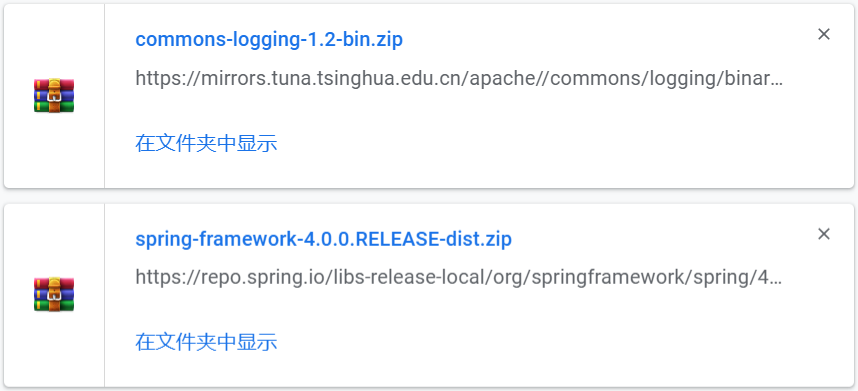
spring-framework-4.x.x.RELEASE-dist.zip压缩文件
- commons-logging:http://commons.apache.org/
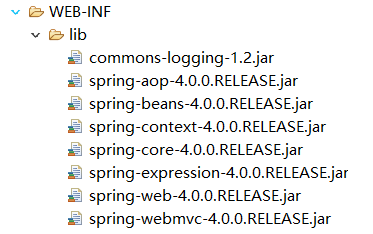
解压之后将jar放入
2.在web.xml中配置DispatcherServlet
<?xml version="1.0" encoding="UTF-8"?>

<web-app xmlns:xsi="http://www.w3.org/2001/XMLSchema-instance"

    xmlns="http://java.sun.com/xml/ns/javaee"

    xsi:schemaLocation="http://java.sun.com/xml/ns/javaee http://java.sun.com/xml/ns/javaee/web-app_3_0.xsd"

    id="WebApp_ID" version="3.0">

    <!-- 配置DispatcherServlet -->

    <servlet>

        <servlet-name>spring</servlet-name>

        <servlet-class>org.springframework.web.servlet.DispatcherServlet</servlet-class>

        <!-- 如果值为正整数或者0时,表示容器在应用启动时就加载并初始化这个servlet,值越小,servlet的优先级越高,就越先被加载 -->

        <load-on-startup>1</load-on-startup>

    </servlet>

    <!-- 配置会把所有的请求都会进行拦截,交给spring去处理。而spring所有请求的URL都是在controller中使用注解@RequestMapping标明,所以这样的情况下访问静态资源是访问不到的。 -->

    <servlet-mapping>

        <servlet-name>spring</servlet-name>

        <url-pattern>/</url-pattern>

    </servlet-mapping>

</web-app>
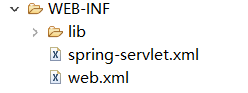
3.加入spring mvc 的配置文件spring-servlet.xml
注意:框架默认读取 {servlet-name}-servlet.xml 是配置文件,所以我们在web.xml中写了
<servlet-name>spring</servlet-name>
那么我们写的配置文件就是 spring-servlet.xml
<?xml version="1.0" encoding="UTF-8"?>

<beans xmlns:xsi="http://www.w3.org/2001/XMLSchema-instance"

       xmlns="http://www.springframework.org/schema/beans"

       xmlns:context="http://www.springframework.org/schema/context"

       xmlns:task="http://www.springframework.org/schema/task"

       xsi:schemaLocation="

        http://www.springframework.org/schema/context

        http://www.springframework.org/schema/context/spring-context-3.0.xsd

        http://www.springframework.org/schema/beans

        http://www.springframework.org/schema/beans/spring-beans-3.0.xsd

        http://www.springframework.org/schema/task

        http://www.springframework.org/schema/task/spring-task-3.0.xsd"

       default-lazy-init="false">

       <!-- 配置自动扫描包 -->

       <context:component-scan base-package="com.ttz.controller"></context:component-scan>

        <!-- 配置视图解析器:如何把handler方法返回值解析为实际的物理视图 -->

        <bean class="org.springframework.web.servlet.view.InternalResourceViewResolver">

            <property name="prefix" value="/views/"></property>

            <property name="suffix" value=".jsp"></property>

        </bean>

</beans>
4.编写处理请求的处理器controller,并标记为处理器
package com.ttz.controller;

import org.springframework.stereotype.Controller;

import org.springframework.web.bind.annotation.RequestMapping;

@Controller

public class HelloWorld {

    @RequestMapping("/helloworld")

    public String hello() {

        System.out.println("hello world");

        return "success";

    }

}
5.编写视图(页面)
hello.jsp
<%@ page language="java" contentType="text/html; charset=UTF-8"

    pageEncoding="UTF-8"%>

<!DOCTYPE html>

<html>

<head>

<meta charset="UTF-8">

<title>Insert title here</title>

</head>

<body>

<a href="helloworld">helloworld</a>

</body>

</html>
success.jsp
<%@ page language="java" contentType="text/html; charset=UTF-8"

    pageEncoding="UTF-8"%>

<!DOCTYPE html>

<html>

<head>

<meta charset="UTF-8">

<title>Insert title here</title>

</head>

<body>

<h1>成功!</h1>

</body>

</html>
二、问题
启动tomcat可以成功打开hello.jsp,点击后跳转到success.jsp。
但是编写index.html,和success.html,均无法打开
三月 24, 2019 10:02:17 下午 org.springframework.web.servlet.PageNotFound noHandlerFound

警告: No mapping found for HTTP request with URI [/Springmvc-01/index.html] in DispatcherServlet with name 'spring'
三、解决
1.原因分析
原因参考:https://blog.csdn.net/jdjdndhj/article/details/54907891
    <!-- 配置会把所有的请求都会进行拦截,交给spring去处理。而spring所有请求的URL都是在controller中使用注解@RequestMapping标明,所以这样的情况下访问静态资源是访问不到的。 -->

    <servlet-mapping>

        <servlet-name>spring</servlet-name>

        <url-pattern>/</url-pattern>

    </servlet-mapping>
从配置上分析,如此配置会把所有的请求都会进行拦截,交给spring去处理。而spring所有请求的URL都是在controller中使用注解@RequestMapping标明,所以这样的情况下访问静态资源是访问不到的。
spring将index.html页面拦截成请求,而在接口层HelloWorld中没有该请求url对应的处理方法。
???不明白为什么jsp可以
2.解决办法
- 修改web.xml
    <!-- 配置会把所有的请求都会进行拦截,交给spring去处理。而spring所有请求的URL都是在controller中使用注解@RequestMapping标明,所以这样的情况下访问静态资源是访问不到的。 -->

    <servlet-mapping>

        <servlet-name>spring</servlet-name>

        <url-pattern>/api/*</url-pattern>

    </servlet-mapping>
注意:不能写 /api/ ,得写 /api/*
- 对应修改页面的请求
<a href="api/helloworld">helloworld</a>
配置会把 /api/* 所有的请求都会进行拦截
问题之Spring MVC配置后,可以打开jsp页面,但打不开html页面的更多相关文章
- spring mvc 配置后,web中的html页面报404,该怎么处理
问题描述: 在根目录webapp下的jsp页面可以通过url直接访问,而html页面就会报404错误. 解决方案1: 在spring-mvc.xml中添加如下配置: <!--将静态文件指定到某个 ...
- spring MVC配置详解
现在主流的Web MVC框架除了Struts这个主力 外,其次就是Spring MVC了,因此这也是作为一名程序员需要掌握的主流框架,框架选择多了,应对多变的需求和业务时,可实行的方案自然就多了.不过 ...
- Spring mvc 配置详解
现在主流的Web MVC框架除了Struts这个主力 外,其次就是Spring MVC了,因此这也是作为一名程序员需要掌握的主流框架,框架选择多了,应对多变的需求和业务时,可实行的方案自然就多了.不过 ...
- spring MVC配置详解(转)
现在主流的Web MVC框架除了Struts这个主力 外,其次就是Spring MVC了,因此这也是作为一名程序员需要掌握的主流框架,框架选择多了,应对多变的需求和业务时,可实行的方案自然就多了.不过 ...
- Tomcat配置和Spring MVC配置
Tomcat启动时,先找系统变量CATALINA_BASE,如果没有,则找CATALINA_HOME.然后找这个变量所指的目录下的conf文件夹,从中读取配置文件.最重要的配置文件:server.xm ...
- Spring MVC配置详解(3)
一.Spring MVC环境搭建:(Spring 2.5.6 + Hibernate 3.2.0) 1. jar包引入 Spring 2.5.6:spring.jar.spring-webmvc.ja ...
- MQTT 4 ——MQTT的Spring Mvc 配置接收字节流数据
本篇记录一下MQTT整合Spring Mvc配置直接收发字节流数据 设备方是纯C开发,并且为了交互数据的安全,将传送的数据用了AES CBC进行了加密. 接下来正常方便做法应该是 将加密后的字节流转换 ...
- Spring MVC配置静态资源和资源包
Spring MVC配置静态资源和资源包 本例映射:css目录: pom.xml <properties> <spring.version>4.3.5.RELEASE</ ...
- 最小可用 Spring MVC 配置
[最小可用 Spring MVC 配置] 1.导入有概率用到的JAR包, -> pom.xml 的更佳实践 - 1.0 <- <project xmlns="http:// ...
随机推荐
- idea 错误: 找不到或无法加载主类
1.cmd进入项目目录 2.输入maven命令重构项目 mvn clean mvn idea:idea install
- 财务平台亿级数据量毫秒级查询优化之elasticsearch原理解析
财务平台进行分录分表以后,随着数据量的日渐递增,业务人员对账务数据的实时分析响应时间越来越长,体验性慢慢下降,之前我们基于mysql的性能优化做了一遍,可以说基于mysql该做的优化已经基本上都做了, ...
- DirectX11--HR宏关于dxerr库的替代方案
DirectX11 With Windows SDK完整目录 欢迎加入QQ群: 727623616 可以一起探讨DX11,以及有什么问题也可以在这里汇报. 综述 参考文章:https://blogs. ...
- 2018-2019-2 《Java程序设计》第9周学习总结
20175319 2018-2019-2 <Java程序设计>第9周学习总结 教材学习内容总结 本周学习任务: 下载安装MySQL数据库管理系统. 教材介绍在官网下载安装Mysql服务,启 ...
- MySQL 死锁场景
SESSION 1 SESSION 2 SESSION 3 START TRANSACTION START TRANSACTION START TRANSACTION INSERT INS ...
- QButtonGroup按钮组
继承 QObject 提供 一个抽象的按钮容器, 可以将多个按钮划分为一组,不具备可视化的效果,一般放的都是可以被检查的按钮 import sys from PyQt5.QtWidgets impo ...
- Apache Storm
作者:jiangzz 电话:15652034180 微信:jiangzz_wx 微信公众账号:jiangzz_wy 背景介绍 流计算:将大规模流动数据在不断变化的运动过程中实现数据的实时分析,捕捉到可 ...
- Codeforces Round #551 (Div. 2) D. Serval and Rooted Tree (树形dp)
题目链接 题意:给你一个有根树,假设有k个叶子节点,你可以给每个叶子节点编个号,要求编号不重复且在1-k以内.然后根据节点的max,minmax,minmax,min信息更新节点的值,要求根节点的值最 ...
- spring依赖注入之构造函数注入,set方法注入
<?xml version="1.0" encoding="UTF-8"?><beans xmlns="http://www.spr ...
- Linux二进制安装apache2.4.25
Linux二进制安装apache2.4.25 安装环境:CentOS 6.2 先检查是否安装了Apache 如通是通过rpm包安装的话直接用下面的命令:rpm -q httpd 也可以使用如下两种方法 ...