
基于.net EF6 MVC5+WEB Api 的Web系统框架总结(1)-Web前端页面
本 Web 系统框架基于C# EF6+MVC+WebApi的快速应用开发平台。本节主要介绍Web前端页面设计与实现。Web前端页面主要分为普通列表页面、树状导航列表页面、普通编辑页面、数据导入页面、向导编辑页面以及新页编辑页面。
1、普通列表页面
普通列表页面是系统框架最基础的列表页面,采用JqGrid组件。
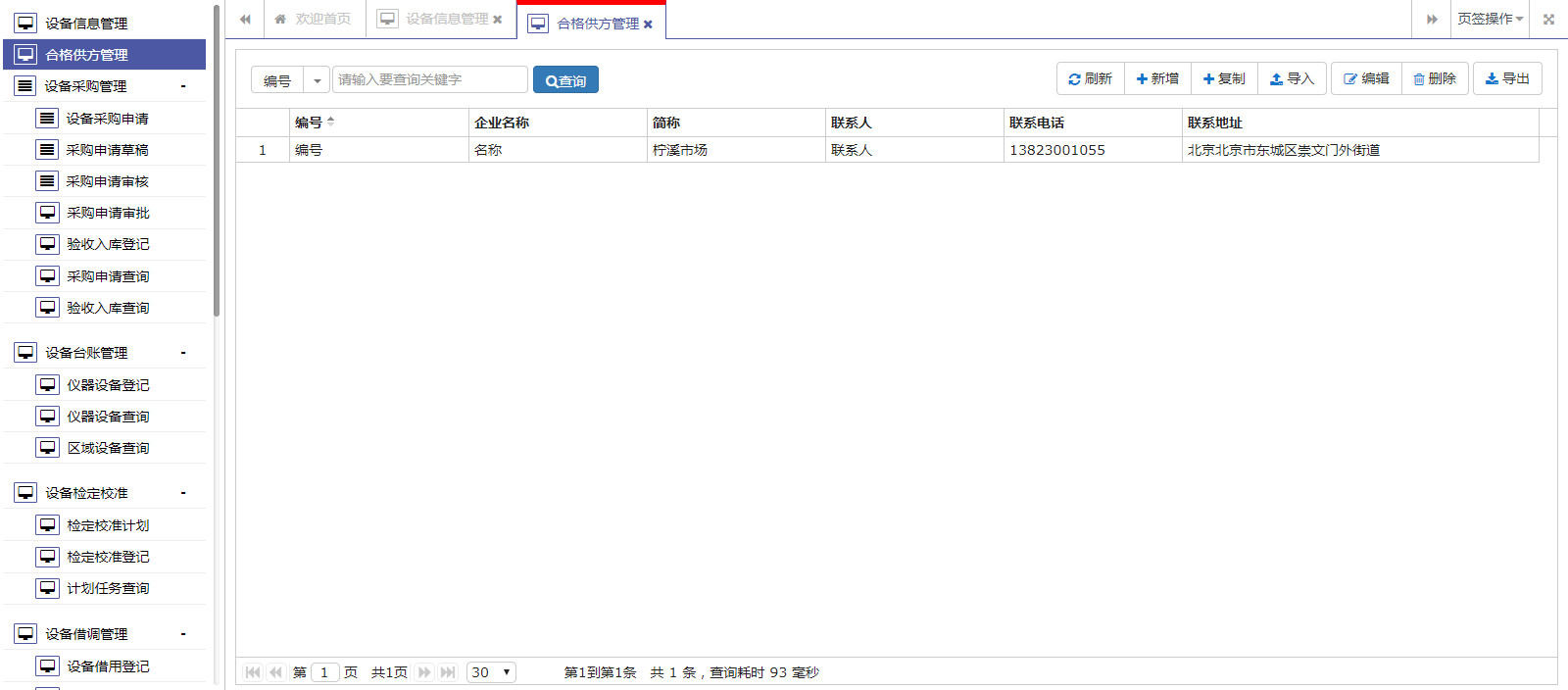
页面布局源码
<!DOCTYPE html>

<html>

<head>

    <meta name="viewport" content="width=device-width" />

    <meta http-equiv="X-UA-Compatible" content="IE=edge">

    <title>@ViewBag.Title</title>

    <!--框架必需start-->

    <script src="~/Content/scripts/jquery/jquery-2.0.3.min.js"></script>

    <link href="~/Content/styles/font-awesome.min.css" rel="stylesheet" />

    <link href="~/Content/scripts/plugins/jquery-ui/jquery-ui.min.css" rel="stylesheet" />

    <script src="~/Content/scripts/plugins/jquery-ui/jquery-ui.min.js"></script>

    <script src="~/Content/scripts/plugins/cookie/jquery.cookie.js"></script>

    <!--框架必需end-->

    <!--bootstrap组件start-->

    <link href="~/Content/scripts/bootstrap/bootstrap.min.css" rel="stylesheet" />

    <script src="~/Content/scripts/bootstrap/bootstrap.min.js"></script>

    <!--bootstrap组件end-->

    <script src="~/Content/scripts/plugins/datepicker/WdatePicker.js"></script>

    @System.Web.Optimization.Styles.Render("~/Content/scripts/plugins/jqgrid/css",

    "~/Content/scripts/plugins/tree/css",

    "~/Content/scripts/plugins/datetime/css",

    "~/Content/styles/xlib-ui.css")

    @System.Web.Optimization.Scripts.Render("~/Content/scripts/plugins/jqgrid/js",

    "~/Content/scripts/plugins/tree/js",

    "~/Content/scripts/plugins/validator/js",

            "~/Content/scripts/plugins/datepicker/js",

    "~/Content/scripts/utils/js")

    <style>

        body {

            margin: 10px;

            margin-bottom: 0px;

        }

    </style>

    <script>

        //列表页默认选择条件 gxlqssjf 20180117

        $(function () {

            if ($("#queryCondition .dropdown-text").length > 0) {

                var selDropItem = $("#queryCondition .dropdown-text").attr("data-value");

                if ($.isNullOrEmpty(selDropItem)) {

                    if ($("#queryCondition ul li").length > 0) {

                        var firstItem = $("#queryCondition ul li:first a");

                        $("#queryCondition .dropdown-text").html(firstItem.text()).attr('data-value', firstItem.attr("data-value"));

                    }

                }

            }

        });

    </script>

</head>

<body>

    @RenderBody()

    @Html.AntiForgeryToken()

</body>

</html>
示例页面源码
@{
ViewBag.Title = "列表页面";
Layout = "~/Views/Shared/_Index.cshtml";
}
<script>
var inDialog = request('inDialog');
$(function () {
InitialPage();
GetGrid();
});
//初始化页面
function InitialPage() {
//resize重设布局;
$(window).resize(function (e) {
window.setTimeout(function () {
$('#gridTable').setGridWidth(($('.gridPanel').width()));
$('#gridTable').setGridHeight($(window).height() - 136.5);
}, 200);
e.stopPropagation();
});
}
//加载表格
function GetGrid() {
var selectedRowIndex = 0;
var $gridTable = $('#gridTable');
$gridTable.jqGrid({
autowidth: true,
height: $(window).height() - 136.5,
url: "/EquipmentManage/EquipmentSupplier/GetPageList",
datatype: "json",
colModel: [
{ label: 'Id', name: 'Id', index: 'Id', width: 100, align: 'left', sortable: true, hidden: true },
{ label: '编号', name: 'Code', index: 'Code', width: 100, align: 'left', sortable: true },
{ label: '企业名称', name: 'Name', index: 'Name', width: 100, align: 'left', sortable: true },
{ label: '简称', name: 'ShortName', index: 'ShortName', width: 100, align: 'left', sortable: true },
{ label: '联系人', name: 'Linkman', index: 'Linkman', width: 100, align: 'left', sortable: true },
{ label: '联系电话', name: 'Phone', index: 'Phone', width: 100, align: 'left', sortable: true },
{ label: '联系地址', name: 'Address', index: 'Address', width: 200, align: 'left', sortable: true },
],
viewrecords: true,
rowNum: 30,
rowList: [30, 50, 100],
pager: "#gridPager",
sortname: 'Code',
sortorder: 'asc',
rownumbers: true,
shrinkToFit: false,
gridview: true,
onSelectRow: function () {
selectedRowIndex = $('#' + this.id).getGridParam('selrow');
},
gridComplete: function () {
$('#' + this.id).setSelection(selectedRowIndex, false);
if($.isNullOrEmpty(inDialog)){
//$("#gridTable").authorizeColModel();
}
}
});
//查询条件
$("#queryCondition .dropdown-menu li").click(function() {
var text = $(this).find('a').html();
var value = $(this).find('a').attr('data-value');
$("#queryCondition .dropdown-text").html(text).attr('data-value', value);
});
//查询事件
$("#btn_Search").click(function() {
var queryJson = {
condition: $("#queryCondition").find('.dropdown-text').attr('data-value'),
keyword: $("#txt_Keyword").val()
};
$gridTable.jqGrid('setGridParam', {
postData: { queryJson: JSON.stringify(queryJson) },
page: 1
}).trigger('reloadGrid');
});
//查询回车
$('#txt_Keyword').bind('keypress', function (event) {
if (event.keyCode == "13") {
$('#btn_Search').trigger("click");
}
});
}
//新增
function btn_add() {
dialogOpen({
id: 'SupplierInfoForm',
title: '添加',
url: '/EquipmentManage/EquipmentSupplier/SupplierInfoForm',
width: '1020px',
height: '600px',
callBack: function (iframeId) {
top.SupplierInfoForm.AcceptClick(function () {
$('#gridTable').trigger('reloadGrid');
});
}
});
}
function btn_copy() {
var keyValue = $('#gridTable').jqGridRowValue('Id');
if (checkedRow(keyValue)) {
dialogOpen({
id: 'SupplierInfoForm',
title: '编辑',
url: '/EquipmentManage/EquipmentSupplier/SupplierInfoForm?copyId=' + keyValue,
width: '1020px',
height: '600px',
callBack: function (iframeId) {
top.SupplierInfoForm.AcceptClick(function () {
$('#gridTable').trigger('reloadGrid');
});
}
});
}
}
function btn_import() {
dialogOpen({
id: 'SupplierInfoForm',
title: '批量导入',
url: '/EquipmentManage/EquipmentSupplier/SupplierInfoImport',
width: '1020px',
height: '600px',
btn:null,
callBack: function (iframeId) {
top.SupplierInfoForm.AcceptClick(function () {
$('#gridTable').trigger('reloadGrid');
});
}
});
}
//编辑
function btn_edit() {
var keyValue = $('#gridTable').jqGridRowValue( 'Id');
if (checkedRow(keyValue)) {
dialogOpen({
id: 'SupplierInfoForm',
title: '编辑',
url: '/EquipmentManage/EquipmentSupplier/SupplierInfoForm?keyValue=' + keyValue,
width: '1020px',
height: '600px',
callBack: function (iframeId) {
top.SupplierInfoForm.AcceptClick(function () {
$('#gridTable').trigger('reloadGrid');
});
}
});
}
}
//删除
function btn_delete() {
var keyValue = $('#gridTable').jqGridRowValue( 'Id');
if (keyValue) {
$.RemoveForm({
url: '/EquipmentManage/EquipmentSupplier/RemoveForm',
param: { keyValue: keyValue },
success: function (data) {
console.log(data);
$('#gridTable').trigger('reloadGrid');
}
})
} else {
dialogMsg('请选择需要删除的数据!', 0);
}
}
//对话框回调
function AcceptClick(callBack) {
var keyValue = $('#gridTable').jqGridRowValue( 'Id');
if (checkedRow(keyValue)){
var row = $('#gridTable').jqGridRow();
callBack(row);
dialogClose();
}
}
</script>
<div class="titlePanel">
<div class="title-search">
<table>
<tr>
<td>
<div id="queryCondition" class="btn-group">
<a class="btn btn-default dropdown-text" data-toggle="dropdown">选择条件</a>
<a class="btn btn-default dropdown-toggle" data-toggle="dropdown"><span class="caret"></span></a>
<ul class="dropdown-menu">
<li><a data-value="Code">编号</a></li>
<li><a data-value="Name">企业名称</a></li>
<li><a data-value="ShortName">许可证号</a></li>
<li><a data-value="Linkman">联系人</a></li>
</ul>
</div>
</td>
<td style="padding-left:2px;">
<input id="txt_Keyword" type="text" class="form-control" placeholder="请输入要查询关键字" style="width: 200px;" />
</td>
<td style="padding-left: 5px;">
<a id="btn_Search" class="btn btn-primary"><i class="fa fa-search"></i>查询</a>
</td>
</tr>
</table>
</div>
<div class="toolbar">
<div class="btn-group">
<a id="btnReload" class="btn btn-default" onclick="reload()"><i class="fa fa-refresh"></i> 刷新</a>
<a id="btnAdd" class="btn btn-default" onclick="btn_add()"><i class="fa fa-plus"></i> 新增</a>
<a id="btnCopy" class="btn btn-default" onclick="btn_copy()"><i class="fa fa-plus"></i> 复制</a>
<a id="btnImport" class="btn btn-default" onclick="btn_import()"><i class="fa fa-upload"></i> 导入</a>
</div>
<div class="btn-group">
<a id="btnEdit" class="btn btn-default" onclick="btn_edit()"><i class="fa fa-pencil-square-o"></i> 编辑</a>
<a id="btnDelete" class="btn btn-default" onclick="btn_delete()"><i class="fa fa-trash-o"></i> 删除</a>
</div>
<script>
if($.isNullOrEmpty(inDialog)){
$('.toolbar').authorizeButton();
}
</script>
</div>
</div>
<div class="gridPanel">
<table id="gridTable"></table>
<div id="gridPager"></div>
</div>
2、树状导航列表页面
树状导航列表页面是在普通列表页面的基础上,增加左边或右边树状导航功能的列表页面。应用于列表数据有上级、分类功能的页面。便于数据查找、过滤或者新增时,作为主信息先选择,减少弹窗,降低操作复杂性。

页面布局源码
<!DOCTYPE html>

<html>

<head>

    <meta name="viewport" content="width=device-width" />

    <meta http-equiv="X-UA-Compatible" content="IE=edge">

    <title>@ViewBag.Title</title>

    <!--框架必需start-->

    <script src="~/Content/scripts/jquery/jquery-2.0.3.min.js"></script>

    <link href="~/Content/styles/font-awesome.min.css" rel="stylesheet" />

    <link href="~/Content/scripts/plugins/jquery-ui/jquery-ui.min.css" rel="stylesheet" />

    <script src="~/Content/scripts/plugins/jquery-ui/jquery-ui.min.js"></script>

    <!--框架必需end-->

    <!--bootstrap组件start-->

    <link href="~/Content/scripts/bootstrap/bootstrap.min.css" rel="stylesheet" />

    <script src="~/Content/scripts/bootstrap/bootstrap.min.js"></script>

    <!--bootstrap组件end-->

    <script src="~/Content/scripts/plugins/layout/jquery.layout.js"></script>

    <script src="~/Content/scripts/plugins/datepicker/WdatePicker.js"></script>

    @System.Web.Optimization.Styles.Render("~/Content/scripts/plugins/jqgrid/css",

    "~/Content/scripts/plugins/tree/css",

    "~/Content/scripts/plugins/datetime/css",

    "~/Content/styles/xlib-ui.css")

    @System.Web.Optimization.Scripts.Render("~/Content/scripts/plugins/jqgrid/js",

    "~/Content/scripts/plugins/tree/js",

    "~/Content/scripts/plugins/validator/js",

            "~/Content/scripts/plugins/datepicker/js",

    "~/Content/scripts/utils/js")

    <style>

        html, body {

            height: 100%;

            width: 100%;

        }

    </style>

</head>

<body>

    @RenderBody()

    @Html.AntiForgeryToken()

</body>

</html>
页面示例源码
@{
ViewBag.Title = "列表页面";
Layout = "~/Views/Shared/_LayoutIndex.cshtml";
}
<script>
var inDialog = request('inDialog');
$(function () {
InitialPage();
GetTree();
GetGrid();
});
//初始化页面
function InitialPage() {
//layout布局
$('#layout').layout({
applyDemoStyles: true,
onresize: function () {
$(window).resize()
}
}).sizePane("west", 250);
//resize重设(表格、树形)宽高
$(window).resize(function (e) {
window.setTimeout(function () {
$('#gridTable').setGridWidth(($('.gridPanel').width()));
$("#gridTable").setGridHeight($(window).height() - 172);
$("#itemTree").setTreeHeight($(window).height() - 52);
}, 240);
e.stopPropagation();
});
$(window).resize();
}
//加载树
var selectItemId = "0";
function GetTree() {
var item = {
height: $(window).height() - 52,
url: "/EquipmentManage/EquipmentClassify/GetTreeList",
onnodeclick: function (item) {
selectItemId = item.id;
//展开下级
//$(".bbit-tree-selected").children('.bbit-tree-ec-icon').trigger("click");
$('#btn_Search').trigger("click");
},
};
//初始化
$("#itemTree").treeview(item);
}
//加载表格
function GetGrid() {
var selectedRowIndex = 0;
var $gridTable = $('#gridTable');
$gridTable.jqGrid({
autowidth: true,
height: $(window).height() - 136.5,
url: "/EquipmentManage/EquipmentInfo/GetPageList",
datatype: "json",
colModel: [
{ label: 'Id', name: 'Id', index: 'Id', width: 100, align: 'left', sortable: true, hidden: true },
{ label: '编号', name: 'Code', index: 'Code', width: 100, align: 'left', sortable: true },
{ label: '名称', name: 'Name', index: 'Name', width: 100, align: 'left', sortable: true },
{ label: '类型', name: 'Type', index: 'Type', width: 100, align: 'left', sortable: true },
{ label: '规格型号', name: 'Spec', index: 'Spec', width: 100, align: 'left', sortable: true },
{ label: '设备分类', name: 'ClassifyName', index: 'ClassifyName', width: 100, align: 'left', sortable: true },
{ label: '主要用途', name: 'Usage', index: 'Usage', width: 100, align: 'left', sortable: true },
{ label: '性能指标', name: 'Target', index: 'Target', width: 200, align: 'left', sortable: true },
],
viewrecords: true,
rowNum: 30,
rowList: [30, 50, 100],
pager: "#gridPager",
sortname: 'Code',
sortorder: 'asc',
rownumbers: true,
shrinkToFit: false,
gridview: true,
onSelectRow: function () {
selectedRowIndex = $('#' + this.id).getGridParam('selrow');
},
gridComplete: function () {
$('#' + this.id).setSelection(selectedRowIndex, false);
if($.isNullOrEmpty(inDialog)){
//$("#gridTable").authorizeColModel();
}
}
});
//查询条件
$("#queryCondition .dropdown-menu li").click(function() {
var text = $(this).find('a').html();
var value = $(this).find('a').attr('data-value');
$("#queryCondition .dropdown-text").html(text).attr('data-value', value);
});
//查询事件
$("#btn_Search").click(function() {
var queryJson = {
RefClassifyId:selectItemId,
condition: $("#queryCondition").find('.dropdown-text').attr('data-value'),
keyword: $("#txt_Keyword").val()
};
$gridTable.jqGrid('setGridParam', {
postData: { queryJson: JSON.stringify(queryJson) },
page: 1
}).trigger('reloadGrid');
});
//查询回车
$('#txt_Keyword').bind('keypress', function (event) {
if (event.keyCode == "13") {
$('#btn_Search').trigger("click");
}
});
}
//新增
function btn_add() {
dialogOpen({
id: 'EquipmentInfoForm',
title: '添加',
url: '/EquipmentManage/EquipmentInfo/EquipmentInfoForm',
width: '1020px',
height: '500px',
callBack: function (iframeId) {
top.EquipmentInfoForm.AcceptClick(function () {
$('#gridTable').trigger('reloadGrid');
});
}
});
}
function btn_copy() {
var keyValue = $('#gridTable').jqGridRowValue('Id');
if (checkedRow(keyValue)) {
dialogOpen({
id: 'EquipmentInfoForm',
title: '复制新增',
url: '/EquipmentManage/EquipmentInfo/EquipmentInfoForm?copyId=' + keyValue,
width: '1020px',
height: '500px',
callBack: function (iframeId) {
top.EquipmentInfoForm.AcceptClick(function () {
$('#gridTable').trigger('reloadGrid');
});
}
});
}
}
//编辑
function btn_edit() {
var keyValue = $('#gridTable').jqGridRowValue( 'Id');
if (checkedRow(keyValue)) {
dialogOpen({
id: 'EquipmentInfoForm',
title: '编辑',
url: '/EquipmentManage/EquipmentInfo/EquipmentInfoForm?keyValue=' + keyValue,
width: '1020px',
height: '500px',
callBack: function (iframeId) {
top.EquipmentInfoForm.AcceptClick(function () {
$('#gridTable').trigger('reloadGrid');
});
}
});
}
}
//删除
function btn_delete() {
var keyValue = $('#gridTable').jqGridRowValue( 'Id');
if (keyValue) {
$.RemoveForm({
url: '/EquipmentManage/EquipmentInfo/RemoveForm',
param: { keyValue: keyValue },
success: function (data) {
console.log(data);
$('#gridTable').trigger('reloadGrid');
}
})
} else {
dialogMsg('请选择需要删除的数据!', 0);
}
}
//新增
function btn_classify() {
dialogOpen({
id: 'EquipmentClassifyIndex',
title: '设备分类',
url: '/EquipmentManage/EquipmentClassify/EquipmentClassifyIndex',
width: '1020px',
height: '600px',
callBack: function (iframeId) {
top.EquipmentClassifyIndex.AcceptClick(function () {
//$('#gridTable').trigger('reloadGrid');
reload();//重新加载
});
}
});
}
//新增
function btn_address() {
dialogOpen({
id: 'InstallAddressIndex',
title: '安装地点',
url: '/EquipmentManage/InstallAddress/InstallAddressIndex',
width: '1020px',
height: '600px',
callBack: function (iframeId) {
top.InstallAddressIndex.AcceptClick(function () {
//$('#gridTable').trigger('reloadGrid');
reload();//重新加载
});
}
});
}
//对话框回调
function AcceptClick(callBack) {
var keyValue = $('#gridTable').jqGridRowValue( 'Id');
if (checkedRow(keyValue)){
var row = $('#gridTable').jqGridRow();
callBack(row);
dialogClose();
}
}
</script>
<div class="ui-layout" id="layout" style="height: 100%; width: 100%;">
<div class="ui-layout-west">
<div class="west-Panel">
<div class="panel-Title">设备分类</div>
<div id="itemTree"></div>
</div>
</div>
<div class="ui-layout-center">
<div class="center-Panel">
<div class="panel-Title">设备信息</div>
<div class="titlePanel">
<div class="title-search">
<table>
<tr>
<td>
<div id="queryCondition" class="btn-group">
<a class="btn btn-default dropdown-text" data-toggle="dropdown">选择条件</a>
<a class="btn btn-default dropdown-toggle" data-toggle="dropdown"><span class="caret"></span></a>
<ul class="dropdown-menu">
<li><a data-value="Code">编号</a></li>
<li><a data-value="Name">设备名称</a></li>
</ul>
</div>
</td>
<td style="padding-left:2px;">
<input id="txt_Keyword" type="text" class="form-control" placeholder="请输入要查询关键字" style="width: 200px;" />
</td>
<td style="padding-left: 5px;">
<a id="btn_Search" class="btn btn-primary"><i class="fa fa-search"></i>查询</a>
</td>
</tr>
</table>
</div>
<div class="toolbar">
<div class="btn-group">
<a id="btnReload" class="btn btn-default" onclick="reload()"><i class="fa fa-refresh"></i> 刷新</a>
<a id="btnAdd" class="btn btn-default" onclick="btn_add()"><i class="fa fa-plus"></i> 新增</a>
<a id="btnCopy" class="btn btn-default" onclick="btn_copy()"><i class="fa fa-plus"></i> 复制</a>
</div>
<div class="btn-group">
<a id="btnEdit" class="btn btn-default" onclick="btn_edit()"><i class="fa fa-pencil-square-o"></i> 编辑</a>
<a id="btnDelete" class="btn btn-default" onclick="btn_delete()"><i class="fa fa-trash-o"></i> 删除</a>
</div>
<div class="btn-group">
<a id="btnMore" class="btn btn-default dropdown-toggle" data-toggle="dropdown" aria-expanded="false">
<i class="fa fa-reorder"></i> 更多<span class="caret"></span>
</a>
<ul class="dropdown-menu pull-right">
<li id="btnClassify"><a onclick="btn_classify()"><i></i> 设备分类</a></li>
<li id="btnAddress"><a onclick="btn_address()"><i></i> 存放地点</a></li>
</ul>
</div>
<script>
if($.isNullOrEmpty(inDialog)){
//$('.toolbar').authorizeButton();
}
</script>
</div>
</div>
<div class="gridPanel">
<table id="gridTable"></table>
<div id="gridPager"></div>
</div>
</div>
</div>
</div>
3、普通编辑页面
即弹窗式,显示待录入信息后,然后进行保存的编辑页面。应用于编辑页面信息少,操作简单的功能页面。
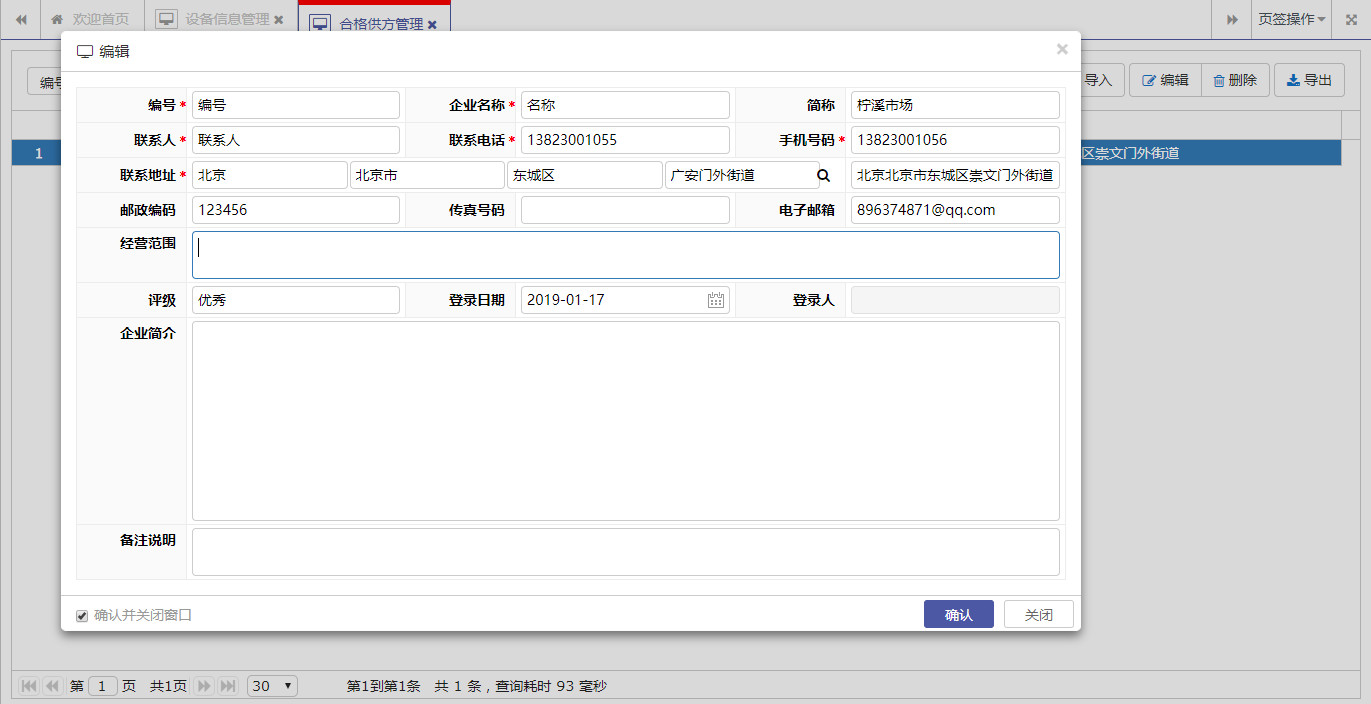
页面布局源码
<!DOCTYPE html>

<html>

<head>

    <meta http-equiv="content-type" content="text/html; charset=UTF-8">

    <meta http-equiv="X-UA-Compatible" content="IE=edge">

    <title>@ViewBag.Title</title>

    <!--框架必需start-->

    @*<script src="~/Content/scripts/jquery/jquery-1.10.2.min.js"></script>*@

    <script src="~/Content/scripts/jquery/jquery-2.0.3.min.js"></script>

    <link href="~/Content/styles/font-awesome.min.css" rel="stylesheet" />

    <link href="~/Content/scripts/plugins/jquery-ui/jquery-ui.min.css" rel="stylesheet" />

    <script src="~/Content/scripts/plugins/jquery-ui/jquery-ui.min.js"></script>

    <!--框架必需end-->

    <!--bootstrap组件start-->

    <link href="~/Content/scripts/bootstrap/bootstrap.min.css" rel="stylesheet" />

    <link href="~/Content/scripts/bootstrap/bootstrap.extension.css" rel="stylesheet" />

    <script src="~/Content/scripts/bootstrap/bootstrap.min.js"></script>

    <!--select2组件-->

    <link href="~/Content/scripts/plugins/select2/css/select2.css" rel="stylesheet"/>

    @*<script src="~/Content/scripts/plugins/select2/js/i18n/zh-CN.js"></script>*@

    <script src="~/Content/scripts/plugins/select2/js/select2.min.js"></script>

    <!--文件上传组件-->

    <link rel="stylesheet" href="~/Content/scripts/plugins/fileinput/css/fileinput.css" />

    <link rel="stylesheet" href="~/Content/scripts/plugins/fileinput/themes/explorer/theme.css" type="text/css" media="all" />

    <script src="~/Content/scripts/plugins/fileinput/js/plugins/sortable.min.js"></script>

    <script src="~/Content/scripts/plugins/fileinput/js/fileinput.min.js"></script>

    <script src="~/Content/scripts/plugins/fileinput/js/locales/zh.js"></script>

    <script src="~/Content/scripts/plugins/fileinput/themes/explorer/theme.js"></script>

    <link href="~/Content/styles/xlib-ckbox-radio.css" rel="stylesheet" />

    <script src="~/Content/scripts/plugins/datepicker/WdatePicker.js"></script>

    <script src="~/Content/scripts/plugins/dialog/dialog.js"></script>

    <script src="~/Content/scripts/fooddetection/jquery.PrintArea.js"></script>

    @System.Web.Optimization.Styles.Render("~/Content/scripts/plugins/tree/css",

    "~/Content/scripts/plugins/jqgrid/css",

    "~/Content/scripts/plugins/datetime/css",

    "~/Content/scripts/plugins/wizard/css",

    "~/Content/styles/xlib-ui.css")

    @System.Web.Optimization.Scripts.Render("~/Content/scripts/plugins/tree/js",

    "~/Content/scripts/plugins/validator/js",

    "~/Content/scripts/plugins/wizard/js",

    "~/Content/scripts/plugins/datepicker/js",

    "~/Content/scripts/plugins/jqgrid/js",

    "~/Content/scripts/utils/js")

</head>

<body>

    <form id="form1">

        @RenderBody()

        @Html.AntiForgeryToken()

    </form>

</body>

</html>
示例页面源码
@{

    ViewBag.Title = "表单页面";

    Layout = "~/Views/Shared/_Form.cshtml";

}

<div style="margin:15px;">

    <table class="form border1">

        <tr>

            <td class="formTitle">编号<font face="宋体">*</font></td>

            <td class="formValue">

                <input id="Code" type="text" class="form-control" length="50" value="" isvalid="yes" checkexpession='["NotNull"]' />

            </td>

            <td class="formTitle">企业名称<font face="宋体">*</font></td>

            <td class="formValue">

                <input id="Name" type="text" class="form-control" length="255" value="" isvalid="yes" checkexpession='["NotNull"]' />

            </td>

            <td class="formTitle">简称</td>

            <td class="formValue">

                <input id="ShortName" type="text" class="form-control" length="50" value="" isvalid="no" checkexpession='["NotNull"]' />

            </td>

        </tr>

        <tr>

            <td class="formTitle">联系人<font face="宋体">*</font></td>

            <td class="formValue">

                <input id="Linkman" type="text" class="form-control" length="50" value="" isvalid="yes" checkexpession='["NotNull"]' />

            </td>

            <td class="formTitle">联系电话<font face="宋体">*</font></td>

            <td class="formValue">

                <input id="Phone" type="text" class="form-control" length="50" value="" isvalid="yes" checkexpession='["NotNull"]' />

            </td>

            <td class="formTitle">手机号码<font face="宋体">*</font></td>

            <td class="formValue">

                <input id="Mobile" type="text" class="form-control" length="50" value="" isvalid="yes" checkexpession='["NotNull"]' />

            </td>

        </tr>

        <tr>

            <td class="formTitle">联系地址<font face="宋体">*</font></td>

            <td class="formValue" colspan="4">

                <input type="hidden" id="RefAreaId" />

                <input id="ProvinceName" type="text" class="form-control" length="100" value="" style="float: left; width: 24%; margin-right: 2px;" isvalid="no" checkexpession='["NotNull"]' />

                <input id="CityName" type="text" class="form-control" length="-1" value="" style="float: left; width: 24%; margin-right: 2px;" isvalid="no" checkexpession='["NotNull"]' />

                <input id="AreaName" type="text" class="form-control" length="-1" value="" style="float: left; width: 24%; margin-right: 2px;" isvalid="no" checkexpession='["NotNull"]' />

                <input id="StreetName" type="text" class="form-control" length="-1" value="" style="float: left; width: 24%; margin-right: 2px;" />

                <span class="input-button" style="margin-top:-15px" title="查找" onclick="selectAdminArea();"><i class="fa fa-search"></i></span>

            </td>

            <td class="formValue">

                <input id="Address" type="text" class="form-control" value="" isvalid="yes" checkexpession='["NotNull"]' />

            </td>

        </tr>

        <tr>

            <td class="formTitle">邮政编码</td>

            <td class="formValue">

                <input id="PostCode" type="text" class="form-control" length="50" value="" isvalid="no" checkexpession='["NotNull"]' />

            </td>

            <td class="formTitle">传真号码</td>

            <td class="formValue">

                <input id="Fax" type="text" class="form-control" length="50" value="" isvalid="no" checkexpession='["NotNull"]' />

            </td>

            <td class="formTitle">电子邮箱</td>

            <td class="formValue">

                <input id="Email" type="text" class="form-control" length="255" value="" isvalid="no" checkexpession='["NotNull","Email"]' />

            </td>

        </tr>

        <tr>

            <td class="formTitle" valign="top">经营范围</td>

            <td class="formValue" colspan="5">

                <textarea id="BusinessScope" type="text" class="form-control"  length="500" value="" isvalid="yes" checkexpession='["LenStrOrNull"]'></textarea>

            </td>

        </tr>

        <tr>

            <td class="formTitle">评级</td>

            <td class="formValue">

                <input id="Grader" type="text" class="form-control" length="50" value="" isvalid="no" checkexpession='["NotNull"]' />

            </td>

            <td class="formTitle">登录日期</td>

            <td class="formValue">

                <input id="StartDate" type="text" class="form-control input-wdatepicker" onfocus="WdatePicker()" length="50" value="" isvalid="no" checkexpession='["NotNull"]' />

            </td>

            <td class="formTitle">登录人</td>

            <td class="formValue">

                <input id="CreatedUserName" type="text" disabled="disabled" class="form-control" length="255" value="" isvalid="no" checkexpession='["NotNull","Email"]' />

            </td>

        </tr>

        <tr>

            <td class="formTitle" valign="top">企业简介</td>

            <td class="formValue" colspan="5">

                <textarea id="Description" type="text" class="form-control" style="height:200px;" length="500" value="" isvalid="yes" checkexpession='["LenStrOrNull"]'></textarea>

            </td>

        </tr>

        <tr>

            <td class="formTitle" valign="top">备注说明</td>

            <td class="formValue" colspan="5">

                <textarea id="Remark" class="form-control" value="" isvalid="yes" checkexpession='["LenStrOrNull"]'></textarea>

            </td>

        </tr>

    </table>

</div>

<script>

    var keyValue = request('keyValue');

    var copyId = request('copyId');

    $(function () {

        initControl();

    });

    //初始化控件

    function initControl() {

        //获取表单

        if (!!keyValue) {

            $.SetForm({

                url: "/EquipmentManage/EquipmentSupplier/GetFormJson",

                param: { keyValue: keyValue },

                success: function (data) {

                    $("#form1").SetWebControls(data);

                }

            })

        } else if (!!copyId) {

            $.SetForm({

                url: "/EquipmentManage/EquipmentSupplier/GetFormJson",

                param: { keyValue: copyId },

                success: function (data) {

                    $("#form1").SetWebControls(data);

                }

            })

        }

    };

    //保存表单;

    function AcceptClick(callBack) {

        if (!$("#form1").Validform()) {

            return false;

        }

        var postData = $("#form1").GetWebControls(keyValue);

        $.SaveForm({

            url: "/EquipmentManage/EquipmentSupplier/SaveForm?keyValue=" + keyValue,

            param: postData,

            loading: "正在保存数据...",

            success: function () {

                if(callBack != undefined){

                     callBack();

                }else{

                     $.currentIframe().$("#gridTable").trigger("reloadGrid");

                }

            }

        });

    }

</script>
4、数据导入页面
数据导入页面主要应用的基础信息数据,批量初始导入功能。
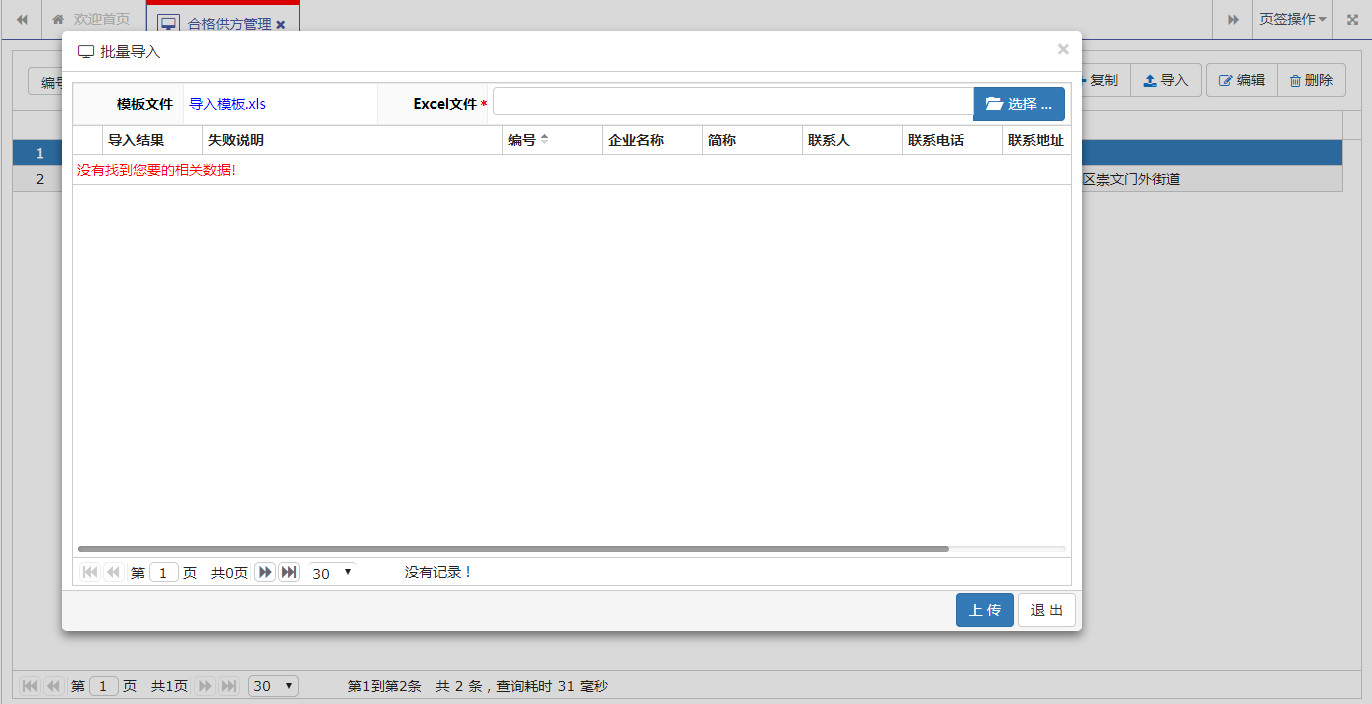
此页面特点是-可以展示数据导入失败的行,并显示相关失败信息。
页面布局源码
与普通编辑页面布局页相同。
示例页面源码
@{
ViewBag.Title = "初始库存导入";
Layout = "~/Views/Shared/_Form.cshtml";
}
<div class="ui-layout">
<div class="ui-layout-center">
<div class="center-Panel" style="margin-left:10px;margin-top:10px;margin-right:10px;">
<form id="form1" name="form1" class="form-horizontal form-table-bordered" enctype="multipart/form-data">
<table class="form border1">
<tr>
<td class="formTitle">模板文件</td>
<td class="formValue">
<a href="@ViewBag.TemplateFile" style="color:blue">导入模板.xls</a>
</td>
<td class="formTitle">Excel文件<font face="宋体">*</font></td>
<td class="formValue" colspan="3">
<input type="file" id="FileName" accept=".xls,.xlsx" class="file" isvalid="yes" checkexpession='["NotNull"]' />
</td>
</tr>
</table>
<div class="gridPanel">
<table id="gridTable"></table>
<div id="gridPager"></div>
</div>
</form>
</div>
</div>
</div>
<div class="form-button" id="wizard-actions">
<a id="btn_upload" class="btn btn-primary">上 传</a>
<a id="btn_cancel" class="btn btn-default">退 出</a>
</div>
<script>
$(function () {
GetGrid();
//完成提交保存
$("#btn_cancel").click(function () {
/*调用上级列表进行刷新*/
$.currentIframe().$("#gridTable").trigger("reloadGrid");
dialogClose();
})
//完成提交保存
$("#btn_upload").click(function () {
if (!$("#form1").Validform()) {
return false;
}
$.SaveFormData({
file: $('input[type=file]')[0].files[0],
url: "/EquipmentManage/EquipmentSupplier/Upload",
loading: "正在导入数据...",
close: false,
success: function (result) {
jQuery("#gridTable").jqGrid("clearGridData");
//console.log(result);
for (var i = 0; i < result.resultdata.length; i++) {
$("#gridTable").jqGrid('addRowData', i + 1, result.resultdata[i]);
}
$.currentIframe().$('#gridTable').trigger('reloadGrid');
}
});
});
});
$("#FileName").fileinput({
showUpload: false,
showRemove: true,
showPreview: false,
language: 'zh',
maxFileSize: 1024 * 10,
});
//加载表格
function GetGrid() {
var selectedRowIndex = 0;
var $gridTable = $('#gridTable');
$gridTable.jqGrid({
autowidth: true,
height: $(window).height() - 156,
//url: "../../CateringManage/StockBillInfo/GetStockImportPage",
datatype: "local",
colModel: [
{
label: '导入结果', name: 'ImportResult', index: 'ImportResult', width: 100, align: 'left', sortable: true,
formatter: function (cellvalue, options, rowObject) {
if (cellvalue == "导入失败") {
return '<span class=\"label label-danger\">' + cellvalue + '</span>';
} else {
return cellvalue;
}
}
},
{ label: '失败说明', name: 'ErrorMessage', index: 'ErrorMessage', width: 300, align: 'left', sortable: true },
{ label: 'Id', name: 'Id', index: 'Id', width: 100, align: 'left', sortable: true, hidden: true },
{ label: '编号', name: 'Code', index: 'Code', width: 100, align: 'left', sortable: true },
{ label: '企业名称', name: 'Name', index: 'Name', width: 100, align: 'left', sortable: true },
{ label: '简称', name: 'ShortName', index: 'ShortName', width: 100, align: 'left', sortable: true },
{ label: '联系人', name: 'Linkman', index: 'Linkman', width: 100, align: 'left', sortable: true },
{ label: '联系电话', name: 'Phone', index: 'Phone', width: 100, align: 'left', sortable: true },
{ label: '联系地址', name: 'Address', index: 'Address', width: 200, align: 'left', sortable: true },
],
viewrecords: true,
rowNum: 30,
rowList: [30, 50, 100],
pager: "#gridPager",
sortname: 'Code',
sortorder: 'asc',
rownumbers: true,
shrinkToFit: false,
gridview: true,
onSelectRow: function () {
selectedRowIndex = $('#' + this.id).getGridParam('selrow');
},
gridComplete: function () {
$('#' + this.id).setSelection(selectedRowIndex, false);
},
jsonReader: {
root: "rows",
page: "page",
total: "total",
records: "records",
repeatitems: false
},
});
}
</script>
5、向导式编辑页面
即使用向导式的方式,一步步处理相关信息,然后进行保存的编辑页面。应用于减少多次弹窗的普通编辑页面。比如示例中设备采购申请,只需要选择设备信息,然后下一步,即可保存数据,三次点击操作即完成数据录入功能。
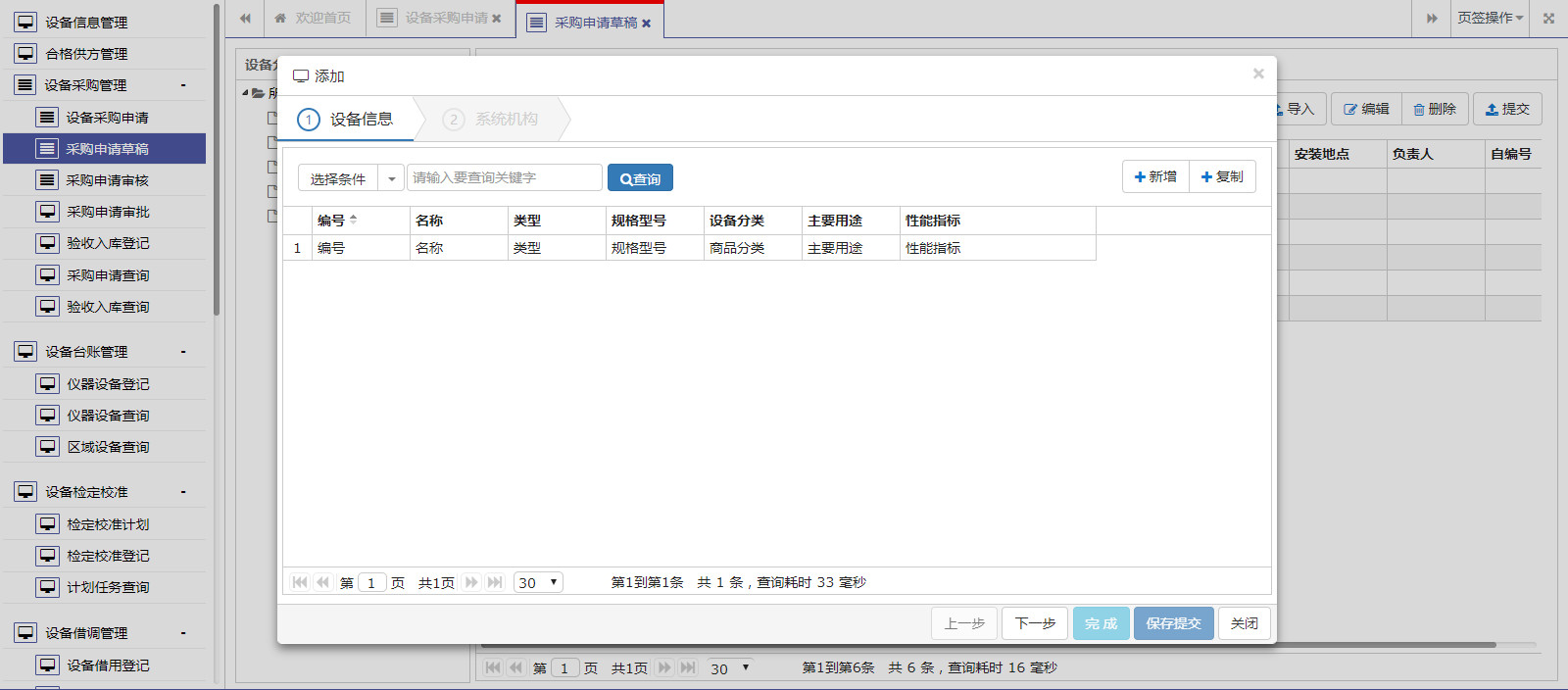
页面布局源码
与普通编辑页面布局页相同。
示例页面源码
@{
ViewBag.Title = "进货信息编辑";
Layout = "~/Views/Shared/_Form.cshtml";
}
<div class="widget-body">
<div id="wizard" class="wizard" data-target="#wizard-steps" style="border-left: none; border-top: none; border-right: none;">
<ul class="steps">
<li data-target="#stepEquipmentInfo" class="active"><span class="step">1</span>设备信息<span class="chevron"></span></li>
<li data-target="#stepBaseInfo"><span class="step">2</span>系统机构<span class="chevron"></span></li>
</ul>
</div>
<div class="step-content" id="wizard-steps" style="border-left: none; border-bottom: none; border-right: none;">
<div class="step-pane active" id="stepEquipmentInfo" style="margin: 5px;">
<div class="titlePanel">
<div class="title-search">
<table>
<tr>
<td>
<div id="queryCondition" class="btn-group">
<a class="btn btn-default dropdown-text" data-toggle="dropdown">选择条件</a>
<a class="btn btn-default dropdown-toggle" data-toggle="dropdown"><span class="caret"></span></a>
<ul class="dropdown-menu">
<li><a data-value="Code">编号</a></li>
<li><a data-value="Name">设备名称</a></li>
</ul>
</div>
</td>
<td style="padding-left:2px;">
<input id="txt_Keyword" type="text" class="form-control" placeholder="请输入要查询关键字" style="width: 200px;" />
</td>
<td style="padding-left: 5px;">
<a id="btn_Search" class="btn btn-primary"><i class="fa fa-search"></i>查询</a>
</td>
</tr>
</table>
</div>
<div class="toolbar">
<div class="btn-group">
<a id="btnAdd" class="btn btn-default"><i class="fa fa-plus"></i> 新增</a>
<a id="btnCopy" class="btn btn-default"><i class="fa fa-plus"></i> 复制</a>
</div>
</div>
</div>
<div class="gridPanel">
<table id="gridTable"></table>
<div id="gridPager"></div>
</div>
</div>
<div class="step-pane" id="stepBaseInfo">
<div class="form-body" style="margin-left: 0px; margin-top: 30px; margin-right: 30px; ">
<table class="form border1">
<tr>
<td class="formTitle">申请编号<font face="宋体">*</font></td>
<td class="formValue">
<input type="hidden" id="Id" />
<input id="ApplyCode" type="text" class="form-control" length="50" value="" isvalid="yes" checkexpession='["NotNull"]' />
</td>
<td class="formTitle">申请人<font face="宋体">*</font></td>
<td class="formValue">
<input id="OperatorBy" type="text" class="form-control" length="255" value="" isvalid="yes" checkexpession='["NotNull"]' />
</td>
<td class="formTitle">申请日期<font face="宋体">*</font></td>
<td class="formValue">
<input id="OperatorOn" type="text" class="form-control" length="50" value="" isvalid="yes" checkexpession='["NotNull"]' />
</td>
</tr>
<tr>
<td class="formTitle">设备编号<font face="宋体">*</font></td>
<td class="formValue">
<input type="hidden" id="RefEquipmentId" />
<input id="EquipmentCode" type="text" class="form-control" length="50" value="" isvalid="yes" checkexpession='["NotNull"]' />
</td>
<td class="formTitle">名称<font face="宋体">*</font></td>
<td class="formValue">
<input id="EquipmentName" type="text" class="form-control" length="255" value="" isvalid="yes" checkexpession='["NotNull"]' />
</td>
<td class="formTitle">类型<font face="宋体">*</font></td>
<td class="formValue">
<input id="EquipmentType" type="text" class="form-control" length="50" value="" isvalid="yes" checkexpession='["NotNull"]' />
</td>
</tr>
<tr>
<td class="formTitle">规格型号</td>
<td class="formValue">
<input id="EquipmentSpec" type="text" class="form-control" length="50" value="" isvalid="no" checkexpession='["NotNull"]' />
</td>
<td class="formTitle">量程</td>
<td class="formValue">
<input id="MeasurementRange" type="text" class="form-control" length="50" value="" isvalid="no" checkexpession='["NotNull"]' />
</td>
<td class="formTitle">精度</td>
<td class="formValue">
<input id="MeasurementAccuracy" type="text" class="form-control" length="50" value="" isvalid="no" checkexpession='["NotNull"]' />
</td>
</tr>
<tr>
<td class="formTitle">数量<font face="宋体">*</font></td>
<td class="formValue">
<input id="Amount" type="text" class="form-control" style="float:left; width:50%" length="255" value="" isvalid="yes" checkexpession='["NotNull"]' />
<input id="AmountUnit" type="text" class="form-control" style="float:left; width:50%" length="255" value="" isvalid="no" checkexpession='["NotNull"]' />
</td>
<td class="formTitle">单价</td>
<td class="formValue">
<input id="Price" type="text" class="form-control" length="50" value="" isvalid="no" checkexpession='["NotNull"]' />
</td>
<td class="formTitle">生产厂家</td>
<td class="formValue">
<input id="RefSupplierId" type="hidden" />
<input id="SupplierName" type="text" class="form-control" length="50" value="" isvalid="no" checkexpession='["NotNull"]' />
</td>
</tr>
<tr>
<td class="formTitle" valign="top">主要用途</td>
<td class="formValue" colspan="5">
<textarea id="Usage" type="text" class="form-control" length="500" value="" isvalid="yes" checkexpession='["LenStrOrNull"]'></textarea>
</td>
</tr>
<tr>
<td class="formTitle" valign="top">性能指标</td>
<td class="formValue" colspan="5">
<textarea id="Target" type="text" class="form-control" length="500" value="" isvalid="yes" checkexpession='["LenStrOrNull"]'></textarea>
</td>
</tr>
<tr>
<td class="formTitle" valign="top">备注说明</td>
<td class="formValue" colspan="5">
<textarea id="Remark" class="form-control" value="" isvalid="yes" checkexpession='["LenStrOrNull"]'></textarea>
</td>
</tr>
</table>
</div>
</div>
</div>
</div>
<div class="form-button" id="wizard-actions">
<a id="btn_last" disabled class="btn btn-default btn-prev">上一步</a>
<a id="btn_next" class="btn btn-default btn-next">下一步</a>
<a id="btn_finish" disabled class="btn btn-info">完 成</a>
<a id="btn_submit" disabled class="btn btn-primary">保存提交</a>
<a id="btn_close" class="btn btn-default">关闭</a>
</div>
<script type="text/javascript">
var keyValue = request("keyValue");
$(function () {
initialPage();
InitEquipmentInfo();
});
function initialPage() {
//加载导向
$('#wizard').wizard().on('change', function (e, data) {
var $finish = $("#btn_finish");
var $submit = $("#btn_submit");
var $next = $("#btn_next");
if (data.direction == "next") {
if (data.step == 1) {
var mEquipmentId = $("#gridTable").jqGridRowValue("Id");
if (mEquipmentId == undefined || mEquipmentId == "") {
dialogMsg('请选择企业信息!', 0);
return false;
}
$.SetForm({
url: "/EquipmentManage/FacilityPurchaseApply/GetNewEntity",
param: { equipmentId: mEquipmentId },
success: function (data) {
$("#form1").SetWebControls(data);
}
});
$finish.removeAttr('disabled');
$submit.removeAttr('disabled');
$next.attr('disabled', 'disabled');
}
} else {
$finish.attr('disabled', 'disabled');
$submit.attr('disabled', 'disabled');
$next.removeAttr('disabled');
}
});
buttonOperation();
//新增企业
$("#btnAdd").click(function () {
dialogOpen({
id: 'EquipmentInfoForm',
title: '添加',
url: '/EquipmentManage/EquipmentInfo/EquipmentInfoForm',
width: '1020px',
height: '500px',
callBack: function (iframeId) {
top.EquipmentInfoForm.AcceptClick(function () {
$('#gridTable').trigger('reloadGrid');
});
}
});
})
//复制
$("#btnCopy").click(function () {
var keyValue = $("#gridTable").jqGridRowValue("Id");
if (checkedRow(keyValue)) {
dialogOpen({
id: 'EquipmentInfoForm',
title: '复制',
url: '/EquipmentManage/EquipmentInfo/EquipmentInfoForm?copyId='+keyValue,
width: '1020px',
height: '500px',
callBack: function (iframeId) {
top.EquipmentInfoForm.AcceptClick(function () {
$('#gridTable').trigger('reloadGrid');
});
}
});
}
});
};
/*系统按钮being==================================*/
function InitEquipmentInfo() {
var selectedRowIndex = 0;
var $gridTable = $("#gridTable");
$gridTable.jqGrid({
height: $(window).height() - 220,
width: $(window).width() - 12,
url: "/EquipmentManage/EquipmentInfo/GetPageList",
datatype: "json",
colModel: [
{ label: 'Id', name: 'Id', index: 'Id', width: 100, align: 'left', sortable: true, hidden: true },
{ label: '编号', name: 'Code', index: 'Code', width: 100, align: 'left', sortable: true },
{ label: '名称', name: 'Name', index: 'Name', width: 100, align: 'left', sortable: true },
{ label: '类型', name: 'Type', index: 'Type', width: 100, align: 'left', sortable: true },
{ label: '规格型号', name: 'Spec', index: 'Spec', width: 100, align: 'left', sortable: true },
{ label: '设备分类', name: 'RefClassifyId', index: 'RefClassifyId', width: 100, align: 'left', sortable: true, hidden: true },
{ label: '设备分类', name: 'ClassifyName', index: 'ClassifyName', width: 100, align: 'left', sortable: true },
{ label: '主要用途', name: 'Usage', index: 'Usage', width: 100, align: 'left', sortable: true },
{ label: '性能指标', name: 'Target', index: 'Target', width: 200, align: 'left', sortable: true },
],
viewrecords: true,
rowNum: 30,
rowList: [30, 50, 100],
pager: "#gridPager",
sortname: 'Code',
sortorder: 'asc',
rownumbers: true,
shrinkToFit: false,
gridview: true,
onSelectRow: function () {
selectedRowIndex = $('#' + this.id).getGridParam('selrow');
},
gridComplete: function () {
$('#' + this.id).setSelection(selectedRowIndex, false);
//if($.isNullOrEmpty(inDialog)){
// $("#gridTable").authorizeColModel();
//}
},
});
//查询条件
$("#queryCondition .dropdown-menu li").click(function () {
var text = $(this).find('a').html();
var value = $(this).find('a').attr('data-value');
$("#queryCondition .dropdown-text").html(text).attr('data-value', value);
});
//查询事件
$("#btn_Search").click(function () {
var queryJson = {
condition: $("#queryCondition").find('.dropdown-text').attr('data-value'),
keyword: $("#txt_Keyword").val()
};
$gridTable.jqGrid('setGridParam', {
postData: { queryJson: JSON.stringify(queryJson) },
page: 1
}).trigger('reloadGrid')
});
//查询回车
$('#txt_Keyword').bind('keypress', function (event) {
if (event.keyCode == "13") {
$('#btn_Search').trigger("click");
}
});
}
//按钮操作(上一步、下一步、完成、关闭)
function buttonOperation() {
var $last = $("#btn_last");
var $next = $("#btn_next");
var btn_finish = $("#btn_finish");
var btn_submit = $("#btn_submit");
var btn_close = $("#btn_close");
//完成提交保存
btn_close.click(function () {
$.currentIframe().$("#gridTable").trigger("reloadGrid");
dialogClose();
})
//完成提交保存
btn_finish.click(function () {
if (!$("#form1").Validform()) {
return false;
}
var keyValue = $("#Id").val();
var postData = $("#form1").GetWebControls(keyValue);
$.SaveForm({
url: "/EquipmentManage/FacilityPurchaseApply/SaveForm?keyValue=" + keyValue,
param: postData,
loading: "正在保存数据...",
success: function () {
$.currentIframe().$("#gridTable").trigger("reloadGrid");
dialogClose();
}
});
});
//完成提交保存
btn_submit.click(function () {
if (!$("#form1").Validform()) {
return false;
}
var keyValue = $("#Id").val();
var postData = $("#form1").GetWebControls(keyValue);
$.SaveForm({
url: "/EquipmentManage/FacilityPurchaseApply/SaveSubmit?keyValue=" + keyValue,
param: postData,
loading: "正在保存数据...",
success: function () {
$.currentIframe().$("#gridTable").trigger("reloadGrid");
dialogClose();
}
});
});
}
//保存表单;
function AcceptClick(callBack) {
if (!$("#form1").Validform()) {
return false;
}
var postData = $("#form1").GetWebControls(keyValue);
$.SaveForm({
url: "../../BusinessManage/StockBillInfo/SaveForm?keyValue=" + keyValue,
param: postData,
loading: "正在保存数据...",
success: function () {
if (callBack != undefined) {
callBack();
} else {
$.currentIframe().$("#gridTable").trigger("reloadGrid");
}
}
});
}
</script>
6、新页编辑页面
屏幕分辨率有限,当普通编辑页面及向导式编辑页面都无法承载编辑信息内容时,或者说采用弹窗式页面需要滚动的页面,此时,应当采用新页编辑页面编辑内容。

页面布局源码
<!DOCTYPE html>

<html>

<head>

    <meta name="viewport" content="width=device-width" />

    <meta http-equiv="X-UA-Compatible" content="IE=edge">

    <title>@ViewBag.Title</title>

    <!--框架必需start-->

    <script src="~/Content/scripts/jquery/jquery-2.0.3.min.js"></script>

    <link href="~/Content/styles/font-awesome.min.css" rel="stylesheet" />

    <link href="~/Content/scripts/plugins/jquery-ui/jquery-ui.min.css" rel="stylesheet" />

    <script src="~/Content/scripts/plugins/jquery-ui/jquery-ui.min.js"></script>

    <!--框架必需end-->

    <!--bootstrap组件start-->

    <link href="~/Content/scripts/bootstrap/bootstrap.min.css" rel="stylesheet" />

    <link href="~/Content/scripts/bootstrap/bootstrap.extension.css" rel="stylesheet" />

    <script src="~/Content/scripts/bootstrap/bootstrap.min.js"></script>

    <!--bootstrap组件end-->

    <script src="~/Content/scripts/plugins/layout/jquery.layout.js"></script>

    <!--select2组件-->

    <link href="~/Content/scripts/plugins/select2/css/select2.css" rel="stylesheet" />

    @*<script src="~/Content/scripts/plugins/select2/js/i18n/zh-CN.js"></script>*@

    <script src="~/Content/scripts/plugins/select2/js/select2.min.js"></script>

    <!--文件上传组件-->

    <link href="~/Content/styles/xlib-bill.css" rel="stylesheet" />

    <link rel="stylesheet" href="~/Content/scripts/plugins/fileinput/css/fileinput.css" />

    <link rel="stylesheet" href="~/Content/scripts/plugins/fileinput/themes/explorer/theme.css" type="text/css" media="all" />

    <script src="~/Content/scripts/plugins/fileinput/js/plugins/sortable.min.js"></script>

    <script src="~/Content/scripts/plugins/fileinput/js/fileinput.min.js"></script>

    <script src="~/Content/scripts/plugins/fileinput/js/locales/zh.js"></script>

    <script src="~/Content/scripts/plugins/fileinput/themes/explorer/theme.js"></script>

    <link href="~/Content/styles/xlib-ckbox-radio.css" rel="stylesheet" />

    <script src="~/Content/scripts/plugins/datepicker/WdatePicker.js"></script>

    @System.Web.Optimization.Styles.Render("~/Content/scripts/plugins/jqgrid/css",

    "~/Content/scripts/plugins/tree/css",

    "~/Content/scripts/plugins/datetime/css",

    "~/Content/styles/xlib-ui.css")

    @System.Web.Optimization.Scripts.Render("~/Content/scripts/plugins/jqgrid/js",

    "~/Content/scripts/plugins/tree/js",

    "~/Content/scripts/plugins/validator/js",

            "~/Content/scripts/plugins/datepicker/js",

    "~/Content/scripts/utils/js")

    <style>

        html, body {

            height: 100%;

            width: 100%;

        }

    </style>

</head>

<body>

    @RenderBody()

    @Html.AntiForgeryToken()

</body>

</html>
示例页面源码
@{
ViewBag.Title = "表单页面";
Layout = "~/Views/Shared/_BillIndex.cshtml";
}
<div class="ui-layout" id="layout" style="height: 100%; width: 100%;">
<div class="ui-layout-center">
<div class="center-Panel" style="margin-left:10px">
<div class="titlePanel">
<div class="title-info">
<div class="title">
采购申请审批
</div>
</div>
<div class="toolbar">
<div class="btn-group">
<a id="btnSubmit" class="btn btn-default" onclick="btn_Submit()"><i class="fa fa-upload"></i>保存提交</a>
</div>
<div class="btn-group">
<a id="btnCloseTab" class="btn btn-default" onclick="btn_CloseTab()"><i class="fa fa-refresh"></i> 退出</a>
</div>
</div>
</div>
<div class="billPanel" style="border-top: 1px solid #ccc; overflow-y:auto; ">
<div class="bill-box" style="margin:10px;padding: 0px;">
<form id="form1" name="form1" class="form-horizontal form-table-bordered" enctype="multipart/form-data">
<table class="form border1">
<tr>
<td class="formTitle">审批结果<font face="宋体">*</font></td>
<td class="formValue">
<input id="ApprovalResult" type="text" class="form-control" length="50" value="" isvalid="yes" checkexpession='["NotNull"]' />
</td>
<td class="formTitle">审批人<font face="宋体">*</font></td>
<td class="formValue">
<input id="ApprovalBy" type="text" class="form-control" length="255" value="" isvalid="yes" checkexpession='["NotNull"]' />
</td>
<td class="formTitle">审批日期<font face="宋体">*</font></td>
<td class="formValue">
<input id="ApprovalOn" type="text" class="form-control input-wdatepicker" onfocus="WdatePicker()" value="@DateTime.Today.ToString("yyyy-MM-dd")" isvalid="yes" checkexpession='["NotNull"]' />
</td>
</tr>
<tr>
<td class="formTitle" valign="top">审批意见</td>
<td class="formValue" colspan="5">
<textarea id="ApprovalRemark" class="form-control" value="" isvalid="yes" checkexpession='["LenStrOrNull"]'></textarea>
</td>
</tr>
</table>
<div class="title-info">
<div class="title" style="width:100%;background-color:#3598dc;height:32px;line-height:32px;font-size:14px;color:#ffffff;margin-top:5px;">
<i class='fa fa-gift'>采购申请审核</i>
</div>
</div>
<table class="form border1" id="auditInfo">
<tr>
<td class="formTitle">审核结果<font face="宋体">*</font></td>
<td class="formValue">
<input id="AuditResult" type="text" class="form-control" length="50" value="" isvalid="yes" checkexpession='["NotNull"]' />
</td>
<td class="formTitle">审核人<font face="宋体">*</font></td>
<td class="formValue">
<input id="AuditBy" type="text" class="form-control" length="255" value="" isvalid="yes" checkexpession='["NotNull"]' />
</td>
<td class="formTitle">审核日期<font face="宋体">*</font></td>
<td class="formValue">
<input id="AuditOn" type="text" class="form-control" length="50" value="" isvalid="yes" checkexpession='["NotNull"]' />
</td>
</tr>
<tr>
<td class="formTitle" valign="top">审核意见</td>
<td class="formValue" colspan="5">
<textarea id="AuditRemark" class="form-control" value="" isvalid="yes" checkexpession='["LenStrOrNull"]'></textarea>
</td>
</tr>
</table>
<div class="title-info">
<div class="title" style="width:100%;background-color:#3598dc;height:32px;line-height:32px;font-size:14px;color:#ffffff;margin-top:5px;">
<i class='fa fa-gift'>采购申请信息</i>
</div>
</div>
<table class="form border1" id="applyInfo">
<tr>
<td class="formTitle">申请编号<font face="宋体">*</font></td>
<td class="formValue">
<input id="Id" type="hidden" />
<input id="ApplyCode" type="text" class="form-control" length="50" value="" isvalid="yes" checkexpession='["NotNull"]' />
</td>
<td class="formTitle">申请人<font face="宋体">*</font></td>
<td class="formValue">
<input id="OperatorBy" type="text" class="form-control" length="255" value="" isvalid="yes" checkexpession='["NotNull"]' />
</td>
<td class="formTitle">申请日期<font face="宋体">*</font></td>
<td class="formValue">
<input id="OperatorOn" type="text" class="form-control" length="50" value="" isvalid="yes" checkexpession='["NotNull"]' />
</td>
</tr>
<tr>
<td class="formTitle">设备编号<font face="宋体">*</font></td>
<td class="formValue">
<input type="hidden" id="RefEquipmentId" />
<input id="EquipmentCode" type="text" class="form-control" length="50" value="" isvalid="yes" checkexpession='["NotNull"]' />
</td>
<td class="formTitle">名称<font face="宋体">*</font></td>
<td class="formValue">
<input id="EquipmentName" type="text" class="form-control" length="255" value="" isvalid="yes" checkexpession='["NotNull"]' />
</td>
<td class="formTitle">类型<font face="宋体">*</font></td>
<td class="formValue">
<input id="EquipmentType" type="text" class="form-control" length="50" value="" isvalid="yes" checkexpession='["NotNull"]' />
</td>
</tr>
<tr>
<td class="formTitle">规格型号</td>
<td class="formValue">
<input id="EquipmentSpec" type="text" class="form-control" length="50" value="" isvalid="no" checkexpession='["NotNull"]' />
</td>
<td class="formTitle">量程</td>
<td class="formValue">
<input id="MeasurementRange" type="text" class="form-control" length="50" value="" isvalid="no" checkexpession='["NotNull"]' />
</td>
<td class="formTitle">精度</td>
<td class="formValue">
<input id="MeasurementAccuracy" type="text" class="form-control" length="50" value="" isvalid="no" checkexpession='["NotNull"]' />
</td>
</tr>
<tr>
<td class="formTitle">数量</td>
<td class="formValue">
<input id="Amount" type="text" class="form-control" style="float:left; width:50%" length="255" value="" isvalid="yes" checkexpession='["NotNull"]' />
<input id="AmountUnit" type="text" class="form-control" style="float:left; width:50%" length="255" value="" isvalid="no" checkexpession='["NotNull"]' />
</td>
<td class="formTitle">单价</td>
<td class="formValue">
<input id="Price" type="text" class="form-control" length="50" value="" isvalid="no" checkexpession='["NotNull"]' />
</td>
<td class="formTitle">生产厂家</td>
<td class="formValue">
<input id="RefSupplierId" type="hidden" />
<input id="SupplierName" type="text" class="form-control" length="50" value="" isvalid="no" checkexpession='["NotNull"]' />
</td>
</tr>
<tr>
<td class="formTitle" valign="top">主要用途</td>
<td class="formValue" colspan="5">
<textarea id="Usage" type="text" class="form-control" length="500" value="" isvalid="yes" checkexpession='["LenStrOrNull"]'></textarea>
</td>
</tr>
<tr>
<td class="formTitle" valign="top">性能指标</td>
<td class="formValue" colspan="5">
<textarea id="Target" type="text" class="form-control" length="500" value="" isvalid="yes" checkexpession='["LenStrOrNull"]'></textarea>
</td>
</tr>
<tr>
<td class="formTitle" valign="top">备注说明</td>
<td class="formValue" colspan="5">
<textarea id="Remark" class="form-control" style="height:100px;" value="" isvalid="yes" checkexpession='["LenStrOrNull"]'></textarea>
</td>
</tr>
</table>
</form>
</div>
</div>
</div>
</div>
</div>
<script type="text/javascript">
var keyValue = request('keyValue');
var tabiframeId = request('tabiframeId');
$(function () {
$("#applyInfo .form-control").attr("disabled", "disabled");
initialPage();
GetGrid();
});
function initialPage() {
var layout = $('#layout').layout({
applyDemoStyles: true,
west__size: 1,
onresize: function () {
$(window).resize();
}
});
//resize重设布局;
$(window).resize(function (e) {
window.setTimeout(function () {
$('.billPanel').css("height", $(window).height() - 75);
}, 200);
e.stopPropagation();
});
$(window).resize();
$("#auditInfo .form-control").attr("disabled", "disabled");
$("#applyInfo .form-control").attr("disabled", "disabled");
//处理结果
$("#ApprovalResult").ComboBox({//检查结果
//url: "../../SystemManage/DataItemDetail/GetDataItemListJson",
//param: { EnCode: "SuperviseInspect" },
data: [{ Name: "通过", Value: "通过" }, { Name: "退回", Value: "退回" }],
id: "Value",
text: "Name",
description: " == 请选择 == ",
height: "200px",
});
//获取表单
if (!!keyValue) {
$.SetForm({
url: "/EquipmentManage/FacilityPurchaseApply/GetApprovalEntity",
param: { keyValue: keyValue },
success: function (data) {
$("#form1").SetWebControls(data);
}
});
} else
{
}
}
//打印
function btn_Finality() {
var keyValue = $("#Id").val();
var queryJson = {
condition: "Id",
keyword: keyValue
};
//console.log(JSON.stringify(queryJson));
//var win = window.open('/LawEnforceManage/CaseArchivesTemplate/ExportPdf?templateId=CaseRegisterInfo&queryJson=' + JSON.stringify(queryJson));
//win.print();
top.tablist.newTab({
id: "ExportPdf",
title: '打印预览',
closed: true,
icon: "fa fa fa-eye",
url: top.contentPath + "/LawEnforceManage/CaseArchivesTemplate/ExportPdf?templateId=T009&queryJson=" + escape(JSON.stringify(queryJson))
});
}
//保存
function btn_Save() {
if (!$("#form1").Validform()) {
return false;
}
var keyValue = $("#Id").val();
var postData = $("#form1").GetWebControls();
$.SaveForm({
url: "/EquipmentManage/FacilityPurchaseApply/AuditSubmit?keyValue=" + keyValue,
param: postData,
loading: "正在保存数据...",
success: function (result) {
if (tabiframeId != "")
top.frames[tabiframeId].$("#gridTable").trigger("reloadGrid");
}
});
}
//保存并提交
function btn_Submit() {
if (!$("#form1").Validform()) {
return false;
}
var keyValue = $("#Id").val();
var postData = $("#form1").GetWebControls();
$.SaveForm({
url: "/EquipmentManage/FacilityPurchaseApply/ApprovalSubmit?keyValue=" + keyValue,
param: postData,
loading: "正在保存数据...",
success: function (result) {
if (tabiframeId != "")
top.frames[tabiframeId].$("#gridTable").trigger("reloadGrid");
btn_CloseTab();
}
});
}
function btn_CloseTab() {
top.tablist.closeTab(window.location.pathname + window.location.search);
}
</script>
至此Web前端页面介绍完毕,记录于此,便于后续自己开发及分享给大家!
基于.net EF6 MVC5+WEB Api 的Web系统框架总结(1)-Web前端页面的更多相关文章
- 【ASP.NET Web API教程】4.1 ASP.NET Web API中的路由
原文:[ASP.NET Web API教程]4.1 ASP.NET Web API中的路由 注:本文是[ASP.NET Web API系列教程]的一部分,如果您是第一次看本博客文章,请先看前面的内容. ...
- .net mvc web api Autofac依赖注入框架-戈多编程
今天自己搭了一套基于三层的依赖注入mvc web api 的依赖注入框架,在此总结下相关配置 1.设置应用程序的.net Framework版本为 4.5 2.通过Nuget 安装autofac包 I ...
- 【ASP.NET Web API教程】5.5 ASP.NET Web API中的HTTP Cookie
原文:[ASP.NET Web API教程]5.5 ASP.NET Web API中的HTTP Cookie 5.5 HTTP Cookies in ASP.NET Web API 5.5 ASP.N ...
- 【ASP.NET Web API教程】5.4 ASP.NET Web API批处理器
原文:[ASP.NET Web API教程]5.4 ASP.NET Web API批处理器 注:本文是[ASP.NET Web API系列教程]的一部分,如果您是第一次看本系列教程,请先看前面的内容. ...
- 【ASP.NET Web API教程】4.3 ASP.NET Web API中的异常处理
原文:[ASP.NET Web API教程]4.3 ASP.NET Web API中的异常处理 注:本文是[ASP.NET Web API系列教程]的一部分,如果您是第一次看本系列教程,请先看前面的内 ...
- ASP.NET MVC , ASP.NET Web API 的路由系统与 ASP.NET 的路由系统是怎么衔接的?
ASP.NET MVC 的路由实际上是建立在 ASP.NET 的路由系统之上的. MVC 路由注册通常是这样的: RouteTable 是一个全局路由表, 它的 Routes 静态属性是一个 Ro ...
- 【ASP.NET Web API教程】6.2 ASP.NET Web API中的JSON和XML序列化
谨以此文感谢关注此系列文章的园友!前段时间本以为此系列文章已没多少人关注,而不打算继续下去了.因为文章贴出来之后,看的人似乎不多,也很少有人对这些文章发表评论,而且几乎无人给予“推荐”.但前几天有人询 ...
- Asp.Net Web API 2第十三课——ASP.NET Web API中的JSON和XML序列化
前言 阅读本文之前,您也可以到Asp.Net Web API 2 系列导航进行查看 http://www.cnblogs.com/aehyok/p/3446289.html 本文描述ASP.NET W ...
- asp.net web api 2.2 基础框架(带例子)
链接:https://github.com/solenovex/asp.net-web-api-2.2-starter-template 简介 这个是我自己编写的asp.net web api 2.2 ...
随机推荐
- mqtt服务器apollo的搭建和测试工具paho的使用
(1)前言 MQTT协议是IBM开发的一个即时通讯协议; 基于发布/订阅的消息协议,近些年来被广泛应用于能源.电力.....等硬件性能低下的远程设备,此外国内很多企业使用MQTT作为android手机 ...
- netcore服务程序暴力退出导致的业务数据不一致的一种解决方案(优雅退出)
一: 问题提出 现如今大家写的netcore程序大多部署在linux平台上,而且服务程序里面可能会做各种复杂的操作,涉及到多数据源(mysql,redis,kafka).成功部署成后台 进程之后,你以 ...
- 【转载】通俗易懂,什么是.NET?什么是.NET Framework?什么是.NET Core?
本文转载自:http://www.cnblogs.com/1996V/p/9037603.html [尊重作者原创,转载说明出处!感谢作者“小曾看世界”分享! ] 什么是.NET?什么是.NET Fr ...
- 【开发记录】如何在B/S项目中使用中国天气的实时天气功能
好久没有更新我的博客了,正好手头有一个比较合适的项目经验可以分享出来,就是这个如何使用中国天气的天气预报功能,也正好做个项目经验记录. 功能需求 这个功能需求比较简单,就是想在网页端显示实时天气数据. ...
- 阿里云ECS云服务器的简单使用
随着云服务的推广与普及,越来越多的人开始接触到云服务器.然而有些人购买后却不知从何下手,今天就来看下阿里云服务器的使用吧! 一.购买完阿里云服务器后进入阿里云官网首页点击控制台 找到所购买的云产品项点 ...
- CesiumJS 添加会动的GIF
由于Cesium使用canvas渲染,如果使用billboard等加载gif图片只能渲染第一帧,导致动图不动.在Cesium的官方示例中找到一段代码可将HTML元素渲染到地图上,将gif以html元素 ...
- 6.使用桌面版AI伴侣或手机版AI伴侣实时预览编程效果
1.根据自己系统下载对应版本AI伴侣,最好解压到D盘根目录. 运行ailaunch.bat ,可以启动原本自带的2.46版AI伴侣.运行AI伴侣247.bat可以启动汉化2.47版的AI伴侣.并且默认 ...
- 安卓开发笔记(二十):利用夜神模拟器调试运行Android Studio的apk
一.首先来到夜神模拟器的安装目录下 如下图所示: 再把这整个文件夹添加到我们的windows环境变量里.然后再把android studio 和夜神模拟器都打开,注意必须同时打开而且不能够把夜神模拟器 ...
- 「技巧」如何将Sketch改为深色模式
之前Sketch只能根据mac系统的外观设置变更皮肤.在更新了版本54之后,可以脱离操作系统,在自己的偏好设置中更改外观了. 准备 Sketch 54 更多工具:whose.design 第一步:打开 ...
- Git分布式版本控制器安装注意点及其常用命令
将git按照默认选项下载安装后,打开git bach版面进行git命令行操作(记住在安装的过程中文件夹中不能存在中文):注:Windows下,路径名不要包含中文,因为Git对中文支持不给力,可能会存在 ...