
spring-boot-devtools
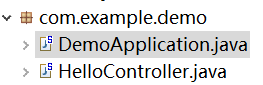
Create a new Maven Project and we have two class under the package com.example.demo like below screen shot.
This page mainly focus on how to make the change you make ready to show the result without restarting spring boot application manually.
package com.example.demo;

import org.springframework.boot.SpringApplication;

import org.springframework.boot.autoconfigure.SpringBootApplication;

@SpringBootApplication

public class DemoApplication {

    public static void main(String[] args) {

        SpringApplication.run(DemoApplication.class, args);

    }

}
package com.example.demo;

import org.springframework.web.bind.annotation.RequestMapping;

import org.springframework.web.bind.annotation.RequestMethod;

import org.springframework.web.bind.annotation.RestController;

@RestController

public class HelloController {

    @RequestMapping(value = "hi" , method = RequestMethod.GET)

    public String sayHi() {

        return "Hello World!";

    }

}
<?xml version="1.0" encoding="UTF-8"?>

<project xmlns="http://maven.apache.org/POM/4.0.0" xmlns:xsi="http://www.w3.org/2001/XMLSchema-instance"

    xsi:schemaLocation="http://maven.apache.org/POM/4.0.0 http://maven.apache.org/xsd/maven-4.0.0.xsd">

    <modelVersion>4.0.0</modelVersion>

    <groupId>com.example</groupId>

    <artifactId>demo</artifactId>

    <version>0.0.1-SNAPSHOT</version>

    <packaging>jar</packaging>

    <name>demo</name>

    <description>Demo project for Spring Boot</description>

    <parent>

        <groupId>org.springframework.boot</groupId>

        <artifactId>spring-boot-starter-parent</artifactId>

        <version>1.5.6.RELEASE</version>

        <relativePath/>

    </parent>

    <properties>

        <project.build.sourceEncoding>UTF-8</project.build.sourceEncoding>

        <project.reporting.outputEncoding>UTF-8</project.reporting.outputEncoding>

        <java.version>1.8</java.version>

    </properties>

    <dependencies>

        <dependency>

            <groupId>org.springframework.boot</groupId>

            <artifactId>spring-boot-starter-web</artifactId>

        </dependency>

        <dependency>

            <groupId>org.springframework.boot</groupId>

            <artifactId>spring-boot-starter-test</artifactId>

            <scope>test</scope>

        </dependency>

    </dependencies>

    <build>

        <plugins>

            <plugin>

                <groupId>org.springframework.boot</groupId>

                <artifactId>spring-boot-maven-plugin</artifactId>

            </plugin>

        </plugins>

    </build>

</project>
Then,run the DemoApplication as Java Application or Spring Boot App (if you are using STS),after the application starts up,input the link localhost:8080/hi ,you will get the Hello World! as the output.
But when you want to change the RequestMapping from "hi" to "hello" ,to make it ready to use you need to change it and restart the application.
with spring-boot-devtools we just change the code and save it without restart the application manually,spring boot help us restart the application .
To achieve this , all you need to do are adding the spring-boot-devtools dependency in the pom.xml and make sure Project>build automatically is chosen in the IDE
这里多了一个Optional选项,是为了防止将 devtools 依赖传递到其他模块中。当将应用打包运行后,devtools 会被自动禁用。
<dependency>

        <groupId>org.springframework.boot</groupId>

        <artifactId>spring-boot-devtools</artifactId>

        <optional>true</optional>

    </dependency>
On the condition that you add the dependency in the pom.xml file and you don't choose the build automatically within the IDE(Eclipse or STS here),then when you change the the RequestMapping from "hi" to "hello" and save it,spring boot will not restart the application for you ,you have to bulid the pom file and restart the application manualy.Because the spring-boot-devtools monitor the code under the target to restart the application to make the change you made ready to use ,so you choose the build atuomatically and change RequestMapping and save it ,the IDE build and the code under the target is updated to trigger the restart of the spring boot application automatically.
For more details,please refer the spring boot devtools reference guide : http://docs.spring.io/spring-boot/docs/current/reference/html/using-boot-devtools.html
由于项目的编码是一个连续的过程,并不需要每改一行代码就重启项目。
此时,可以使用触发文件,在application.yml 中配置spring.devtools.restart.trigger
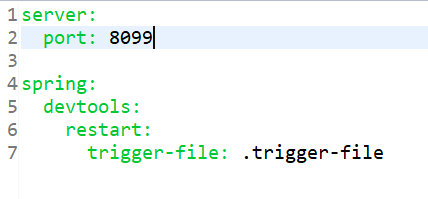
然后在src/main/resource 下创建 .trigger-file
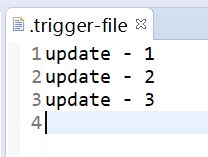
此时,当开发者修改代码时,不会重启项目;需要重启项目时,开发者需要在修改代码并保存之后,修改 .trigger-file, 项目就会重启。
如果项目没有改变,只是改变了 .trigger-file 文件,项目不会重启。
SpringBoot 中使用的自动重启技术涉及两个类加载器,一个是 baseclassloader, 用来加载不会变化的类,例如项目应用的第三方Jar 包;
另一个是 restartclassloader,用来加载开发者自己写的会变化的类。
当改变自己写的代码项目需要重启时,restartclassloader 将被一个新创建的类加载器代替,而 baseclassloader 则继续使用原来的,这种启动方式要比冷启动快很多,因为 baseclassloader 已经存在并且已经加载好。
当改变POM 文件中的依赖,项目会重启,因为 baseclassloader 会重新加载所依赖的 Jar包。
spring-boot-devtools的更多相关文章
- 使用IDEA 中 实现springboot 热部署 (spring boot devtools版)
第一步:添加springboot的配置文件 首先我先贴出我的配置 添加依赖包 <!-- spring boot devtools 依赖包. --> <dependency> & ...
- 使用Spring Boot DevTools优化你的开发体验
场景再现 某日少年收到前端同学发来的消息说联调的接口响应异常
- spring boot devtools热部署
问题1: Springloaded 在springboot2的maven的pom.xml 无法找到 解决方法:在idea通过View->Tool Windows->Maven Projec ...
- IntelliJ IDEA Spring boot devtools 实现热部署
一.spring-boot-devtools是一个为开发者服务的一个模块,其中最重要的功能就是自动部署新代码. 二.原理 使用了两个ClassLoader,一个ClassLoader用来加载那些不会变 ...
- Spring Boot 系列教程5-热部署-devtools模块
devtools模块 devtools模块,是为开发者服务的一个模块.主要的功能就是代码修改后一般在5秒之内就会自动重新加载至服务器,相当于restart成功. 原理 简单原理 在发现代码有更改之后, ...
- Spring Boot 面试题
1.列举一些SpringBoot特性 1.创建独立的Spring项目 2.内置Tomcat和Jetty容器 3.提供一个starter POMs来简化Maven配置 4.提供了一系列大型项目中常见的非 ...
- 2019阿里P7最新总结Spring Boot面试问题
Spring Boot一直是Spring生态系统的关键参与者.该项目通过其自动配置功能使我们的生活更加轻松.在本教程中,我们将介绍在求职面试中可能出现的一些与Spring Boot相关的最常见 ...
- spring boot:创建一个简单的web(maven web project)
1.新建一个maven web project; 2.在pom.xml文件中添加相应的依赖包: 3.新建一个HelloController请求控制类: 4.编写index.jsp页面: 5.编写启动类 ...
- spring boot: spring-data-jpa (Repository/CrudRepository) 数据库操作, @Entity实体类持久化
SpringBoot实现的JPA封装了JPA的特性, Repository是封装了jpa的特性(我是这么理解的) 1在pom.xml引入mysql, spring-data-jpa依赖 2.在src/ ...
- spring boot: 热部署spring-boot-devtools
spring boot: 热部署spring-boot-devtools 1引入spring-boot-devtools依赖包 <!-- spring boot devtools 热部署 --& ...
随机推荐
- FusionCharts 3D帕累托图报错
今天我在设计3D帕累托图时,是由原来的2D帕累托图页面重命名而来,但是当我重命名后发现HTML文件打不开,而且还报错,真不知道是什么原因引起的.因此,我就将这个错误截图,保存下来,希望以后能够解决,或 ...
- Flex中的FusionCharts 2D面积图
Flex中的FusionCharts 2D面积图 1.源码 <?xml version="1.0" encoding="utf-8"?> <s ...
- EJB相关的面试题
1.EJB是基于哪些技术实现的?并说出SessionBean和EntityBean的区别,StatefulBean和StatelessBean的区别. (1)EJB包括Session Bean.Ent ...
- Nginx 原理解析和配置摘要
前言 Nginx 作为高性能的 http 服务器,知名度不必多言,相似产品中无出其右.本篇随笔记录我认为较为重要的原理和配置. 1. 原理解析 1.1 结构 以上是 Nginx 的结构图,其包含一个 ...
- 芝麻HTTP: Python爬虫利器之Requests库的用法
前言 之前我们用了 urllib 库,这个作为入门的工具还是不错的,对了解一些爬虫的基本理念,掌握爬虫爬取的流程有所帮助.入门之后,我们就需要学习一些更加高级的内容和工具来方便我们的爬取.那么这一节来 ...
- 在ASP.NET 中检测手机浏览器(转)
引言 之前做的项目中需要在浏览器查看PDF文件.在电脑端没有问题,但是手机端网页打开失败. 后来使用了pdf.js,个人认为pdf.js的页面不够清爽,就希望网站能自动检测登录设备,电脑端保持原样,手 ...
- 【LightOJ1336】Sigma Function(数论)
[LightOJ1336]Sigma Function(数论) 题面 Vjudge 求和运算是一种有趣的操作,它来源于古希腊字母σ,现在我们来求一个数字的所有因子之和.例如σ(24)=1+2+3+4+ ...
- [APIO2015]八邻旁之桥
题面在这里 sol 这是一个\(Splay\)的题解 首先,如果一个人的家和办公室在同一侧,我们可以直接预处理; 如果不在同一侧,也可以加上1(当然要过桥啦) 当k==1时 我们设桥的位置为\(pos ...
- JVM学习笔记一:Java运行时数据区域
1. 程序计数器 当前线程所执行的字节码的行号指示器. 2. Java虚拟机栈 线程私有,与线程具有相同生命周期.用于存储局部变量表.操作数栈.动态链表.方法出口等信息. 局部变量表存放内容: 基本数 ...
- js与后台交互详述(入门篇)
很多新手前端在初期学习的时候往往把注意力放在如何编写页面,如何编写效果上,群里有个朋友问我js是如何与后台交互的,我简单的说一下. 首先需要知道两个东西,一个是客户端,一个是服务器,客户端其实就是我们 ...