
mysql8.0绿色版安装及mysqldump备份
1、下载mysql绿色版压缩包
https://dev.mysql.com/downloads/mysql/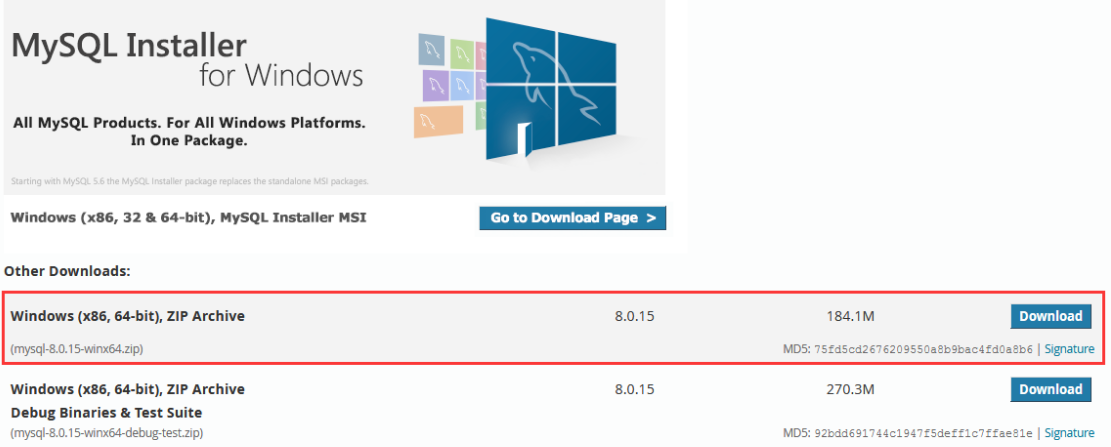
2、解压到安装目录后,在根目录创建data文件夹
3、把mysql下的bin目录添加到环境变量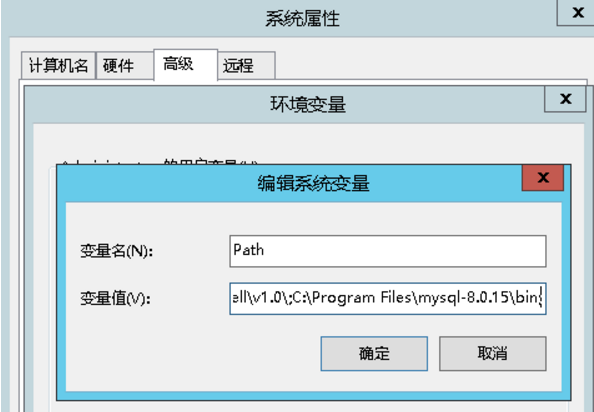
4、根目录创建my.ini文件,并拷贝以下代码,并修改basedir和datadir路径
# MySQL Server Instance Configuration File

# ----------------------------------------------------------------------

# Generated by the MySQL Server Instance Configuration Wizard

#

#

# Installation Instructions

# ----------------------------------------------------------------------

#

# On Linux you can copy this file to /etc/my.cnf to set global options,

# mysql-data-dir/my.cnf to set server-specific options

# (@localstatedir@ for this installation) or to

# ~/.my.cnf to set user-specific options.

#

# On Windows you should keep this file in the installation directory

# of your server (e.g. C:\Program Files\MySQL\MySQL Server X.Y). To

# make sure the server reads the config file use the startup option

# "--defaults-file".

#

# To run run the server from the command line, execute this in a

# command line shell, e.g.

# mysqld --defaults-file="D:\GreenSoft\MySQL\my.ini"

#

# To install the server as a Windows service manually, execute this in a

# command line shell, e.g.

# mysqld --install mysql --defaults-file="D:\GreenSoft\MySQL\my.ini"

#

# And then execute this in a command line shell to start the server, e.g.

# net start mysql

#

#

# Guildlines for editing this file

# ----------------------------------------------------------------------

#

# In this file, you can use all long options that the program supports.

# If you want to know the options a program supports, start the program

# with the "--help" option.

#

# More detailed information about the individual options can also be

# found in the manual.

#

# For advice on how to change settings please see

# http://dev.mysql.com/doc/refman/8.0/en/server-configuration-defaults.html

#

#

# CLIENT SECTION

# ----------------------------------------------------------------------

#

# The following options will be read by MySQL client applications.

# Note that only client applications shipped by MySQL are guaranteed

# to read this section. If you want your own MySQL client program to

# honor these values, you need to specify it as an option during the

# MySQL client library initialization.

#

[client]

no-beep

# pipe

# socket=0.0

port=

[mysql]

default-character-set=utf8

[mysqld]

# 这是8..4的新特性 caching_sha2_password,在linux上面使用命宁 mysql -uroot -proot 可以链接,但是使用windows下面的navict链接不成功

default_authentication_plugin = mysql_native_password

# These are commonly set, remove the # and set as required.

character-set-server = utf8

basedir = D:\Program Files\mysql-8.0.-winx64

datadir = D:\Program Files\mysql-8.0.-winx64\data

port =

server_id =

# Remove leading # and set to the amount of RAM for the most important data

# cache in MySQL. Start at % of total RAM for dedicated server, else %.

innodb_buffer_pool_size = 128M

# Remove leading # to turn on a very important data integrity option: logging

# changes to the binary log between backups.

# log_bin

# General and Slow logging.

log-output=FILE

general-log=

general_log_file="CUPID.log"

slow-query-log=

slow_query_log_file="CUPID-slow.log"

long_query_time=

# Binary Logging.

# log-bin

# Error Logging.

log-error="CUPID.err"

# Remove leading # to set options mainly useful for reporting servers.

# The server defaults are faster for transactions and fast SELECTs.

# Adjust sizes as needed, experiment to find the optimal values.

# join_buffer_size = 128M

# sort_buffer_size = 2M

# read_rnd_buffer_size = 2M

# 8.0.4版本的时候,用的是这个sql_mode,但在8..11版本中会报错,改成下面那个

# sql_mode=STRICT_TRANS_TABLES,NO_ZERO_IN_DATE,NO_ZERO_DATE,ERROR_FOR_DIVISION_BY_ZERO,NO_AUTO_CREATE_USER,NO_ENGINE_SUBSTITUTION

sql-mode="STRICT_TRANS_TABLES,NO_ENGINE_SUBSTITUTION"

default-storage-engine=INNODB

innodb_log_file_size = 512M

binlog_format='MIXED'

max_allowed_packet = 1G

# innodb_file_per_table =

# innodb_file_format = Barracuda

# 大小写是否敏感,0敏感 Linux下默认为0, Windows下默认值是 , MacOS下默认值是 (0敏感)

lower_case_table_names =

innodb_strict_mode =

max_connections =
5、mysqld --install //安装MYSQL服务
6、mysqld --initialize --user=mysql --console //初始化mysql,并记下临时密码
7、net start mysql //启动mysql服务
8、SET PASSWORD = '123456'; //修改密码
或者使用 ALTER USER 'root'@'localhost' IDENTIFIED BY '123456';
9、CREATE USER 'username'@'host' IDENTIFIED BY 'password'; (创建异地登录用户)
例:CREATE USER 'backup'@'10.0.0.2' IDENTIFIED BY '123456'; (用户名为backup,密码123456,只允许10.0.0.2远程登录)
10、GRANT privileges ON databasename.tablename TO 'username'@'host';(用户授权)
例:GRANT select,lock tables ON db1.* TO 'backup'@'%';(授权db1数据库的select和lock tables权限给backup用户)
客户端下使用mysqldump备份
1、下载mysql绿色版,解压后,进入bin目录(客户端可以不用安装服务和初始化)
2、mysqldump -h主机名 -P端口 -u用户名 -p密码 数据库名 > 文件名.sql
mysqldump -h10.0.0.1 -P3310 -ubackup -p123456 db1 > db1.sql (备份db1数据库并保存为db1.sql文件)
安装mysql过程中,出现过的报错
1、丢失MSVCP140.DLL
解决方法:安装VC++2015运行库

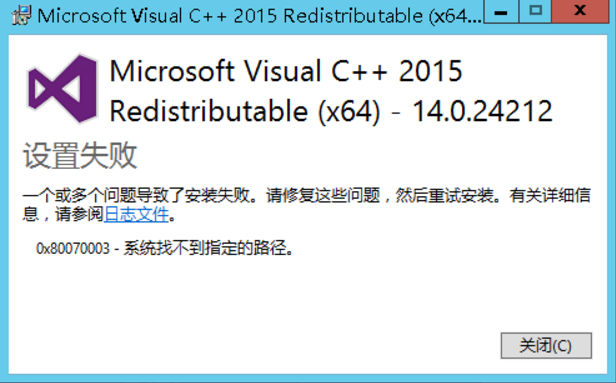
2、安装VC++2015运行库失败
解决方法:控制面板-》Windows更新,更新到最新补丁

mysql8.0绿色版安装及mysqldump备份的更多相关文章
- mysql-8.0解压缩版安装配置完整过程
https://www.cnblogs.com/xiongzaiqiren/p/8970203.html
- mysql-8.0.11-winx64 免安装版配置方法
mysql-8.0.11-winx64.zip 下载地址:https://dev.mysql.com/downloads/file/?id=476233 mysql-8.0.11-winx64.zi ...
- mysql8.0.15二进制安装
mysql8.0.15二进制安装 今天有幸尝试安装了社区版本的mysql8.0.15,记录下来,供以后方便使用.特此感谢知数堂的叶老师,提供了配置文件的模板. # 第一部分:系统配置 # 1.安装系统 ...
- mysql8.0.16二进制安装
mysql8.0.16二进制安装 环境简介操作系统:Centos 6.10 64位 目前版本:8.0.16 MySQL Community Server 二进制 安装目录:/data/mysql/my ...
- 硬盘图标修改器 V1.0 绿色版
软件名称:硬盘图标修改器 V1.0 绿色版软件语言: 简体中文授权方式: 免费软件应用平台: Win7 / Vista / Win2003 / WinXP / Win2008 软件大小: 12.3MB ...
- mysql-5.7.10-winx64 绿色版安装办法
mysql-5.7.10-winx64 绿色版安装办法 为了防止安装程序造成电脑系统冗余,经过测试,终于将绿色版的mysql for windows安装成功.当然很多是从事百度搜索到的,但作为一种积累 ...
- MySQL5.6绿色版安装
1.下载 MySQL绿色版安装需下载好三个文件 (1).MySQL5.6版本离线安装包 (2).Microsoft Visual C++ (3).Microsoft .NET Framework 1. ...
- 微信小程序(原名微信应用号)开发工具0.9版安装教程
微信小程序全称微信公众平台·小程序,原名微信公众平台·应用号(简称微信应用号) 声明 微信小程序开发工具类似于一个轻量级的IDE集成开发环境,目前仅开放给了少部分受微信官方邀请的人士(据说仅200个名 ...
- 2016032201 - mysql5.7.10绿色版安装
参考地址:http://jingyan.baidu.com/article/ff42efa93580c4c19e2202b6.html 其实您完全可以参考上面的百度贴吧内容搞定的,我记录只是做个笔记, ...
随机推荐
- iOS 好文源码收藏
bireme 大佬的 iOS 保持界面流畅的技巧 https://blog.ibireme.com/2015/11/12/smooth_user_interfaces_for_ios/ 深入理解Run ...
- NodePort,LoadBalancer还是Ingress?我该如何选择 - kubernetes
原文:http://mp.weixin.qq.com/s/dHaiX3H421jBhnzgCCsktg 当我们使用k8s集群部署好应用的Service时,默认的Service类型是ClusterIP, ...
- Spring的PropertyPlaceholderConfigurer强制使用默认值的坑
1.问题 dubbo client配置: <dubbo:reference id="channelCustomerClient" interface="com.gt ...
- css垂直居中方法总结
在网页布局中,我们往往会遇到下图所示的场景,让小图标和文字对齐 可能有的小伙伴会说,这个简单,直接给小图标设置左浮动来实现. 这样做是可以的,但不推荐,毕竟浮动是会影响布局的,能少用还是少用. 以前遇 ...
- 深入浅出一下Java的HashMap
在平常的开发当中,HashMap是我最常用的Map类(没有之一),它支持null键和null值,是绝大部分利用键值对存取场景的首选.需要切记的一点是——HashMap不是线程安全的数据结构,所以不要在 ...
- 轻量级数据库Sqlite的使用
SqLite是什么? SQLite是一个进程内的库,实现了自给自足的.无服务器的.零配置的.事务性的 SQL 数据库引擎.它是一个零配置的数据库,这意味着与其他数据库一样,您不需要在系统中配置. 就像 ...
- 【Android Studio安装部署系列】四、Android SDK目录和作用分析
版权声明:本文为HaiyuKing原创文章,转载请注明出处! 概述 Android SDk Tool软件开发工具包(software development kit).被软件开发工程师用于为特定的软件 ...
- ASP.NET Core - 开篇
由来 ASP.NET Core 是一个跨平台的高性能开源框架,ASP.NET Core第一次出现在我们眼前是以 ASP.NET vNext 命名的,然后又重新命名为ASP.NET 5,为了表明它并不是 ...
- Chrome浏览器下自动填充的输入框背景
记录下从张鑫旭老师的微博中看到关于input输入框的属性 1.autocomplete="off" autocomplete 属性规定输入字段是否应该启用自动完成功能 自动完成允许 ...
- js 实现 复制 功能 (zeroclipboard)
#复制功能因访问权限和安全问题, 被浏览器禁了# 我要实现的功能:点击复制按钮,复制浏览器的当前页面地址,加上用户选择的参数(用户查找过滤),直接将该链接发给别人,点击打开就是对应的查找结果而不是默认 ...