
windows下 gvim8.0 编译器配置
最近由于各种原因,IDE从source insight换成了vim,参考了诸多博客的文章,折腾了好久折腾了个大概的样子,现在总结一下经验:
主要参考:
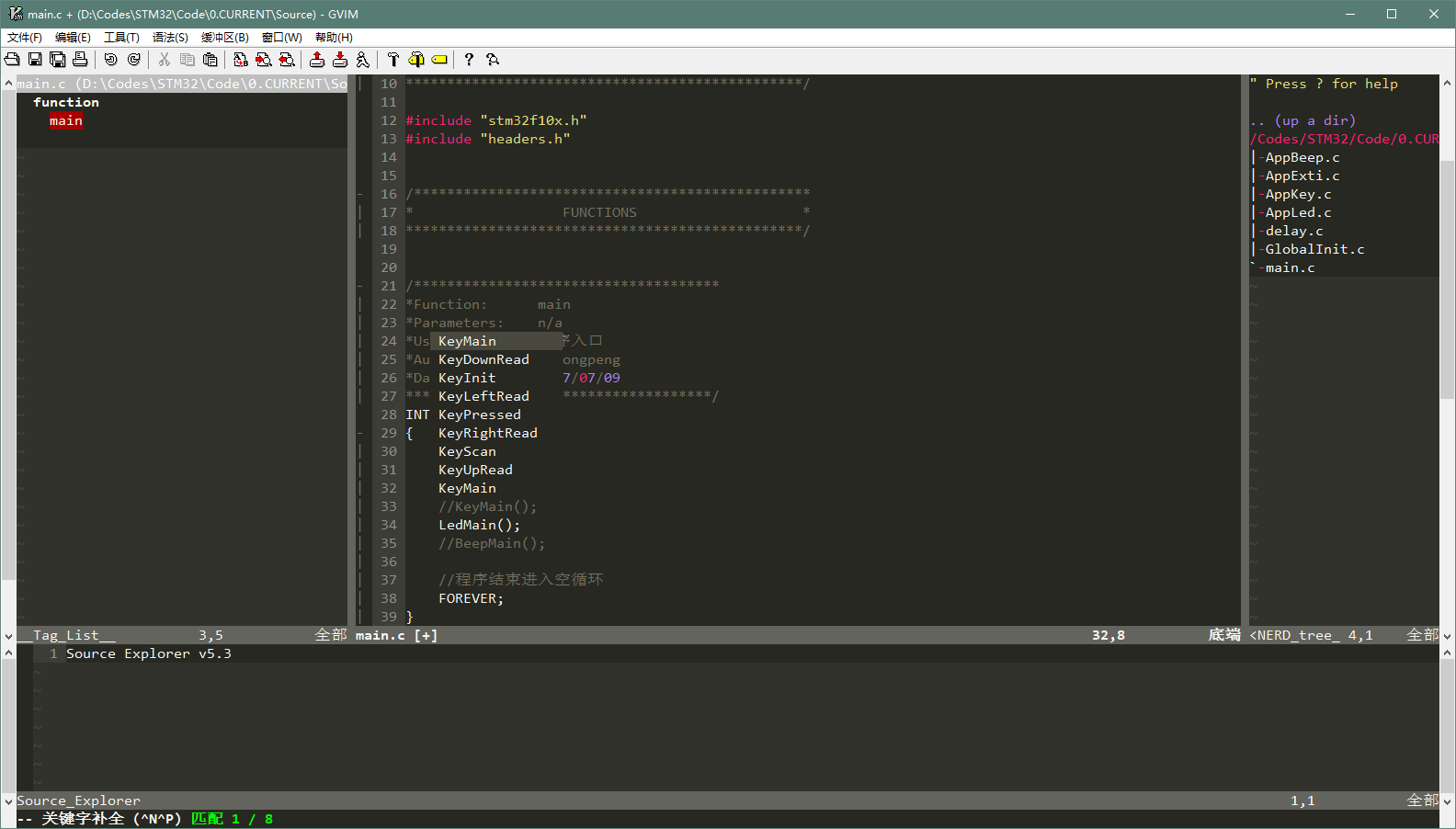
效果图(新:Taglist+NERD_Tree+SrcExpl),图为自动补全状态:
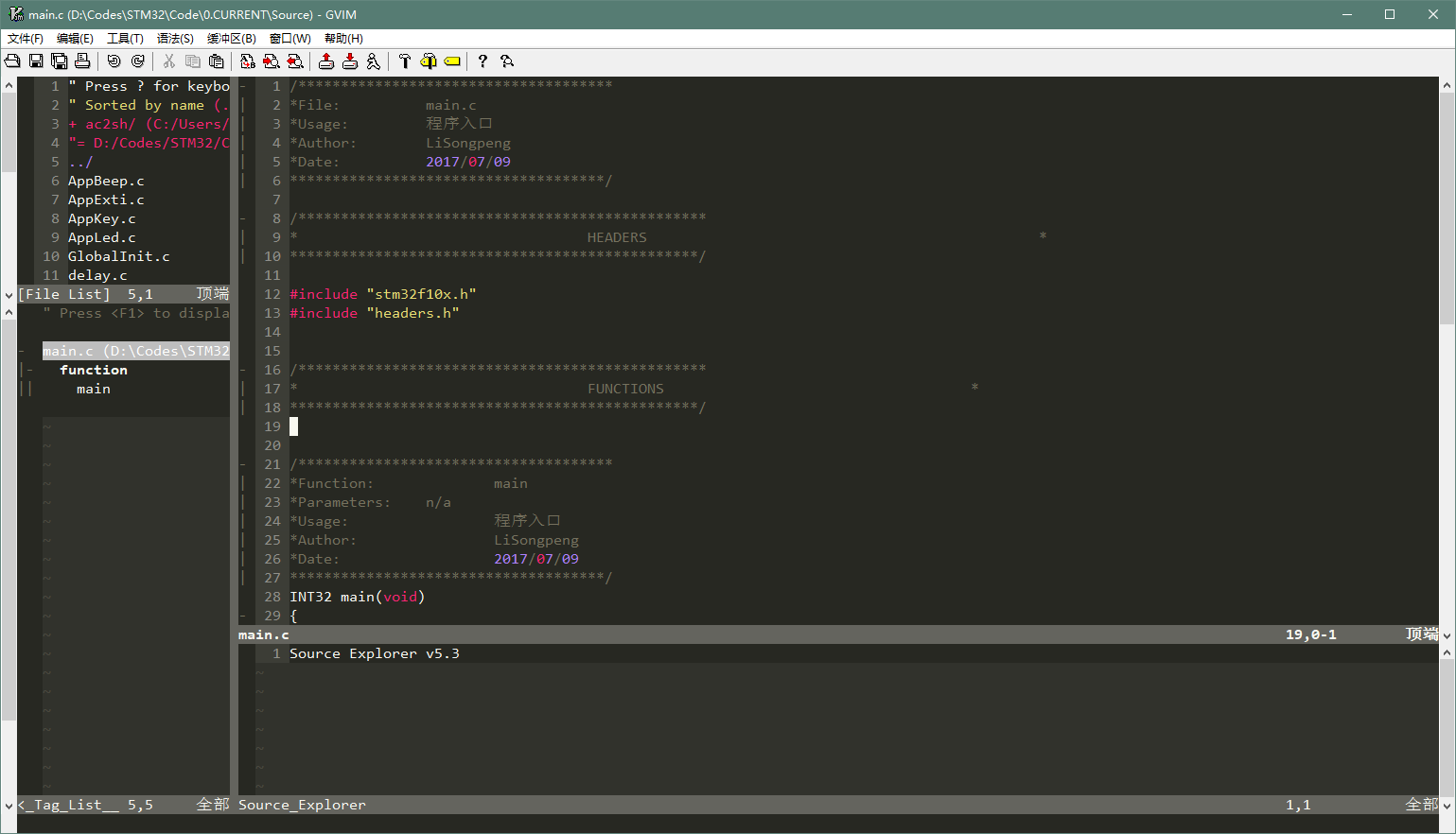
效果图(旧:WinManager+SrcExpl):
1. 安装:
下载gvim8.0安装就可以了
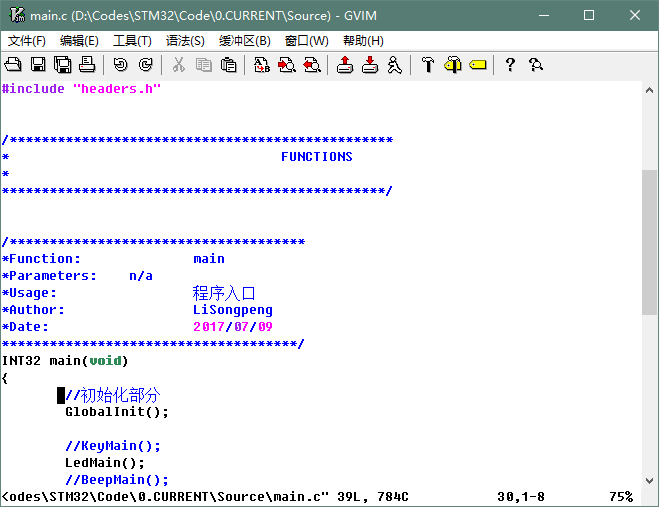
刚装完是这个样子的:
2. 插件安装:
选用的插件如下表 (尝试后发现WinManager和SrcExpl冲突,改用Trinity)
|
插件名 |
作用 |
下载地址 |
安装方法(vimrc在后面统一配置) |
|
taglist |
基于ctags的taglist |
解压到.\vim80目录下面 |
|
|
WinManager |
将FileExplore和Taglist整合 |
解压到.\vim80目录下面 |
|
|
Ctags |
ctags,用于生成tag文件(符号链接) |
将ctags.exe放到.\vim80路径下,并将vim80添加到环境变量/ctags.exe放到system32路径下 |
|
|
Snipmate |
提供常用代码快速输入(Tab补齐) |
解压到.\vimfiles目录下面 |
|
|
Supertab |
用Tab键自动补齐 |
Open the file in vim ($ vim supertab.vmb) |
|
|
SrcExpl |
实现source |
解压到.\vimfiles目录下面 |
|
|
Cscope |
ctags的强化版,不仅可以生成源tag还能生成调用tag |
将压缩包解压并将目录加入环境变量path中 |
|
|
Trinity |
NERD_Tree+taglist+SrcExpl的组合版 |
解压到.\vimfiles目录下面 |
3. 主题安装:
vim主题选用monokai,字体选用consolas
主题地址:https://github.com/sickill/vim-monokai
更改文件名为monokai.vim后放到vim80\colors\里
个人喜好的一些修改:(修改到monokai.vim对应的行)
hi Search term=reverse cterm=NONE ctermfg=231 ctermbg=24 gui=NONE guifg=#f8f8f2 guibg=#AA0000

hi Folded ctermfg=242 ctermbg=235 cterm=NONE guifg=#75715e guibg=#272822 gui=NONE

hi FoldColumn ctermfg=242 ctermbg=235 cterm=NONE guifg=#75715e guibg=#272822 gui=NONE
4.vimrc更改:
在_vimrc文件后增加如下:
"设置Taglist

let Tlist_Show_One_File=1

let Tlist_Exit_OnlyWindow=1

"使用F8打开Taglist

"nmap <silent> <F8> :TlistToggle<CR>

"通过WinManager插件来将TagList窗口和netrw窗口整合起来

let g:winManagerWindowLayout='FileExplorer|TagList'

"nmap <F8> :WMToggle<cr>

"使用F9打开SrcExpl

"nmap <F9> :SrcExplToggle<CR>

"Trinity 设置

" Open and close all the three plugins on the same time

nmap <F8>   :TrinityToggleAll<CR>

" Open and close the srcexpl.vim separately

nmap <F9>   :TrinityToggleSourceExplorer<CR>

let g:SrcExpl_jumpKey = "<ENTER>"

let g:SrcExpl_gobackKey = "<SPACE>"

let g:SrcExpl_prevDefKey = "<F3>"

let g:SrcExpl_nextDefKey = "<F4>"

"设置SuperTab,用tab键打开cppcomplet的自动补全功能。

let g:SuperTabRetainCompletionType=2

let g:SuperTabDefaultCompletionType="<C-X><C-O>"

"显示行号

set number

"设置主题颜字体

colorscheme monokai

set guifont=Consolas:h12

"为了使用智能补全,打开文件类型检测,关闭VI兼容模式

filetype plugin indent on

set nocp

"字符匹配单词

set incsearch

"代码折叠

set fdm=syntax

set foldlevel=1

set foldcolumn=2

"不换行

set nowrap

"缩进设置

set smartindent

set tabstop=4

set shiftwidth=4

set expandtab

set softtabstop=4
F8开启全部插件,F9开关SrcExpl(Trinity版)
Winmanager的设置被注视掉了(发现和SrcExpl冲突)
cscope设置:(我没用到)
详见:http://cscope.sourceforge.net/cscope_maps.vim
"cscope

nmap <C-\>s :cs find s <C-R>=expand("<cword>")<CR><CR>

nmap <C-\>g :cs find g <C-R>=expand("<cword>")<CR><CR>

nmap <C-\>c :cs find c <C-R>=expand("<cword>")<CR><CR>

nmap <C-\>t :cs find t <C-R>=expand("<cword>")<CR><CR>

nmap <C-\>e :cs find e <C-R>=expand("<cword>")<CR><CR>

nmap <C-\>f :cs find f <C-R>=expand("<cfile>")<CR><CR>

nmap <C-\>i :cs find i ^<C-R>=expand("<cfile>")<CR>$<CR>

nmap <C-\>d :cs find d <C-R>=expand("<cword>")<CR><CR>
5. 一些其他设置:
tags生成(虽然Source Explore支持每次打开调用时更新,但如果首次打开没有tags会在当前目录生成,如果打开的是工程内部文件就会导致tags不全,所以首次运行最好生成一下)
ctags -R ./Drvlib ./Source ./Include
cscope数据库生成(路径更改为自己的)
find -P ./Drvlib ./Source ./Include > cscope.files

cscope -bq
cscope数据库包含(路径更改为自己的)
cscope add ..\cscope.out
windows下 gvim8.0 编译器配置的更多相关文章
- Nginx + Tomcat Windows下的负载均衡配置
Nginx + Tomcat Windows下的负载均衡配置 一.为什么需要对Tomcat服务器做负载均衡? Tomcat服务器作为一个Web服务器,其并发数在300-500之间,如果超过50 ...
- Windows下pry安装和配置
Windows下pry安装和配置 pry是一个增强型的交互式命令行工具,比irb强大. 有自动完成功能,自动缩进,有颜色.有更强大的调试功能. pry 安装很简单. 在终端输入: gem instal ...
- 【Objective-C】Windows下Objective-C开发环境配置
[Objective-C]Windows下Objective-C开发环境配置 ftp://ftpmain.gnustep.org/pub/gnustep/binaries/windows/ 最近打 ...
- Windows下Apache+mod_python+Django配置
Windows下Apache+mod_python+Django配置 Apache 首先要安装Apache,我安装的版本是2.2.*: Python python肯定是要安装的,我安装的版本是2.5的 ...
- Mysql在windows下的免安装配置步骤和重新安装的步骤
windows下mysql免安装配置 1. 下载mysql免安装压缩包 下载mysql-5.6.22-winx64.zip 解压到本地D:\mysql-5.6.22-winx64 2. 修改配置文件 ...
- windows下spark开发环境配置
http://www.cnblogs.com/davidwang456/p/5032766.html windows下spark开发环境配置 --本篇随笔由同事葛同学提供. windows下spark ...
- ACE在windows下的编译及配置(VS2010)
ACE在windows下的编译及配置(VS2010) 分类: -[小西南]- 2013-08-06 16:17 2354人阅读 评论( ...
- windows下apache+https环境配置
windows下apache+https环境配置 转 https://www.cnblogs.com/sandaizi/p/7519370.html 1.修改配置文件conf/httpd.conf,去 ...
- windows下redis安装和配置
windows下redis安装和配置 redis介绍 Redis是一个开源,高级的键值存储和一个适用的解决方案,用于构建高性能,可扩展的Web应用程序. Redis有三个主要特点,使它优越于其它键值数 ...
随机推荐
- python/零起点(一、字符串)
python/零起点(一.字符串) 字符串(str) 字符串是可迭代的 str()强制转成字符串类型 字符串是有序的,且不可变的数据类型. 字符串转换整型的案例: 1 name=['guobaoyua ...
- 二、配置QtDesigner、PyUIC及PyRcc
配置QtDesigner.PyUIC及PyRcc 安装完PyQt 5 及PyQt5-tools 后,则需要在Pycharm中配置QtDesigner.PyUIC及PyRcc. 配置QtDesigner ...
- hdu1072 Nightmare---BFS
题目链接: http://acm.hdu.edu.cn/showproblem.php?pid=1072 题目大意: 在n×m的地图上,0表示墙,1表示空地,2表示人,3表示目的地,4表示有定时炸弹重 ...
- 用PHP如何实现这种乘法口诀表?
用PHP如何实现这种乘法口诀表? 1x1=1 ,1x2=2 ,1x3=3 ,.....,1x9=9 2x2=4 ,2x3=6 ,......,2x9=18 ........ ...... 8x8=64 ...
- 常见web安全隐患及解决方案
Abstract 有关于WEB服务以及web应用的一些安全隐患总结资料. 1. 常见web安全隐患 1.1. 完全信赖用户提交内容 开发人员决不能相信一个来自外部的数据.不管它来自用户提交 ...
- 从零开始系列之vue全家桶(1)安装前期准备nodejs+cnpm+webpack+vue-cli+vue-router
写在前面: 什么是全家桶? 包含了vue-router(http://router.vuejs.org),vuex(http://vuex.vuejs.org), vue-resource(https ...
- YARN中FIFO、Capacity以及Fari调度器的详细介绍
(1)FIFO Scheduler 将所有的Applications放到队列中,先按照作业的优先级高低.再按照到达时间的先后,为每个app分配资源.如果第一个app需要的资源被满足了,如果还剩下了资源 ...
- [LeetCode] Split Array into Consecutive Subsequences 将数组分割成连续子序列
You are given an integer array sorted in ascending order (may contain duplicates), you need to split ...
- 【linux之sed及vim】
一.sed sed 文本处理工具 流编辑器 行编辑器保留空间模式空间sed不会影响原文件的内容,它处理的是它载入模式空间的内容 sed [options].."AddressCommand& ...
- 机器学习基石:14 Regularization
一.正则化的假设集合 通过从高次多项式的H退回到低次多项式的H来降低模型复杂度, 以降低过拟合的可能性, 如何退回? 通过加约束条件: 如果加了严格的约束条件, 没有必要从H10退回到H2, 直接使用 ...