
windows下 gvim8.0 编译器配置
最近由于各种原因,IDE从source insight换成了vim,参考了诸多博客的文章,折腾了好久折腾了个大概的样子,现在总结一下经验:
主要参考:
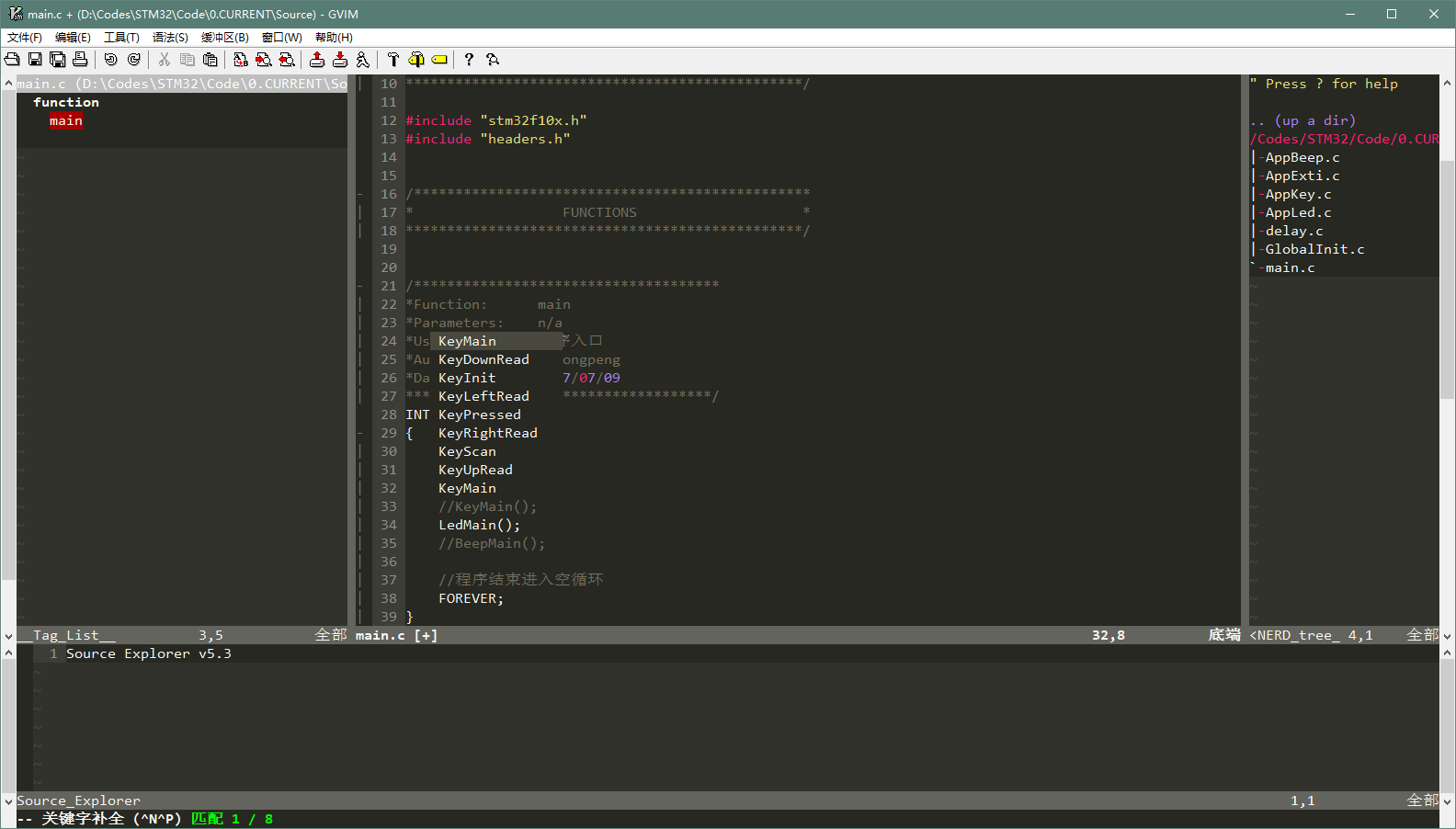
效果图(新:Taglist+NERD_Tree+SrcExpl),图为自动补全状态:
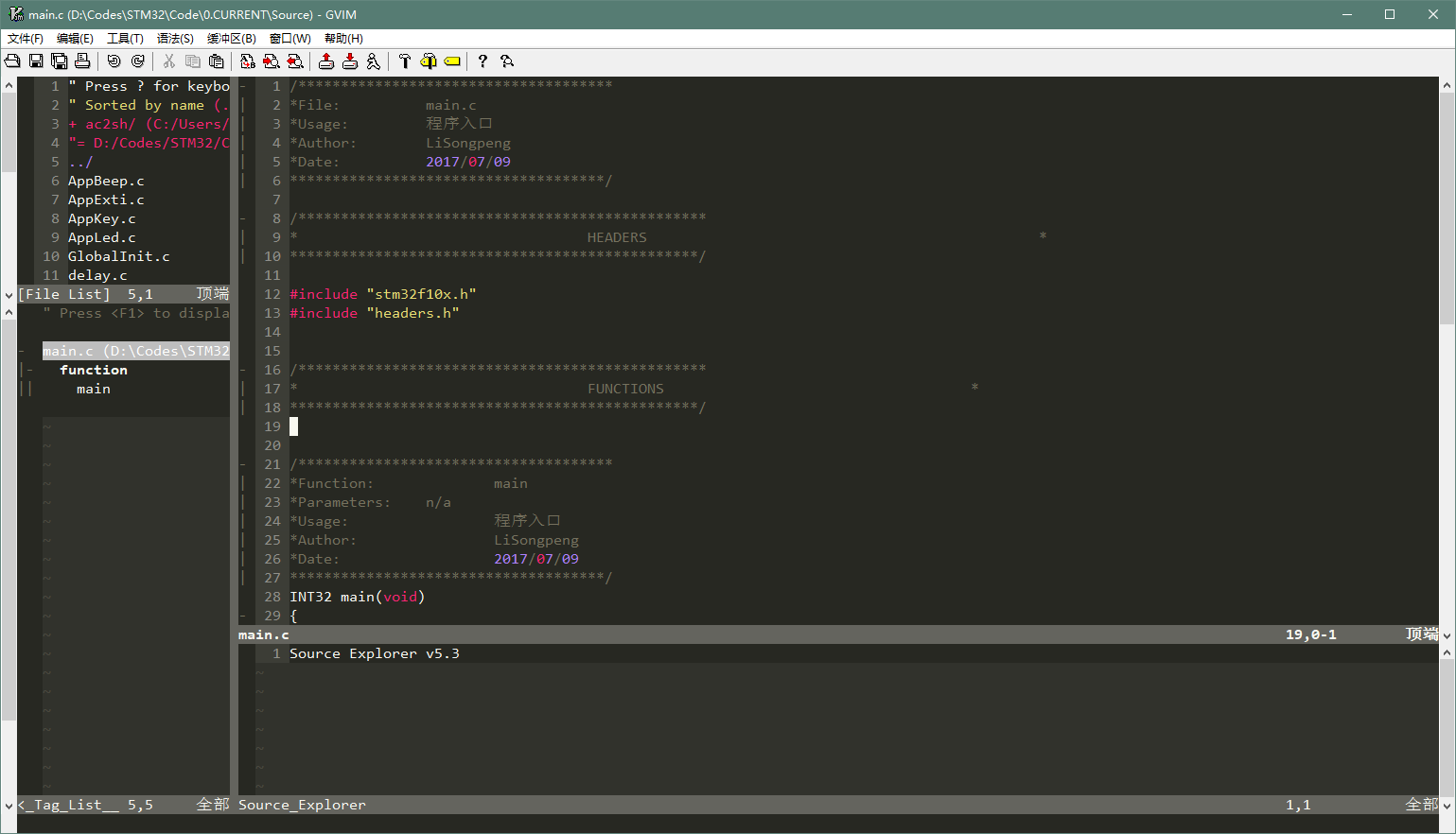
效果图(旧:WinManager+SrcExpl):
1. 安装:
下载gvim8.0安装就可以了
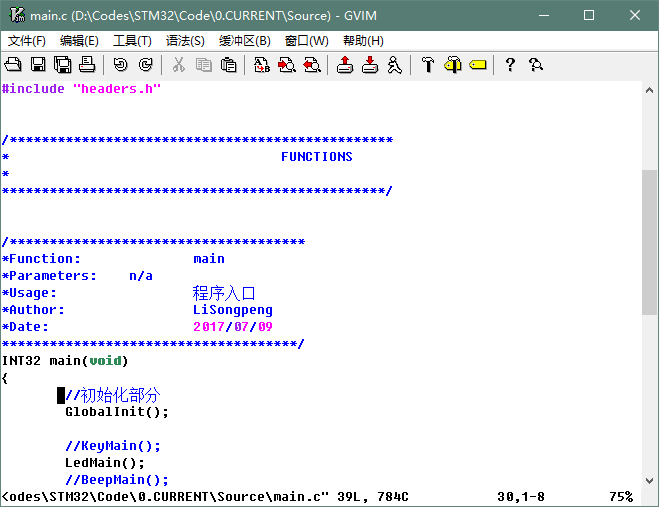
刚装完是这个样子的:
2. 插件安装:
选用的插件如下表 (尝试后发现WinManager和SrcExpl冲突,改用Trinity)
|
插件名 |
作用 |
下载地址 |
安装方法(vimrc在后面统一配置) |
|
taglist |
基于ctags的taglist |
解压到.\vim80目录下面 |
|
|
WinManager |
将FileExplore和Taglist整合 |
解压到.\vim80目录下面 |
|
|
Ctags |
ctags,用于生成tag文件(符号链接) |
将ctags.exe放到.\vim80路径下,并将vim80添加到环境变量/ctags.exe放到system32路径下 |
|
|
Snipmate |
提供常用代码快速输入(Tab补齐) |
解压到.\vimfiles目录下面 |
|
|
Supertab |
用Tab键自动补齐 |
Open the file in vim ($ vim supertab.vmb) |
|
|
SrcExpl |
实现source |
解压到.\vimfiles目录下面 |
|
|
Cscope |
ctags的强化版,不仅可以生成源tag还能生成调用tag |
将压缩包解压并将目录加入环境变量path中 |
|
|
Trinity |
NERD_Tree+taglist+SrcExpl的组合版 |
解压到.\vimfiles目录下面 |
3. 主题安装:
vim主题选用monokai,字体选用consolas
主题地址:https://github.com/sickill/vim-monokai
更改文件名为monokai.vim后放到vim80\colors\里
个人喜好的一些修改:(修改到monokai.vim对应的行)
hi Search term=reverse cterm=NONE ctermfg=231 ctermbg=24 gui=NONE guifg=#f8f8f2 guibg=#AA0000

hi Folded ctermfg=242 ctermbg=235 cterm=NONE guifg=#75715e guibg=#272822 gui=NONE

hi FoldColumn ctermfg=242 ctermbg=235 cterm=NONE guifg=#75715e guibg=#272822 gui=NONE
4.vimrc更改:
在_vimrc文件后增加如下:
"设置Taglist

let Tlist_Show_One_File=1

let Tlist_Exit_OnlyWindow=1

"使用F8打开Taglist

"nmap <silent> <F8> :TlistToggle<CR>

"通过WinManager插件来将TagList窗口和netrw窗口整合起来

let g:winManagerWindowLayout='FileExplorer|TagList'

"nmap <F8> :WMToggle<cr>

"使用F9打开SrcExpl

"nmap <F9> :SrcExplToggle<CR>

"Trinity 设置

" Open and close all the three plugins on the same time

nmap <F8>   :TrinityToggleAll<CR>

" Open and close the srcexpl.vim separately

nmap <F9>   :TrinityToggleSourceExplorer<CR>

let g:SrcExpl_jumpKey = "<ENTER>"

let g:SrcExpl_gobackKey = "<SPACE>"

let g:SrcExpl_prevDefKey = "<F3>"

let g:SrcExpl_nextDefKey = "<F4>"

"设置SuperTab,用tab键打开cppcomplet的自动补全功能。

let g:SuperTabRetainCompletionType=2

let g:SuperTabDefaultCompletionType="<C-X><C-O>"

"显示行号

set number

"设置主题颜字体

colorscheme monokai

set guifont=Consolas:h12

"为了使用智能补全,打开文件类型检测,关闭VI兼容模式

filetype plugin indent on

set nocp

"字符匹配单词

set incsearch

"代码折叠

set fdm=syntax

set foldlevel=1

set foldcolumn=2

"不换行

set nowrap

"缩进设置

set smartindent

set tabstop=4

set shiftwidth=4

set expandtab

set softtabstop=4
F8开启全部插件,F9开关SrcExpl(Trinity版)
Winmanager的设置被注视掉了(发现和SrcExpl冲突)
cscope设置:(我没用到)
详见:http://cscope.sourceforge.net/cscope_maps.vim
"cscope

nmap <C-\>s :cs find s <C-R>=expand("<cword>")<CR><CR>

nmap <C-\>g :cs find g <C-R>=expand("<cword>")<CR><CR>

nmap <C-\>c :cs find c <C-R>=expand("<cword>")<CR><CR>

nmap <C-\>t :cs find t <C-R>=expand("<cword>")<CR><CR>

nmap <C-\>e :cs find e <C-R>=expand("<cword>")<CR><CR>

nmap <C-\>f :cs find f <C-R>=expand("<cfile>")<CR><CR>

nmap <C-\>i :cs find i ^<C-R>=expand("<cfile>")<CR>$<CR>

nmap <C-\>d :cs find d <C-R>=expand("<cword>")<CR><CR>
5. 一些其他设置:
tags生成(虽然Source Explore支持每次打开调用时更新,但如果首次打开没有tags会在当前目录生成,如果打开的是工程内部文件就会导致tags不全,所以首次运行最好生成一下)
ctags -R ./Drvlib ./Source ./Include
cscope数据库生成(路径更改为自己的)
find -P ./Drvlib ./Source ./Include > cscope.files

cscope -bq
cscope数据库包含(路径更改为自己的)
cscope add ..\cscope.out
windows下 gvim8.0 编译器配置的更多相关文章
- Nginx + Tomcat Windows下的负载均衡配置
Nginx + Tomcat Windows下的负载均衡配置 一.为什么需要对Tomcat服务器做负载均衡? Tomcat服务器作为一个Web服务器,其并发数在300-500之间,如果超过50 ...
- Windows下pry安装和配置
Windows下pry安装和配置 pry是一个增强型的交互式命令行工具,比irb强大. 有自动完成功能,自动缩进,有颜色.有更强大的调试功能. pry 安装很简单. 在终端输入: gem instal ...
- 【Objective-C】Windows下Objective-C开发环境配置
[Objective-C]Windows下Objective-C开发环境配置 ftp://ftpmain.gnustep.org/pub/gnustep/binaries/windows/ 最近打 ...
- Windows下Apache+mod_python+Django配置
Windows下Apache+mod_python+Django配置 Apache 首先要安装Apache,我安装的版本是2.2.*: Python python肯定是要安装的,我安装的版本是2.5的 ...
- Mysql在windows下的免安装配置步骤和重新安装的步骤
windows下mysql免安装配置 1. 下载mysql免安装压缩包 下载mysql-5.6.22-winx64.zip 解压到本地D:\mysql-5.6.22-winx64 2. 修改配置文件 ...
- windows下spark开发环境配置
http://www.cnblogs.com/davidwang456/p/5032766.html windows下spark开发环境配置 --本篇随笔由同事葛同学提供. windows下spark ...
- ACE在windows下的编译及配置(VS2010)
ACE在windows下的编译及配置(VS2010) 分类: -[小西南]- 2013-08-06 16:17 2354人阅读 评论( ...
- windows下apache+https环境配置
windows下apache+https环境配置 转 https://www.cnblogs.com/sandaizi/p/7519370.html 1.修改配置文件conf/httpd.conf,去 ...
- windows下redis安装和配置
windows下redis安装和配置 redis介绍 Redis是一个开源,高级的键值存储和一个适用的解决方案,用于构建高性能,可扩展的Web应用程序. Redis有三个主要特点,使它优越于其它键值数 ...
随机推荐
- AOP及专有名词通俗解答
AOP面向切面编程,是一种编程思想,并不是Spring专有,Spring是封装代理模式完成,之前的博客中也写到了关于AOP的文章,Filter和代理,请见<以此之长,补彼之短----AOP(Fi ...
- 【原创】自己动手实现JDK动态代理
项目结构如下图所示,maven项目 1.JDK动态代理 先来一段jdk动态代理的demo, 首先创建一个接口,Person package bean; public interface Person ...
- Mysql 库表
create database student_info default character set utf8 collate utf8_general_ci; ------------------- ...
- 简单的Nginx自动化安装啊脚本
#!/bin/bash #description:Nginx installation script automatically #user:baomanji #date:2017-03-25 #ve ...
- Nginx配置特定二级域名
首先把先在域名设置页面把二级域名解析到服务器的公网IP上,这里假设是 bbs.domainname.com 然后编辑 /etc/nginx/sites-available/domain.com.con ...
- javascript获取表单的各项值
何谓表单? 表单是html页面中负责数据采集功能的部件,它往往由三个部分组成: 表单标签:<form></form> 用于声明表单的范围,位于表单标签中的元素将被提交.属性有m ...
- Windows Socket的UDP和TCP编程介绍
1:网络中进程之间如何通信 为了实现进程之间通信,首要解决的问题是如何唯一标识一个进程,在本地可以通过进程PID来唯一标识一个进程,但是在网络中则是行不通的,其实TCP/IP协议族已经帮我们解决了这个 ...
- mysql新建表设置为utf8
CREATE DATABASE IF NOT EXISTS yourdbname DEFAULT CHARSET utf8 COLLATE utf8_general_ci;
- ios开发-日期处理(类似朋友圈,微博等的发送时间)
ios开发中,我们经常要处理从服务器获取的时间.类似朋友圈,微博这些应用.我们经常可以看到“刚刚”,“31分钟前发表”,“昨天5点”,之类的字样. 当时我们从服务器端获取的都是那条朋友圈信息,或者微博 ...
- python内置方法
1. 简介 本指南归纳于我的几个月的博客,主题是 魔法方法 . 什么是魔法方法呢?它们在面向对象的Python的处处皆是.它们是一些可以让你对类添加"魔法"的特殊方法. 它们经常是 ...