
【Chrome插件】去掉因使用jsonView插件的弹出窗口"请停用以开发者模式运行的扩展程序"
前言
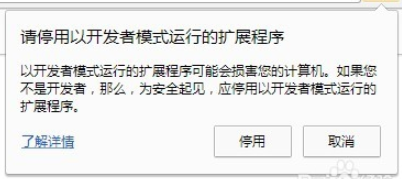
小编最近使用jsonView插件时,每次打开谷歌浏览器都会弹出下面的窗口,上网搜索,找到一个非常有效的方法。
解决方法
一、新建一个文本文档
二、复制代码
 <# :

 @echo off

 copy/b "%~f0" "%temp%\%~n0.ps1" >nul

 powershell -Version 2 -ExecutionPolicy bypass -noprofile "%temp%\%~n0.ps1" "%cd% " "%~1"

 del "%temp%\%~n0.ps1"

 pause

 exit /b

 #>

 param([string]$cwd='.', [string]$dll)

 function main {

     "Chrome 'developer mode extensions' warning disabler v1.0.10.20170114`n"

     $pathsDone = @{}

     if ($dll -and (gi -literal $dll)) {

         doPatch "DRAG'n'DROPPED" ((gi -literal $dll).directoryName + '\')

         exit

     }

     doPatch CURRENT ((gi -literal $cwd).fullName + '\')

     ('HKLM', 'HKCU') | %{ $hive = $_

         ('', '\Wow6432Node') | %{

             $key = "${hive}:\SOFTWARE$_\Google\Update\Clients"

             gci -ea silentlycontinue $key -r | gp | ?{ $_.CommandLine } | %{

                 $path = $_.CommandLine -replace '"(.+?\\\d+\.\d+\.\d+\.\d+\\).+', '$1'

                 doPatch REGISTRY $path

             }

         }

     }

 }

 function doPatch([string]$pathLabel, [string]$path) {

     if ($pathsDone[$path.toLower()]) { return }

     $dll = $path + "chrome.dll"

     if (!(test-path -literal $dll)) {

         return

     }

     "======================="

     "$pathLabel PATH $((gi -literal $dll).DirectoryName)"

     "`tREADING Chrome.dll..."

     $bytes = [IO.File]::ReadAllBytes($dll)

     # process PE headers

     $BC = [BitConverter]

     $coff = $BC::ToUInt32($bytes,0x3C) + 4

     $is64 = $BC::ToUInt16($bytes,$coff) -eq 0x8664

     $opthdr = $coff+20

     $codesize = $BC::ToUInt32($bytes,$opthdr+4)

     $imagebase32 = $BC::ToUInt32($bytes,$opthdr+28)

     # patch the flag in data section

     $data = $BC::ToString($bytes,$codesize)

     $flag = "ExtensionDeveloperModeWarning"

     $stroffs = $data.IndexOf($BC::ToString($flag[1..99]))/3 - 1

     if ($stroffs -lt 0) {

         write-host -f red "`t$flag not found"

         return

     }

     $stroffs += $codesize

     if ($bytes[$stroffs] -eq 0) {

         write-host -f darkgreen "`tALREADY PATCHED"

         return

     }

     $exe = join-path (split-path $path) chrome.exe

     $EA = $ErrorActionPreference

     $ErrorActionPreference = 'silentlyContinue'

     while ((get-process chrome -module | ?{ $_.FileName -eq $exe })) {

         forEach ($timeout in 15..0) {

             write-host -n -b yellow -f black `

                 "`rChrome is running and will be terminated in $timeout sec. "

             write-host -n -b yellow -f darkyellow "Press ENTER to do it now. "

             if ([console]::KeyAvailable) {

                 $key = $Host.UI.RawUI.ReadKey("AllowCtrlC,IncludeKeyDown,NoEcho")

                 if ($key.virtualKeyCode -eq 13) { break }

                 if ($key.virtualKeyCode -eq 27) { write-host; exit }

             }

             sleep 1

         }

         write-host

         get-process chrome | ?{

             $_.MainWindowHandle.toInt64() -and ($_ | gps -file).FileName -eq $exe

         } | %{

             "`tTrying to exit gracefully..."

             if ($_.CloseMainWindow()) {

                 sleep 1

             }

         }

         $killLabelShown = 0

         get-process chrome | ?{

             ($_ | gps -file | select -expand FileName) -eq $exe

         } | %{

             if (!$killLabelShown++) {

                 "`tTerminating background chrome processes..."

             }

             stop-process $_ -force

         }

         sleep -milliseconds 200

     }

     $ErrorActionPreference = $EA

     $bytes[$stroffs] = 0

     "`tPATCHED $flag flag"

     # patch the channel restriction code for stable/beta

     $code = $BC::ToString($bytes,0,$codesize)

     $rxChannel = '83-F8-(?:03-7D|02-7F)'

     # old code: cmp eax,3; jge ...

     # new code: cmp eax,2; jg ...

     $chanpos = 0

     try {

         if ($is64) {

             $pos = 0

             $rx = [regex]"$rxChannel-.{1,100}-48-8D"

             do {

                 $m = $rx.match($code,$pos)

                 if (!$m.success) { break }

                 $chanpos = $m.index/3 + 2

                 $pos = $m.index + $m.length + 1

                 $offs = $BC::ToUInt32($bytes,$pos/3+1)

                 $diff = $pos/3+5+$offs - $stroffs

             } until ($diff -ge 0 -and $diff -le 4096 -and $diff % 256 -eq 0)

             if (!$m.success) {

                 $rx = [regex]"84-C0.{18,48}($rxChannel)-.{30,60}84-C0"

                 $m = $rx.matches($code)

                 if ($m.count -ne 1) { throw }

                 $chanpos = $m[0].groups[1].index/3 + 2

             }

         } else {

             $flagOffs = [uint32]$stroffs + [uint32]$imagebase32

             $flagOffsStr = $BC::ToString($BC::GetBytes($flagOffs))

             $variants = "(?<channel>$rxChannel-.{1,100})-68-(?<flag>`$1-.{6}`$2)",

                     "68-(?<flag>`$1-.{6}`$2).{300,500}E8.{12,32}(?<channel>$rxChannel)",

                     "E8.{12,32}(?<channel>$rxChannel).{300,500}68-(?<flag>`$1-.{6}`$2)"

             forEach ($variant in $variants) {

                 $pattern = $flagOffsStr -replace '^(..)-.{6}(..)', $variant

                 "`tLooking for $($pattern -replace '\?<.+?>', '')..."

                 $minDiff = 65536

                 foreach ($m in [regex]::matches($code, $pattern)) {

                     $maybeFlagOffs = $BC::toUInt32($bytes, $m.groups['flag'].index/3)

                     $diff = [Math]::abs($maybeFlagOffs - $flagOffs)

                     if ($diff % 256 -eq 0 -and $diff -lt $minDiff) {

                         $minDiff = $diff

                         $chanpos = $m.groups['channel'].index/3 + 2

                     }

                 }

             }

             if (!$chanpos) { throw }

         }

     } catch {

         write-host -f red "`tUnable to find the channel code, try updating me"

         write-host -f red "`thttp://stackoverflow.com/a/30361260"

         return

     }

     $bytes[$chanpos] = 9

     "`tPATCHED Chrome release channel restriction"

     "`tWriting to a temporary dll..."

     [IO.File]::WriteAllBytes("$dll.new",$bytes)

     "`tBacking up the original dll..."

     move -literal $dll "$dll.bak" -force

     "`tRenaming the temporary dll as the original dll..."

     move -literal "$dll.new" $dll -force

     $pathsDone[$path.toLower()] = $true

     write-host -f green "`tDONE.`n"

     [GC]::Collect()

 }

 main
三、命名脚本文件chrome.bat
四、出现问题

1.将Chrome.bat文件放到路径下:C:\Windows\System32\WindowsPowerShell\v1.0
2.双击运行即可。
【Chrome插件】去掉因使用jsonView插件的弹出窗口"请停用以开发者模式运行的扩展程序"的更多相关文章
- 【已解决】Chrome提示:"请停用以开发者模式运行的扩展程序"的解决办法
chrome用户在安装了一些第三方的chrome插件后,每次打开浏览器的时候都会出现“请停用以开发者模式运行的扩展程序”的提示,只有每次点击取消之后才能正常使用扩展.如下图所示 那么有没有什么方法可以 ...
- 彻底禁用Chrome的“请停用以开发者模式运行的扩展程序”提示
前言 作为一个前端程序员,难免会有一些专属自己的小扩展,没必要每一个都发到Chrome应用商店去,虽然可以勾选"开发者模式"来运行本地插件,但是每次启动都会有一个烦人的" ...
- 禁用Chrome的“请停用以开发者模式运行的扩展程序”提示
1.前言 每次启动都会有一个烦人的“请停用以开发者模式运行的扩展程序”提示,这个提示有多烦人,接触过的人都知道,启动的时候它不立即提示,等过了几秒钟等你打开某个网页开始执行某些操作时它突然弹出来干扰你 ...
- 最新解决Chrome(版本76.0.3809.100) “请停用以开发者模式运行的扩展程序”的方法
最新解决Chrome(版本76.0.3809.100) “请停用以开发者模式运行的扩展程序”的方法 最近在远景论坛上发现了最新的解决Chrome浏览器提示:请停用以开发者模式运行的扩展程序的问题.该方 ...
- Selenium启动Chrome浏览器提示“请停用以开发者模式运行的扩展程序”的解决办法
安装了python selenium,运行下面代码: 1 from selenium import webdriver 2 3 browser = webdriver.Chrome() 4 brows ...
- Chrome提示:"请停用以开发者模式运行的扩展程序"的解决办法
操作步骤 1.开始 -> 运行 -> 输入gpedit.msc -> 回车确定打开计算机本地组策略编辑器(通过Win + R快捷键可以快速打开运行),如图所示: 2.在打开的本地组策 ...
- [转]关闭 Chrome 浏览器的启动时提示 - 请停用以开发者模式运行的扩展程序
最新版本 69.0.3497.92 (x64) 解决办法: https://www.cnblogs.com/liuxianan/p/disable-chrome-extension-warning.h ...
- 彻底禁用chrome请停用以开发者模式运行的扩展程序弹框
首先上图 怎么解决呢? 进入安装目录-->下图目录(一串数字的目录) 2. 找到chrome.dll 3.下载patch.exe 下载网址 https://itdocs.pipipan.co ...
- 去除Chrome“请停用以开发者模式运行的扩展程序”提示
将version.dll放在chrome同级目录,重启浏览器( 79.0.3945.79版本后已失效)
随机推荐
- Java 的字节流文件读取(一)
上篇文章我们介绍了抽象化磁盘文件的 File 类型,它仅仅用于抽象化描述一个磁盘文件或目录,却不具备访问和修改一个文件内容的能力. Java 的 IO 流就是用于读写文件内容的一种设计,它能完成将磁盘 ...
- PAT1100:Mars Numbers
1100. Mars Numbers (20) 时间限制 400 ms 内存限制 65536 kB 代码长度限制 16000 B 判题程序 Standard 作者 CHEN, Yue People o ...
- 【转】MySQL datetime数据类型设置当前时间为默认值
转自http://blog.csdn.net/u014694759/article/details/30295285 方法一: MySQL目前不支持列的Default 为函数的形式,如达到你某列的默认 ...
- Oracle-01:基础命令小结
------------吾亦无他,唯手熟尔,谦卑若愚,好学若饥------------- 记录一下我的Oracle学习之路,详细的安装教程忙完这俩天会认真总结一版 本次记录这次学习cmd基础命令 一, ...
- windows远程桌面到linux
centos: http://lovesoo.org/xmanager-to-connect-to-the-remote-desktop-centos.html redhat: http://ww ...
- Python Web(Django)与SQL SERVER的连接处理
(开开心心每一天~ ---虫瘾师) Python Web(Django) 与SQL SERVRE的连接----Come QQ群:607021567(里面有很多开源代码和资料,并且python的游戏也有 ...
- 错误 C2280 Union : 尝试引用已删除的函数 以及 警告 C4624 “Grade”: 已将析构函数隐式定义为“已删除”的一种解决方法
Union 是C/C++语言中的一种结构类型,用于定义可共享内存的数据变量的一种方式,初次使用Union联合体时可能会遇到以下问题: 错误 C2280 Union : 尝试引用已删除的函数 警告 C4 ...
- bug排查小结
mysql cpu利用率偏高,并且长时间居高不下. show processlist 发现有一个单表查询的sql语句出现的频率比较高, 这个单表查询中规中矩,where语句中条件都使用”=“连接,再加 ...
- 写完批处理脚本,再写个Gradle脚本,解放双手
前言 上一篇写个批处理来帮忙干活---遍历&字符串处理中,我们已经学习如何写批处理脚本来帮我们做一些简单的重复性工作,本篇继续来学习如何用 Gradle 写脚本,让它也来帮我们干活 Gradl ...
- tkinter中checkbutton多选框控件和variable用法(六)
checkbutton控件 简单的实现多选: import tkinter wuya = tkinter.Tk() wuya.title("wuya") wuya.geometry ...