
【Chrome插件】去掉因使用jsonView插件的弹出窗口"请停用以开发者模式运行的扩展程序"
前言
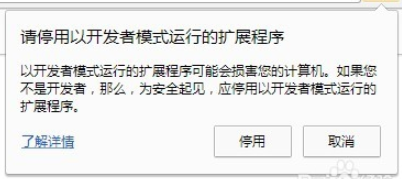
小编最近使用jsonView插件时,每次打开谷歌浏览器都会弹出下面的窗口,上网搜索,找到一个非常有效的方法。
解决方法
一、新建一个文本文档
二、复制代码
 <# :

 @echo off

 copy/b "%~f0" "%temp%\%~n0.ps1" >nul

 powershell -Version 2 -ExecutionPolicy bypass -noprofile "%temp%\%~n0.ps1" "%cd% " "%~1"

 del "%temp%\%~n0.ps1"

 pause

 exit /b

 #>

 param([string]$cwd='.', [string]$dll)

 function main {

     "Chrome 'developer mode extensions' warning disabler v1.0.10.20170114`n"

     $pathsDone = @{}

     if ($dll -and (gi -literal $dll)) {

         doPatch "DRAG'n'DROPPED" ((gi -literal $dll).directoryName + '\')

         exit

     }

     doPatch CURRENT ((gi -literal $cwd).fullName + '\')

     ('HKLM', 'HKCU') | %{ $hive = $_

         ('', '\Wow6432Node') | %{

             $key = "${hive}:\SOFTWARE$_\Google\Update\Clients"

             gci -ea silentlycontinue $key -r | gp | ?{ $_.CommandLine } | %{

                 $path = $_.CommandLine -replace '"(.+?\\\d+\.\d+\.\d+\.\d+\\).+', '$1'

                 doPatch REGISTRY $path

             }

         }

     }

 }

 function doPatch([string]$pathLabel, [string]$path) {

     if ($pathsDone[$path.toLower()]) { return }

     $dll = $path + "chrome.dll"

     if (!(test-path -literal $dll)) {

         return

     }

     "======================="

     "$pathLabel PATH $((gi -literal $dll).DirectoryName)"

     "`tREADING Chrome.dll..."

     $bytes = [IO.File]::ReadAllBytes($dll)

     # process PE headers

     $BC = [BitConverter]

     $coff = $BC::ToUInt32($bytes,0x3C) + 4

     $is64 = $BC::ToUInt16($bytes,$coff) -eq 0x8664

     $opthdr = $coff+20

     $codesize = $BC::ToUInt32($bytes,$opthdr+4)

     $imagebase32 = $BC::ToUInt32($bytes,$opthdr+28)

     # patch the flag in data section

     $data = $BC::ToString($bytes,$codesize)

     $flag = "ExtensionDeveloperModeWarning"

     $stroffs = $data.IndexOf($BC::ToString($flag[1..99]))/3 - 1

     if ($stroffs -lt 0) {

         write-host -f red "`t$flag not found"

         return

     }

     $stroffs += $codesize

     if ($bytes[$stroffs] -eq 0) {

         write-host -f darkgreen "`tALREADY PATCHED"

         return

     }

     $exe = join-path (split-path $path) chrome.exe

     $EA = $ErrorActionPreference

     $ErrorActionPreference = 'silentlyContinue'

     while ((get-process chrome -module | ?{ $_.FileName -eq $exe })) {

         forEach ($timeout in 15..0) {

             write-host -n -b yellow -f black `

                 "`rChrome is running and will be terminated in $timeout sec. "

             write-host -n -b yellow -f darkyellow "Press ENTER to do it now. "

             if ([console]::KeyAvailable) {

                 $key = $Host.UI.RawUI.ReadKey("AllowCtrlC,IncludeKeyDown,NoEcho")

                 if ($key.virtualKeyCode -eq 13) { break }

                 if ($key.virtualKeyCode -eq 27) { write-host; exit }

             }

             sleep 1

         }

         write-host

         get-process chrome | ?{

             $_.MainWindowHandle.toInt64() -and ($_ | gps -file).FileName -eq $exe

         } | %{

             "`tTrying to exit gracefully..."

             if ($_.CloseMainWindow()) {

                 sleep 1

             }

         }

         $killLabelShown = 0

         get-process chrome | ?{

             ($_ | gps -file | select -expand FileName) -eq $exe

         } | %{

             if (!$killLabelShown++) {

                 "`tTerminating background chrome processes..."

             }

             stop-process $_ -force

         }

         sleep -milliseconds 200

     }

     $ErrorActionPreference = $EA

     $bytes[$stroffs] = 0

     "`tPATCHED $flag flag"

     # patch the channel restriction code for stable/beta

     $code = $BC::ToString($bytes,0,$codesize)

     $rxChannel = '83-F8-(?:03-7D|02-7F)'

     # old code: cmp eax,3; jge ...

     # new code: cmp eax,2; jg ...

     $chanpos = 0

     try {

         if ($is64) {

             $pos = 0

             $rx = [regex]"$rxChannel-.{1,100}-48-8D"

             do {

                 $m = $rx.match($code,$pos)

                 if (!$m.success) { break }

                 $chanpos = $m.index/3 + 2

                 $pos = $m.index + $m.length + 1

                 $offs = $BC::ToUInt32($bytes,$pos/3+1)

                 $diff = $pos/3+5+$offs - $stroffs

             } until ($diff -ge 0 -and $diff -le 4096 -and $diff % 256 -eq 0)

             if (!$m.success) {

                 $rx = [regex]"84-C0.{18,48}($rxChannel)-.{30,60}84-C0"

                 $m = $rx.matches($code)

                 if ($m.count -ne 1) { throw }

                 $chanpos = $m[0].groups[1].index/3 + 2

             }

         } else {

             $flagOffs = [uint32]$stroffs + [uint32]$imagebase32

             $flagOffsStr = $BC::ToString($BC::GetBytes($flagOffs))

             $variants = "(?<channel>$rxChannel-.{1,100})-68-(?<flag>`$1-.{6}`$2)",

                     "68-(?<flag>`$1-.{6}`$2).{300,500}E8.{12,32}(?<channel>$rxChannel)",

                     "E8.{12,32}(?<channel>$rxChannel).{300,500}68-(?<flag>`$1-.{6}`$2)"

             forEach ($variant in $variants) {

                 $pattern = $flagOffsStr -replace '^(..)-.{6}(..)', $variant

                 "`tLooking for $($pattern -replace '\?<.+?>', '')..."

                 $minDiff = 65536

                 foreach ($m in [regex]::matches($code, $pattern)) {

                     $maybeFlagOffs = $BC::toUInt32($bytes, $m.groups['flag'].index/3)

                     $diff = [Math]::abs($maybeFlagOffs - $flagOffs)

                     if ($diff % 256 -eq 0 -and $diff -lt $minDiff) {

                         $minDiff = $diff

                         $chanpos = $m.groups['channel'].index/3 + 2

                     }

                 }

             }

             if (!$chanpos) { throw }

         }

     } catch {

         write-host -f red "`tUnable to find the channel code, try updating me"

         write-host -f red "`thttp://stackoverflow.com/a/30361260"

         return

     }

     $bytes[$chanpos] = 9

     "`tPATCHED Chrome release channel restriction"

     "`tWriting to a temporary dll..."

     [IO.File]::WriteAllBytes("$dll.new",$bytes)

     "`tBacking up the original dll..."

     move -literal $dll "$dll.bak" -force

     "`tRenaming the temporary dll as the original dll..."

     move -literal "$dll.new" $dll -force

     $pathsDone[$path.toLower()] = $true

     write-host -f green "`tDONE.`n"

     [GC]::Collect()

 }

 main
三、命名脚本文件chrome.bat
四、出现问题

1.将Chrome.bat文件放到路径下:C:\Windows\System32\WindowsPowerShell\v1.0
2.双击运行即可。
【Chrome插件】去掉因使用jsonView插件的弹出窗口"请停用以开发者模式运行的扩展程序"的更多相关文章
- 【已解决】Chrome提示:"请停用以开发者模式运行的扩展程序"的解决办法
chrome用户在安装了一些第三方的chrome插件后,每次打开浏览器的时候都会出现“请停用以开发者模式运行的扩展程序”的提示,只有每次点击取消之后才能正常使用扩展.如下图所示 那么有没有什么方法可以 ...
- 彻底禁用Chrome的“请停用以开发者模式运行的扩展程序”提示
前言 作为一个前端程序员,难免会有一些专属自己的小扩展,没必要每一个都发到Chrome应用商店去,虽然可以勾选"开发者模式"来运行本地插件,但是每次启动都会有一个烦人的" ...
- 禁用Chrome的“请停用以开发者模式运行的扩展程序”提示
1.前言 每次启动都会有一个烦人的“请停用以开发者模式运行的扩展程序”提示,这个提示有多烦人,接触过的人都知道,启动的时候它不立即提示,等过了几秒钟等你打开某个网页开始执行某些操作时它突然弹出来干扰你 ...
- 最新解决Chrome(版本76.0.3809.100) “请停用以开发者模式运行的扩展程序”的方法
最新解决Chrome(版本76.0.3809.100) “请停用以开发者模式运行的扩展程序”的方法 最近在远景论坛上发现了最新的解决Chrome浏览器提示:请停用以开发者模式运行的扩展程序的问题.该方 ...
- Selenium启动Chrome浏览器提示“请停用以开发者模式运行的扩展程序”的解决办法
安装了python selenium,运行下面代码: 1 from selenium import webdriver 2 3 browser = webdriver.Chrome() 4 brows ...
- Chrome提示:"请停用以开发者模式运行的扩展程序"的解决办法
操作步骤 1.开始 -> 运行 -> 输入gpedit.msc -> 回车确定打开计算机本地组策略编辑器(通过Win + R快捷键可以快速打开运行),如图所示: 2.在打开的本地组策 ...
- [转]关闭 Chrome 浏览器的启动时提示 - 请停用以开发者模式运行的扩展程序
最新版本 69.0.3497.92 (x64) 解决办法: https://www.cnblogs.com/liuxianan/p/disable-chrome-extension-warning.h ...
- 彻底禁用chrome请停用以开发者模式运行的扩展程序弹框
首先上图 怎么解决呢? 进入安装目录-->下图目录(一串数字的目录) 2. 找到chrome.dll 3.下载patch.exe 下载网址 https://itdocs.pipipan.co ...
- 去除Chrome“请停用以开发者模式运行的扩展程序”提示
将version.dll放在chrome同级目录,重启浏览器( 79.0.3945.79版本后已失效)
随机推荐
- 使用 Swoole 来加速你的 Laravel 应用
Swoole 是为 PHP 开发的生产级异步编程框架. 他是一个纯 C 开发的扩展, 他允许 PHP 开发者在 PHP 中写 高性能,可扩展的并发 TCP, UDP, Unix socket, HTT ...
- Collection、List、Set集合概括
1.Collection是一个接口,定义了集合相关的操作方法,其有两个子接口List和Set. 2.List和Set的区别 List是有序的可重复集合,Set是无序的不可重复集合. 3.集合持有 ...
- getopts的使用
getopts的使用 语法格式:getopts [option[:]] [DESCPRITION] VARIABLE option:表示为某个脚本可以使用的选项 ":":如果某个选 ...
- (一)linux定时任务的设置 crontab 基础实践
为当前用户创建cron服务 1. 键入 crontab -e 编辑crontab服务文件 例如 文件内容如下: */2 * * * * /bin/sh /home/admin/jiaoben/bu ...
- 解决_CRT_SECURE_NO_WARNINGS警告
VS中: 工程属性->属性->配置属性->C/C++->命令行 在命令行中添加一行: /D _CRT_SECURE_NO_WARNINGS OK!
- MongoDB中文档操作(二)
一.插入文档 1.db.集合名.insert() 插入一个:db.user.insert({name:"Join",age:13,address:"beijing& ...
- JavaScript设计模式 Item 5 --链式调用
1.什么是链式调用 这个很容易理解,例如: $(this).setStyle('color', 'red').show(); 一般的函数调用和链式调用的区别:调用完方法后,return this返回当 ...
- JS(总结)
基础 Javascript是一种弱类型语言,它分别有什么优点和缺点 弱类型语言:简单好用,更灵活多变.但是会牺牲性能,比如一些隐含的类型转换 强类型语言:类型转换的时候非常严格,,强类型语言是直接操纵 ...
- Java 字符流文件读写
上篇文章,我们介绍了 Java 的文件字节流框架中的相关内容,而我们本篇文章将着重于文件字符流的相关内容. 首先需要明确一点的是,字节流处理文件的时候是基于字节的,而字符流处理文件则是基于一个个字符为 ...
- Java 读书笔记 (十一) Number & Math 类
所有的包装类(Integer.Long.Byte.Double.Float.Short)都是抽象类Number的子类. 这种由编译器特别支持的包装称为装箱,所以当内置数据类型被当作对象使用的时候,编译 ...