
Python内置函数(59)——open
英文文档:
open(file, mode='r', buffering=-1, encoding=None, errors=None, newline=None, closefd=True, opener=None)
Open file and return a corresponding file object. If the file cannot be opened, an OSError is raised.
file is either a string or bytes object giving the pathname (absolute or relative to the current working directory) of the file to be opened or an integer file descriptor of the file to be wrapped. (If a file descriptor is given, it is closed when the returned I/O object is closed, unless closefd is set to False.)
mode is an optional string that specifies the mode in which the file is opened. It defaults to 'r' which means open for reading in text mode. Other common values are 'w' for writing (truncating the file if it already exists), 'x' for exclusive creation and 'a' for appending (which on some Unix systems, means that all writes append to the end of the file regardless of the current seek position). In text mode, if encoding is not specified the encoding used is platform dependent: locale.getpreferredencoding(False) is called to get the current locale encoding. (For reading and writing raw bytes use binary mode and leave encoding unspecified.) The available modes are:
| Character | Meaning |
|---|---|
'r' |
open for reading (default) |
'w' |
open for writing, truncating the file first |
'x' |
open for exclusive creation, failing if the file already exists |
'a' |
open for writing, appending to the end of the file if it exists |
'b' |
binary mode |
't' |
text mode (default) |
'+' |
open a disk file for updating (reading and writing) |
'U' |
universal newlines mode (deprecated) |
The default mode is 'r' (open for reading text, synonym of 'rt'). For binary read-write access, the mode 'w+b' opens and truncates the file to 0 bytes. 'r+b' opens the file without truncation.
As mentioned in the Overview, Python distinguishes between binary and text I/O. Files opened in binary mode (including 'b' in the mode argument) return contents as bytes objects without any decoding. In text mode (the default, or when 't' is included in the mode argument), the contents of the file are returned as str, the bytes having been first decoded using a platform-dependent encoding or using the specified encoding if given.
Note
Python doesn’t depend on the underlying operating system’s notion of text files; all the processing is done by Python itself, and is therefore platform-independent.
buffering is an optional integer used to set the buffering policy. Pass 0 to switch buffering off (only allowed in binary mode), 1 to select line buffering (only usable in text mode), and an integer > 1 to indicate the size in bytes of a fixed-size chunk buffer. When no buffering argument is given, the default buffering policy works as follows:
- Binary files are buffered in fixed-size chunks; the size of the buffer is chosen using a heuristic trying to determine the underlying device’s “block size” and falling back on
io.DEFAULT_BUFFER_SIZE. On many systems, the buffer will typically be 4096 or 8192 bytes long. - “Interactive” text files (files for which
isatty()returnsTrue) use line buffering. Other text files use the policy described above for binary files.
encoding is the name of the encoding used to decode or encode the file. This should only be used in text mode. The default encoding is platform dependent (whatever locale.getpreferredencoding() returns), but any text encodingsupported by Python can be used. See the codecs module for the list of supported encodings.
errors is an optional string that specifies how encoding and decoding errors are to be handled–this cannot be used in binary mode. A variety of standard error handlers are available (listed under Error Handlers), though any error handling name that has been registered with codecs.register_error() is also valid. The standard names include:
'strict'to raise aValueErrorexception if there is an encoding error. The default value ofNonehas the same effect.'ignore'ignores errors. Note that ignoring encoding errors can lead to data loss.'replace'causes a replacement marker (such as'?') to be inserted where there is malformed data.'surrogateescape'will represent any incorrect bytes as code points in the Unicode Private Use Area ranging from U+DC80 to U+DCFF. These private code points will then be turned back into the same bytes when thesurrogateescapeerror handler is used when writing data. This is useful for processing files in an unknown encoding.'xmlcharrefreplace'is only supported when writing to a file. Characters not supported by the encoding are replaced with the appropriate XML character reference&#nnn;.'backslashreplace'replaces malformed data by Python’s backslashed escape sequences.'namereplace'(also only supported when writing) replaces unsupported characters with\N{...}escape sequences.
newline controls how universal newlines mode works (it only applies to text mode). It can be None, '', '\n', '\r', and '\r\n'. It works as follows:
- When reading input from the stream, if newline is
None, universal newlines mode is enabled. Lines in the input can end in'\n','\r', or'\r\n', and these are translated into'\n'before being returned to the caller. If it is'', universal newlines mode is enabled, but line endings are returned to the caller untranslated. If it has any of the other legal values, input lines are only terminated by the given string, and the line ending is returned to the caller untranslated. - When writing output to the stream, if newline is
None, any'\n'characters written are translated to the system default line separator,os.linesep. If newline is''or'\n', no translation takes place. If newline is any of the other legal values, any'\n'characters written are translated to the given string.
If closefd is False and a file descriptor rather than a filename was given, the underlying file descriptor will be kept open when the file is closed. If a filename is given closefd must be True (the default) otherwise an error will be raised.
A custom opener can be used by passing a callable as opener. The underlying file descriptor for the file object is then obtained by calling opener with (file, flags). opener must return an open file descriptor (passing os.open as openerresults in functionality similar to passing None).
打开文件
说明:
1. 函数功能打开一个文件,返回一个文件读写对象,然后可以对文件进行相应读写操作。
2. file参数表示的需要打开文件的相对路径(当前工作目录)或者一个绝对路径,当传入路径不存在此文件会报错。或者传入文件的句柄。
>>> a = open('test.txt') # 相对路径

>>> a

<_io.TextIOWrapper name='test.txt' mode='r' encoding='cp936'>

>>> a.close()

>>> a = open(r'D:\Python\Python35-32\test.txt') # 绝对路径

>>> a

<_io.TextIOWrapper name='D:\\Python\\Python35-32\\test.txt' mode='r' encoding='cp936'>
3. mode参数表示打开文件的模式,常见的打开模式有如下几种,实际调用的时候可以根据情况进行组合。
'r': 以只读模式打开(缺省模式)(必须保证文件存在)
'w':以只写模式打开。若文件存在,则会自动清空文件,然后重新创建;若文件不存在,则新建文件。使用这个模式必须要保证文件所在目录存在,文件可以不存在。该模式下不能使用read*()方法
'a':以追加模式打开。若文件存在,则会追加到文件的末尾;若文件不存在,则新建文件。该模式不能使用read*()方法。
下面四个模式要和上面的模式组合使用
'b':以二进制模式打开
't': 以文本模式打开(缺省模式)
'+':以读写模式打开
'U':以通用换行符模式打开
常见的mode组合
'r'或'rt': 默认模式,文本读模式
'w'或'wt': 以文本写模式打开(打开前文件会被清空)
'rb': 以二进制读模式打开
'ab': 以二进制追加模式打开
'wb': 以二进制写模式打开(打开前文件会被清空)
'r+': 以文本读写模式打开,可以写到文件任何位置;默认写的指针开始指在文件开头, 因此会覆写文件
'w+': 以文本读写模式打开(打开前文件会被清空)。可以使用read*()
'a+': 以文本读写模式打开(写只能写在文件末尾)。可以使用read*()
'rb+': 以二进制读写模式打开
'wb+': 以二进制读写模式打开(打开前文件会被清空)
'ab+': 以二进制读写模式打开
# t为文本读写,b为二进制读写

>>> a = open('test.txt','rt')

>>> a.read()

'some text'

>>> a = open('test.txt','rb')

>>> a.read()

b'some text'

# r为只读,不能写入;w为只写,不能读取

>>> a = open('test.txt','rt')

>>> a.write('more text')

Traceback (most recent call last):

  File "<pyshell#67>", line 1, in <module>

    a.write('more text')

io.UnsupportedOperation: write

>>> a = open('test.txt','wt')

>>> a.read()

Traceback (most recent call last):

  File "<pyshell#69>", line 1, in <module>

    a.read()

io.UnsupportedOperation: not readable

#其它不一一举例了
4. buffering表示文件在读取操作时使用的缓冲策略。
0: 代表buffer关闭(只适用于二进制模式)
1: 代表line buffer(只适用于文本模式)
>1: 表示初始化的buffer大小
5. encoding参数表示读写文件时所使用的的文件编码格式。
假设现在test.txt文件以utf-8编码存储了一下文本:
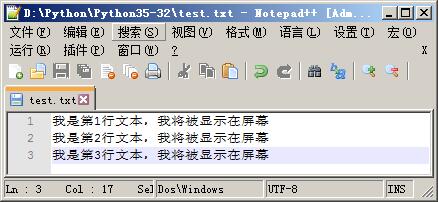
>>> a = open('test.txt','rt') # 未正确指定编码,有可能报错

>>> a.read()

Traceback (most recent call last):

  File "<pyshell#87>", line 1, in <module>

    a.read()

UnicodeDecodeError: 'gbk' codec can't decode byte 0xac in position 8: illegal multibyte sequence

>>> a = open('test.txt','rt',encoding = 'utf-8')

>>> a.read()

'我是第1行文本,我将被显示在屏幕\n我是第2行文本,我将被显示在屏幕\n我是第3行文本,我将被显示在屏幕'

>>>
6. errors参数表示读写文件时碰到错误的报错级别。
常见的报错基本有:
'strict'严格级别,字符编码有报错即抛出异常,也是默认的级别,errors参数值传入None按此级别处理.'ignore'忽略级别,字符编码有错,忽略掉.'replace'替换级别,字符编码有错的,替换成?.
>>> a = open('test.txt','rt',encoding = 'utf-8')

>>> a.read()

'我是第1行文本,我将被显示在屏幕\n我是第2行文本,我将被显示在屏幕\n我是第3行文本,我将被显示在屏幕'

>>> a = open('test.txt','rt')

>>> a.read()

Traceback (most recent call last):

  File "<pyshell#91>", line 1, in <module>

    a.read()

UnicodeDecodeError: 'gbk' codec can't decode byte 0xac in position 8: illegal multibyte sequence

>>> a = open('test.txt','rt',errors = 'ignore' )

>>> a.read()

'鎴戞槸绗1琛屾枃鏈锛屾垜灏嗚鏄剧ず鍦ㄥ睆骞\n鎴戞槸绗2琛屾枃鏈锛屾垜灏嗚鏄剧ず鍦ㄥ睆骞\n鎴戞槸绗3琛屾枃鏈锛屾垜灏嗚鏄剧ず鍦ㄥ睆骞'

>>> a = open('test.txt','rt',errors = 'replace' )

>>> a.read()

'鎴戞槸绗�1琛屾枃鏈�锛屾垜灏嗚��鏄剧ず鍦ㄥ睆骞�\n鎴戞槸绗�2琛屾枃鏈�锛屾垜灏嗚��鏄剧ず鍦ㄥ睆骞�\n鎴戞槸绗�3琛屾枃鏈�锛屾垜灏嗚��鏄剧ず鍦ㄥ睆骞�'
7. newline表示用于区分换行符(只对文本模式有效,可以取的值有None,'\n','\r','','\r\n')
>>> a = open('test.txt','rt',encoding = 'utf-8',newline = '\r')

>>> a.readline()

'我是第1行文本,我将被显示在屏幕\r'

>>> a = open('test.txt','rt',encoding = 'utf-8',newline = '\n')

>>> a.readline()

'我是第1行文本,我将被显示在屏幕\r\n'
8. closefd表示传入的file参数类型(缺省为True),传入文件路径时一定为True,传入文件句柄则为False。
>>> a = open('test.txt','rt',encoding = 'utf-8',newline = '\n',closefd = False)

Traceback (most recent call last):

  File "<pyshell#115>", line 1, in <module>

    a = open('test.txt','rt',encoding = 'utf-8',newline = '\n',closefd = False)

ValueError: Cannot use closefd=False with file name

>>> a = open('test.txt','rt',encoding = 'utf-8',newline = '\n',closefd = True)
Python内置函数(59)——open的更多相关文章
- Python内置函数(59)——sorted
英文文档: sorted(iterable[, key][, reverse]) Return a new sorted list from the items in iterable. Has tw ...
- Python | 内置函数(BIF)
Python内置函数 | V3.9.1 | 共计155个 还没学完, 还没记录完, 不知道自己能不能坚持记录下去 1.ArithmeticError 2.AssertionError 3.Attrib ...
- python内置函数
python内置函数 官方文档:点击 在这里我只列举一些常见的内置函数用法 1.abs()[求数字的绝对值] >>> abs(-13) 13 2.all() 判断所有集合元素都为真的 ...
- python 内置函数和函数装饰器
python内置函数 1.数学相关 abs(x) 取x绝对值 divmode(x,y) 取x除以y的商和余数,常用做分页,返回商和余数组成一个元组 pow(x,y[,z]) 取x的y次方 ,等同于x ...
- Python基础篇【第2篇】: Python内置函数(一)
Python内置函数 lambda lambda表达式相当于函数体为单个return语句的普通函数的匿名函数.请注意,lambda语法并没有使用return关键字.开发者可以在任何可以使用函数引用的位 ...
- [python基础知识]python内置函数map/reduce/filter
python内置函数map/reduce/filter 这三个函数用的顺手了,很cool. filter()函数:filter函数相当于过滤,调用一个bool_func(只返回bool类型数据的方法) ...
- Python内置函数进制转换的用法
使用Python内置函数:bin().oct().int().hex()可实现进制转换. 先看Python官方文档中对这几个内置函数的描述: bin(x)Convert an integer numb ...
- Python内置函数(12)——str
英文文档: class str(object='') class str(object=b'', encoding='utf-8', errors='strict') Return a string ...
- Python内置函数(61)——str
英文文档: class str(object='') class str(object=b'', encoding='utf-8', errors='strict') Return a string ...
随机推荐
- 读书笔记-浅析Java运行时数据区
作为一个 Java 为主语言的程序员,我偶尔也需要 用 C/C++ 写程序,在使用时让我很烦恼的一件事情就是需要对 new 出来的对象进行 delete/free 操作,我老是担心忘了这件事情,从而导 ...
- css样式加载顺序
css样式加载顺序: A: id选择器指定的样式 > 类选择器指定的样式 > 元素类型选择器指定的样式 B: 如果要让某个样式的优先级变高,可以使用!important来指定: .clas ...
- shell总的exit与sleep
- Linux如此“自私”?
Linux如此“自私”? “如果当时我真的知道从头建立一个操作系统的难度,肯定是不会有勇气去做的.”1991年8月25日,随着林纳斯·托瓦兹(Linus Torvalds)这句“天真”的描述,Linu ...
- ios滑动流畅(丝般顺滑)滚动
在ios html->body->list(少一个样式都不行!) html->body->list <!DOCTYPE html> <html lang=&q ...
- Java基础知识回顾之二 ----- 修饰符和String
前言 在上一篇中,回顾了Java的基本数据类型 ,这篇就来回顾下Java中的一些修饰符以及String. 修饰符介绍 Java修饰符主要分为两类: 访问修饰符 非访问修饰符 其中访问修饰符主要包括 p ...
- 剑指Kubernetes 揭秘腾讯云的PaaS技术选型策略
1.前言 Kubernetes 很火,一大批互联网公司早已领先一步,搭建起专有的 PaaS平台,传统企业们看到的 Kubernetes的趋势,亦不甘落后,在试水的道上一路狂奔-- 虽然,Kuberne ...
- STL --> queue单向队列
queue单向队列 queue 模板类的定义在<queue>头文件中.与stack 模板类很相似,queue 模板类也需要两个模板参数,一个是元素类型,一个容器类型,元素类型是必要的,容器 ...
- 设计模式 --> (5)适配器模式
适配器模式 适配器模式把一个类的接口变换成客户端所期待的另一种接口,从而使原本接口不匹配而无法在一起工作的两个类能够在一起工作.比如说我的hp笔记本,美国产品,人家美国的电压是110V的,而我们中国的 ...
- 深入解析C语言数组和指针
概述 指针是C语言的重点,同时也是让初学者认为最难理解的部分.有人说它是C语言的灵魂,只有深入理解指针才能说理解了C语言.暂且撇开这些观点不谈.这章是我在阅读<C和指针>这本书的读书笔记. ...