
highcharts中的仪表盘样式
仪表盘的样式如下:
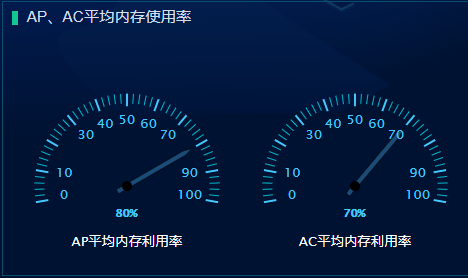
是双表盘展示
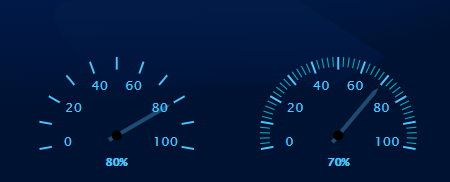
左边的图中minorTickInterval的值为null,右边的minorTickInterval的值为“auto”
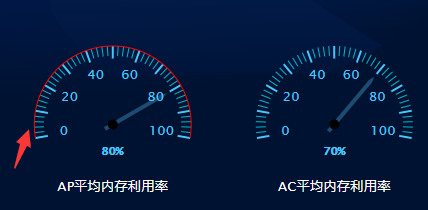
左边的图中lineColor的值为‘#f00’,右边的lineColor的值为“transparent”
yAxis: [{

    min: 0,

    // 最小刻度值

    max: 100,

    // 最大刻度值

    minorTickInterval: 'auto',

    // 表盘中比较短的刻度值

    minorTickWidth: that.torem(2),

    // 表盘中比较短的刻度值的宽度

    minorTickLength: that.torem(20),

    // 表盘中比较短的刻度值的长度

    minorTickPosition: 'inside',

    // 表盘中比较短的刻度值在内部还是在外部显示

    minorTickColor: '#00bfd3',

    // 表盘中比较短的刻度值的颜色

    tickPixelInterval: 'auto',

    // 表盘中比较长的刻度值

    tickWidth: that.torem(4),

    // 表盘中比较长的刻度值的宽度

    tickPosition: 'inside',

    // 表盘中比较长的刻度值在内部还是在外部显示

    tickLength: that.torem(26),

    // 表盘中比较长的刻度值的长度

    tickColor: '#48c7ff',

    // 表盘中比较长的刻度值的颜色

    tickInterval: 10,

    // 间隔

    lineColor: 'transparent',

    // 表盘最外层的连接线

}]
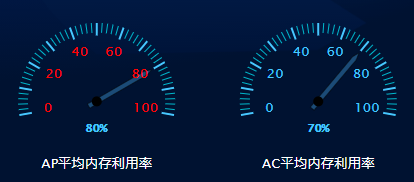
labels: {

    style: { // 刻度值数字的样式

        color: '#f00',

        fontSize: that.torem(28)

        // step: 20

    },

    distance: that.offetY

},
y轴的一些设置
yAxis: [{

    min: 0,

    // 最小刻度值

    max: 100,

    // 最大刻度值

    minorTickInterval: 'auto',

    // 表盘中比较短的刻度值

    minorTickWidth: that.torem(2),

    // 表盘中比较短的刻度值的宽度

    minorTickLength: that.torem(20),

    // 表盘中比较短的刻度值的长度

    minorTickPosition: 'inside',

    // 表盘中比较短的刻度值在内部还是在外部显示

    minorTickColor: '#00bfd3',

    // 表盘中比较短的刻度值的颜色

    tickPixelInterval: 'auto',

    // 表盘中比较长的刻度值

    tickWidth: that.torem(4),

    // 表盘中比较长的刻度值的宽度

    tickPosition: 'inside',

    // 表盘中比较长的刻度值在内部还是在外部显示

    tickLength: that.torem(26),

    // 表盘中比较长的刻度值的长度

    tickColor: '#48c7ff',

    // 表盘中比较长的刻度值的颜色

    tickInterval: 10,

    // 间隔

    lineColor: 'transparent',

    // 表盘最外层的连接线

    labels: {

        style: { // 刻度值数字的颜色

            color: '#48c7ff',

            fontSize: that.torem(28)

            // step: 20

        },

        distance: that.offetY

    },

    pane: 0,

    // 第一个面板,第二个面板是1

    title: { // 描述文字

        text: this.text1,

        verticalAlign: 'bottom',

        style: {

            color: '#fff',

            fontSize: that.torem(28)

        },

        y: that.torem(220) // 离y轴的距离

    }

}, {

    min: 0,

    max: 100,

    minorTickInterval: 'auto',

    minorTickWidth: that.torem(2),

    minorTickLength: that.torem(20),

    minorTickPosition: 'inside',

    minorTickColor: '#00bfd3',

    tickPixelInterval: 30,

    tickWidth: that.torem(4),

    tickPosition: 'inside',

    tickLength: that.torem(26),

    tickColor: '#48c7ff',

    tickInterval: 10,

    // 间隔

    tickmarkPlacement: 'on',

    lineColor: 'transparent',

    labels: {

        style: {

            color: '#48c7ff',

            fontSize: that.torem(28)

        },

        distance: that.offetY

    },

    pane: 1,

    title: {

        text: this.text2,

        verticalAlign: 'bottom',

        style: {

            color: '#fff',

            fontSize: that.torem(28)

        },

        y: that.torem(220)

    }

}],
指针以及表盘内百分比的显示的设置
plotOptions: {

    gauge: {

        dataLabels: {

            borderWidth: 0,

            enabled: true,

            color: '#48c7ff',

            fontSize: that.torem(80),

            format: ` <span> {y} % </span>`

        },

        dial: {

            radius: '80%', // 半径:指针长度

            backgroundColor: '#1b4b77',

            //指针背景色

            borderColor: 'black',

            borderWidth: that.torem(1),

            baseWidth: that.torem(10),

            topWidth: that.torem(1),

            baseLength: '90%',

            // of radius

            rearLength: '15%' //尾巴长度

        },

        borderWidth: 0

    }

},
指针中的百分比值,也就是y轴的初始刻度值
series: [{// 第一个表盘对应的数据

    data: [80],

    yAxis: 0

}, {// 第二个表盘对应的数据

    data: [70],

    yAxis: 1

}]
完整的代码
<template>

  <div class="highcharts-container" ref="chart_gauge"></div>

</template>

<script>

import Highcharts from 'highcharts/highstock';

import HighchartsMore from 'highcharts/highcharts-more';

import HighchartsDrilldown from 'highcharts/modules/drilldown';

import Highcharts3D from 'highcharts/highcharts-3d';

HighchartsMore(Highcharts);

HighchartsDrilldown(Highcharts);

Highcharts3D(Highcharts);

import { font } from '@/mixins';

export default {

    props: ['name', 'title'],

    name: 'highcharts',

    mixins: [font],

    data() {

        return {

            chart1: null,

            data_terminal: [

                {

                    name: '华为',

                    y: 21.9

                },

                {

                    name: '苹果',

                    y: 14.9

                },

                {

                    name: '三星',

                    y: 15.2

                },

                {

                    name: '小米',

                    y: 25.7

                },

                {

                    name: '其他',

                    y: 35.7

                }

            ],

            data_flow: [

                {

                    name: '热点1',

                    y: 21.9

                },

                {

                    name: '热点2',

                    y: 14.9

                },

                {

                    name: '热点3',

                    y: 15.2

                },

                {

                    name: '热点4',

                    y: 25.7

                },

                {

                    name: '其他',

                    y: 35.7

                }

            ],

            options: null,

            chartTitle: '',

            text1: null,

            text2: null,

            standSize: document.body.clientWidth,

            offetY: 0

        };

    },

    watch: {

        standSize: {

            handler(newVal, oldVal) {

                if (newVal == 4000) {

                    this.offetY = this.torem(-70);

                } else {

                    this.offetY = this.torem(-60);

                }

            },

            deep: true,

            immediate: true

        }

    },

    mounted() {

        var that = this;

        that.$el.style.height = that.$refs.chart_gauge.offsetHeight - that.torem(100) + 'px';

        console.log(this.$refs.chart_gauge.offsetHeight, 'qq');

        switch (that.title) {

            case 'cpu':

                that.text1 = 'AP平均cpu利用率';

                that.text2 = 'AC平均cpu利用率';

                break;

            case '内存':

                that.text1 = 'AP平均内存利用率';

                that.text2 = 'AC平均内存利用率';

                break;

        }

        this.options = {

            chart: {

                type: 'gauge',

                backgroundColor: 'transparent'

                // height: that.torem(500)

            },

            title: {

                text: null

            },

            labels: {

                items: [

                    {

                        style: { left: that.torem(180), top: that.torem(280), fontSize: that.torem(42), fontWeight: 'bold', fontFamily: '微软雅黑' }

                        // html: '<span style="color:#C02316">{y}</span>'

                    }

                ]

            },

            pane: [

                // 表盘1设置

                {

                    startAngle: -100, // 表盘开始的角度

                    endAngle: 100, // 表盘结束的角度

                    background: null, // 表盘的背景颜色,为null的话就是不要背景颜色

                    center: ['25%', '65%'], // 表盘的位置

                    size: '80%' // 表盘的大小

                },

                // 表盘2设置

                {

                    startAngle: -100,

                    endAngle: 100,

                    background: null,

                    center: ['75%', '65%'],

                    size: '80%'

                }

            ],

            yAxis: [

                {

                    min: 0, // 最小刻度值

                    max: 100, // 最大刻度值

                    minorTickInterval: 'auto', // 表盘中比较短的刻度值

                    minorTickWidth: that.torem(2), // 表盘中比较短的刻度值的宽度

                    minorTickLength: that.torem(20),// 表盘中比较短的刻度值的长度

                    minorTickPosition: 'inside',// 表盘中比较短的刻度值在内部还是在外部显示

                    minorTickColor: '#00bfd3',// 表盘中比较短的刻度值的颜色

                    tickPixelInterval: 'auto', // 表盘中比较长的刻度值

                    tickWidth: that.torem(4),// 表盘中比较长的刻度值的宽度

                    tickPosition: 'inside',// 表盘中比较长的刻度值在内部还是在外部显示

                    tickLength: that.torem(26),// 表盘中比较长的刻度值的长度

                    tickColor: '#48c7ff',// 表盘中比较长的刻度值的颜色

                    tickInterval: 10, // 间隔

                    lineColor: 'transparent',// 表盘最外层的连接线

                    labels: {

                        style: {// 刻度值数字的颜色

                            color: '#48c7ff',

                            fontSize: that.torem(28)

                            // step: 20

                        },

                        distance: that.offetY

                    },

                    pane: 0, // 第一个面板,第二个面板是1

                    title: { // 描述文字

                        text: this.text1,

                        verticalAlign: 'bottom',

                        style: {

                            color: '#fff',

                            fontSize: that.torem(28)

                        },

                        y: that.torem(220) // 离y轴的距离

                    }

                },

                {

                    min: 0,

                    max: 100,

                    minorTickInterval: 'auto',

                    minorTickWidth: that.torem(2),

                    minorTickLength: that.torem(20),

                    minorTickPosition: 'inside',

                    minorTickColor: '#00bfd3',

                    tickPixelInterval: 30,

                    tickWidth: that.torem(4),

                    tickPosition: 'inside',

                    tickLength: that.torem(26),

                    tickColor: '#48c7ff',

                    tickInterval: 10, // 间隔

                    tickmarkPlacement: 'on',

                    lineColor: 'transparent',

                    labels: {

                        style: {

                            color: '#48c7ff',

                            fontSize: that.torem(28)

                        },

                        distance: that.offetY

                    },

                    pane: 1,

                    title: {

                        text: this.text2,

                        verticalAlign: 'bottom',

                        style: {

                            color: '#fff',

                            fontSize: that.torem(28)

                        },

                        y: that.torem(220)

                    }

                }

            ],

            plotOptions: {

                gauge: {

                    dataLabels: {

                        borderWidth: 0,

                        enabled: true,

                        color: '#48c7ff',

                        fontSize: that.torem(80),

                        format: `<span>{y}%</span>`

                    },

                    dial: {

                        radius: '80%', // 半径:指针长度

                        backgroundColor: '#1b4b77', //指针背景色

                        borderColor: 'black',

                        borderWidth: that.torem(1),

                        baseWidth: that.torem(10),

                        topWidth: that.torem(1),

                        baseLength: '90%', // of radius

                        rearLength: '15%' //尾巴长度

                    },

                    borderWidth: 0

                }

            },

            series: [

                {

                    data: [80],

                    yAxis: 0

                },

                {

                    data: [70],

                    yAxis: 1

                }

            ]

        };

        this.initChart();

    },

    methods: {

        initChart(options) {

            this.chart1 = new Highcharts.Chart(this.$refs.chart_gauge, this.options);

            var title_AP_cpu = {

                text: 'AP平均cpu利用率'

            };

            var title_AC_cpu = {

                text: 'AC平均cpu利用率'

            };

            var title_AP_RAM = {

                text: 'AP平均内存利用率'

            };

            var title_AC_RAM = {

                text: 'AC平均内存利用率'

            };

        }

    }

};

</script>

<style lang="scss">

// .highcharts-container {

// width: 100%;

// height: calc(100% - 30px);

// display: flex;

// & > div {

//     flex: 1;

// }

.highcharts-credits {

    display: none !important;

}

.highcharts-text-outline {

    // 去掉dataLabels的outline

    display: none;

}

.redColor {

    color: #ff6748;

}

.blueColor {

    color: #48c7ff;

}

.greenColor {

    color: #13c792;

}

// }

</style>
highcharts中的仪表盘样式的更多相关文章
- trigger() --工作中问题nav样式
自动执行某元素的某个事件 $("#div").trigger("click"); //让系统自动执行单击事件 适用于nav样式中,下面横线绝对定位于nav.o ...
- JQuery中操作Css样式的方法
JQuery中操作Css样式的方法//1.获取和设置样式 $("#tow").attr("class")获取ID为tow的class属性 $("#tw ...
- Android中自定义checkbox样式
1.首先在drawable文件夹中添加drawable文件checkbox_style.xml.
- ArcGIS中的style样式的使用
MapGIS安装包大小(以M计算)与ArcGIS (以G计算)在数量级存在差异,就可以隐约知道ArcGIS功能的强大.ArcGIS更注重重用(比如符号库.模块等).数据与制图分离(尤其是制图表达最能体 ...
- 在网页中插入CSS样式表的几种方法
1. 链入外部样式表 链入外部样式表是把样式表保存为一个样式表文件,然后在页面中用<link>标记链接到这个样式表文件,这个<link>标记必须放到页面的<head> ...
- html5 中的 css样式单 的 两种调用方式的区别
在 html5 中 使用 css 样式单的方式 有4种: 1.链接外部样式文件:将样式文件 彻底与 html 文档分离,样式文件需要额外引入,这种情况下 一批样式 可以控制多份文档.对于好多文件都共有 ...
- css中的列表样式
在网页设计中,我们经常将某些具有相似功能的标签放在同一组中,这时我们经常会用到列表标签(无序列表ul,有序列表ol),在列表标签中对列表样式的设计可以使我们的页面得到一定程度的美化. 在css中对列表 ...
- css中的字体样式及元素样式
css中的字体样式一般包含有就9中,常见的有7种.这7种依次为: 1.字体样式:font-family: 2.字体大小:font-size: 3.字体加粗:font-weight: 4.字体斜体:fo ...
- Windows Phone 8初学者开发—第13部分:设置LongListSelector中磁贴的样式
原文 Windows Phone 8初学者开发—第13部分:设置LongListSelector中磁贴的样式 第13部分:设置LongListSelector中磁贴的样式 原文地址: http://c ...
- HTML文档中应用css样式的方法总结
在HTML文档中应用css样式大致有三种方法:1.link标签链接外部样式表:2.使用style元素包含样式表:3.使用style属性,即内联样式 一.link标签链接外部样式表 先看一条较为标准的l ...
随机推荐
- 深入浅出Stream流
Java 8的新特性之一就是流stream,配合同版本出现的 Lambda ,使得操作集合(Collection)提供了极大的便利. 案例引入 在JAVA中,涉及到对数组.Collection等集合类 ...
- Unity 中 Color 与 Color32 的区别
1. 存储方式 Color用四个浮点数(float)来表示RGBA,取值范围均是0到1 举例: var orange = new Color(1f, 0.5f, 0f, 1f); 而Color32使用 ...
- 《SpringBoot事务》单机mybatis事务控制
一.场景再现 我们同时操作两张表及以上,一张表操作成功后,第二张表操作失败,此时需要回滚上一次的操作. 或者两次操作都成功,但后续业务处理的时候异常,此时需要回滚前面的所有数据库操作. 二.代码 1 ...
- 前端微服务qiankun 2.x主子应用通信代码片段
主应用代码 主应用工程里面源代码新建qiankun/index.js,通信代码如下: import { initGlobalState } from "qiankun"; impo ...
- Asp.net core 学习笔记 Secret 和 Data Protect Azure key-vault & Storage Account 第 2 篇
更新 30-04-2023 最新版本请看这 2 篇 ASP.NET Core – User Secret & Azure Key Vault 之前有写过 2 篇关于 key-vault 和 d ...
- .net core8 使用JWT鉴权(附当前源码)
说明 该文章是属于OverallAuth2.0系列文章,每周更新一篇该系列文章(从0到1完成系统开发). 该系统文章,我会尽量说的非常详细,做到不管新手.老手都能看懂. 说明:OverallAuth2 ...
- 搭建高效攻防靶场vulfocus与Docker仓库管理实战:从听说到入门系列
搭建高效攻防靶场vulfocus与Docker仓库管理实战:从听说到入门系列 vulfocus 简介 vulfocus,作为一款前沿的漏洞集成平台,它巧妙地将多种最新的CVE漏洞环境封装于Docker ...
- 【QT性能优化】QT性能优化之QT6框架高性能图形视图框架快速展示百万图元大规模场景
QT性能优化之QT6框架高性能图形视图框架快速展示百万图元大规模场景 简介: 本文展示了使用QT图形视图框架在一个场景中绘制出百万个图元的程序的效果以及源代码:本文还介绍了QT图形视图框架的一些实用功 ...
- Laravel视图共享数据
Laravel视图共享数据 最近在用lavavel过程中想实现公共头部尾部需要的配置数据在所有的页面中都可以使用,便查看了官方文档,在此做一个总结: 一. 修改 ComposerServiceProv ...
- 使用nnUNet跑BraTS脑肿瘤分割预测TC和ET非常低的原因。
使用nnUNet跑BraTS脑肿瘤分割预测TC和ET非常低,原来是预测的时候,使用了预处理后的标签.原本标签是:2:WT, 1:TC, 4:ET.但是预处理之后变为:1:WT, 2:TC, 3:ET. ...