
Help document of CAD Plus Mobile
If you have any questions, please send email to 3167292926@qq.com
1. Permission request
1.1 Require location information
When using the File manager function, it is necessary to obtain the location information permission to display the network information. For the file manager function, refer to 2.5 File Manager.
2. Functions description
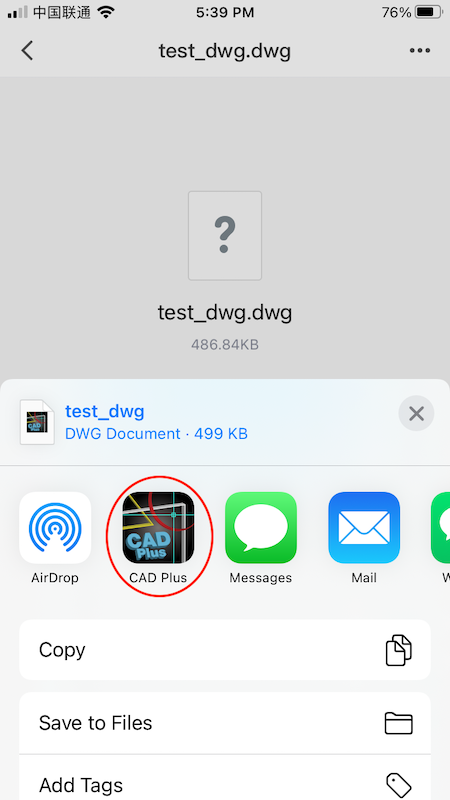
2.1 Import and open external drawing
Import DWG drawings received by other apps into CAD Plus.
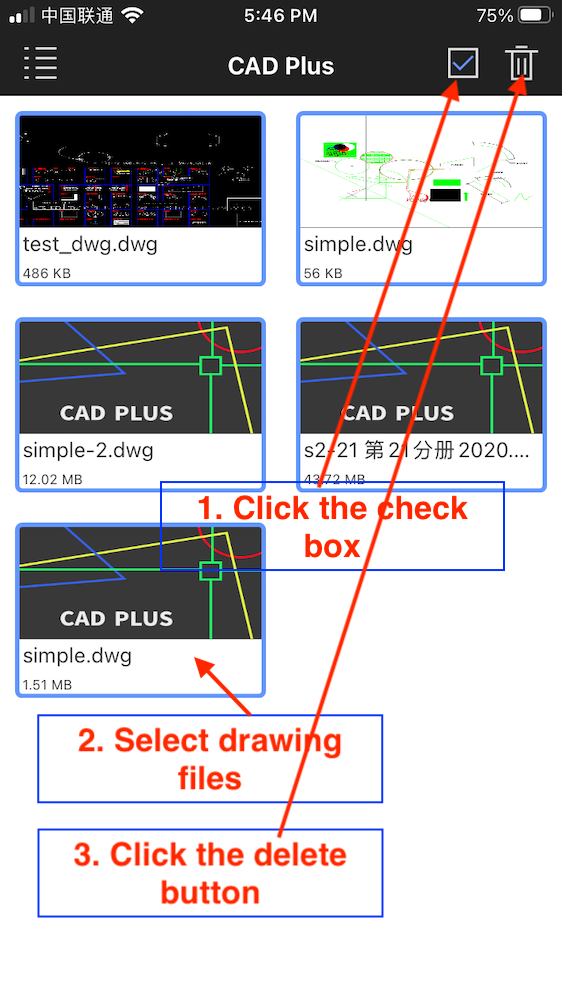
2.2 Delete selected drawing files
2.3 Refresh drawing files list
When the drawings in the drawing list are not displayed, use this function to display the drawing list normally.

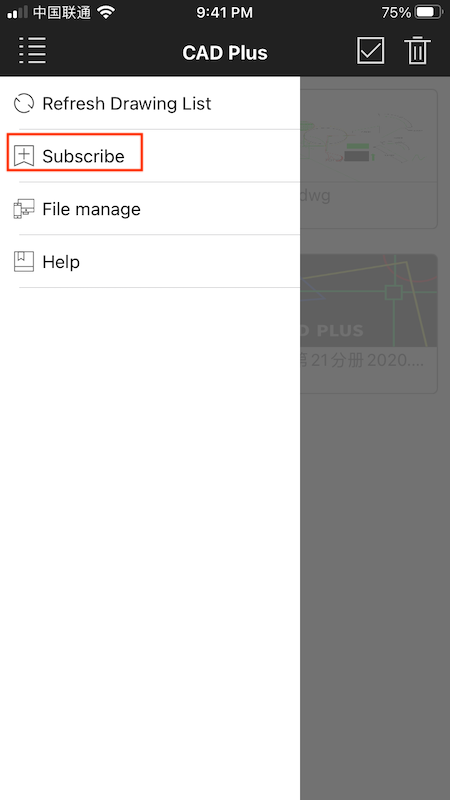
2.4 Subscribe
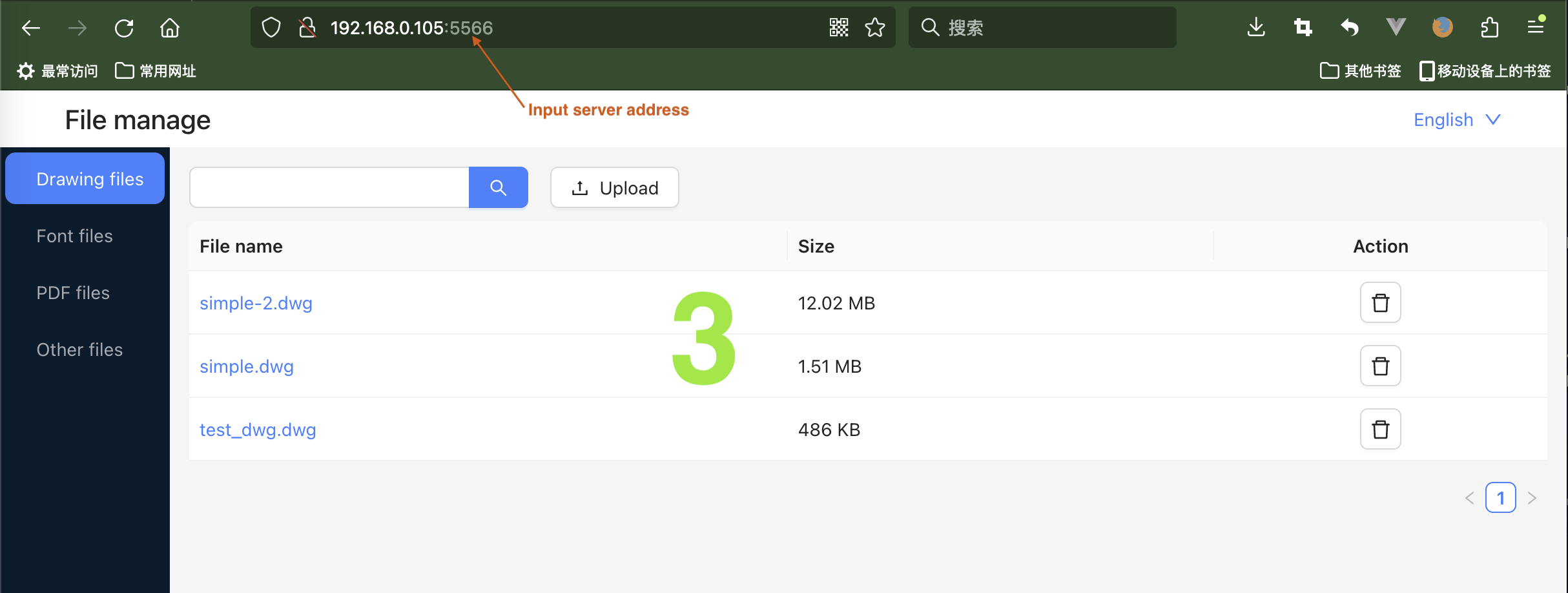
2.5 File manager
With the file manager function, you can manage files on mobile devices through the browser.
- Upload drawings in your computer to the mobile CAD Plus
- Download drawings from the mobile CAD Plus to your computer
- Delete drawings in mobile CAD Plus through computer browser
2.5.1 Start file manager server
Note:Mobile device and computer must be connected under the same WIFI; Android built-in browser is not supported. Please use Firefox or Chrome. You cannot turn off the phone screen during use!

2.6 Open and edit drawing
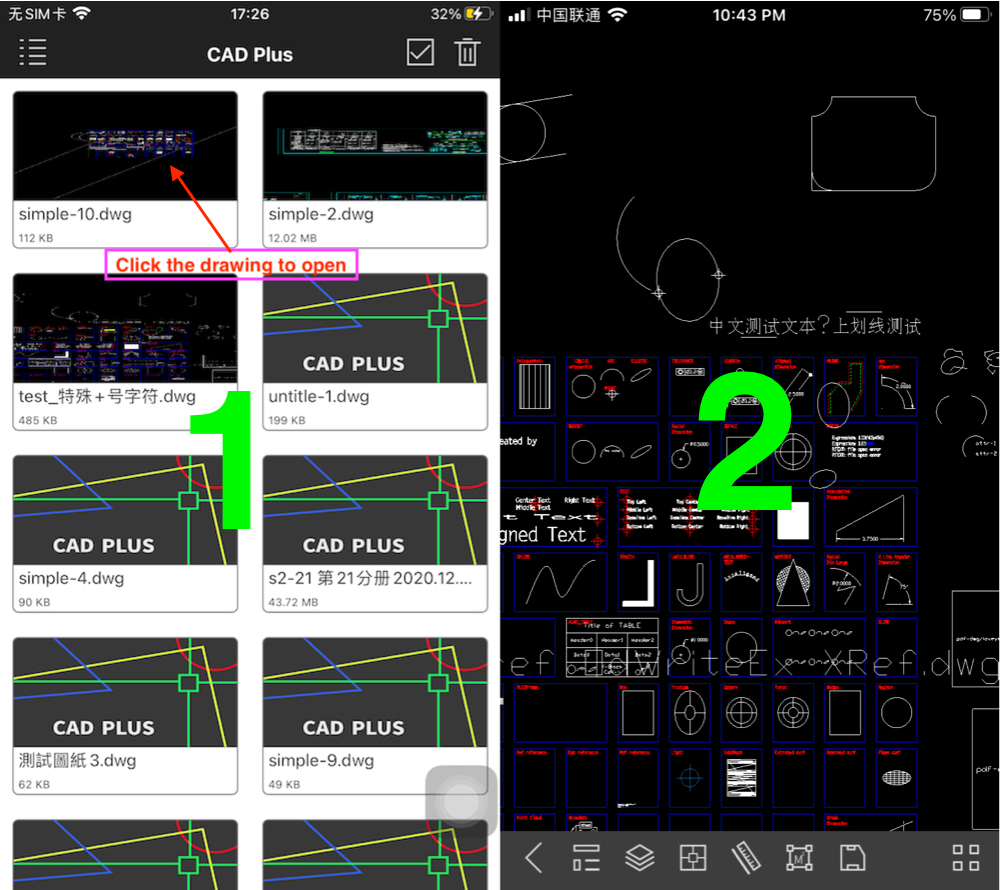
Drag the drawing when a single finger or two fingers move on the drawing screen, and scale the drawing when two fingers move in the same or opposite direction on the screen
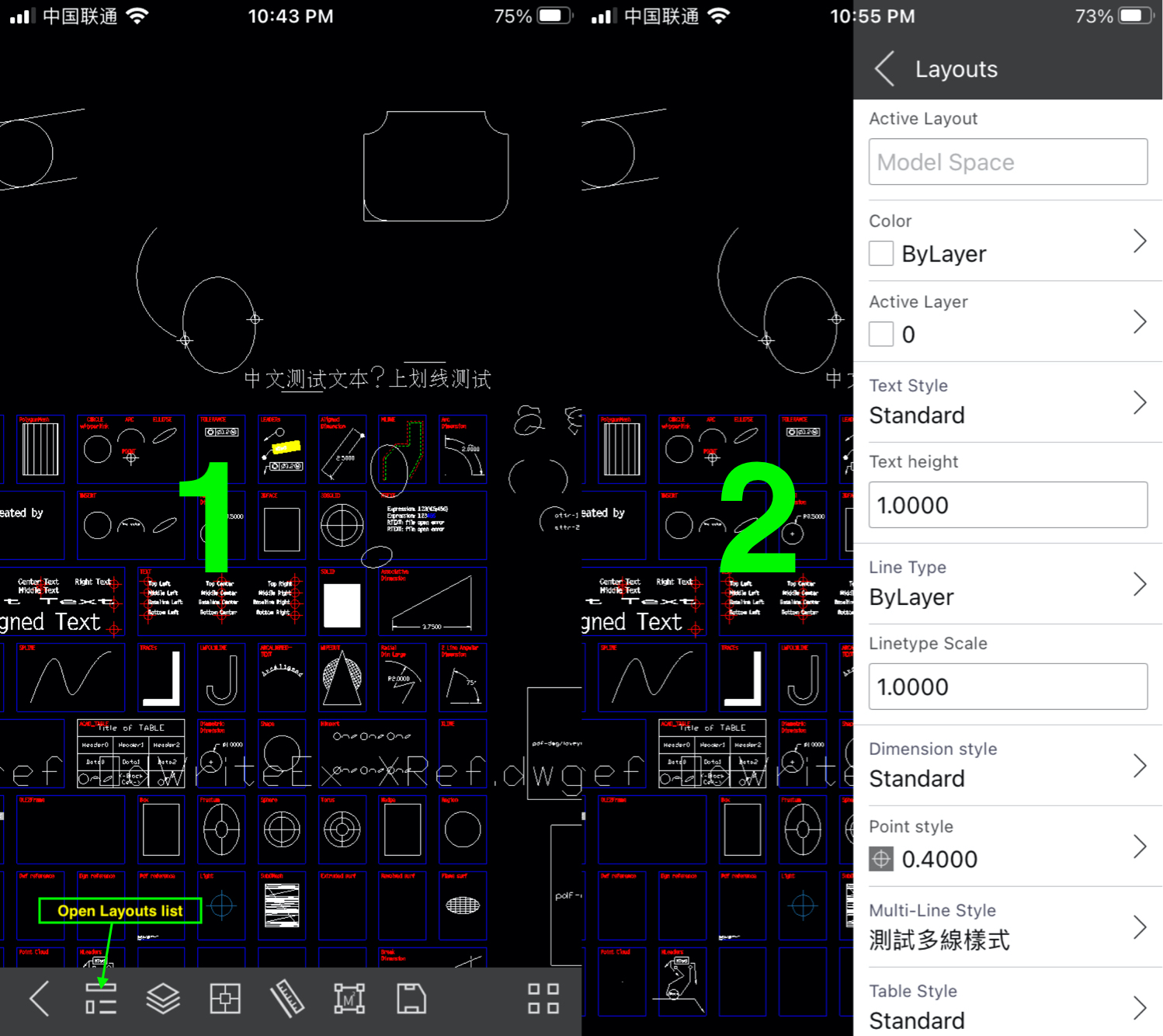
2.6.1 View layouts
In the layouts view, you can change the name of a layout (model space cannot change the name), change the color, layer, delete the layout, add the layout, etc
2.6.2 View layers
In the layers view, you can create new layer, delete layer, and modify layer attributes 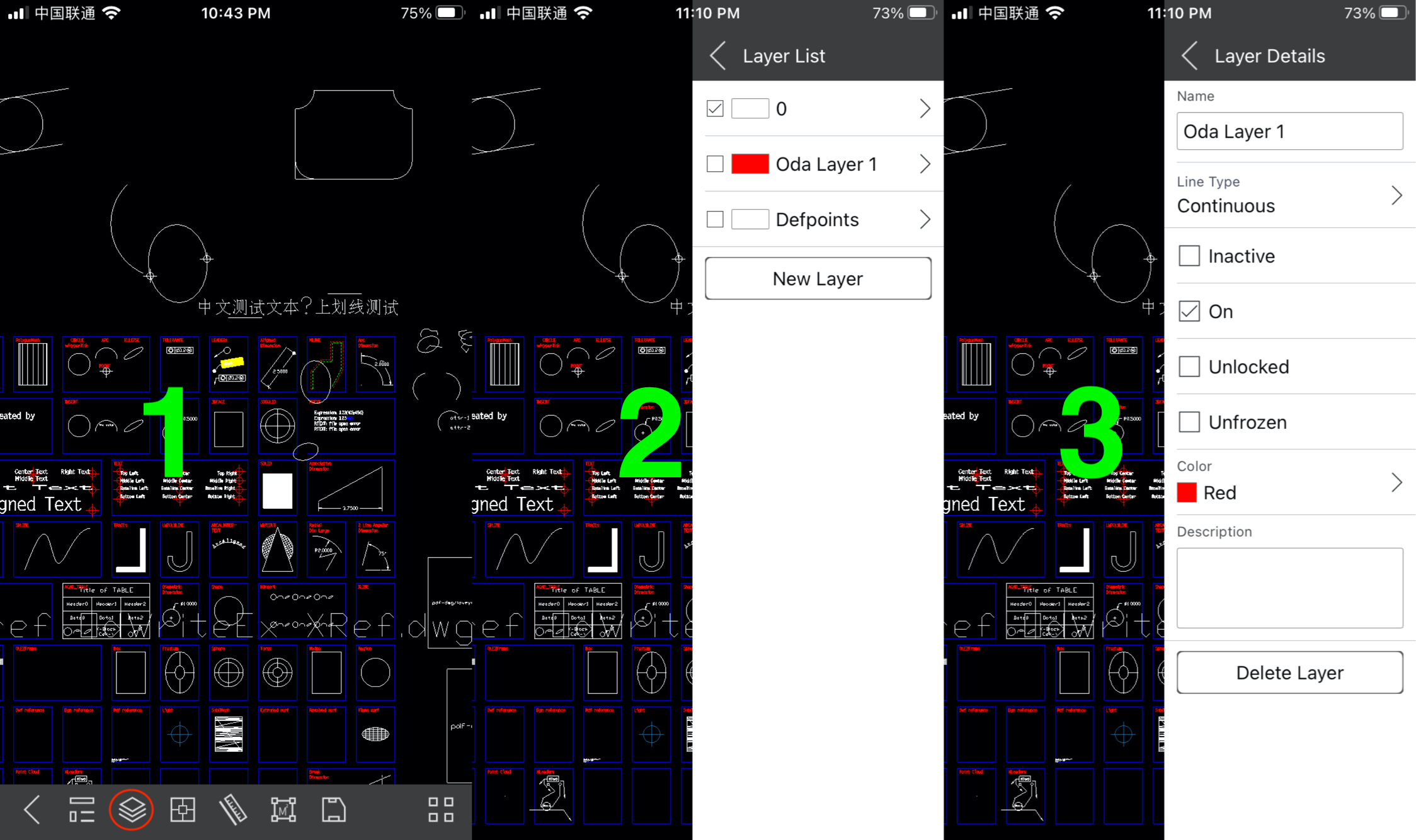
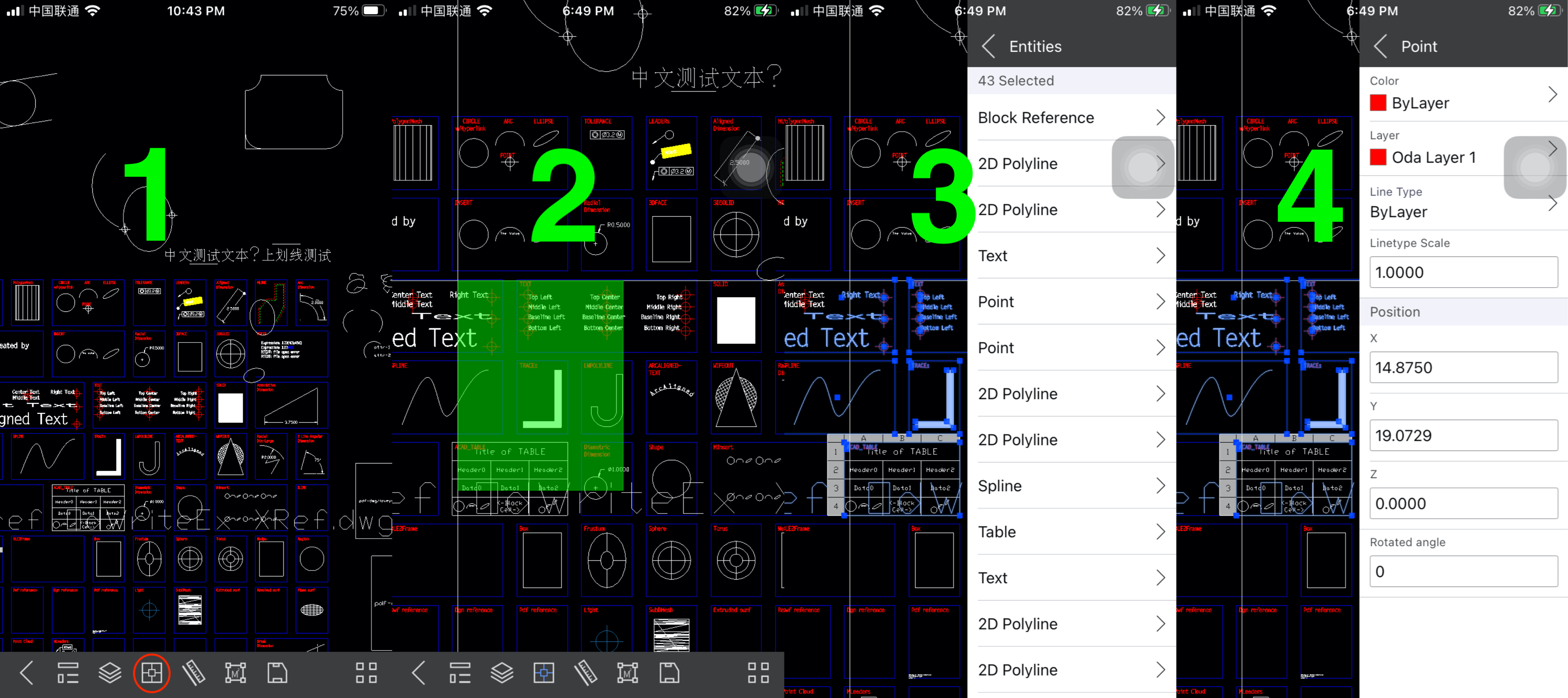
2.6.3 Select entities
Click the screen to specify the starting point of the selection box, and move the cursor to specify another endpoint of the selection box to complete the entity selection. If you want to drag the drawing during entity selection, use 2 fingers to drag the drawing.
2.6.4 Measure distance
Measure the distance between the specified 2 points. If you want to move the drawing during the measurement, you can use 2 points to drag the drawing
- Move the cursor to the position to be measured and click the screen to specify the starting point
- Move the cursor to the end of the measurement and click the screen again to complete the measurement
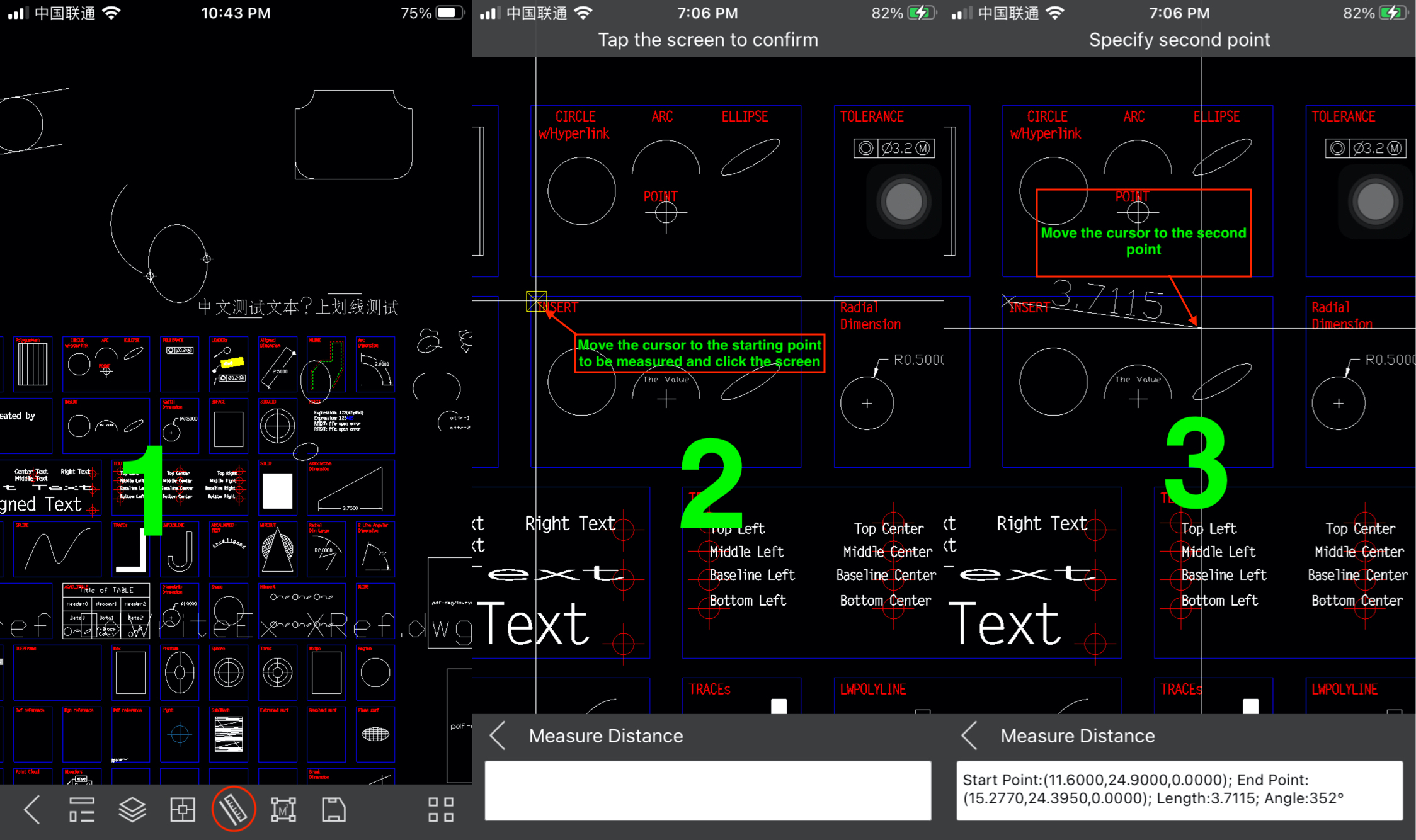

2.6.5 Measure area
Measure the area of the specified range. You must specify more than 3 points to measure the area
- Move the cursor to the starting point of the position to be measured
- Move the cursor to the next point to measure and click the screen to determine the measurement point
- Double-click the screen to complete the area measurement
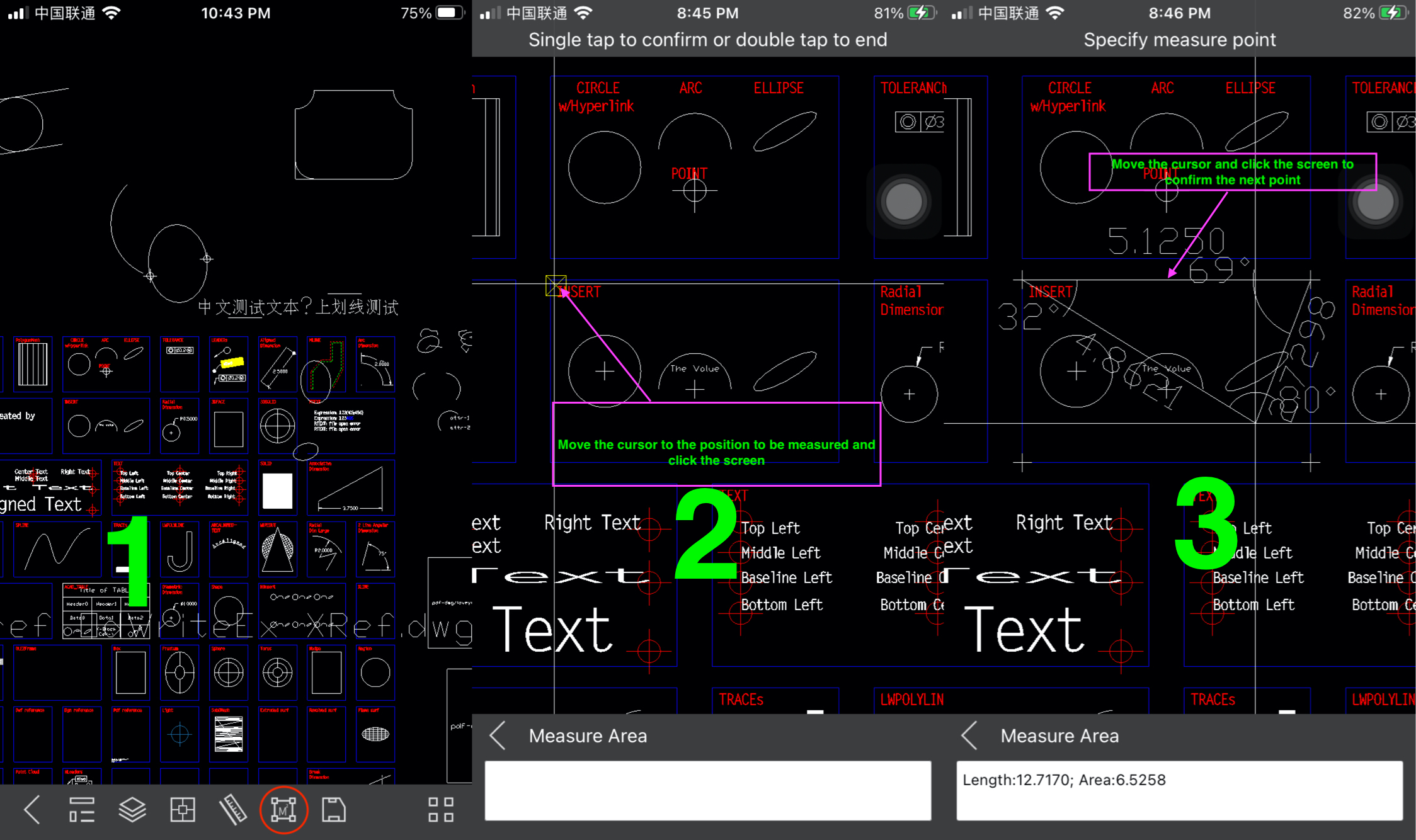

2.6.6 Full screen display
After entering full-screen display, double-click the screen to exit full-screen display
2.6.7 Zoom extents
This function displays all entities of the drawing on the screen
2.6.8 View coordinate
View the coordinates of the specified location and move the cursor to the location to view; Double-click the screen to exit the view coordinate mode.
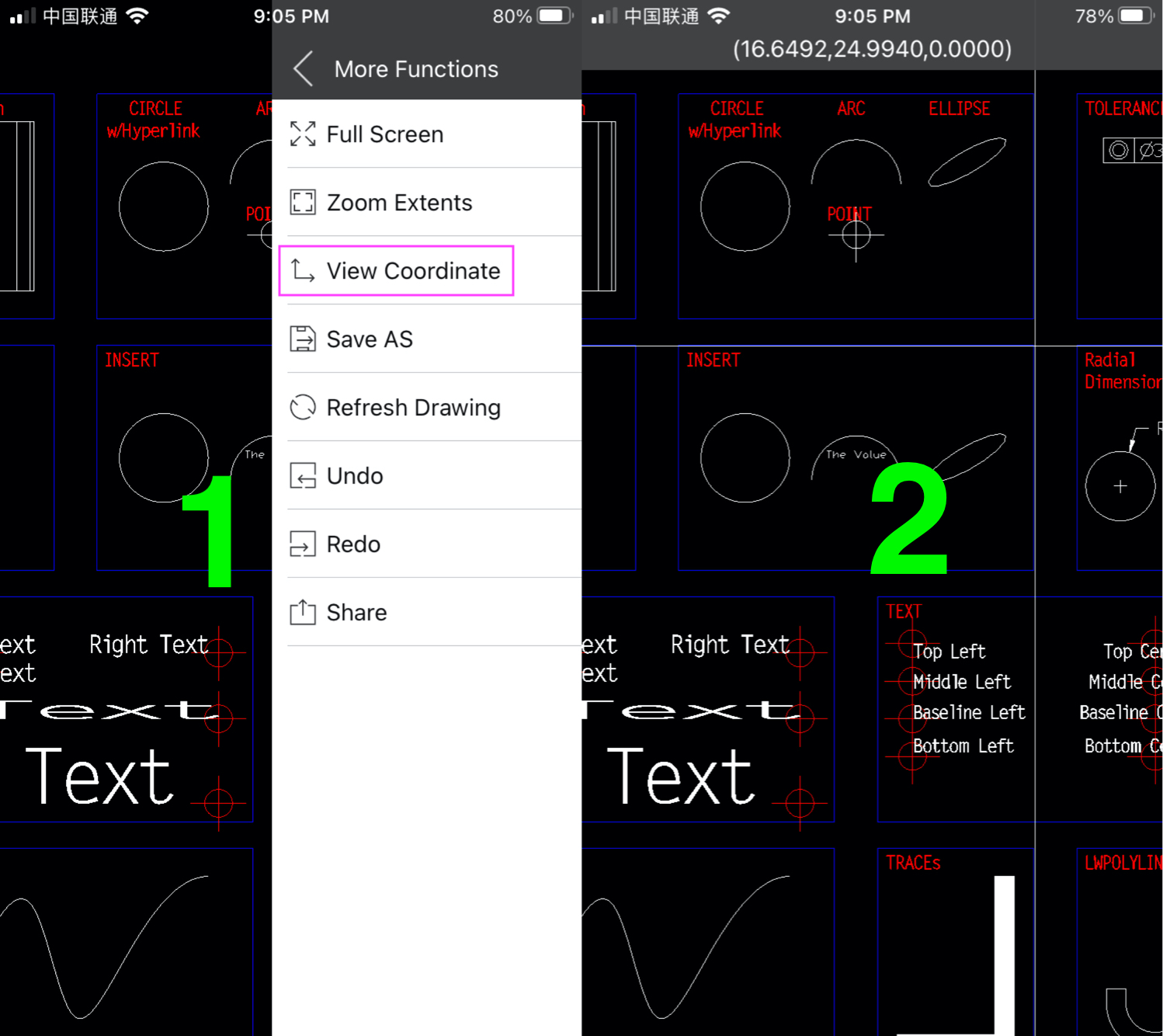
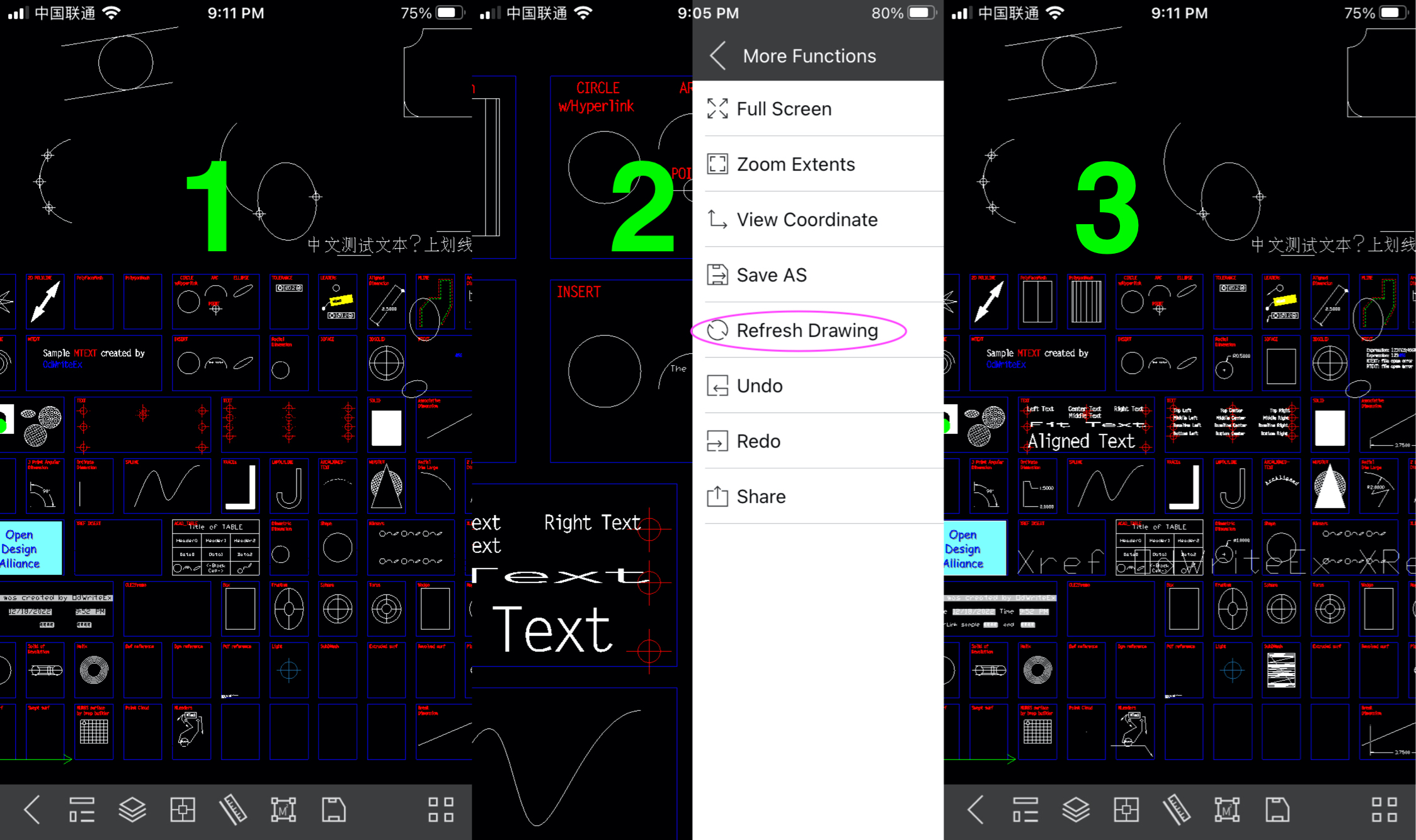
2.6.9 Refresh drawing
Some entities may not display normally after switching layout space. Use this command to display entities normally
Help document of CAD Plus Mobile的更多相关文章
- jquery mobile cannot be created in a document with origin 'null' and URL
jquery mobile cannot be created in a document with origin 'null' and URL http://zhidao.baidu.com/lin ...
- 解决jquery mobile的遇到高版本Chrome一直转圈,页面加载不出来的情况。
把这么一段代码,加到jquery.mobile.js中后问题解决了. $(document).on('mobileinit',function(){ $.mobile.changePage.defau ...
- jquery mobile 对手势触控提供了如下几个事件监听:
jquery mobile 对手势触控提供了如下几个事件监听: 复制代码代码如下: tap 当用户点屏幕时触发taphold 当用户点屏幕且保持触摸超过1秒时触发swipe 当页面被垂直或者水平拖动 ...
- chrome浏览器不兼容jQuery Mobile问题解决
最近在学习jQuery Mobile.第一次运行例子的时候发现chrome总是等待,查看后台报错.错误如下所示: 最后在stackoverflow上找到一个解决方案:将以下代码放在 jquery.mo ...
- mvc RedirectToAction、mobile 重定向地址栏未改变
@using (Html.BeginForm("actionName", "controllerName", FormMethod.Post, new { da ...
- 不通过getElementByName实现获取表单数据 (document.form表单的name值.input输入框的name值)
function update() { //document.form表单的name值.input输入框的name值 var username = document.form1.username; v ...
- 为什么加了jquery mobile 会有 Loading 字样在页面底部?【已解决】
这是一个奇怪的问题,用了jquery mobile js库,页面底部就会出现Loading字样, 解决办法如下: 1,正常加上css样式 2,一定要在jquery mobile js库加载之前,设置 ...
- 如何修改Jquery Mobile 设置默认选项
以下的默认配置可以通过$.mobile对象重新配置自定义命名空间s (字符, 默认: ""): 在jQuery Mobile中,甚至可以自定义象HTML5中的data-attrib ...
- jquery mobile AJAX特性的陷阱
简单情况是 MVC 重定向,URL不变 试了N种方式,跳来跳去,无解,服务端跳,写JS跳,生成跳转中间页跳.失败 后来一看,明明已经跳到新页了,样式什么还是原页的,有点火大了. 出去溜一圈,喝杯水,和 ...
- JQM开发Tips
1.radio Button 点击后有时候有高亮样式,有时候没有 解决方案: $("#task_form label").click(function () { $("# ...
随机推荐
- 为何AI更懂你:向量搜索,了解一下!
现在,你有没有发现自己越来越多地依赖推荐系统,有时候自己搜到的结果好像还没有AI推荐的精准. 那估计有人好奇了,推荐系统怎么这么"聪明"的呢?答案就是:"向量搜索&quo ...
- 2024-08-28:用go语言,给定一个从1开始、长度为n的整数数组nums,定义一个函数greaterCount(arr, val)可以返回数组arr中大于val的元素数量。 按照以下规则进行n次
2024-08-28:用go语言,给定一个从1开始.长度为n的整数数组nums,定义一个函数greaterCount(arr, val)可以返回数组arr中大于val的元素数量. 按照以下规则进行n次 ...
- c++学习笔记(三):函数++
函数PLUS 函数默认参数 在c++中,函数的形参列表中的形参是可以有默认值的.调用函数时,如果未传递参数的值(传入参数为空),则会使用默认值,如果指定了值,则会忽略默认值,使用传递的值. 语法:返回 ...
- 【YashanDB数据库】YAS-02079 archive log mode must be enabled when database is in replication mode
[标题]错误码处理 [问题分类]调整归档 [关键字]关闭归档.YAS-02079.replication mode [问题描述]执行alter database noarchivelog 关闭归档时, ...
- ArgoWorkflow教程(四)---Workflow & 日志归档
上一篇我们分析了argo-workflow 中的 artifact,包括 artifact-repository 配置以及 Workflow 中如何使用 artifact.本篇主要分析流水线 GC 以 ...
- JavaScript – ECMAScript 版本
参考 TC39.ECMA-262.ECMAScript 的一些事儿 简史 es3 千禧年后稳定版 es4 革命版本, 最后在 2008 年难产了 es5 2009 年推出, 拿了 es4 一些比较简单 ...
- Bit, Byte, ASCII, Unicode, UTF, Base64
前言 做项目偶尔会接触到 stream 这个感念,不管是 memory stream 还是 file stream,它们又会提到 bytes. 还有像 Identity – 安全基础知识 中提到的 S ...
- [USACO1.5] 八皇后 Checker Challenge 题解
[USACO1.5] 八皇后 Checker Challenge 题目描述 一个如下的 \(6 \times 6\) 的跳棋棋盘,有六个棋子被放置在棋盘上,使得每行.每列有且只有一个,每条对角线(包括 ...
- HTTP——简介
HTTP
- 暑假集训CSP提高模拟4
A.White and Black 暴力的 \(O(nq)\) 做法比较显然,因为对于根节点来说,只有它自己可以改变自己的颜色,因此如果它是黑色则一定需要更改自己,同时把更改传下去(应该没有那种每次真 ...