
SpringBoot事件驱动开发
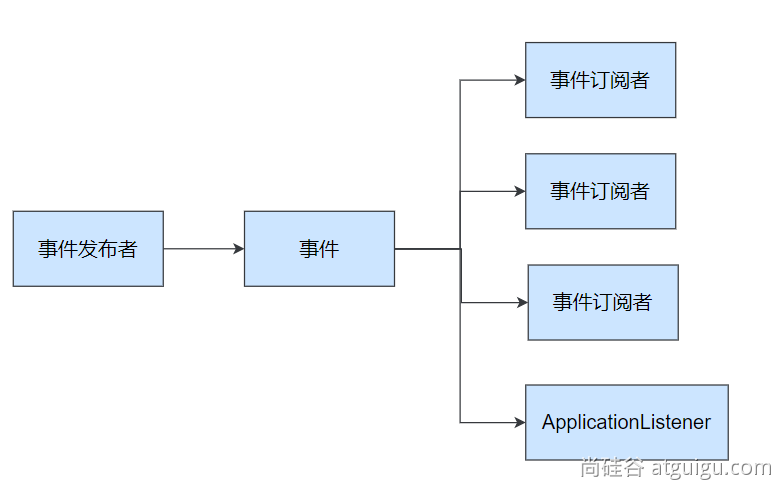
应用启动过程生命周期事件感知(9大事件)、应用运行中事件感知(无数种)
- 事件发布:
ApplicationEventPublisherAware或注入:ApplicationEventMulticaster - 事件监听:
组件 + @EventListener
场景:
当用户登录后,我们需要为用户增加一个积分、随机获取一张优惠券、增加日志等,传统的开发模式为在用户登录的login()方法后调用积分、优惠券、日志服务。这样在后续的开发中login()方法可能会频繁变动,根据设计模式方法应该对新增开放,修改关闭,所以可以在login()方法中发布登录成功的事件,在积分、优惠券、日志服务增加对事件的监听进行后续处理即可。
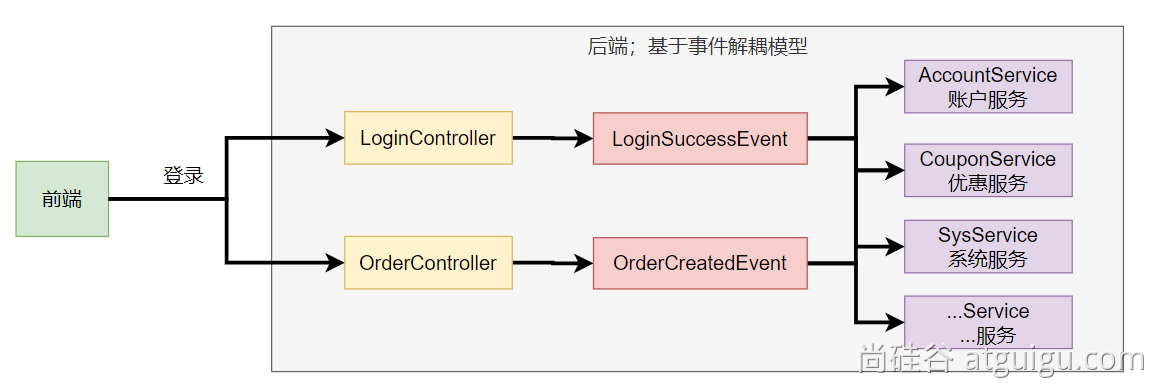
编写代码
LoginController.java
在login()方法后发布登录成功事件
package com.atguigu.boot3.core.controller;

import com.atguigu.boot3.core.entity.UserEntity;

import com.atguigu.boot3.core.event.EventPublisher;

import com.atguigu.boot3.core.event.LoginSuccessEvent;

import org.springframework.beans.factory.annotation.Autowired;

import org.springframework.web.bind.annotation.GetMapping;

import org.springframework.web.bind.annotation.RequestParam;

import org.springframework.web.bind.annotation.RestController;

/**

 * @date 2023/10/30 18:57

 */

@RestController

public class LoginController {

    @Autowired

    EventPublisher eventPublisher;

    @GetMapping("/login")

    public String login(@RequestParam("username") String username,

                        @RequestParam("passwd")String passwd){

        //业务处理登录

        System.out.println("业务处理登录完成....");

        //1、创建事件信息

        LoginSuccessEvent event = new LoginSuccessEvent(new UserEntity(username, passwd));

        //2、发送事件

        eventPublisher.publishEvent(event);

        //设计模式:对新增开放,对修改关闭

        return username+"登录成功";

    }

}
LoginSuccessEvent.java 事件定义
通过继承ApplicationEvent类,将source传给父类对象。
package com.atguigu.boot3.core.event;

import com.atguigu.boot3.core.entity.UserEntity;

import org.springframework.context.ApplicationEvent;

/**

 * 登录成功事件

 * @author 朱俊伟

 * @date 2023/10/30 18:56

 */

public class LoginSuccessEvent  extends ApplicationEvent {

    /**

     * @param source  代表是谁登录成了

     */

    public LoginSuccessEvent(UserEntity source) {

        super(source);

    }

}
EventPublisher.java事件发布器
定义事件发布器,实现
ApplicationEventPublisherAware接口,用来发布事件
package com.atguigu.boot3.core.event;

import org.springframework.context.ApplicationEvent;

import org.springframework.context.ApplicationEventPublisher;

import org.springframework.context.ApplicationEventPublisherAware;

import org.springframework.stereotype.Component;

/**

 * @date 2023/10/30 18:58

 */

@Component

public class EventPublisher implements ApplicationEventPublisherAware {

    /**

     * 底层发送事件用的组件,SpringBoot会通过ApplicationEventPublisherAware接口自动注入给我们

     * 事件是广播出去的。所有监听这个事件的监听器都可以收到

     */

    ApplicationEventPublisher applicationEventPublisher;

    @Override

    public void setApplicationEventPublisher(ApplicationEventPublisher applicationEventPublisher) {

        this.applicationEventPublisher = applicationEventPublisher;

    }

    /**

     * 发布事件

     * @param event 事件

     */

    public void publishEvent(LoginSuccessEvent event) {

        applicationEventPublisher.publishEvent(event);

    }

}
CouponService.java 优惠券服务
可以通过给方法定义
@EventListener注解,代表该类监听某种事件
可以给监听器使用@Order(1)注解定义监听器的顺序,数字越小,越先执行
package com.atguigu.boot3.core.service;

import com.atguigu.boot3.core.entity.UserEntity;

import com.atguigu.boot3.core.event.LoginSuccessEvent;

import lombok.extern.slf4j.Slf4j;

import org.springframework.context.event.EventListener;

import org.springframework.core.annotation.Order;

import org.springframework.stereotype.Service;

/**

 * 优惠券服务

 * @date 2023/10/30 19:06

 */

@Service

@Slf4j

public class CouponService {

    @Order(1)

    @EventListener

    public void onEvent(LoginSuccessEvent loginSuccessEvent){

        log.info("CouponService.onEvent....");

        UserEntity user = (UserEntity) loginSuccessEvent.getSource();

        sendCoupon(user);

    }

    public void sendCoupon(String username){

        System.out.println(username + " 随机得到了一张优惠券");

    }

    public void sendCoupon(UserEntity user){

        sendCoupon(user.getUsername());

    }

}
AccountService.java 积分服务
可以实现
ApplicationListener接口来监听事件
实现onApplicationEvent方法来进行事件的处理
package com.atguigu.boot3.core.service;

import com.atguigu.boot3.core.entity.UserEntity;

import com.atguigu.boot3.core.event.LoginSuccessEvent;

import lombok.extern.slf4j.Slf4j;

import org.springframework.context.ApplicationListener;

import org.springframework.core.annotation.Order;

import org.springframework.stereotype.Service;

/**

 * 积分服务

 * @date 2023/10/30 19:03

 */

@Service

@Slf4j

@Order(2)

public class AccountService implements ApplicationListener<LoginSuccessEvent> {

    @Override

    public void onApplicationEvent(LoginSuccessEvent event) {

      log.info("AccountService.onApplicationEvent.....");

        UserEntity user = (UserEntity) event.getSource();

        addAccountScore(user);

    }

    public void addAccountScore(UserEntity user){

        System.out.println(user.getUsername() +" 加了1分");

    }

}
SysService.java 日志服务
package com.atguigu.boot3.core.service;

import com.atguigu.boot3.core.entity.UserEntity;

import com.atguigu.boot3.core.event.LoginSuccessEvent;

import lombok.extern.slf4j.Slf4j;

import org.springframework.context.event.EventListener;

import org.springframework.core.annotation.Order;

import org.springframework.stereotype.Service;

/**

 * 日志服务

 * @date 2023/10/30 19:09

 */

@Service

@Slf4j

public class SysService {

    @EventListener

    @Order(3)

    public void onEvent(LoginSuccessEvent event){

        log.info("SysService.onEvent....");

        UserEntity user = (UserEntity) event.getSource();

        recordLog(user);

    }

    public void recordLog(UserEntity user){

        System.out.println(user.getUsername() + "登录信息已被记录");

    }

}
UserEntity.java实体类
package com.atguigu.boot3.core.entity;

import lombok.AllArgsConstructor;

import lombok.Builder;

import lombok.Data;

import lombok.NoArgsConstructor;

/**

 * @date 2023/10/30 18:55

 */

@AllArgsConstructor

@NoArgsConstructor

@Data

@Builder

public class UserEntity {

    private String username;

    private String passwd;

}
调用
http://localhost:8080/login?username=admin&passwd=123
控制台打印结果
业务处理登录完成....

2023-10-30T19:20:11.670+08:00  INFO 11984 --- [nio-8080-exec-5] c.a.boot3.core.service.CouponService     : CouponService.onEvent....

admin 随机得到了一张优惠券

2023-10-30T19:20:11.671+08:00  INFO 11984 --- [nio-8080-exec-5] c.a.boot3.core.service.AccountService    : AccountService.onApplicationEvent.....

admin 加了1分

2023-10-30T19:20:11.671+08:00  INFO 11984 --- [nio-8080-exec-5] c.atguigu.boot3.core.service.SysService  : SysService.onEvent....

admin登录信息已被记录
在业务类中增加方法来实现对事件的监听个人感觉是比较好的方法,可以更好的调节事件处理的顺序以及减少业务类对实现接口的定义。
参考:
https://www.yuque.com/leifengyang/springboot3/lliphvul8b19pqxp#Cq1vD
SpringBoot事件驱动开发的更多相关文章
- springboot区分开发、测试、生产多环境的应用配置(二)
转:https://www.jb51.net/article/139119.htm springboot区分开发.测试.生产多环境的应用配置(二) 这篇文章主要给大家介绍了关于maven profil ...
- SpringBoot Web开发(5) 开发页面国际化+登录拦截
SpringBoot Web开发(5) 开发页面国际化+登录拦截 一.页面国际化 页面国际化目的:根据浏览器语言设置的信息对页面信息进行切换,或者用户点击链接自行对页面语言信息进行切换. **效果演示 ...
- SpringBoot Web开发(4) Thymeleaf模板与freemaker
SpringBoot Web开发(4) Thymeleaf模板与freemaker 一.模板引擎 常用得模板引擎有JSP.Velocity.Freemarker.Thymeleaf SpringBoo ...
- springboot区分开发、测试、生产多环境的应用配置
转:https://blog.csdn.net/daguairen/article/details/79236885 springboot区分开发.测试.生产多环境的应用配置(一) Spring可使用 ...
- 千锋很火的SpringBoot实战开发教程视频
springboot是什么? Spring Boot是由Pivotal团队提供的全新框架,其设计目的是用来简化新Spring应用的初始搭建以及开发过程.该框架使用了特定的方式来进行配置,从而使开发人员 ...
- springboot 快速开发的定制补充
增强 SpringBoot 快速开发工具 项目地址:https://gitee.com/sanri/web-ui 优点:这是一个 web 通用配置的组件,即插即用,可用于新项目或私活.是对 Sprin ...
- springboot实战开发全套教程,让开发像搭积木一样简单!Github星标已上10W+!
前言 先说一下,这份教程在github上面星标已上10W,下面我会一一给大家举例出来全部内容,原链接后面我会发出来!首先我讲一下接下来我们会讲到的知识和技术,对比讲解了多种同类技术的使用手日区别,大家 ...
- springboot注解开发
可以毫不夸张地说,这篇文章介绍的 Spring/SpringBoot 常用注解基本已经涵盖你工作中遇到的大部分常用的场景.对于每一个注解我都说了具体用法,掌握搞懂,使用 SpringBoot 来开发项 ...
- SpringBoot快速开发REST服务最佳实践
一.为什么选择SpringBoot Spring Boot是由Pivotal团队提供的全新框架,被很多业内资深人士认为是可能改变游戏规则的新项目.早期我们搭建一个SSH或者Spring Web应用,需 ...
- springboot快速开发(简单web)
这是一个springboot基础配置文件介绍的demo.只涉及到 控制层与前端的简单交互,用于验证代码的畅通. spring-boot pom.xml解释 <?xml version=&quo ...
随机推荐
- Q:rdp远程桌面如何传输文件
通过自带的rdp远程连接传输文件 方法: 1.按下win+r键 输入 mstsc.打开远程桌面选择选项如下图 2.选择本地资源选项卡,打开详细信息选项 3.在详细信息选项卡中点开驱动器前面的+号,选择 ...
- 关于SpringBoot的测试类中运行时报空指针异常
1. 首先给出我所遇到的问题源代码 一直会报错 java.lang.NullPointerException: Cannot invoke "com.course.rainngcourseb ...
- Docker部署 .Net程序
项目准备 首先创建一个项目,这里准备的是api项目,当然也可以是其他项目,按照自己需要的项目创建即可: 添加Dockerfile 接下来添加Dockfile文件,Dockerfile文件是Do ...
- Drasi Sources SDK
什么是Drasi数据源(Source)? Source提供了与系统的连接,Drasi 可以将这些系统视为变化源.source 在 Drasi 中执行三个重要功能: 处理源系统生成的更改日志/源,并将这 ...
- 【Unity】光照解决方案笔记
[Unity]光照解决方案笔记 https://docs.unity.cn/cn/2022.3/Manual/BestPracticeLightingPipelines.html 确定对象显示效果的三 ...
- kalibr标定单相机,自用指南,防忘记
1. 标定环境 1.1 从源码编译(linux环境,建议ubuntu 18或20) 步骤见 kalibr wiki 1.2 Docker 如果实体机为Ubuntu,则见official docker ...
- .NET周刊【2月第4期 2025-02-23】
国内文章 [翻译] 为什么 Tracebit 用 C# 开发 https://www.cnblogs.com/liuliu-66/p/-/why-tracebit-is-written-in-c-sh ...
- vue练习用免费开源api大全
1. 网易云api 网易云api是网上一位大神工具网易云获取的,数据都是真实的网易云数据 2. api大全 这是csdn一个兄弟收集的,种类挺多,就是有一些需要money,不过大部分还是免费的 3. ...
- MySQL超大表删除数据过程
背景 笔者在公司负责公司的OpenAPI应用,估产生了调用审计的需求.对于存储这些AccessLog,虽然业界有很合适的架构和理论,奈何我司已成本优先,且作为toB的项目,调用量并不算特别大,每天也就 ...
- go 数组或切片转为字符串
数组转字符串 将 var slice = []int{1, 2, 3, 4},转为 [1,2,3,4] 可以使用 json.Marshal(),这是因为 json 包,会将数组和切片值编码为JSON数 ...