
Ant Design Pro项目ProTable怎么实现单元格合并效果
前情
公司有经常需要做一些后台管理页面,我们选择了Ant Design Pro,它是基于 Ant Design 和 umi 的封装的一整套企业级中后台前端/设计解决方案。
产品效果图
最新接到的一个后台管理界面需求,需要根据相同的itemId做单元格合并,要实现的效果如下:
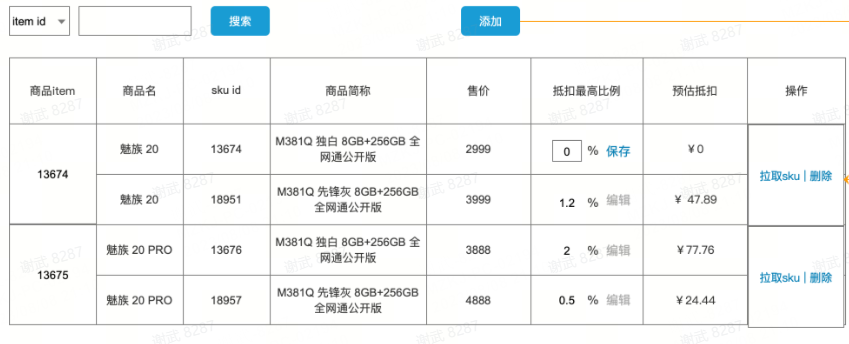
解决方案
方式1:使用表格的rowspan属性来实现单元格合并
关键示例代码:
/**

 * 实现单元格合并

 * 在原始数据中加上rowSpan属性,该值为接下来和当前项itemId相同的个数+1,

 * 其它相同的项rowSpan设为0即为不显示

 * @param list

 */

const dataProcessingForRowspan = (list, key) => {

  let repeatCount = 1;

  let startIndex = 0;

  list.forEach((item, index) => {

    if (index < list.length - 1 && item.itemId === list[index+1].itemId) {

      item.rowSpan = 0;

      repeatCount += 1

    } else {

      list[startIndex].rowSpan = repeatCount;

      startIndex = index + 1;

      repeatCount = 1;

    }

  })

}

const columns: ProColumns<API.EduAuthenticatedUserItem>[] = [

    {

      title: '商品itemId',

      dataIndex: 'itemId',

      editable: false,

      render: (text: any, record: any, index: number) => {

        return {

          children: text || '',

          props: {

            rowSpan: record.rowSpan ? record.rowSpan : 0

          }

        }

      }

    },

		...

    {

      title: '操作',

      dataIndex: 'option',

      valueType: 'option',

      render: (text, record:any, index) => {

        return {

          children: [

            <a

              key="config"

              onClick={() => {

              }}

            >

              拉取sku

            </a>,

            ' | '

            ,

            <a

              key="delete"

              onClick={() => {

              }}

            >

              删除

            </a>,

          ],

          props: {

            rowSpan: record.rowSpan ? record.rowSpan : 0

          }

        }

      },

    },

  ];

return (

<PageContainer>

      <ProTable<API.EduAuthenticatedUserItem, API.AuthenticatedUserParams>

        headerTitle=''

        rowKey="skuId"

        search={{

          labelWidth: 120,

        }}

        toolBarRender={() => [

        ]}

        request={async (params) => {

          await waitTime(3000)

					// 这里是模拟的数据

          const initData = [{

            itemId: '1',

            name: '魅族20',

            skuId: 'a123456b',

            productAbbreviation: '魅族20 独白 8GB+256GB 全网通公开版',

            price: 2459,

            maximumDeduction: 3,

            estimatedDeduction: 49.18

          },{

            itemId: '1',

            name: '魅族20',

            skuId: 'b123456b',

            productAbbreviation: '魅族20 独白 8GB+256GB 全网通公开版',

            price: 2459,

            maximumDeduction: 2,

            estimatedDeduction: 49.18

          },{

            itemId: '2',

            name: '魅族20',

            skuId: 'c123456b',

            productAbbreviation: '魅族20 独白 8GB+256GB 全网通公开版',

            price: 2459,

            maximumDeduction: 1,

            estimatedDeduction: 49.18

          },{

            itemId: '2',

            name: '魅族20',

            skuId: 'd123456b',

            productAbbreviation: '魅族20 独白 8GB+256GB 全网通公开版',

            price: 2459,

            maximumDeduction: 1,

            estimatedDeduction: 49.18

          },{

            itemId: '2',

            name: '魅族20',

            skuId: 'e123456b',

            productAbbreviation: '魅族20 独白 8GB+256GB 全网通公开版',

            price: 2459,

            maximumDeduction: 1,

            estimatedDeduction: 49.18

          },{

            itemId: '3',

            name: '魅族20',

            skuId: 'f123456b',

            productAbbreviation: '魅族20 独白 8GB+256GB 全网通公开版',

            price: 2459,

            maximumDeduction: 1,

            estimatedDeduction: 49.18

          }]

          dataProcessingForRowspan(initData, 'itemId');

          return {

            data: initData,

            // success 请返回 true,

            // 不然 table 会停止解析数据,即使有数据

            success: true,

            // 不传会使用 data 的长度,如果是分页一定要传

            total: 5,

          };

        }}

        columns={columns}

      />

    </PageContainer>

);
方式2:直接自定义reander方法,在一个单元格中生成遍历的内容,内容块之间加下边框,实现伪单元格合并效果
关键示例代码:
const columns: ProColumns<API.EduAuthenticatedUserItem>[] = [

    {

      title: '商品itemId',

      dataIndex: 'itemId',

      editable: false,

    },

    {

      title: '商品名',

      dataIndex: 'itemName',

    },

    {

      title: 'skuId',

      dataIndex: 'itemSkuList',

      key: 'skuId',

      render: (text: any, record: any) => {

        return record.itemSkuList.map((item: any, indexIn: number) => {

          return (

            <div

              key={item.skuId + '' + indexIn}

              style={{

                borderBottom: indexIn === record.itemSkuList.length - 1 ? '' : '1px solid #f0f0f0',

              }}

            >

              <div

                style={{

                  width: '100%',

                  height: '50px',

                  display: 'flex',

                  justifyContent: 'center',

                  alignItems: 'center',

                  margin: 'auto',

                }}

              >

                {item['skuId']}

              </div>

            </div>

          );

        });

      },

    },

    ...

    {

      title: '预估抵扣',

      dataIndex: 'itemSkuList',

      key: 'predictDeductionPrice',

      editable: false,

      hideInSearch: true,

      render: (text: any, record: any) => {

        return record.itemSkuList.map((item: any, indexIn: number) => {

          return (

            <div

              key={item.skuId + '' + indexIn}

              style={{

                borderBottom: indexIn === record.itemSkuList.length - 1 ? '' : '1px solid #f0f0f0',

              }}

            >

              <div

                style={{

                  width: '100%',

                  height: '50px',

                  display: 'flex',

                  justifyContent: 'center',

                  alignItems: 'center',

                  margin: 'auto',

                }}

              >

                {item['predictDeductionPrice']}

              </div>

            </div>

          );

        });

      },

    },

    {

      title: '操作',

      dataIndex: 'option',

      valueType: 'option',

      render: (text: any, record: any) => {

        return (

          <>

            <a

              key="config"

              onClick={async () => {

              }}

            >

              拉取sku

            </a>{' '}

            |{' '}

            <a

              key="delete"

              onClick={async () => {

              }}

            >

              删除

            </a>

          </>

        );

      },

    },

  ];

  return (

    <PageContainer>

      <ProTable<API.EduAuthenticatedUserItem, API.AuthenticatedUserParams>

        headerTitle=''

        rowKey="itemId"

        search={{

          labelWidth: 120,

        }}

        toolBarRender={() => [

        ]}

        request={async (params) => {

          await waitTime(3000)

          const initData = [{

            itemId: '1',

            itemSkuList:[

              {

                name: '魅族20',

                skuId: 'a123456b',

                productAbbreviation: '魅族20 独白 8GB+256GB 全网通公开版',

                price: 2459,

                maximumDeduction: 3,

                estimatedDeduction: 49.18

              },{

                name: '魅族20',

                skuId: 'b123456b',

                productAbbreviation: '魅族20 独白 8GB+256GB 全网通公开版',

                price: 2459,

                maximumDeduction: 2,

                estimatedDeduction: 49.18

              },{

                name: '魅族20',

                skuId: 'c123456b',

                productAbbreviation: '魅族20 独白 8GB+256GB 全网通公开版',

                price: 2459,

                maximumDeduction: 1,

                estimatedDeduction: 49.18

              },{

              }

            ]

          },{

            itemId: '2',

            itemSkuList: [

              {

                name: '魅族20',

                skuId: 'd123456b',

                productAbbreviation: '魅族20 独白 8GB+256GB 全网通公开版',

                price: 2459,

                maximumDeduction: 1,

                estimatedDeduction: 49.18

              },{

                name: '魅族20',

                skuId: 'e123456b',

                productAbbreviation: '魅族20 独白 8GB+256GB 全网通公开版',

                price: 2459,

                maximumDeduction: 1,

                estimatedDeduction: 49.18

              }

            ]

          },{

            itemId: '3',

            name: '魅族20',

            skuId: 'f123456b',

            productAbbreviation: '魅族20 独白 8GB+256GB 全网通公开版',

            price: 2459,

            maximumDeduction: 1,

            estimatedDeduction: 49.18

          }]

          dataProcessingForRowspan(initData, 'itemId');

          return {

            data: initData,

            // success 请返回 true,

            // 不然 table 会停止解析数据,即使有数据

            success: true,

            // 不传会使用 data 的长度,如果是分页一定要传

            total: 5,

          };

        }}

        columns={columns}

      />

    </PageContainer>

  );
- 注:二种方式是对不同的数据结构做的更优的方法,如果只想用其中一种,二种数据结构互转一下也可以的。
Ant Design Pro项目ProTable怎么实现单元格合并效果的更多相关文章
- Ant Design Pro项目打开页设为登录或者其他页面
Ant Design Pro项目打开页设为登录或者其他页面 一.打开页设为登录页 首先找到utils包中的authority文件,在该文件中找到如下代码: export function getAut ...
- 修改TreeList单元格格式(实现类似单元格合并效果)
关键点:(1)TreeList中显示的单元格默认不显示上.下.左.右边框,显示的是TreeList自身的行横边框.列纵边框,具体对应TreeList属性中OptionView项下的ShowVertLi ...
- 【后台管理系统】—— Ant Design Pro 项目爬坑(一)
1.表单rule中可以分对象处理不同规则 <FormItem label="类型名称" {...formLayout}> { form.getFieldDecorato ...
- element-ui 格式化树形数组在table组件中展示(单元格合并)
最近做的项目涉及到很多单元格合并问题,element-ui组件对于单元格合并的处理虽然很灵活,但是需要事先计算好每个单元格合并的rowspan和colspan,直接在span-method属性中计算实 ...
- ant design pro(一)安装、目录结构、项目加载启动【原始、以及idea开发】
一.概述 1.1.脚手架概念 编程领域中的“脚手架(Scaffolding)”指的是能够快速搭建项目“骨架”的一类工具.例如大多数的React项目都有src,public,webpack配置文件等等, ...
- 使用ant design pro搭建项目
脚手架搭建 git clone --depth=1 https://github.com/ant-design/ant-design-pro.git my-project 然后 cd my-proje ...
- 阿里开源项目之Ant Design Pro
本篇文章主要包含的内容有三个方面. 第一.Ant Design Pro简介; 第二.Ant Design Pro能做什么; 第三.初步使用; 我相信通过这三个方面的讲解能让你大概知道Ant Desig ...
- 【后台管理系统】—— Ant Design Pro入门学习&项目实践笔记(三)
前言:前一篇记录了[后台管理系统]目前进展开发中遇到的一些应用点,这一篇会梳理一些自己学习Ant Design Pro源码的功能点.附:Ant Design Pro 在线预览地址. Dashboard ...
- Ant Design Pro+Electron+electron-builder实现React应用脱离浏览器,桌面安装运行
ant-design-pro ----> version :2.3.1 由于网上Ant Design Pro+Electron的资料太少,我就贡献一点经验 最近需要讲AntD Pro项目(以 ...
- ant design pro (十五)advanced 使用 API 文档工具
一.概述 原文地址:https://pro.ant.design/docs/api-doc-cn 在日常开发中,往往是前后端分离的,这个时候约定好一套接口标准,前后端各自独立开发,就不会被对方的技术难 ...
随机推荐
- IDEA如何查看每一行代码的提交记录(人员,时间)
前言 我们在使用IDEA开发时,一般需要使用git来管理我们的代码,而且大家协同开发. 有时候,我们在开发的时候,经常需要看一下当前的代码时谁开发的,除了看类上面的作者外,更精细的方式是看每一行代 ...
- 对 LLM 工具使用进行统一
我们为 LLM 确立了一个跨模型的 统一工具调用 API.有了它,你就可以在不同的模型上使用相同的代码,在 Mistral.Cohere.NousResearch 或 Llama 等模型间自由切换,而 ...
- Kubernetes Deployment控制器(二十)
前面我们学习了 ReplicaSet 控制器,了解到该控制器是用来维护集群中运行的 Pod 数量的,但是往往在实际操作的时候,我们反而不会去直接使用 RS,而是会使用更上层的控制器,比如我们今天要学习 ...
- 【赵渝强老师】什么是Oracle的数据字典?
数据字典是oracle存放有关数据库信息的地方,几乎所有的系统信息和对象信息都可在数据字典中进行查询.数据字典是oracle数据库系统的信息核心,它是一组提供有关数据库信息的表和视图的集合,这些表和视 ...
- 常见函数 ,过滤函数 直接导入使用 ,filters.js 文件 批量注册过滤器
// import parseTime, formatTime and set to filter /** * Show plural label if time is plural number * ...
- .NET高级调试 - 3.9~3.11代码审查以及杂项命令
简介 代码审查就是观察代码,代码形态分为三种C#代码>IL代码>汇编代码.通过代码审查,可以从原始代码的字节流中推测出逻辑详情 高级调试本质上属于逆向分析,更多的是以汇编为主. 反汇编代码 ...
- C#通过JS变量提取天天基金API返回的基金净值
目录 天天基金API 添加项目依赖项 请求 API 数据 获取所有基金代码 获取基金净值信息 功能测试 参考链接 天天基金API 常见的 API 如下: 所有基金代码:http://fund.east ...
- 为什么会有unknown模块
当一个模块在free后,他的线程仍然在运行时,会导致GetModuleName失败,返回unknown
- Nuxt.js 应用中的 imports:context 事件钩子详解
title: Nuxt.js 应用中的 imports:context 事件钩子详解 date: 2024/10/29 updated: 2024/10/29 author: cmdragon exc ...
- 对于特定的游戏问题使用启发式算法可以取得比AI算法更好的表现
相关: Using A.I. to DOMINATE NERDS in TETRIS 有些问题的求解可以通过建模将其转换为强化学习问题,然后再使用强化学习算法对其进行求解,但是很多问题如果不建模为强化 ...