
第一个helloworld,有点小兴奋
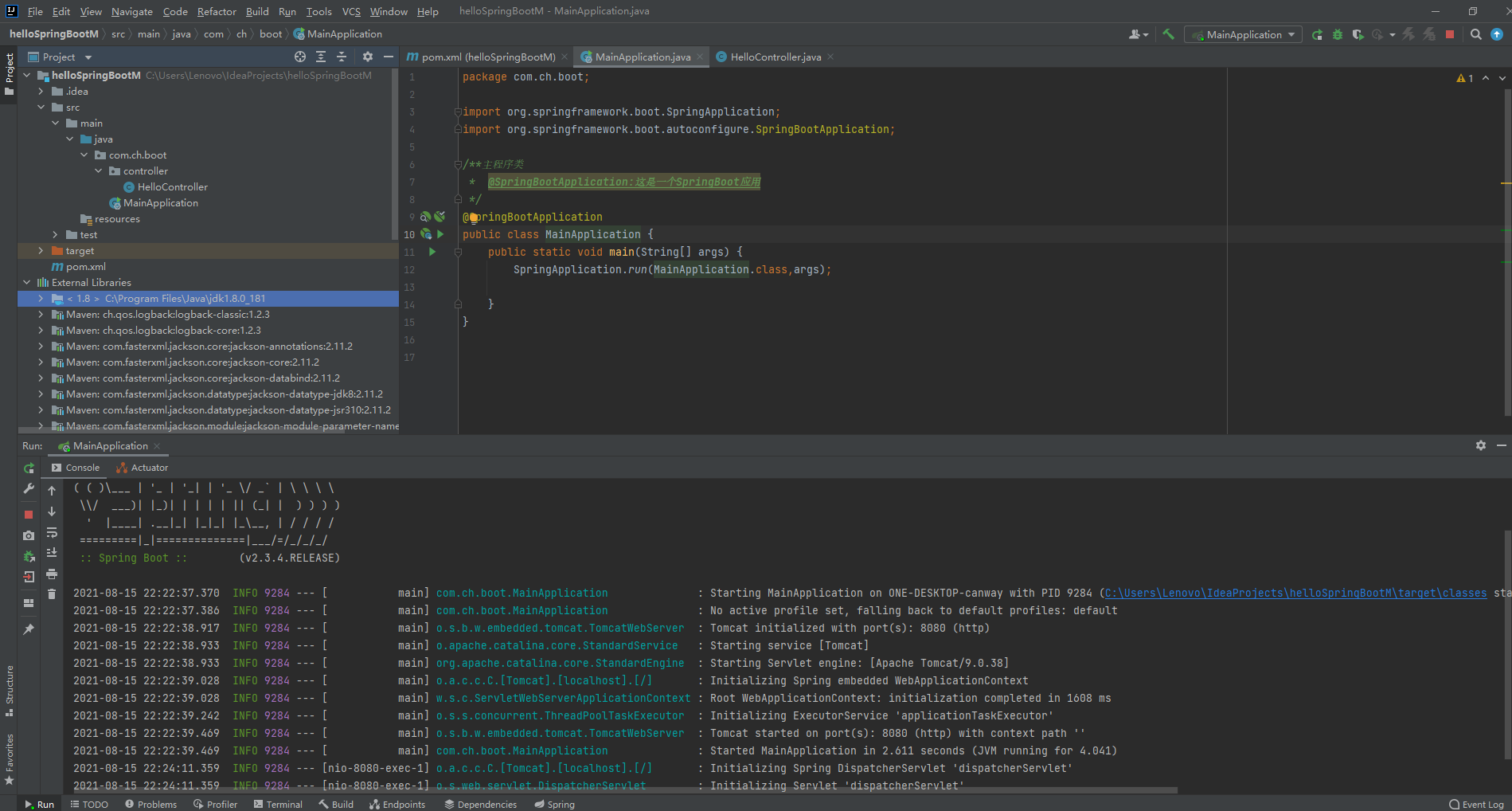
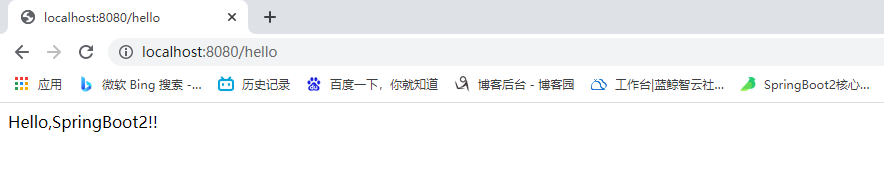
@SpringBootApplication
package com.ch.boot;

import org.springframework.boot.SpringApplication;

import org.springframework.boot.autoconfigure.SpringBootApplication;

/**主程序类

 *  @SpringBootApplication:这是一个SpringBoot应用

 */

@SpringBootApplication

public class MainApplication {

    public static void main(String[] args) {

        SpringApplication.run(MainApplication.class,args);

    }

}
HelloController
package com.ch.boot.controller;

import org.springframework.stereotype.Controller;

import org.springframework.web.bind.annotation.RequestMapping;

import org.springframework.web.bind.annotation.ResponseBody;

import org.springframework.web.bind.annotation.RestController;

@ResponseBody

@Controller

@RestController

public class HelloController {

    @RequestMapping("/hello")

    public String handle01(){

        return "Hello,SpringBoot2!!";

    }

}
配置文件
pom.xml
<?xml version="1.0" encoding="UTF-8"?>

<project xmlns="http://maven.apache.org/POM/4.0.0"

         xmlns:xsi="http://www.w3.org/2001/XMLSchema-instance"

         xsi:schemaLocation="http://maven.apache.org/POM/4.0.0 http://maven.apache.org/xsd/maven-4.0.0.xsd">

    <modelVersion>4.0.0</modelVersion>

    <groupId>com.ch</groupId>

    <artifactId>helloSpringBootM</artifactId>

    <version>1.0-SNAPSHOT</version>

    <properties>

        <maven.compiler.source>8</maven.compiler.source>

        <maven.compiler.target>8</maven.compiler.target>

    </properties>

    <parent>

        <groupId>org.springframework.boot</groupId>

        <artifactId>spring-boot-starter-parent</artifactId>

        <version>2.3.4.RELEASE</version>

    </parent>

    <dependencies>

        <dependency>

            <groupId>org.springframework.boot</groupId>

            <artifactId>spring-boot-starter-web</artifactId>

        </dependency>

    </dependencies>

</project>
为什么用SpringBoot
Spring Boot makes it easy to create stand-alone, production-grade Spring based Applications that you can "just run".
能快速创建出生产级别的Spring应用
2.1、SpringBoot优点
- Create stand-alone Spring applications
- 创建独立Spring应用
- Embed Tomcat, Jetty or Undertow directly (no need to deploy WAR files)
- 内嵌web服务器
- Provide opinionated 'starter' dependencies to simplify your build configuration
- 自动starter依赖,简化构建配置
- Automatically configure Spring and 3rd party libraries whenever possible
- 自动配置Spring以及第三方功能
- Provide production-ready features such as metrics, health checks, and externalized configuration
- 提供生产级别的监控、健康检查及外部化配置
- Absolutely no code generation and no requirement for XML configuration
- 无代码生成、无需编写XML
SpringBoot是整合Spring技术栈的一站式框架
SpringBoot是简化Spring技术栈的快速开发脚手架
2.2、SpringBoot缺点
- 人称版本帝,迭代快,需要时刻关注变化
- 封装太深,内部原理复杂,不容易精通
3、时代背景
3.1、微服务
James Lewis and Martin Fowler (2014) 提出微服务完整概念。https://martinfowler.com/microservices/
In short, the microservice architectural style is an approach to developing a single application as a suite of small services, each running in its own process and communicating with lightweight mechanisms, often an HTTP resource API. These services are built around business capabilities and independently deployable by fully automated deployment machinery. There is a bare minimum of centralized management of these services, which may be written in different programming languages and use different data storage technologies.-- James Lewis and Martin Fowler (2014)
- 微服务是一种架构风格
- 一个应用拆分为一组小型服务
- 每个服务运行在自己的进程内,也就是可独立部署和升级
- 服务之间使用轻量级HTTP交互
- 服务围绕业务功能拆分
- 可以由全自动部署机制独立部署
- 去中心化,服务自治。服务可以使用不同的语言、不同的存储技术
3.2、分布式
分布式的困难
- 远程调用
- 服务发现
- 负载均衡
- 服务容错
- 配置管理
- 服务监控
- 链路追踪
- 日志管理
- 任务调度
- ......
分布式的解决
- SpringBoot + SpringCloud
3.3、云原生
原生应用如何上云。 Cloud Native
上云的困难
- 服务自愈
- 弹性伸缩
- 服务隔离
- 自动化部署
- 灰度发布
- 流量治理
- ......
上云的解决
4、如何学习SpringBoot
4.1、官网文档架构
查看版本新特性;
https://github.com/spring-projects/spring-boot/wiki#release-notes
SpringBoot2入门
1、系统要求
- Java 8 & 兼容java14 .
- Maven 3.3+
- idea 2019.1.2
1.1、maven设置
<mirrors>

      <mirror>

        <id>nexus-aliyun</id>

        <mirrorOf>central</mirrorOf>

        <name>Nexus aliyun</name>

        <url>http://maven.aliyun.com/nexus/content/groups/public</url>

      </mirror>

  </mirrors>

  <profiles>

         <profile>

              <id>jdk-1.8</id>

              <activation>

                <activeByDefault>true</activeByDefault>

                <jdk>1.8</jdk>

              </activation>

              <properties>

                <maven.compiler.source>1.8</maven.compiler.source>

                <maven.compiler.target>1.8</maven.compiler.target>

                <maven.compiler.compilerVersion>1.8</maven.compiler.compilerVersion>

              </properties>

         </profile>

  </profiles>
2、HelloWorld
需求:浏览发送/hello请求,响应 Hello,Spring Boot 2
2.1、创建maven工程
2.2、引入依赖
<parent>

        <groupId>org.springframework.boot</groupId>

        <artifactId>spring-boot-starter-parent</artifactId>

        <version>2.3.4.RELEASE</version>

    </parent>

    <dependencies>

        <dependency>

            <groupId>org.springframework.boot</groupId>

            <artifactId>spring-boot-starter-web</artifactId>

        </dependency>

    </dependencies>
2.3、创建主程序
/**

 * 主程序类

 * @SpringBootApplication:这是一个SpringBoot应用

 */

@SpringBootApplication

public class MainApplication {

    public static void main(String[] args) {

        SpringApplication.run(MainApplication.class,args);

    }

}
2.4、编写业务
@RestController

public class HelloController {

    @RequestMapping("/hello")

    public String handle01(){

        return "Hello, Spring Boot 2!";

    }

}
2.5、测试
直接运行main方法
2.6、简化配置
application.properties
server.port=8888
2.7、简化部署
 <build>

        <plugins>

            <plugin>

                <groupId>org.springframework.boot</groupId>

                <artifactId>spring-boot-maven-plugin</artifactId>

            </plugin>

        </plugins>

    </build>
把项目打成jar包,直接在目标服务器执行即可。
注意点:
- 取消掉cmd的快速编辑模式
第一个helloworld,有点小兴奋的更多相关文章
- 微信小程序开发入门:10分钟从0开始写一个hello-world
小程序开发需要三个描述整体程序的app文件 和 一个描述多个页面的 pages文件夹. (1)三个app文件分别是app.js,app.json,app.wxss. app.js文件是脚本文件处理一些 ...
- zynq学习01 新建一个Helloworld工程
1,好早买了块FPGA板,zynq 7010 .终极目标是完成相机图像采集及处理.一个Window C++程序猿才开始学FPGA,一个小菜鸟,准备转行. 2,关于这块板,卖家的官方资料学起来没劲.推荐 ...
- 学习spring2--跟我一起学Spring 3(3)–使用Spring开发第一个HelloWorld应用
http://www.importnew.com/13246.html 首页 所有文章 资讯 Web 架构 基础技术 书籍 教程 我要投稿 更多频道 » - 导航条 - 首页 所有文章 资讯 ...
- 字节码编程,Byte-buddy篇一《基于Byte Buddy语法创建的第一个HelloWorld》
作者:小傅哥 博客:https://bugstack.cn 沉淀.分享.成长,让自己和他人都能有所收获! 一.前言 相对于小傅哥之前编写的字节码编程: ASM.Javassist 系列,Byte Bu ...
- 第一个Mac shell 小脚本
大多数程序员都喜欢偷懒的,我也不例外.相信好多Android开发的coder 在网络http请求方面,会浪费很多时间在接口调试这里..有时候,自己写了一个小测试,行还好,不行的话,还要跟写后台的哥们一 ...
- Android Studio新建一个HelloWorld 程序(App)
Android Studio新建一个HelloWorld程序(App) 新建 或者直接启动程序(注:如果已有程序,此方法会直接打开最近一次关闭从程序) 更改App名 选择App运行平台 选择模板 更改 ...
- [浅学] 1、Node.js尝试_安装&运行第一个helloworld
官网:https://nodejs.org/ 介绍:Node.js® is a platform built on Chrome's JavaScript runtime for easily bui ...
- 2.每人自己建立一个HelloWorld项目,练习使用git的add/commit/push/pull/fetch/clone等基本命令。比较项目的新旧版本的差别。答题人:张立鹏
第1步:创建SSH Key.在用户主目录下,看看有没有.ssh目录,如果有,再看看这个目录下有没有id_rsa和id_rsa.pub这两个文件,如果已经有了,可直接跳到下一步.如果没有,打开Shell ...
- 第二章——建立一个HelloWorld项目,练习使用git的add/commit/push/pull/fetch/clone等基本命令。比较项目的新旧版本的差别-----答题者:徐潇瑞
1.首先下载安装git,很简单所以就不详细说了,当弹出一个类似的命令窗口的东西,就说明Git安装成功 2.因为Git是分布式版本控制系统,所以需要填写用户名和邮箱作为一个标识 3.接着,注册githu ...
- 一个python爬虫小程序
起因 深夜忽然想下载一点电子书来扩充一下kindle,就想起来python学得太浅,什么“装饰器”啊.“多线程”啊都没有学到. 想到廖雪峰大神的python教程很经典.很著名.就想找找有木有pdf版的 ...
随机推荐
- dotnet core微服务框架Jimu ~ 浏览和发布新闻微服务
提供新闻浏览和发布服务 有 3 个需要授权公开的 api: GetAllNews 获取所有新闻 PostNews 发布新闻, 具有 admin 角色的会员才能发布新闻 GetNews 根据 id 获取 ...
- 记录个Java/Groovy的小问题:空字符串调用split函数返回非空数组
问题复现 最近写了一个groovy替换程序增量流水线脚本(会Java也能看懂),示意脚本如下: //获取文件列表方法 def listFiles(folder) { def output = sh(s ...
- Blazor 组件库 BootstrapBlazor 中Tag组件介绍
Tag组件的样子 Tag组件的介绍 Tag组件是一个非常简单的组件. <Tag Icon="fa fa-fw fa-check-circle" Color="Col ...
- PTA 那就别担心了
PTA 那就别担心了 给定一个有向无环图,给出起点\(st\)和终点\(ed\),问从起点出发的所有路径是否都能到达终点,并且让你求出从起点到终点的不同路径数量 \(DFS\)记忆化搜索 对于第一个问 ...
- manim边做边学--曲面
Surface类是Manim中专为创建和操控复杂的三维表面而打造的. 在实际应用中,无论是创建数学教学中的几何模型,还是模拟物理现象中的曲面变化,甚至是构建复杂的动画场景中的三维元素,Surface类 ...
- R机器学习:重复抽样在机器学习模型建立过程中的地位理解
在做机器学习项目的时候,一开始我们会将数据集分为训练集和测试集,要记住测试集只能用一次,只能用来评估最终最好的模型.如果你反复去使用测试集,反复测试后从里面挑最好的,你就是在耍流氓. 建模过程中肯定有 ...
- 2000 Star,是时候为我的开源项目更新下功能了
哈喽啊,我是阿朗,马上就要年末了,已经半年多没有更新文章了.年初定的计划早已经忘的一干二净.再不捡起来一点东西,就要2025年了. 要写点东西了. 你是一个博客撰写专家,你擅长开发领域,你喜欢使用通俗 ...
- 【Vue】vue基础学习笔记
目录 基础 差值语法 模板语法 数据绑定 el与data的两种写法 el与data写法1 el写法2:挂载 data写法2:函数式写法 绑定样式 绑定class样式 绑定style样式 条件渲染 基础 ...
- Linux命令行/终端连接(隐藏)SSID的WiFi
推荐看完Linux命令行/终端连接隐藏SSID的WiFi(续篇)和本文后,再按照实际情况采用network-manager或者ifupdown 多数Linux系统默认自带有线网络的驱动和配置软件,但是 ...
- 完美解决idea2020一直indexing,无法操作的问题
hello,大家好,2021年的第一篇文章,希望疫情早日过去,大家早日恢复正常生活. 今天主要分享一下在使用idea 2020.3版本开发maven项目的时候,一直出现有效件index, 有时候是sc ...