
VKProxy已提供命令行工具,镜像和简单的ui
VKProxy 是使用c#开发的基于 Kestrel 实现 L4/L7的代理
经过6个月业余时间偶尔缝缝补补,已经达到能跑的地步了 (感兴趣的同学烦请点个github小赞赞呢)
相关使用写了一些简单的文档说明
这里列举一下新增的安装使用方式
dotnet tool
提供简单的命令行工具,可以在本地进行相关测试
dotnet tool install --global VKProxy.Cli
不过目前只支持 net9.0 (net10 正式发布后会切换制net10)
安装后可以使用如下命令
vkproxy -h

// it will output

--config (-c)       json file config, like /xx/app.json

--socks5            use simple socks5 support

--etcd              etcd address, like http://127.0.0.1:2379

--etcd-prefix       default is /ReverseProxy/

--etcd-delay        delay change config when etcd change, default is 00:00:01

--help (-h)         show all options

View more at https://fs7744.github.io/VKProxy.Doc/docs/introduction.html
如果使用json文件配置
配置项很多,可参考后续具体配置项说明
这里举个例子
创建json文件
{

  "ReverseProxy": {

    "Listen": {

      "http": {

        "Protocols": [

          "Http1"

        ],

        "Address": [

          "127.0.0.1:5001"

        ]

      }

    },

    "Routes": {

      "HTTPTEST": {

        "Match": {

          "Hosts": [

            "*com"

          ],

          "Paths": [

            "/ws*"

          ],

          "Statement": "Method = 'GET'"

        },

        "ClusterId": "apidemo",

        "Timeout": "00:10:11"

      }

    },

    "Clusters": {

      "apidemo": {

        "LoadBalancingPolicy": "RoundRobin",

        "HealthCheck": {

          "Active": {

            "Enable": true,

            "Policy": "Http",

            "Path": "/test",

            "Query": "?a=d",

            "Method": "post"

          }

        },

        "Destinations": [

          {

            "Address": "http://127.0.0.1:1104"

          },

          {

            "Address": "https://google.com"

          }

        ]

      }

    }

  }

}
然后启动
vkproxy -c D:\code\test\proxy\config.json

// 启动后会看到类似如下的内容

info: VKProxy.Server.ReverseProxy[3]

      Listening on: [Key: http,Protocols: HTTP1,EndPoint: 127.0.0.1:5001]

info: Microsoft.Hosting.Lifetime[0]

      Application started. Press Ctrl+C to shut down.

info: Microsoft.Hosting.Lifetime[0]

      Hosting environment: Production

info: Microsoft.Hosting.Lifetime[0]

      Content root path: D:\code\test\proxy

warn: VKProxy.Server.ReverseProxy[5]

      Active health failed, can not connect socket 127.0.0.1:1104 No connection could be made because the target machine actively refused it. (127.0.0.1:1104).
使用 etcd 配置
在多实例的情况,同一份配置分发就比较麻烦, 这里提供 ui 可以配置etcd + agent 从etcd读取配置 方便大家使用
ui使用可以参考 UI配置站点
用tool 启动 agent 可以这样使用
vkproxy --etcd http://127.0.0.1:2379 --etcd-prefix /ReverseProxy/

// 启动后会看到类似如下的内容

info: VKProxy.Server.ReverseProxy[3]

      Listening on: [Key: http,Protocols: HTTP1,EndPoint: 127.0.0.1:5001]

info: Microsoft.Hosting.Lifetime[0]

      Application started. Press Ctrl+C to shut down.

info: Microsoft.Hosting.Lifetime[0]

      Hosting environment: Production

info: Microsoft.Hosting.Lifetime[0]

      Content root path: D:\code\test\proxy

warn: VKProxy.Server.ReverseProxy[5]

      Active health failed, can not connect socket 127.0.0.1:1104 No connection could be made because the target machine actively refused it. (127.0.0.1:1104).
Docker
当大家基本代理功能足够时,简化大家使用成本/快速构建的默认已构建镜像
所有的镜像可以在 docker hub vkproxy agent 找到
提供如下环境变量
VKPROXY_CONFIG
json file config, like /xx/app.json
example
VKPROXY_CONFIG=/xx/app.jsonVKPROXY_SOCKS5
use simple socks5 support
example
VKPROXY_SOCKS5=trueETCD_CONNECTION_STRING
etcd address, like http://127.0.0.1:2379
example
ETCD_CONNECTION_STRING=http://127.0.0.1:2379ETCD_PREFIX
default is /ReverseProxy/
example
ETCD_PREFIX=/ReverseProxy/ETCD_DELAY
delay change config when etcd change, default is 00:00:01
example
ETCD_DELAY=00:00:01
如果使用json文件配置
配置项很多,可参考后续具体配置项说明
这里举个例子
创建json文件
{

  "ReverseProxy": {

    "Listen": {

      "http": {

        "Protocols": [

          "Http1"

        ],

        "Address": [

          "127.0.0.1:5001"

        ]

      }

    },

    "Routes": {

      "HTTPTEST": {

        "Match": {

          "Hosts": [

            "*com"

          ],

          "Paths": [

            "/ws*"

          ],

          "Statement": "Method = 'GET'"

        },

        "ClusterId": "apidemo",

        "Timeout": "00:10:11"

      }

    },

    "Clusters": {

      "apidemo": {

        "LoadBalancingPolicy": "RoundRobin",

        "HealthCheck": {

          "Active": {

            "Enable": true,

            "Policy": "Http",

            "Path": "/test",

            "Query": "?a=d",

            "Method": "post"

          }

        },

        "Destinations": [

          {

            "Address": "http://127.0.0.1:1104"

          },

          {

            "Address": "https://google.com"

          }

        ]

      }

    }

  }

}
然后启动
docker run --rm -v /mnt/d/code/test/proxy:/config -e VKPROXY_CONFIG=/config/config

.json -e ETCD_CONNECTION_STRING= --network host a.newegg.org/docker-hub-remote/vkproxy/agent:0.0.0.6

// 启动后会看到类似如下的内容

info: VKProxy.Server.ReverseProxy[3]

      Listening on: [Key: http,Protocols: HTTP1,EndPoint: 127.0.0.1:5001]

info: Microsoft.Hosting.Lifetime[0]

      Application started. Press Ctrl+C to shut down.

info: Microsoft.Hosting.Lifetime[0]

      Hosting environment: Production

info: Microsoft.Hosting.Lifetime[0]

      Content root path: /app

warn: VKProxy.Server.ReverseProxy[5]

      Active health failed, can not connect socket [2404:6800:4012:7::200e]:443 Network is unreachable ([2404:6800:4012:7::200e]:443).

warn: VKProxy.Server.ReverseProxy[5]

      Active health failed, can not connect socket 127.0.0.1:1104 Connection refused (127.0.0.1:1104).
使用 etcd 配置
在多实例的情况,同一份配置分发就比较麻烦, 这里提供 ui 可以配置etcd + agent 从etcd读取配置 方便大家使用
ui使用可以参考 UI配置站点
用 docker 启动 agent 可以这样使用
docker run --rm -e ETCD_CONNECTION_STRING=http://127.0.0.1:2379 --network host vkproxy/agent:0.0.0.6

// 启动后会看到类似如下的内容

info: VKProxy.Server.ReverseProxy[3]

      Listening on: [Key: http,Protocols: HTTP1,EndPoint: 127.0.0.1:5001]

info: Microsoft.Hosting.Lifetime[0]

      Application started. Press Ctrl+C to shut down.

info: Microsoft.Hosting.Lifetime[0]

      Hosting environment: Production

info: Microsoft.Hosting.Lifetime[0]

      Content root path: D:\code\test\proxy

warn: VKProxy.Server.ReverseProxy[5]

      Active health failed, can not connect socket 127.0.0.1:1104 No connection could be made because the target machine actively refused it. (127.0.0.1:1104).
通过UI站点配置
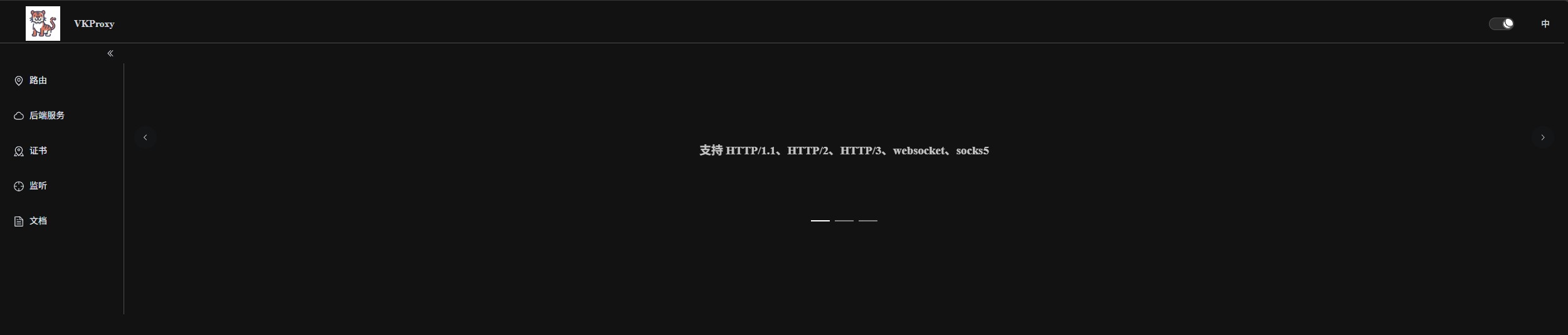
由于文件配置存在一定使用难度,所以也有提供简单的 ui配置站点VKProxy.Web
[!WARNING]
由于文件分发会导致大家部署多实例的难度,所以 ui 站点目前只支持 etcd 作为配置源, 同时服务器参数相关无法通过ui站点配置, 请使用文件会程序配置 参见服务器参数
首先启动一个 etcd (可参考 Run etcd clusters inside containers)
export NODE1=127.0.0.1

ETCD_VERSION=v3.4.37

REGISTRY=quay.io/coreos/etcd

# available from v3.2.5

REGISTRY=gcr.io/etcd-development/etcd

docker run \

  -p 2379:2379 \

  -p 2380:2380 \

  --volume=${DATA_DIR}:/etcd-data \

  --name etcd ${REGISTRY}:${ETCD_VERSION} \

  /usr/local/bin/etcd \

  --data-dir=/etcd-data --name node1 \

  --initial-advertise-peer-urls http://${NODE1}:2380 --listen-peer-urls http://0.0.0.0:2380 \

  --advertise-client-urls http://${NODE1}:2379 --listen-client-urls http://0.0.0.0:2379 \

  --initial-cluster node1=http://${NODE1}:2380
VKProxy agent 启动参考 安装
UI 所有的镜像可以在 docker hub vkproxy ui 找到
UI docker 部署
参数可以使用如下
ETCD_CONNECTION_STRING
etcd address, like http://127.0.0.1:2379
example
ETCD_CONNECTION_STRING=http://127.0.0.1:2379ETCD_PREFIX
default is /ReverseProxy/
example
ETCD_PREFIX=/ReverseProxy/ASPNETCORE_URLS
example
ASPNETCORE_URLS=http://*:80
举例:
docker run --rm -e ETCD_CONNECTION_STRING=http://127.0.0.1:2379 -e ASPNETCORE_URLS=http://*:8770 --network host vkproxy/ui:0.0.0.7

// 启动后会看到类似输出

warn: Microsoft.AspNetCore.Hosting.Diagnostics[15]

      Overriding HTTP_PORTS '8080' and HTTPS_PORTS ''. Binding to values defined by URLS instead 'http://*:8770'.

info: Microsoft.Hosting.Lifetime[14]

      Now listening on: http://[::]:8770

info: Microsoft.Hosting.Lifetime[0]

      Application started. Press Ctrl+C to shut down.

info: Microsoft.Hosting.Lifetime[0]

      Hosting environment: Production

info: Microsoft.Hosting.Lifetime[0]

      Content root path: /app
然后你就可以在浏览器 访问 http://127.0.0.1:8770 使用 UI 了
定制化扩展
为了方便大家使用 KVProxy 在一些场景,默认功能无法满足时,可以通过自定义扩展实现自己的需求。
同时也是遵照 asp.net core 设计理念,提供了两种扩展方式
中间件管道
中间件是一种装配到应用管道以处理请求和响应的软件。 每个组件:
- 选择是否将请求传递到管道中的下一个组件。
- 可在管道中的下一个组件前后执行工作。
请求委托用于生成请求管道。 请求委托处理每个 HTTP/tcp/udp 请求。
具体概念可参考ASP.NET Core 中间件

KVProxy 添加了 udp 和 tcp 的特殊中间件
具体参见如何通过中间件定制化功能
还有一个socks5的示例以供大家参考如何利用中间件扩展实现socks5
特定功能策略增加
有些特定功能策略比较难以直接使用中间件扩展,这里列举主要部分
(其实由于基于依赖注入,天生解耦,所以内部实现基本都可以覆盖或者添加新实现)
ReverseProxyFeature
除了两大扩展方式之外,还有一个接口数据在运行时有表明当前路由匹配情况
public interface IReverseProxyFeature  // http 路由会使用该接口

{

    public RouteConfig Route { get; set; } // 匹配上的路由,如为 null 则未匹配任何路由

    public DestinationState? SelectedDestination { get; set; } // 在选中健康的目标地址后,对应配置会设置在这里

}

public interface IL4ReverseProxyFeature : IReverseProxyFeature // tcp / udp 路由会使用该接口

{

    public bool IsDone { get; set; }  // 表明是否已经处理,当为 true 时,KVProxy 内置L4代理将不会进行代理

    public bool IsSni { get; set; }   // 表明是否为 tcp sni 代理模式

    public SniConfig? SelectedSni { get; set; }  // 为 tcp sni 代理模式时的配置

}
运行时可通过 feature 获取, 比如
// http

internal class EchoHttpMiddleware : IMiddleware

{

    public async Task InvokeAsync(HttpContext context, RequestDelegate next)

    {

        var f = context.Features.Get<IReverseProxyFeature>();

    }

}

//tcp

internal class EchoTcpProxyMiddleware : ITcpProxyMiddleware

{

    public Task InitAsync(ConnectionContext context, CancellationToken token, TcpDelegate next)

    {

        var f = context.Features.Get<IL4ReverseProxyFeature>();

    }

    public Task<ReadOnlyMemory<byte>> OnRequestAsync(ConnectionContext context, ReadOnlyMemory<byte> source, CancellationToken token, TcpProxyDelegate next)

    {

        var f = context.Features.Get<IL4ReverseProxyFeature>();

    }

    public Task<ReadOnlyMemory<byte>> OnResponseAsync(ConnectionContext context, ReadOnlyMemory<byte> source, CancellationToken token, TcpProxyDelegate next)

    {

        logger.LogInformation($"tcp {DateTime.Now} {context.Features.Get<IL4ReverseProxyFeature>()?.SelectedDestination?.EndPoint.ToString()} reponse size: {source.Length}");

    }

}

//udp

internal class EchoUdpProxyMiddleware : IUdpProxyMiddleware

{

    public Task InitAsync(UdpConnectionContext context, CancellationToken token, UdpDelegate next)

    {

        var f = context.Features.Get<IL4ReverseProxyFeature>();

    }

    public Task<ReadOnlyMemory<byte>> OnRequestAsync(UdpConnectionContext context, ReadOnlyMemory<byte> source, CancellationToken token, UdpProxyDelegate next)

    {

        var f = context.Features.Get<IL4ReverseProxyFeature>();

    }

    public Task<ReadOnlyMemory<byte>> OnResponseAsync(UdpConnectionContext context, ReadOnlyMemory<byte> source, CancellationToken token, UdpProxyDelegate next)

    {

        logger.LogInformation($"udp {DateTime.Now} {context.Features.Get<IL4ReverseProxyFeature>()?.SelectedDestination?.EndPoint.ToString()} reponse size: {source.Length}");

    }

}
不建议大家直接修改 IReverseProxyFeature 的值,可能会破坏路由
可扩展套接字应用程序框架
除了代理功能外,由于通过反射释放了Kestrel的能力,你也可以把 VKProxy 当成可扩展套接字应用程序框架使用
使用它轻松构建始终连接的套接字应用程序,而无需考虑如何使用套接字,如何维护套接字连接以及套接字如何工作。
(在Kestrel基础上开发,理论可以帮大家节省一些比如直接socket要自己管理 socket之类的事情)
具体可以参考可扩展套接字应用程序框架
2025年后续大概就继续添加限流 追踪啊之类功能吧
VKProxy已提供命令行工具,镜像和简单的ui的更多相关文章
- 如何用Node编写命令行工具
0. 命令行工具 当全局安装模块之后,我们可以在控制台下执行指定的命令来运行操作,如果npm一样.我把这样的模块称之为命令行工具模块(如理解有偏颇,欢迎指正) 1.用Node编写命令行工具 在Node ...
- FFmpeg命令行工具学习(一):查看媒体文件头信息工具ffprobe
一.简述 ffprobe是ffmpeg命令行工具中相对简单的,此命令是用来查看媒体文件格式的工具. 二.命令格式 在命令行中输入如下格式的命令: ffprobe [文件名] 三.使用ffprobe查看 ...
- 【AMAD】watchdog -- 用于监控文件系统的事件,并且提供了shell命令行工具
简介 动机 作用 用法 个人评分 简介 用于监控文件系统的事件的Python库,并且提供了shell命令行工具 动机 有很多情况下,我们希望监控文件的变化,在变化之后作出一些响应. 比如flask,d ...
- 安装rvm命令行工具
rvm是一个命令行工具,可以提供一个便捷的多版本ruby环境的管理和切换. https://rvm.io/ 如果你打算学习ruby/rails, rvm是必不可少的工具之一. 这里所有的命令都是再用户 ...
- NodeJS 安装cnpm命令行工具
在安装之前,请确保已安装Git和NodeJS. cmd机内命令窗口,输入以下命令: git config --system http.sslcainfo /bin/curl-ca-bundle.crt ...
- windows下的命令行工具babun
什么是babun babun是windows上的一个第三方shell,在这个shell上面你可以使用几乎所有linux,unix上面的命令,他几乎可以取代windows的shell.用官方的题目说就是 ...
- Linux 性能监控之命令行工具
引言 对于系统和网络管理员来说每天监控和调试Linux系统的性能问题是一项繁重的工作.这些命令行工具可以在各种Linux系统下使用,可以用于监控和查找产生性能问题的原因.这个命令行工具列表提供了足够的 ...
- JDK的命令行工具
Jcmd:综合工具 jcmd -l 列出当前运行的所有虚拟机 参数-l表示列出所有java虚拟机,针对每一个虚拟机,可以使用help命令列出该虚拟机支持的所有命令 jcmd [pid] help j ...
- 监控Linux性能的18个命令行工具
监控 Linux 性能的 18 个命令行工具 对于系统和网络管理员来说每天监控和调试Linux系统的性能问题是一项繁重的工作.在IT领域作为一名Linux系统的管理员工作5年后,我逐渐 认识到监控和保 ...
- Linux 性能监控的18个命令行工具
对于系统和网络管理员来说每天监控和调试Linux系统的性能问题是一项繁重的工作.在IT领域作为一名Linux系统的管理员工作5年后,我逐渐 认识到监控和保持系统启动并运行是多么的不容易.基于此原因,我 ...
随机推荐
- 张高兴的大模型开发实战:(二)使用 LangChain 构建本地知识库应用
目录 基础概念 什么是 LangChain 什么是 Ollama 环境搭建与配置 安装 Ollama 安装 LangChain 文档加载 加载 JSON 数据 加载文件夹中的文档 文本向量化 实现问答 ...
- Java SE 24 新增特性
Java SE 24 新增特性 作者:Grey 原文地址: 博客园:Java SE 24 新增特性 CSDN:Java SE 24 新增特性 源码 源仓库: Github:java_new_featu ...
- 【python-数据分析】pandas数据提取
import pandas as pd 1. 直接索引 df = pd.DataFrame({'AdmissionDate': ['2021-01-25','2021-01-22','2021-01- ...
- 【Node.js】npm配置国内镜像源
[服务器]npm配置国内镜像源 零.问题 配置Node.js的HTTPS的时候,下载不了 一.解决 这里使用的是淘宝的镜像: npm config set registry https://regis ...
- SQL Server 2008语句大全完整版
--======================== --设置内存选项 --======================== --设置 min server memory 配置项 EXEC sp_co ...
- Codeforces Round 954 (Div. 3)
A. X Axis 1.既然要求每个点到a到距离之和最小,不妨让点a为3个点中的中间点,也就是先对三个数从小到大排序,然后输出首尾数减中间值的绝对值之和即可 #include <bits/std ...
- 测试用例Xmind转XML格式教程
运行环境: Python版本:3.7(Python2.x和Python2.x均可) 第三方库:xmind2testlink/xmind2testcase 1.安装Python(以Python3.x为例 ...
- .NET 阻止关机机制以及关机前执行业务
本文主要介绍Windows在关闭时,如何正确.可靠的阻止系统关机以及关机前执行相应业务.因有一些场景需要在关机/重启前执行业务逻辑,确保下次开机时数据的一致性以及可靠性. 以下是实现这一需求的几种方法 ...
- Asp.net mvc基础(十)判断是否是ajax请求
通过Request.IsAjaxRequest()方法进行判断是否是ajax的请求,true是ajax的请求,false不是ajax的请求 后端: 前端: 效果: 使用Request.IsAjaxRe ...
- 什么是 MySQL 的主从同步机制?它是如何实现的?
什么是 MySQL 的主从同步机制?它是如何实现的? MySQL 的主从同步机制是一种将主数据库(Master)上的数据实时或接近实时地同步到从数据库(Slave)的机制.通过这种机制,从数据库可以获 ...