
asp.net mvc中换肤机制类库 ThemedViewEngines
制作blog系统或者通用cms系统的时候,我们经常会用到Theme功能。asp.net mvc中的一种实现方式,是继承实现RazorViewEngine即可。
这是在GitHub中找到的一个示例:https://github.com/benedict-chan/ThemedViewEngines
结构如下图:
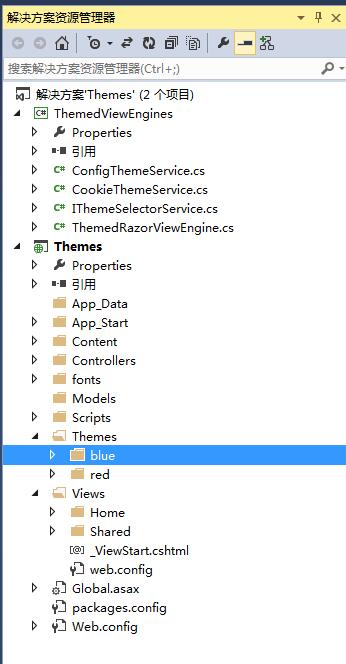
实现的核心代码ThemedRazorViewEngine.cs:
using System;

using System.Web.Mvc;

namespace ThemedViewEngines

{

    public class ThemedRazorViewEngine : RazorViewEngine

    {

        private readonly IThemeSelectorService _themeSelectorService;

        public string DefaultMasterName { get; set; }

        public ThemedRazorViewEngine(IThemeSelectorService themeSelectorService)

            : base()

        {

            DefaultMasterName = "_Layout";

            this._themeSelectorService = themeSelectorService;

            AreaViewLocationFormats = new[]

            {

                "~/#@/Areas/{2}/Views/{1}/{0}.cshtml",

                "~/#@/Areas/{2}/Views/{1}/{0}.vbhtml",

                "~/#@/Areas/{2}/Views/Shared/{0}.cshtml",

                "~/#@/Areas/{2}/Views/Shared/{0}.vbhtml",

                "~/Areas/{2}/Views/{1}/{0}.cshtml",

                "~/Areas/{2}/Views/{1}/{0}.vbhtml",

                "~/Areas/{2}/Views/Shared/{0}.cshtml",

                "~/Areas/{2}/Views/Shared/{0}.vbhtml"

            };

            AreaMasterLocationFormats = new[]

            {

                "~/#@/Areas/{2}/Views/{1}/{0}.cshtml",

                "~/#@/Areas/{2}/Views/{1}/{0}.vbhtml",

                "~/#@/Areas/{2}/Views/Shared/{0}.cshtml",

                "~/#@/Areas/{2}/Views/Shared/{0}.vbhtml",

                "~/Areas/{2}/Views/{1}/{0}.cshtml",

                "~/Areas/{2}/Views/{1}/{0}.vbhtml",

                "~/Areas/{2}/Views/Shared/{0}.cshtml",

                "~/Areas/{2}/Views/Shared/{0}.vbhtml"

            };

            AreaPartialViewLocationFormats = new[]

            {

                "~/#@/Areas/{2}/Views/{1}/{0}.cshtml",

                "~/#@/Areas/{2}/Views/{1}/{0}.vbhtml",

                "~/#@/Areas/{2}/Views/Shared/{0}.cshtml",

                "~/#@/Areas/{2}/Views/Shared/{0}.vbhtml",

                "~/Areas/{2}/Views/{1}/{0}.cshtml",

                "~/Areas/{2}/Views/{1}/{0}.vbhtml",

                "~/Areas/{2}/Views/Shared/{0}.cshtml",

                "~/Areas/{2}/Views/Shared/{0}.vbhtml"

            };

            ViewLocationFormats = new[]

            {

                "~/#@/Views/{1}/{0}.cshtml",

                "~/#@/Views/{1}/{0}.vbhtml",

                "~/#@/Views/Shared/{0}.cshtml",

                "~/#@/Views/Shared/{0}.vbhtml",

                "~/Views/{1}/{0}.cshtml",

                "~/Views/{1}/{0}.vbhtml",

                "~/Views/Shared/{0}.cshtml",

                "~/Views/Shared/{0}.vbhtml"

            };

            MasterLocationFormats = new[]

            {

                "~/#@/Views/{1}/{0}.cshtml",

                "~/#@/Views/{1}/{0}.vbhtml",

                "~/#@/Views/Shared/{0}.cshtml",

                "~/#@/Views/Shared/{0}.vbhtml",

                "~/Views/{1}/{0}.cshtml",

                "~/Views/{1}/{0}.vbhtml",

                "~/Views/Shared/{0}.cshtml",

                "~/Views/Shared/{0}.vbhtml"

            };

            PartialViewLocationFormats = new[]

            {

                "~/#@/Views/{1}/{0}.cshtml",

                "~/#@/Views/{1}/{0}.vbhtml",

                "~/#@/Views/Shared/{0}.cshtml",

                "~/#@/Views/Shared/{0}.vbhtml",

                "~/Views/{1}/{0}.cshtml",

                "~/Views/{1}/{0}.vbhtml",

                "~/Views/Shared/{0}.cshtml",

                "~/Views/Shared/{0}.vbhtml"

            };

            FileExtensions = new[]

            {

                "cshtml",

                "vbhtml",

            };

        }

        protected override IView CreatePartialView(ControllerContext controllerContext, string partialPath)

        {

            string replacedPartialPath = GetThemedPath(partialPath);

            return base.CreatePartialView(controllerContext, replacedPartialPath);

        }

        protected override IView CreateView(ControllerContext controllerContext, string viewPath, string masterPath)

        {

            string replacedViewPath = GetThemedPath(viewPath);

            string replacedMasterPath = GetThemedPath(masterPath);

            return base.CreateView(controllerContext, replacedViewPath, replacedMasterPath);

        }

        protected override bool FileExists(ControllerContext controllerContext, string virtualPath)

        {

            string replacedVirtualPath = GetThemedPath(virtualPath);

            return base.FileExists(controllerContext, replacedVirtualPath);

        }

        public override ViewEngineResult FindView(ControllerContext controllerContext, string viewName, string masterName, bool useCache)

        {

            var themeName = this._themeSelectorService.GetThemeName();

            if (!string.IsNullOrEmpty(themeName) && string.IsNullOrEmpty(masterName))

            {

                //In case if we have a theme, and the request view is not found in the theme folder (i.e. we will use the default view),

                // we will not be able to locate the theme's master page via _ViewStart (as the view is now in the default "theme" tree )

                //Therefore we have to manually locate the Master page name here

                masterName = DefaultMasterName;

            }

            return base.FindView(controllerContext, viewName, masterName, false);

        }

        private string GetThemedPath(string originalPath)

        {

            var replacedPath = originalPath;

            var themeName = this._themeSelectorService.GetThemeName();

            if (!string.IsNullOrEmpty(themeName))

            {

                string replaceText = string.Format("Themes/{0}", themeName);

                replacedPath = originalPath.Replace("#@", replaceText);

            }

            return replacedPath;

        }

    }

}
ConfigThemeService.cs的代码
 1 namespace ThemedViewEngines

 2 {

 3     public class ConfigThemeService : IThemeSelectorService

 4     {

 5         public string GetThemeName()

 6         {

 7             return ConfigurationManager.AppSettings["ThemeName"] ?? string.Empty;

 8         }

 9         public void SetThemeName(string themeName)

10         {

11             throw new NotSupportedException();

12         }

13

14     }

15 }
IThemeSelectorService.cs的代码:
 1 namespace ThemedViewEngines

 2 {

 3     public interface IThemeSelectorService

 4     {

 5         /// <summary>

 6         /// 获取Theme名称

 7         /// </summary>

 8         /// <returns></returns>

 9         string GetThemeName();

10         /// <summary>

11         /// 设置主题名称

12         /// </summary>

13         /// <param name="themeName"></param>

14         void SetThemeName(string themeName);

15     }

16 }
CookieThemeService.cs的代码
 1 using System;

 2 using System.Web;

 3

 4 namespace ThemedViewEngines

 5 {

 6     public class CookieThemeService : IThemeSelectorService

 7     {

 8         public string GetThemeName()

 9         {

10             var cookie = HttpContext.Current.Request.Cookies["ThemeName"];

11             if (cookie != null)

12                 return cookie.Value;

13             return string.Empty;

14         }

15

16         public void SetThemeName(string themeName)

17         {

18             throw new System.NotImplementedException();

19         }

20     }

21 }
调用方式:
1、新建mvc项目
2、根据上图中的示例建立Themes文件夹,Themes下面新建blue和red文件夹,然后分别把Views下的文件复制到blue和red中(主要是web.config一定要复制过去,不然没有智能提示)
3、添加引用ThemedViewEngines类库
4、在global文件的Application_Start方法下添加:
1 ViewEngines.Engines.Clear();

2 //用 Web.config 配置 theme 的写法

3 ViewEngines.Engines.Add(new ThemedRazorViewEngine(new ConfigThemeService()));

4 //用cookie配置theme的写法

5 //ViewEngines.Engines.Add(new ThemedRazorViewEngine(new CookieThemeService()));
5、在Web.config的appSettings节点下添加:
    <!--Theme配置-->

    <add key="ThemeName" value="blue" />

    <!--Theme配置 end-->
6、运行项目即可。
Demo下载
asp.net mvc中换肤机制类库 ThemedViewEngines的更多相关文章
- 转载ASP.NET MVC中Session的处理机制
本文章转载自 http://www.cnblogs.com/darrenji/p/3951065.html ASP.NET MVC中的Session以及处理方式 最近在ASP.NET MVC项目中 ...
- Asp.net Mvc中利用ValidationAttribute实现xss过滤
在网站开发中,需要注意的一个问题就是防范XSS攻击,Asp.net mvc中已经自动为我们提供了这个功能.用户提交数据时时,在生成Action参数的过程中asp.net会对用户提交的数据进行验证,一旦 ...
- 【ASP.NET MVC系列】浅谈jqGrid 在ASP.NET MVC中增删改查
ASP.NET MVC系列文章 [01]浅谈Google Chrome浏览器(理论篇) [02]浅谈Google Chrome浏览器(操作篇)(上) [03]浅谈Google Chrome浏览器(操作 ...
- 如何在 ASP.NET MVC 中集成 AngularJS(1)
介绍 当涉及到计算机软件的开发时,我想运用所有的最新技术.例如,前端使用最新的 JavaScript 技术,服务器端使用最新的基于 REST 的 Web API 服务.另外,还有最新的数据库技术.最新 ...
- Asp.Net MVC中DropDownListFor的用法(转)
2016.03.04 扩展:如果 view中传入的是List<T>类型 怎么使用 DropList 既然是List<T> 那么我转化成 T List<T>的第一个 ...
- Asp.Net MVC中DropDownListFor的用法
在Asp.Net MVC中可以用DropDownListFor的方式来让用户选择已定列表中的一个数值.用法不复杂,这里简单做一个记录. 首先我们要定义一个 Model ,用户在 DropDownLis ...
- 在ASP.Net MVC 中,如何在Global.asax中配置一个指向Area内部的默认Route
ASP.Net MVC 中配置Route的时候可以设置一个默认的Route. 比如我要在输入http://localhost的时候默认进入http://localhost/home/index.可以在 ...
- 转:Asp.Net MVC中DropDownListFor的用法
在Asp.Net MVC中可以用DropDownListFor的方式来让用户选择已定列表中的一个数值.用法不复杂,这里简单做一个记录. 首先我们要定义一个 Model ,用户在 DropDownLis ...
- 在ASP.NET MVC中使用IIS级别的URL Rewrite
原文 在ASP.NET MVC中使用IIS级别的URL Rewrite 大约一年半前,我在博客上写过一系列关于URL Rewrite的文章(2.3.4),把ASP.NET平台上进行URL Rewrit ...
- ASP.NET MVC中对Model进行分步验证的解决方法
原文:ASP.NET MVC中对Model进行分步验证的解决方法 在我之前的文章:ASP.NET MVC2.0结合WF4.0实现用户多步注册流程中将一个用户的注册分成了四步,而这四个步骤都是在完善一个 ...
随机推荐
- Vulhub 安装运行
前言 vulhub是利用docker技术做的一个漏洞复现平台,可以一键搭建对应的配置.在下载好对应的代码包后,不需要安装,只需要解压并利用3条命令,就可以简单的创建关闭对应漏洞环境.最好是购买一台阿里 ...
- 前台sessionStorage存取对象注意事项
一.概述 使用sessionStorage存取全局数据: 语法: sessionStorage.setItem("key",value); object = sessionStor ...
- C语言(从入门到入土)
1.C语言整体上需要记住的 总体上必须清楚的: 1)程序结构是三种: 顺序结构 , 循环结构 (三个循环结构), 选择结构 (if 和 switch) 2)读程序都要从main()入口, 然后从最上面 ...
- Python 中的抽象类和接口类
[抽象类] 抽象类是一个特殊的类,只能被继承,不能被实例化.它主要用于作为其他类的基类或模板. 抽象类可以包含抽象方法和具体方法.在抽象类中定义的抽象方法必须在子类中进行实现. from abc im ...
- NOIP2024模拟11:忠于自我
NOIP2024模拟11:忠于自我 T1 一句话题意:有若干个容量为 \(L\) 的包,从左往右装物品,当前包还能装则装,否则必须重开一个包装进去,对于\(\forall i \in [1,n]\), ...
- You Shi Zai Wo
Xuzhou is a place where there have been more than 50 large-scale battles from ancient times to the p ...
- 源码开放:WebSocket应用示例
1 WebSocket概述 WebSocket是HTML5下一种新的协议(本质上是一个基于TCP的协议),它实现了浏览器与服务器之间的全双工通信,能够节省服务器资源和带宽,达到实时通讯的目的.WebS ...
- 切换自己为www-data用户
突发奇想的想把切换为www-data用户去看看会怎么样.然后做了一个尝试 由于我安装了lamp环境,所以有www-data用户,用它可以来执行web php ,以及安全放心的跑cli(避免权限过高执行 ...
- 孤立森林(IForest)代码实现及与PyOD对比
孤立森林(Isolation Forest)是经典的异常检测算法(论文网址).本文用python对其进行实现,以及与常用的异常检测包PyOD进行效果对比. 简单来说,孤立森林(IForest)中包含若 ...
- Nuxt.js 应用中的 webpack:error 事件钩子
title: Nuxt.js 应用中的 webpack:error 事件钩子 date: 2024/11/25 updated: 2024/11/25 author: cmdragon excerpt ...