
CentOS6.5之Zabbix3.2.2 Server安装、汉化及Agent安装
1、安装MySQL
1.1、安装MySQL
rpm -ivh http://dev.mysql.com/get/mysql-community-release-el6-5.noarch.rpm

yum -y install mysql-server
1.2、修改MySQL的配置文件
vim /etc/my.cnf

default-storage-engine = innodb

innodb_file_per_table

collation-server = utf8_general_ci

init-connect = 'SET NAMES utf8'

character-set-server = utf8
1.3、设置MySQL自动启动并启动MySQL
chkconfig mysqld on

service mysqld start
1.4、设置MySQL安全选项
mysql_secure_installation

NOTE: RUNNING ALL PARTS OF THIS SCRIPT IS RECOMMENDED FOR ALL MySQL

      SERVERS IN PRODUCTION USE!  PLEASE READ EACH STEP CAREFULLY!

In order to log into MySQL to secure it, we'll need the current

password for the root user.  If you've just installed MySQL, and

you haven't set the root password yet, the password will be blank,

so you should just press enter here.

Enter current password for root (enter for none):

OK, successfully used password, moving on...

Setting the root password ensures that nobody can log into the MySQL

root user without the proper authorisation.

Set root password? [Y/n] Y

New password:

Re-enter new password:

Password updated successfully!

Reloading privilege tables..

 ... Success!

By default, a MySQL installation has an anonymous user, allowing anyone

to log into MySQL without having to have a user account created for

them.  This is intended only for testing, and to make the installation

go a bit smoother.  You should remove them before moving into a

production environment.

Remove anonymous users? [Y/n] Y

 ... Success!

Normally, root should only be allowed to connect from 'localhost'.  This

ensures that someone cannot guess at the root password from the network.

Disallow root login remotely? [Y/n] Y

 ... Success!

By default, MySQL comes with a database named 'test' that anyone can

access.  This is also intended only for testing, and should be removed

before moving into a production environment.

Remove test database and access to it? [Y/n] Y

 - Dropping test database...

ERROR  (HY000) at line : Can't drop database 'test'; database doesn't exist

 ... Failed!  Not critical, keep moving...

 - Removing privileges on test database...

 ... Success!

Reloading the privilege tables will ensure that all changes made so far

will take effect immediately.

Reload privilege tables now? [Y/n] Y

 ... Success!

All done!  If you've completed all of the above steps, your MySQL

installation should now be secure.

Thanks for using MySQL!
Cleaning up...
1.5、创建Zabbix数据库
mysql -uroot -proot123

mysql> create database zabbix character set utf8 collate utf8_bin;

Query OK, 1 row affected (0.04 sec)

mysql> grant all privileges on zabbix.* to zabbix@localhost identified by 'zabbix';

Query OK, 0 rows affected (0.01 sec)

mysql> FLUSH PRIVILEGES;

Query OK, 0 rows affected (0.00 sec)

mysql> quit

Bye
2、安装PHP
2.1、安装PHP
rpm -ivh http://repo.webtatic.com/yum/el6/latest.rpm

yum install -y httpd libxml2-devel net-snmp-devel libcurl-devel php56w php56w-gd php56w-mysql php56w-bcmath php56w-mbstring php56w-xml php56w-ldap
2.2、修改PHP配置文件
vim /etc/php.ini

post_max_size=16M

max_execution_time=

max_input_time=

date.timezone=Asia/Shanghai

always_populate_raw_post_data=-
2.3、设置HTTP自动启动并启动HTTP
chkconfig httpd on

service httpd start
3、安装Zabbix Server
3.1、下载相关的软件包
wget http://repo.zabbix.com/zabbix/3.2/rhel/6/i386/deprecated/zabbix-server-mysql-3.2.2-1.el6.i686.rpm

wget http://repo.zabbix.com/zabbix/3.2/rhel/6/i386/deprecated/zabbix-web-3.2.2-1.el6.noarch.rpm

wget http://repo.zabbix.com/zabbix/3.2/rhel/6/i386/deprecated/zabbix-web-mysql-3.2.2-1.el6.noarch.rpm
3.2、安装Zabbix Server
yum -y localinstall zabbix-web-3.2.-.el6.noarch.rpm zabbix-web-mysql-3.2.-.el6.noarch.rpm zabbix-server-mysql-3.2.-.el6.i686.rpm
3.3、将Zabbix相关数据导入 MySQL
zcat /usr/share/doc/zabbix-server-mysql-3.2./create.sql.gz | mysql -uroot -proot123 zabbix
3.4、修改Zabbix Sever配置
vim /etc/zabbix/zabbix_server.conf

DBHost=localhost

DBName=zabbix

DBUser=zabbix

DBPassword=zabbix
3.5、将Zabbix相关文件拷贝至相关目录
cp -r /usr/share/zabbix/* /var/www/html/zabbix/

chown -R apache:apache /var/www/html/zabbix
3.6、设置Zabbix Server自动启动并启动Zabbix Server
chkconfig zabbix-server on

service zabbix-server start
4、浏览器配置Zabbix
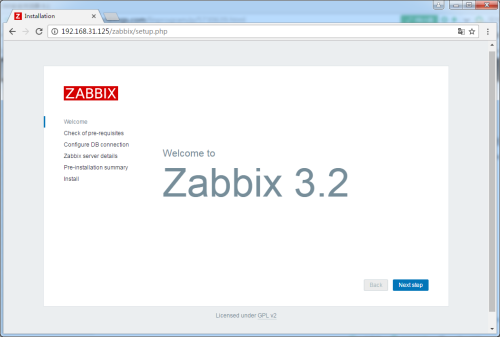
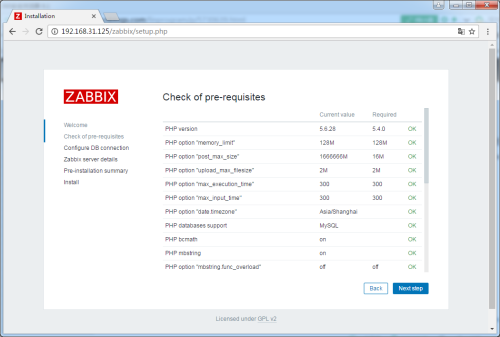
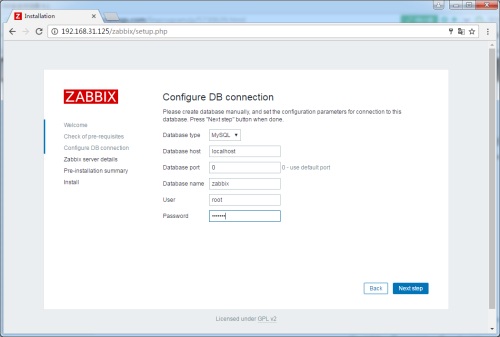
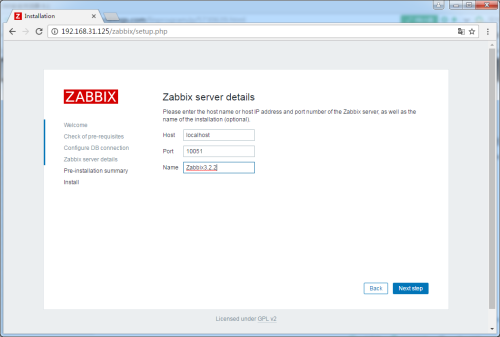
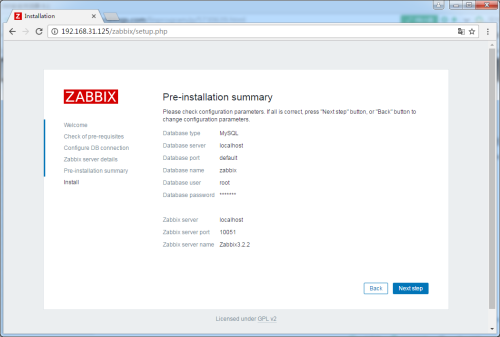
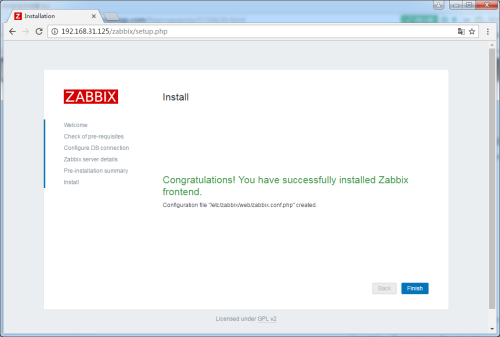
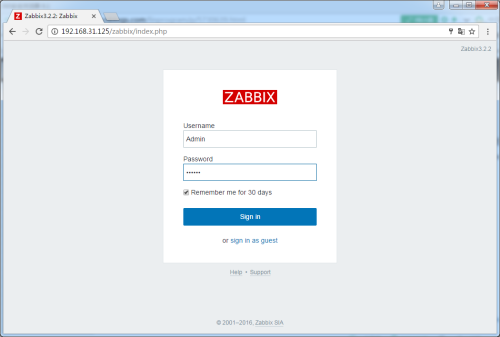
默认账号为:Admin 默认密码为:zabbix
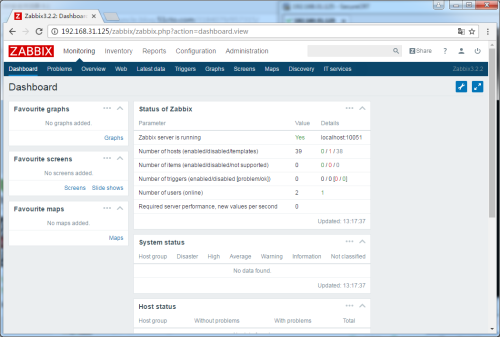
5、开启中文支持及更正中文乱码问题
开启中文支持:
vim /var/www/html/zabbix/include/locales.inc.php

zh_CN' => array('name' => _('Chinese (zh_CN)'),        'display' => true),

将false改为true
更正中文乱码问题:
在Windows中找到所需的字体文件传到/var/www/html/zabbix/fonts目录下,修改zabbix的web端/var/www/html/zabbix/include/defines.inc.php将原来的字体替换掉.
#define('ZBX_GRAPH_FONT_NAME',          'graphfont'); // 45行

define('ZBX_GRAPH_FONT_NAME',           'simkai');

#define('ZBX_FONT_NAME', 'graphfont');                //93行

define('ZBX_FONT_NAME', 'simkai');
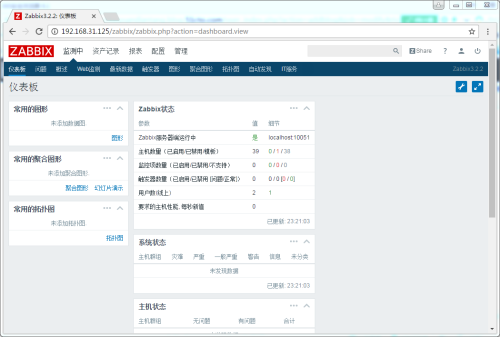
6、安装Zabbix Agent
6.1、下载相关的软件包
wget http://repo.zabbix.com/zabbix/3.2/rhel/6/i386/zabbix-agent-3.2.2-1.el6.i686.rpm
6.2、安装Zabbix Agent
yum -y localinstall zabbix-agent-3.2.-.el6.i686.rpm
6.2、修改Zabbix Agent配置
vim /etc/zabbix/zabbix_agentd.conf

Server=192.168.31.125
6.3、设置Zabbix Agent自动启动并启动Zabbix Agent
chkconfig zabbix-agent on

service zabbix-agent start

声明:
本文转载自:http://blog.51cto.com/kaiyuandiantang/1881583
CentOS6.5之Zabbix3.2.2 Server安装、汉化及Agent安装的更多相关文章
- Gitlab一键端的安装汉化及问题解决(2017/12/14目前版本为10.2.4)
Gitlab的安装汉化及问题解决 一.前言 Gitlab需要安装的包太TM多了,源码安装能愁死个人,一直出错,后来发现几行命令就装的真是遇到的新大陆一样... ... 装完之后感觉太简单,加了汉化补丁 ...
- Gitlab的安装汉化及问题解决
Gitlab的安装汉化及问题解决(2017/12/14目前版本为10.2.4) 一.前言 Gitlab需要安装的包太TM多了,源码安装能愁死个人,一直出错,后来发现几行命令就装的真是遇到的新大陆一样. ...
- Sublime Text 2安装汉化破解、插件包安装教程
原文地址: Sublime Text 2安装汉化破解.插件包安装教程_百度经验 http://jingyan.baidu.com/article/ff4116259b057c12e48237b8.ht ...
- PS抠图神器: KnockOut 2.0安装汉化和使用教程
PS抠图神器: KnockOut 2.0安装汉化和使用教程 http://jingyan.baidu.com/article/6b97984d8aeadc1ca2b0bf3b.html
- 如何给sublime text3安装汉化包?so easy 哦
这是我本人亲身测试过的,肯定有效,没用的话怪我咯. 首先安装package control,然后安装汉化包即可,很简单哦!!! 1.安装package control:打开sublime,使用快捷键: ...
- kibana安装汉化包
kibana安装汉化包其实很简单!但要找到汉化包可能就很麻烦了.我这里提供了6.2的版本的汉化包!至于能不能在其他版本用,我就没试过了.但6.2的kibana本人亲测.没问题!!!! 下载——解压.这 ...
- JIRA6.3.6 安装汉化破解指南
JIRA6.3.6 安装汉化破解指南 近期试着安装了下JIRA,碰到了些问题.特记录下来,供后来者使用: 1.常规安装 1.1. 下载并安装jira 从官网下载atlassian-jira-6.3.6 ...
- Charles抓包1-Charles安装汉化(附正版注册码)
目录 1.下载&&安装 2.汉化 1.下载&&安装 charles官网 charles下载 下载后直接安装即可. 2.汉化 下载提供的汉化包charles.jar(加群 ...
- C语言入门-ide的概念介绍及codeblocks编辑器安装汉化
大家好,本章教程就ide(集成开发环境)来说一说. ide就是编译器+编辑器,原理就是在编辑器写代码,然后编辑器会让编译器来编译成二进制可执行文件. 常见的c/c++编译器有mingw64,msvc, ...
随机推荐
- EasyUI Ajax 表单
创建form <divstyle="width:230px;background:#E0ECFF;padding:10px;"> <formid=&quo ...
- javascript 实现java中的Map
javascript实现java中的Map,代码是在国外的一个网站上看到的(http://stackoverflow.com/questions/368280/javascript-hashmap-e ...
- google cloud之查看任务任务过程
点击侧边栏的logging
- thymeleaf教程
本教程涵盖了常见的前端操作,比如,判断,循环,引入模板,常用函数(日期格式化,字符串操作)下拉,js和css中使用,基本可以应对一般场景. 怎么使用? 前端html页面标签中引入如下: <htm ...
- zabbix服务器搭建
zabbix服务器源码安装 参看官方文档 这里不做过多的翻译,我的系统是centos6.5,安装的时候是base安装,所以要装一些其他依赖包,除此之外,还有一些php插件: extension=bcm ...
- 带清空按钮TextBox的实现(WPF)
本博文针对人群:WPF新手.博文内容:通过Style制定包含清空Button的TextBox样式模板,通过在Style中引入自定义类的附加属性完成对TextBox的内容清空. <span sty ...
- JavaScript的parseint()函数
定义和用法 parseInt() 函数可解析一个字符串,并返回一个整数. 语法 parseInt(string, radix) 参数 描述 string 必选项.要转换为数字的字符串. radix 可 ...
- 安装wampserver时提示丢失MSVCR110.dll
安装Wampserver 2后启动的时候提示系统错误:MSVCR110.dll丢失. 在wampserver官网上有例如以下提示: 于是卸载原来的WAMPSERVER 2 ,在http://www.m ...
- Linq------错误:EntityType: EntitySet 'Products' is based on type 'Product' that has no keys defined.
解决方法: [Table("bma_products")] public class Product { //加上[Key]即可 [Key] public int pid{get; ...
- 编程之美 set 13 光影切割问题
题目 给出几条线段, 求解这几条线段把给定平面切成的份数 思路 1. 枚举 3 条直线的情况, 发现有规律可循 两条直线, 一个交点 -> 空间分成 4 份 三条直线, 两个交点 -> 空 ...