
IOS手机使用Fiddler抓获HTTPS报文方法
Configure Fiddler
Click Tools > Fiddler Options > Connections.
Click the checkbox by Allow remote computers to connect.
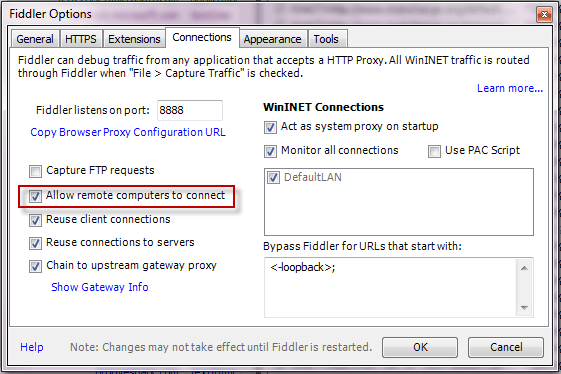
Restart Fiddler.
Ensure your firewall allows incoming connections to the Fiddler process.
Hover over the Online indicator at the far right of the Fiddler toolbar to display the IP addresses assigned to Fiddler's machine.
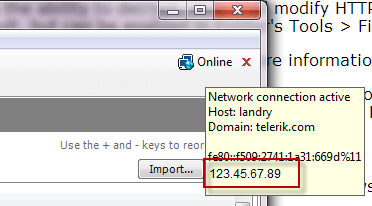
Verify client iOS device can reach Fiddler by navigating in the browser to http://FiddlerMachineIP:8888. This address should return the Fiddler Echo Service page.
For iPhone: Disable the 3g/4g connection.
Set the iOS Device Proxy
Tap Settings > General > Network > Wi-Fi.
Tap the settings for the Wi-Fi network.
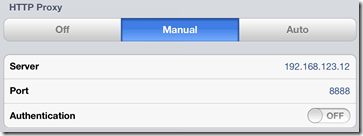
Tap the Manual option in the HTTP Proxy section.
In the Server box, type the IP address or hostname of your Fiddler instance.
In the Port box, type the port Fiddler is listening on (usually 8888).
Ensure the Authentication slider is set to Off.
Decrypt HTTPS Traffic from iOS Devices
Download the Certificate Maker plugin for Fiddler.
Install the Certificate Maker plugin.
Restart Fiddler.
Configure the device where Fiddler is installed to trust Fiddler root certificate.
On the iOS device, go to http://ipv4.fiddler:8888/ in a browser.
From the bottom of the Fiddler Echo Service webpage, download the FiddlerRoot certificate.

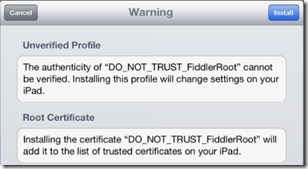
Open the FiddlerRoot.cer file.
Tap the Install button.
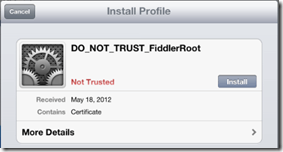
Tap the Install button again.
Uninstall FiddlerRoot Certificate
If you decide to uninstall the root certificate:
Tap the Settings app.
Tap General.
Scroll to Profiles.
Tap the DO_NOT_TRUST_FiddlerRoot* profile.
Tap Remove.
IOS手机使用Fiddler抓获HTTPS报文方法的更多相关文章
- 安卓手机使用Fiddler抓获HTTPS报文方法
Configure Fiddler Click Tools > Fiddler Options > Connections. Ensure that the checkbox by All ...
- ios手机通过fiddler抓去Https协议包时证书问题
解决Fiddler无法抓取ios端HTTPS请求的问题 南天E心 关注 2018.01.15 10:36 字数 281 阅读 909评论 0喜欢 0 近日公司服务升级,将所有的接口请求由HTTP升级为 ...
- Android/IOS手机使用Fiddler抓包
对于Android和IOS开发及测试的同事来说抓包是一个很重要的事,有利于排查问题所在,快速定位问题.但长期以来一直没有一款可以快速抓包的工具,直到有了Fiddler2. 使用步骤: 1. Fidd ...
- Mac使用Charles抓取ios手机APP中的https请求
1.配置Http代理 Port为监听端口号,默认为8888,勾选Enable transparent HTTP proxying,接着勾选SOCKS proxy,可以监听Socks请求 2.安装Cha ...
- Fiddler实现IOS手机抓取https报文
如何设置代理访问内网进而抓取手机的Https报文进行分析定位. 准备工作: 1.PC上连接好VPN 2.管理员方式打开Fiddler工具 开搞: 一.设置Fiddler 1.打开Tools->O ...
- 为什么ios手机安装好fiddler证书/charles证书还是抓不到https请求?
为什么ios手机安装好fiddler证书/charles证书还是抓不到https请求? 最近有不少人有此困惑, 因为你的ios系统应该是10.0以上的系统, 在手机系统设置---关于手机----证书信 ...
- 《吐血整理》进阶系列教程-拿捏Fiddler抓包教程(12)-Fiddler设置IOS手机抓包,你知多少???
1.简介 Fiddler不但能截获各种浏览器发出的 HTTP 请求,也可以截获各种智能手机发出的HTTP/ HTTPS 请求. Fiddler 能捕获Android 和 Windows Phone 等 ...
- 手机设置Fiddler代理后无法访问Https网络的解决办法
第一种方法: 首先,下载最新版本的Fiddler,将手机和PC设置为统一局域网(手机链接PC的wifi) 打开手机设置-无线网络设置,设置代理为手动,输入pc的ip和Fillder的端口8888(Fi ...
- Fiddler之iOS手机抓包代理设置
一.前置步骤:官网下载并安装好 二.设置iOS手机代理到windows电脑 1.打开Fiddler,点击上方Tools,进入Options,选择HTTPS,按下图设置 2.fiddler默认监听端口8 ...
随机推荐
- HDU 6141 I am your Father!(最小树形图)
[题目链接] http://acm.hdu.edu.cn/showproblem.php?pid=6141 [题目大意] 给出一个有向图,求1点为根的最小树形图使得第n个点的直接父亲编号最小 [题解] ...
- 二、python的逻辑运算与数据类型
.python的逻辑运算符 数学运算符 加:+ 减:- 乘:* 除:/ 取余:% 关系运算符 等于: == 不等于: != 小于:< 大于:> 大于等于: >= ...
- 内功心法 -- java.util.LinkedList<E> (7)
写在前面的话:读书破万卷,编码如有神--------------------------------------------------------------------下文主要对java.util ...
- Codeforces Beta Round #9 (Div. 2 Only) B. Running Student 水题
B. Running Student 题目连接: http://www.codeforces.com/contest/9/problem/B Description And again a misfo ...
- Microsoft Visual Studio 2010导致系统C盘不断增大问题处理。
一直用Microsoft Visual Studio 2010做开发,发现最近C盘空间是越来越小,一开始以为是IE或者一些系统补丁造成的临时文件,但是使用360,windows优化大师之类的软件都清过 ...
- 解决新版本webpack vue-cli生成文件没有dev.server.js问题
新版本webpack生成的dev.server.js 在webpack.dev.conf.js中 webpack.dev.conf.js const axios = require('axios') ...
- apache&mod_wsgi&django部署多个项目
今天做好了第二个django项目,但在部署时出了一点小问题,在此记录一下. 1.mod_wsgi 3.4已经支持了部署多个项目,只需在httpd.conf中进行如下配置: WSGIScriptAlia ...
- Windows Embedded Compact 7网络编程概述(上)
如今,不论是嵌入式设备.PDA还是智能手机,网络都是必不可少的模块.网络使人们更方便地共享设备上的信息和资源.而且,利用智能手机浏览互联网,也逐渐成为生活中的常见手段.物联网所倡导的物物相联,也离不开 ...
- MYSQL 名人博客
: DavidYang的博客 - CSDN.NET DimitriK's (dim) Weblog Xaprb · Stay Curious! 飞鸿无痕的博客 - ChinaUnix博客 何登成的技术 ...
- openfire Hazelcast插件集群配置
原文:http://blog.csdn.net/frankcheng5143/article/details/48708899 注意虽然hazelcast 官方已经有了3.5.2版本,但是openfi ...