
Android编程 EditView 中如何设置最多可以输入的字符数量 属性 android:ems 与 android:maxLength 的区别
最近有一个新的感悟,那就是工作的时候千万不要遇到那种特要人无语的领导,很不幸我现在就遇到了这样的一个领导,说是要给领导认识的一个熟人家的孩子写本科毕业设计预算把我给派过去给本科生写毕业设计,这事情的确要人十分的无语,为了完成领导交代的任务还是要好好去弄,于是乎我现在变搞起了Android编程,这个以前未做过的方向。
现在遇到了这样的一个界面,在Android编程中这叫做Activity, 如下图:
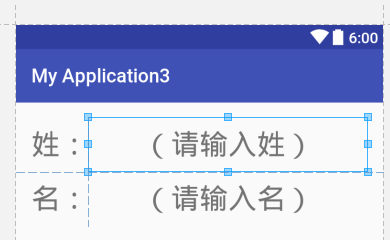
其中,需要弄一个EditText 组件, 也就是做那个输入姓名的那个东西,为了限制输入的字符需要对EditText组件进行设置,在网上搜到了 android:ems 属性的设置。
但是很奇怪的事情是 虽然设置了 android:ems 属性,但是输入的字符数量并没有任何限制。
有文章指出:
https://blog.csdn.net/caroline_wendy/article/details/41684255
但是,在我的APP中我发现这么一个事情,那就是不论 android:layout_width 设置为wrap_content 还是 match_parent 都没有起到限制输入字符数量的作用。
以下文章给出其他解释:
https://blog.csdn.net/qq_33618323/article/details/66477490
那就是 android:ems 是限制显示的数量。
但是在我的APP中这一点也没有被证实,可能是我的APP上某些设置还是存在一定的问题的。
最后,https://www.cnblogs.com/liaojie970/p/5834106.html
给出
android:maxLength
的用法,该属性设置可以被用来设置EditText中的最大可输入的字符串数量。
也就是说,要限制 输入的字符数量 我们应该使用属性 Android:maxLength 来进行设置。
android:ems 和 android:layout_width="wrap_content” 搭配使用可以限制 显示字符的数量,当然这还和Layout的设置和其他的设置有关。如果采用RelativeLayout布局下的TextView组件中显示的字符串有可能不受限制。
不过最终也没有太搞明白 Android:ems的具体含义是什么,不过网上有网友做过这方面的尝试,以下给出链接,个人认为下面这个资料还是不错的,至少从多个方面尝试过,虽然最后还是不太好解释通。
https://blog.csdn.net/beiminglei/article/details/9317997
不过,上文中给出了一个所能找到的一个不错的解释,如下:
https://blog.csdn.net/JavaLive09/article/details/38661773
em是一个印刷排版的单位,表示字宽的单位。 em字面意思为:equal M (和M字符一致的宽度为一个单位)简称em。
ems是em的复数表达。
最终的代码实现:
<?xml version="1.0" encoding="utf-8"?>

<LinearLayout xmlns:android="http://schemas.android.com/apk/res/android"

    xmlns:tools="http://schemas.android.com/tools"

    android:orientation="vertical"

    android:id="@+id/activity_main"

    android:layout_width="match_parent"

    android:layout_height="match_parent"

    android:paddingBottom="@dimen/activity_vertical_margin"

    android:paddingLeft="@dimen/activity_horizontal_margin"

    android:paddingRight="@dimen/activity_horizontal_margin"

    android:paddingTop="@dimen/activity_vertical_margin"

    tools:context="com.example.myapplication3.MainActivity">

    <LinearLayout

        android:orientation="horizontal"

        android:layout_width="match_parent"

        android:layout_height="wrap_content">

        <TextView

            android:text="姓:"

            android:layout_width="60sp"

            android:layout_height="wrap_content"

            android:id="@+id/textView1"

            android:textSize="30sp" />

        <EditText

            android:maxLength="10"

            android:layout_width="0dp"

            android:layout_height="wrap_content"

            android:inputType="textPersonName"

            android:ems="10"

            android:id="@+id/editText1"

            android:layout_weight="1"

            android:textSize="30sp"

            android:hint="(请输入姓)"

            android:maxLines="1"

            android:textAlignment="center" />

    </LinearLayout>

    <LinearLayout

        android:orientation="horizontal"

        android:layout_width="match_parent"

        android:layout_height="wrap_content">

        <TextView

            android:text="名:"

            android:layout_width="60sp"

            android:layout_height="wrap_content"

            android:id="@+id/textView2"

            android:textSize="30sp" />

        <EditText

            android:maxLength="10"

            android:layout_width="0dp"

            android:layout_height="wrap_content"

            android:inputType="textPersonName"

            android:ems="10"

            android:id="@+id/editText2"

            android:layout_weight="1"

            android:textSize="30sp"

            android:hint="(请输入名)"

            android:maxLines="1"

            android:textAlignment="center" />

    </LinearLayout>

</LinearLayout>
Android编程 EditView 中如何设置最多可以输入的字符数量 属性 android:ems 与 android:maxLength 的区别的更多相关文章
- xamarin android 在代码中如何设置文本颜色
xamarin android 在代码中如何设置文本颜色 TextView v = FindViewById<TextView>(Android.Resource.Id.Message); ...
- TextView设置最多显示指定个字符,超过部分显示...(省略号)
今天在公司遇到一个需求:TextView设置最多显示8个字符,超过部分显示...(省略号),网上找了很多资料,有人说分别设置TextView的android:signature="true& ...
- Android编程学习过程中遇到的错误以及解决办法
Android Studio遇到的问题 Android Studio一直提示右下角那个错误,Failed to open zip file.我是根据这位大佬的博客https://www.cnblogs ...
- 001-Mono for android在vs2012中发布设置
详细讲解 :http://www.cr173.com/html/20099_1.html 这里是快速设置: 1,把Debug换成Release 这里是必须改的 2,点击工具选项 3, ...
- .NET混合开发解决方案8 WinForm程序中通过设置固定版本运行时的BrowserExecutableFolder属性集成WebView2控件
系列目录 [已更新最新开发文章,点击查看详细] 在我的博客<.NET混合开发解决方案7 WinForm程序中通过NuGet管理器引用集成WebView2控件>中介绍了WinForm ...
- Android 手机卫士13--进程设置
1.显示隐藏系统进程 修改ProcessManagerActivity的Adapter ..... @Override public int getCount() { if(SpUtil.getBoo ...
- 在android的spinner中,实现取VALUE值和TEXT值。 ZT
在android的spinner中,实现取VALUE值和TEXT值. 为了实现在android的 spinner实现取VALUE值和TEXT值,我尝试过好些办法,在网上查的资料,都是说修改适配器, ...
- Android编程中的实用快捷键
作为一个优秀的程序员,不但要能开发出漂亮的软件,也要能熟练掌握编程的技巧,包括IDE的快捷键使用.比如linux 下的VI编辑器,对于不熟练快捷键的人来说就是一个噩梦,但一旦你熟练了VI的快捷键,VI ...
- Android编程中的5种数据存储方式
Android编程中的5种数据存储方式 作者:牛奶.不加糖 字体:[增加 减小] 类型:转载 时间:2015-12-03我要评论 这篇文章主要介绍了Android编程中的5种数据存储方式,结合实例形式 ...
随机推荐
- 设置CentOS7虚拟机使用静态IP上网
一.在VMware里,依次点击”编辑“ - ”虚拟网络编辑器“,如下图,我选择的是NAT模式: 为了能够使用静态IP,这里不要勾选”使用本地DHCP服务将IP分配给虚拟机“这个选项.然后是配置子网ip ...
- arp攻击的处理方法
http://www.hacking-tutorial.com/tips-and-trick/4-steps-to-prevent-man-in-the-middle-attack-arp-poiso ...
- 爬虫框架Scrapy之Downloader Middlewares
反反爬虫相关机制 Some websites implement certain measures to prevent bots from crawling them, with varying d ...
- unix_timestamp() 和 from_unixtime()
unix_timestamp() 将时间转换为时间戳.(date 类型数据转换成 timestamp 形式整数) select unix_timestamp('2016-03-23 11:10:10' ...
- Vim练级攻略(转)
转自平凡的世界:http://www.ccvita.com/ 前言今天看到这篇文章,共鸣点非常多.它把Vim使用分为4个级别,目前我自己是熟练运用前面三级的命令,在培养习惯使用第四级.完全就是我这一年 ...
- 分布式MySql
# 分布式MySql 部署方案---1. 解决方案2. 系统环境3. mysql 主从备份4. MyCat 中间件搭建5. haproxy 负载代理6. keepalived 解决单点故障7. myc ...
- linux加域退域
realm list realm leave od.com realm join -U Administrator od.com
- uva10002凸包重心
把每个三角形看成一个质点,坐标就是各自的重心, #include<map> #include<set> #include<cmath> #include<qu ...
- (新)自己动手写ORM框架(1)-增删查改的使用
之前写过一个系列文章自己动手写ORM框架,经过在多个项目的中的使用,对这套代码进行了许多改进,下面是使用方法: 新增学员信息代码预览: DBHelper db = DBHelper.getInstan ...
- ana3+opencv+TensorFlow+NVIDIAGPU 安装
http://blog.csdn.net/qq_30611601/article/details/79067982 这个博客写的挺完整的 当你发现你的anna下载的贼鸡儿的慢,你就需要使用清华的镜像网 ...