
多线程间通信之AutoResetEvent和ManualResetEvent的原理分析和开发示例
AutoResetEvent 允许线程通过发信号互相通信。 通常,当线程需要独占访问资源时使用该类。
线程通过调用 AutoResetEvent 上的 WaitOne 来等待信号。 如果 AutoResetEvent 为非终止状态,则线程会被阻止,并等待当前控制资源的线程通过调用 Set 来通知资源可用。
调用 Set 向 AutoResetEvent 发信号以释放等待线程。 AutoResetEvent 将保持终止状态,直到一个正在等待的线程被释放,然后自动返回非终止状态。 如果没有任何线程在等待,则状态将无限期地保持为终止状态。
如果当 AutoResetEvent 为终止状态时线程调用 WaitOne,则线程不会被阻止。 AutoResetEvent 将立即释放线程并返回到非终止状态。
ManualResetEvent 允许线程通过发信号互相通信。 通常,此通信涉及一个线程在其他线程进行之前必须完成的任务。
当一个线程开始一个活动(此活动必须完成后,其他线程才能开始)时,它调用 Reset 以将 ManualResetEvent 置于非终止状态。 此线程可被视为控制 ManualResetEvent。 调用 ManualResetEvent 上的 WaitOne 的线程将阻止,并等待信号。 当控制线程完成活动时,它调用Set 以发出等待线程可以继续进行的信号。 并释放所有等待线程。
一旦它被终止,ManualResetEvent 将保持终止状态,直到它被手动重置。 即对 WaitOne 的调用将立即返回。
可以通过将布尔值传递给构造函数来控制 ManualResetEvent 的初始状态,如果初始状态处于终止状态,为 true;否则为 false。
ManualResetEvent 也可以同 staticWaitAll 和 WaitAny 方法一起使用。
生活中的例子
AutoResetEvent :在上海坐地铁,检票口有个刷卡的通道,一次只能一个人刷卡后通过,而我过后,它又是关闭的,另一个人又得再刷卡.一次操作,只有一个事件,这时就是非终止状态,一般是用来同步访问资源.
ManualResetEvent :公司园区的大门很大,一次可以多人通过。
ManualResetEvent和AutoResetEvent 比较
ManualResetEvent和AutoResetEvent都继承自EventWaitHandler,它们的唯一区别就在于父类 EventWaitHandler的构造函数参数EventResetMode不同,这样我们只要弄清了参数EventResetMode值不同时,EventWaitHandler类控制线程同步的行为有什么不同,两个子类也就清楚了。
共同点:
A、Set方法将事件状态设置为终止状态,允许一个或多个等待线程继续;Reset方法将事件状态设置为非终止状态,导致线程阻止;WaitOne阻止当前线程,直到当前线程的WaitHandler收到事件信号。
B、可以通过构造函数的参数值来决定其初始状态,若为true则事件为终止状态从而使线程为非阻塞状态,为false则线程为阻塞状态。
C、如果某个线程调用WaitOne方法,则当事件状态为终止状态时,该线程会得到信号,继续向下执行。
不同点:
A、AutoResetEvent.WaitOne()每次只允许一个线程进入,当某个线程得到信号后,AutoResetEvent会自动又将信号置为不发送状态,则其他调用WaitOne的线程只有继续等待,也就是说AutoResetEvent一次只唤醒一个线程;
B、ManualResetEvent则可以唤醒多个线程,因为当某个线程调用了ManualResetEvent.Set()方法后,其他调用WaitOne的线程获得信号得以继续执行,而ManualResetEvent不会自动将信号置为不发送。
C、也就是说,除非手工调用了ManualResetEvent.Reset()方法,则ManualResetEvent将一直保持有信号状态,ManualResetEvent也就可以同时唤醒多个线程继续执行。
先看下AutoResetEvent 的代码
|
1
2
3
4
5
6
7
8
9
10
11
12
13
|
namespace System.Threading { using System; using System.Security.Permissions; using System.Runtime.InteropServices; [HostProtection(Synchronization=true, ExternalThreading=true)] [System.Runtime.InteropServices.ComVisible(true)] public sealed class AutoResetEvent : EventWaitHandle { public AutoResetEvent(bool initialState) : base(initialState,EventResetMode.AutoReset){ } } } |
再来看下EventWaitHandle的代码
|
1
2
3
4
5
6
7
8
9
10
11
12
13
14
15
16
17
18
19
20
21
22
23
24
25
26
27
28
29
30
31
32
33
34
35
36
37
38
39
40
41
42
43
44
45
46
47
48
49
50
51
52
53
54
55
56
57
58
59
60
61
62
63
64
65
66
67
68
69
70
71
72
73
74
75
76
77
78
79
80
81
82
83
84
85
86
87
88
89
90
91
92
93
94
95
96
97
98
99
100
101
102
103
104
105
106
107
108
109
110
111
112
113
114
115
116
117
118
119
120
121
122
123
124
125
126
127
128
129
130
131
132
133
134
135
136
137
138
139
140
141
142
143
144
145
146
147
148
149
150
151
152
153
154
155
156
157
158
159
160
161
162
163
164
165
166
167
168
169
170
171
172
173
174
175
176
177
178
179
180
181
182
183
184
185
186
187
188
189
190
191
192
193
194
195
196
197
198
199
200
201
202
203
204
205
206
207
208
209
210
211
212
|
namespace System.Threading { using System; using System.Threading; using System.Runtime.CompilerServices; using System.Security.Permissions; using System.IO; using Microsoft.Win32; using Microsoft.Win32.SafeHandles; using System.Runtime.InteropServices; using System.Runtime.Versioning; #if !FEATURE_PAL using System.Security.AccessControl; #endif [HostProtection(Synchronization=true, ExternalThreading=true)] [ComVisibleAttribute(true)] public class EventWaitHandle : WaitHandle { [ResourceExposure(ResourceScope.None)] [ResourceConsumption(ResourceScope.Machine, ResourceScope.Machine)] public EventWaitHandle(bool initialState, EventResetMode mode) : this(initialState,mode,null) { } [SecurityPermissionAttribute(SecurityAction.LinkDemand,Flags=SecurityPermissionFlag.UnmanagedCode)] [ResourceExposure(ResourceScope.Machine)] [ResourceConsumption(ResourceScope.Machine)] public EventWaitHandle(bool initialState, EventResetMode mode, string name) { if(null != name && System.IO.Path.MAX_PATH < name.Length) { throw new ArgumentException(Environment.GetResourceString("Argument_WaitHandleNameTooLong",name)); } SafeWaitHandle _handle = null; switch(mode) { case EventResetMode.ManualReset: _handle = Win32Native.CreateEvent(null, true, initialState, name); break; case EventResetMode.AutoReset: _handle = Win32Native.CreateEvent(null, false, initialState, name); break; default: throw new ArgumentException(Environment.GetResourceString("Argument_InvalidFlag",name)); }; if (_handle.IsInvalid) { int errorCode = Marshal.GetLastWin32Error(); _handle.SetHandleAsInvalid(); if(null != name && 0 != name.Length && Win32Native.ERROR_INVALID_HANDLE == errorCode) throw new WaitHandleCannotBeOpenedException(Environment.GetResourceString("Threading.WaitHandleCannotBeOpenedException_InvalidHandle",name)); __Error.WinIOError(errorCode, ""); } SetHandleInternal(_handle); } [SecurityPermissionAttribute(SecurityAction.LinkDemand,Flags=SecurityPermissionFlag.UnmanagedCode)] [ResourceExposure(ResourceScope.Machine)] [ResourceConsumption(ResourceScope.Machine)] public EventWaitHandle(bool initialState, EventResetMode mode, string name, out bool createdNew) #if !FEATURE_PAL : this(initialState, mode, name, out createdNew, null) { } [SecurityPermissionAttribute(SecurityAction.LinkDemand,Flags=SecurityPermissionFlag.UnmanagedCode)] [ResourceExposure(ResourceScope.Machine)] [ResourceConsumption(ResourceScope.Machine)] public unsafe EventWaitHandle(bool initialState, EventResetMode mode, string name, out bool createdNew, EventWaitHandleSecurity eventSecurity) #endif { if(null != name && System.IO.Path.MAX_PATH < name.Length) { throw new ArgumentException(Environment.GetResourceString("Argument_WaitHandleNameTooLong",name)); } Win32Native.SECURITY_ATTRIBUTES secAttrs = null; #if !FEATURE_PAL // For ACL's, get the security descriptor from the EventWaitHandleSecurity. if (eventSecurity != null) { secAttrs = new Win32Native.SECURITY_ATTRIBUTES(); secAttrs.nLength = (int)Marshal.SizeOf(secAttrs); byte[] sd = eventSecurity.GetSecurityDescriptorBinaryForm(); byte* pSecDescriptor = stackalloc byte[sd.Length]; Buffer.memcpy(sd, 0, pSecDescriptor, 0, sd.Length); secAttrs.pSecurityDescriptor = pSecDescriptor; } #endif SafeWaitHandle _handle = null; Boolean isManualReset; switch(mode) { case EventResetMode.ManualReset: isManualReset = true; break; case EventResetMode.AutoReset: isManualReset = false; break; default: throw new ArgumentException(Environment.GetResourceString("Argument_InvalidFlag",name)); }; _handle = Win32Native.CreateEvent(secAttrs, isManualReset, initialState, name); int errorCode = Marshal.GetLastWin32Error(); if (_handle.IsInvalid) { _handle.SetHandleAsInvalid(); if(null != name && 0 != name.Length && Win32Native.ERROR_INVALID_HANDLE == errorCode) throw new WaitHandleCannotBeOpenedException(Environment.GetResourceString("Threading.WaitHandleCannotBeOpenedException_InvalidHandle",name)); __Error.WinIOError(errorCode, name); } createdNew = errorCode != Win32Native.ERROR_ALREADY_EXISTS; SetHandleInternal(_handle); } private EventWaitHandle(SafeWaitHandle handle) { SetHandleInternal(handle); } [SecurityPermissionAttribute(SecurityAction.LinkDemand,Flags=SecurityPermissionFlag.UnmanagedCode)] [ResourceExposure(ResourceScope.Machine)] [ResourceConsumption(ResourceScope.Machine)] public static EventWaitHandle OpenExisting(string name) { #if !FEATURE_PAL return OpenExisting(name, EventWaitHandleRights.Modify | EventWaitHandleRights.Synchronize); } [SecurityPermissionAttribute(SecurityAction.LinkDemand,Flags=SecurityPermissionFlag.UnmanagedCode)] [ResourceExposure(ResourceScope.Machine)] [ResourceConsumption(ResourceScope.Machine)] public static EventWaitHandle OpenExisting(string name, EventWaitHandleRights rights) { #endif // !FEATURE_PAL if (name == null) { throw new ArgumentNullException("name", Environment.GetResourceString("ArgumentNull_WithParamName")); } if(name.Length == 0) { throw new ArgumentException(Environment.GetResourceString("Argument_EmptyName"), "name"); } if(null != name && System.IO.Path.MAX_PATH < name.Length) { throw new ArgumentException(Environment.GetResourceString("Argument_WaitHandleNameTooLong",name)); }#if FEATURE_PAL SafeWaitHandle myHandle = Win32Native.OpenEvent(Win32Native.EVENT_MODIFY_STATE | Win32Native.SYNCHRONIZE, false, name);#else SafeWaitHandle myHandle = Win32Native.OpenEvent((int) rights, false, name); #endif if (myHandle.IsInvalid) { int errorCode = Marshal.GetLastWin32Error(); if(Win32Native.ERROR_FILE_NOT_FOUND == errorCode || Win32Native.ERROR_INVALID_NAME == errorCode) throw new WaitHandleCannotBeOpenedException(); if(null != name && 0 != name.Length && Win32Native.ERROR_INVALID_HANDLE == errorCode) throw new WaitHandleCannotBeOpenedException(Environment.GetResourceString("Threading.WaitHandleCannotBeOpenedException_InvalidHandle",name)); //this is for passed through Win32Native Errors __Error.WinIOError(errorCode,""); } return new EventWaitHandle(myHandle); } public bool Reset() { bool res = Win32Native.ResetEvent(safeWaitHandle); if (!res) __Error.WinIOError(); return res; } public bool Set() { bool res = Win32Native.SetEvent(safeWaitHandle); if (!res) __Error.WinIOError(); return res; }#if !FEATURE_PAL public EventWaitHandleSecurity GetAccessControl() { return new EventWaitHandleSecurity(safeWaitHandle, AccessControlSections.Access | AccessControlSections.Owner | AccessControlSections.Group); } public void SetAccessControl(EventWaitHandleSecurity eventSecurity) { if (eventSecurity == null) throw new ArgumentNullException("eventSecurity"); eventSecurity.Persist(safeWaitHandle); } #endif } } |
再来看下ManualResetEvent的代码
|
1
2
3
4
5
6
7
8
9
10
11
12
13
|
namespace System.Threading { using System; using System.Security.Permissions; using System.Runtime.InteropServices; [HostProtection(Synchronization=true, ExternalThreading=true)][System.Runtime.InteropServices.ComVisible(true)] public sealed class ManualResetEvent : EventWaitHandle { public ManualResetEvent(bool initialState) : base(initialState,EventResetMode.ManualReset){} } } |
其实这两个的差别就是AutoResetEvent是base(initialState,EventResetMode.AutoReset)而ManualResetEvent是base(initialState,EventResetMode.ManualReset).
AutoResetEvent是操作单个线程的,而ManualResetEvent可以操作多个线程.
AutoResetEvent开发示例
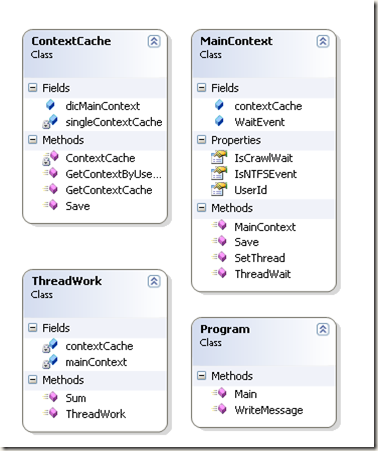
在主线程运行后,新开一个新线程,由新线程来控制主线程的等待和执行.
类关系图
代码实现
|
1
2
3
4
5
6
7
8
9
10
11
12
13
14
15
16
17
18
19
20
21
22
23
24
25
26
27
28
29
30
31
32
33
34
35
36
37
38
39
40
41
42
43
44
45
46
47
48
49
50
51
52
53
54
55
56
57
58
59
60
61
62
63
64
65
66
67
68
69
70
71
72
73
74
75
76
77
78
79
80
81
82
83
84
85
86
87
88
89
90
91
92
93
94
95
96
97
98
99
100
101
102
103
104
105
106
107
108
109
110
111
112
113
114
115
116
117
118
119
120
121
122
123
124
125
126
127
128
129
130
131
132
133
134
135
136
137
138
139
140
141
142
143
144
145
146
147
148
149
150
151
152
153
154
155
156
157
158
159
|
//===============================================================================//作者:Spring Yang//日期:2011-10-12//===============================================================================namespace TestMultipleThread{ using System; using System.Collections.Generic; using System.Threading; public class ThreadWork { private MainContext mainContext; private ContextCache contextCache; public ThreadWork() { contextCache = ContextCache.GetContextCache(); mainContext = contextCache.GetContextByUserId("001"); } public void Sum() { Console.WriteLine(string.Format("this is thread ID {0} execute", Thread.CurrentThread.ManagedThreadId)); for (int i = 0; i < 10; i++) { Thread.Sleep(10); } if (mainContext != null && mainContext.IsCrawlWait == false) { mainContext.IsNTFSEvent = true; while (mainContext.IsCrawlWait) { Thread.Sleep(25); } Console.WriteLine("main thread is wait"); Thread.Sleep(10000); Console.WriteLine("main thread is start"); mainContext.IsNTFSEvent = false; mainContext.SetThread(); } } } class Program { public static void Main() { MainContext mainContext = new MainContext("001"); mainContext.Save(); //新开一个线程 ThreadWork threadWork = new ThreadWork(); ThreadStart myThreadDelegate = new ThreadStart(threadWork.Sum); Thread myThread = new Thread(myThreadDelegate); myThread.Start(); for (int i = 0; i < 100; i++) { if (mainContext.IsNTFSEvent) mainContext.ThreadWait(); Thread.Sleep(10); } Console.WriteLine("main Thread continue"); Thread.Sleep(100000); } public void WriteMessage() { Console.WriteLine("Stop the main thread."); } } public class MainContext { public string UserId { get; set; } //设置 AutoResetEvent public AutoResetEvent WaitEvent; public ContextCache contextCache; //设置线程等待 public void ThreadWait() { if (WaitEvent == null) WaitEvent = new AutoResetEvent(false); if (IsNTFSEvent) { IsCrawlWait = true; WaitEvent.WaitOne(); } } public MainContext(string userID) { UserId = userID; IsCrawlWait = false; IsNTFSEvent = false; contextCache = ContextCache.GetContextCache(); } public void Save() { contextCache.Save(UserId, this); } public void SetThread() { if (!IsNTFSEvent && IsCrawlWait) { IsCrawlWait = false; WaitEvent.Set(); } } public bool IsCrawlWait { get; set; } public bool IsNTFSEvent { get; set; } } //单例模式,保存到内存中 public class ContextCache { public Dictionary<string, MainContext> dicMainContext = new Dictionary<string, MainContext>(); public void Save(string userId, MainContext mainContext) { dicMainContext.Add(userId, mainContext); } private static ContextCache singleContextCache; public MainContext GetContextByUserId(string userId) { MainContext context; dicMainContext.TryGetValue(userId, out context); return context; } private ContextCache() { } public static ContextCache GetContextCache() { if (singleContextCache == null) { singleContextCache = new ContextCache(); } return singleContextCache; } }} |
运行结果

参考资料:
1、MSDN
2、C#多线程:深入了解线程同步lock,Monitor,Mutex,同步事件和等待句柄(中) 地址: http://dongguojun.iteye.com/blog/960586
转自:http://www.cnblogs.com/springyangwc/archive/2011/10/12/2208991.html
多线程间通信之AutoResetEvent和ManualResetEvent的原理分析和开发示例的更多相关文章
- 多线程间通信之AutoResetEvent和ManualResetEvent的原理分析
AutoResetEvent 允许线程通过发信号互相通信. 通常,当线程需要独占访问资源时使用该类. 线程通过调用 AutoResetEvent 上的 WaitOne 来等待信号. 如果 AutoRe ...
- (十一)boost库之多线程间通信
(十一)boost库之多线程间通信 1.互斥锁 在编程中,引入了对象互斥锁的概念,来保证共享数据操作的完整性.每个对象都对应于一个可称为" 互斥锁" 的标记,这个标记用来保证在任一 ...
- Java 多线程间通信
JDK 1.5 以后, 将同步和锁封装成了对象, 并将操作锁的隐式方法定义到了该对象中, 将隐式动作变成了显示动作. Lock 接口 Lock 接口, 位于 java.util.concurrent. ...
- Java多线程间通信-解决安全问题、等待唤醒机制
/*1.增加一个知识点一个类怎么在所有的类中,让其它类来共同修改它的数据呢?可以用单例设计模式可以用静态可以在其它类中做一个构造函数,接受同一个对象,这样就可以实现对象 2.状态选择可以用数字0 1 ...
- java 多线程间通信(二)
传统的线程通信 Object提供了三个方法wait(), notify(), notifyAll()在线程之间进行通信,以此来解决线程间执行顺序等问题. wait():释放当前线程的同步监视控制器,并 ...
- java 多线程间通信(一)
synchronized同步 package com.test7; public class Run { public class MyObject { private int a; public M ...
- cuda多线程间通信
#include "cuda_runtime.h" #include "device_launch_parameters.h" #include <std ...
- wxpython多线程间通信
#!bin/bash/python # -*- coding=utf-8 -*- import time import wx from threading import Thread from wx. ...
- Android线程间通信更新UI的方法(重点分析EventBus)
Android的UI更新只能在UI线程中,即主线程.子线程中如果要进行UI更新,都是要通知主线程来进行. 几种实现方式总结如下,欢迎补充. 1.runOnUiThread() 子线程中持有当前Acti ...
随机推荐
- group by的运用
select a.* from zeai_photo a inner join (select max(id) mid,userid from zeai_photo group by userid) ...
- vue数据传递--我有特殊的实现技巧
最近碰到了比较多的关于vue的eventBus的问题,之前定技术选型的时候也被问到了,vuex和eventBus的使用范围.所以简单的写一下.同时有一种特殊的实现方案. 有这么几种数据传递方式,vue ...
- systemd服务内容详解
systemd是Linux下的一种init软件,由Lennart Poettering带头开发,并在LGPL 2.1及其后续版本许可证下开源发布.其开发目标是提供更优秀的框架以表示系统服务间的依赖关系 ...
- Codeforces 798D - Mike and distribution(二维贪心、(玄学)随机排列)
题目链接:http://codeforces.com/problemset/problem/798/D 题目大意:从长度为n的序列A和序列B中分别选出k个下表相同的数要求,设这两个序列中k个数和分别为 ...
- hbase学习(一)hbase简介
1.hadoop生态系统 2.hbase简介 非关系型数据库知识面扩展 cassandra.hbase.mongodb.redis couchdb,文件存储数据库 Neo4j非关系型图数据库 3.hb ...
- ECMA-Script5
严格模式 所谓严格模式,从字面上就很好理解,即更严格的模式 在这种模式下执行,浏览器会对JS的要求更苛刻. 举例: function m1(){ max = 100; } m1(); al ...
- 完美解决doc、docx格式word转换为Html
http://blog.csdn.net/renzhehongyi/article/details/48767597
- 洛谷P2692 覆盖 题解
题目传送门 这道题一开始想使用二维的bool型数组来存,最后统计.但看到数据范围... 所以就改用两个bool型数组(一维),分别储存横.列,最后将横.列面积求出来,再减去重复算的面积(横的个数*列的 ...
- lr如何屏蔽全局变量的影响
首先要熟悉C语言的全局变量和局部变量的含义: C语言中的变量详解 先说说变量的作用域,比如,在函数中,形参变量只是在被调用期间才分配内存单元,调用结束立即释放.这就说明形参变量只有在函授内才是有效的, ...
- SQL 如何查找一个表里,每个班级各个学科的最高分?
SQL 如何查找一个表里,每个班级各个学科的最高分? 学生表:STUDENT(S#,SNAME,SAGE,SSEX,CLASSNO) 班级表:CLASS(CLASSNO,CLASSNAME) 课程表: ...