
SpringBoot RestFul集成Swagger2
一、依赖:
       <dependency>

            <groupId>io.springfox</groupId>

            <artifactId>springfox-swagger2</artifactId>

            <version>2.6.</version>

        </dependency>

        <dependency>

            <groupId>io.springfox</groupId>

            <artifactId>springfox-swagger-ui</artifactId>

            <version>2.6.</version>

        </dependency>
二、新增配置项:
@Configuration

@EnableSwagger2

public class Swagger2 {

    @Bean

    public Docket createRestApi() {

        return new Docket(DocumentationType.SWAGGER_2)

                .apiInfo(apiInfo())

                .select()

                .apis(RequestHandlerSelectors.basePackage("com.bosssoft.platform.appframe.rest"))

                .paths(PathSelectors.any())

                .build();

    }

    private ApiInfo apiInfo() {

        return new ApiInfoBuilder()

                .title("应用中心springBoot之RestFulApi接口文档")

                .version("1.0")

                .build();

    }

}
通过@Configuration注解,表明它是一个配置类,@EnableSwagger2开启swagger2。apiINfo()配置一些基本的信息。apis()指定扫描的包会生成文档。
三、写生产文档的注解
swagger通过注解表明该接口会生成文档,包括接口名、请求方法、参数、返回信息的等等。
@Api:修饰整个类,描述Controller的作用
@ApiOperation:描述一个类的一个方法,或者说一个接口
@ApiParam:单个参数描述
@ApiModel:用对象来接收参数
@ApiProperty:用对象接收参数时,描述对象的一个字段
@ApiResponse:HTTP响应其中1个描述
@ApiResponses:HTTP响应整体描述
@ApiIgnore:使用该注解忽略这个API
@ApiError :发生错误返回的信息
@ApiParamImplicitL:一个请求参数
@ApiParamsImplicit 多个请求参数
例如:
/**

 *

 * @author Shaw

 *

 */

@RestController

@RequestMapping(value = "/rest", produces = MediaType.APPLICATION_JSON_UTF8_VALUE)

@Api(value = "/rest", tags = "ApplicationRestController", description = "应用管理接口")

public class ApplicationRestController{

    @Autowired

    private AfaApplicationService applicationService;

    @ApiOperation("获取所有应用")

    @RequestMapping(value="/application",method=RequestMethod.GET)

    public List<ApiApplication> getApplications() {

        AfaApplication app = new AfaApplication();

        app.setIsOpen("");

        List<AfaApplication> afaAppList = applicationService.getAfaApplicationList(app);

        return BeanUtils.copyList(afaAppList, ApiApplication.class);

    }

    @ApiOperation("根据用户编码获取当前用户应用")

    @RequestMapping(value="/application/userCode/{userCode}",method=RequestMethod.GET)

    public List<ApiApplication> getApplicationsByUserCode(@PathVariable("userCode")String userCode) {

        return BeanUtils.copyList(applicationService.getApplicationsByUserCode(userCode),ApiApplication.class);

    }

}
启动项目,访问:
http://127.0.0.1:8088/appframe-web/swagger-ui.html
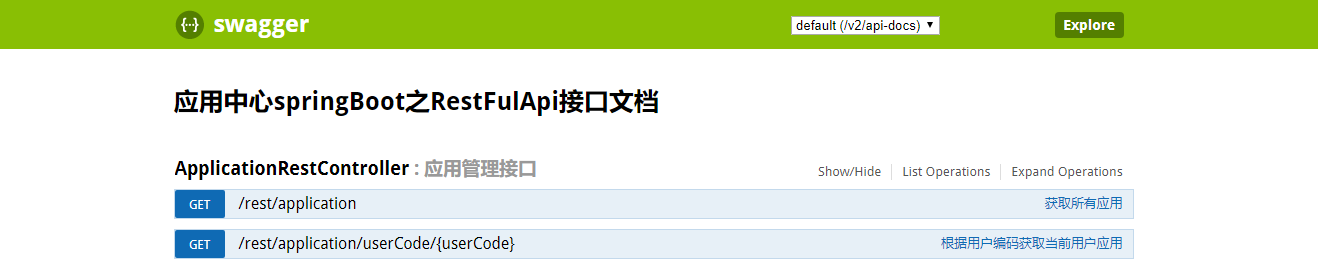
测试的时候,可以直接在这个ui界面上进行测试,或者可以通过postman或者soapui等工具进行测试。
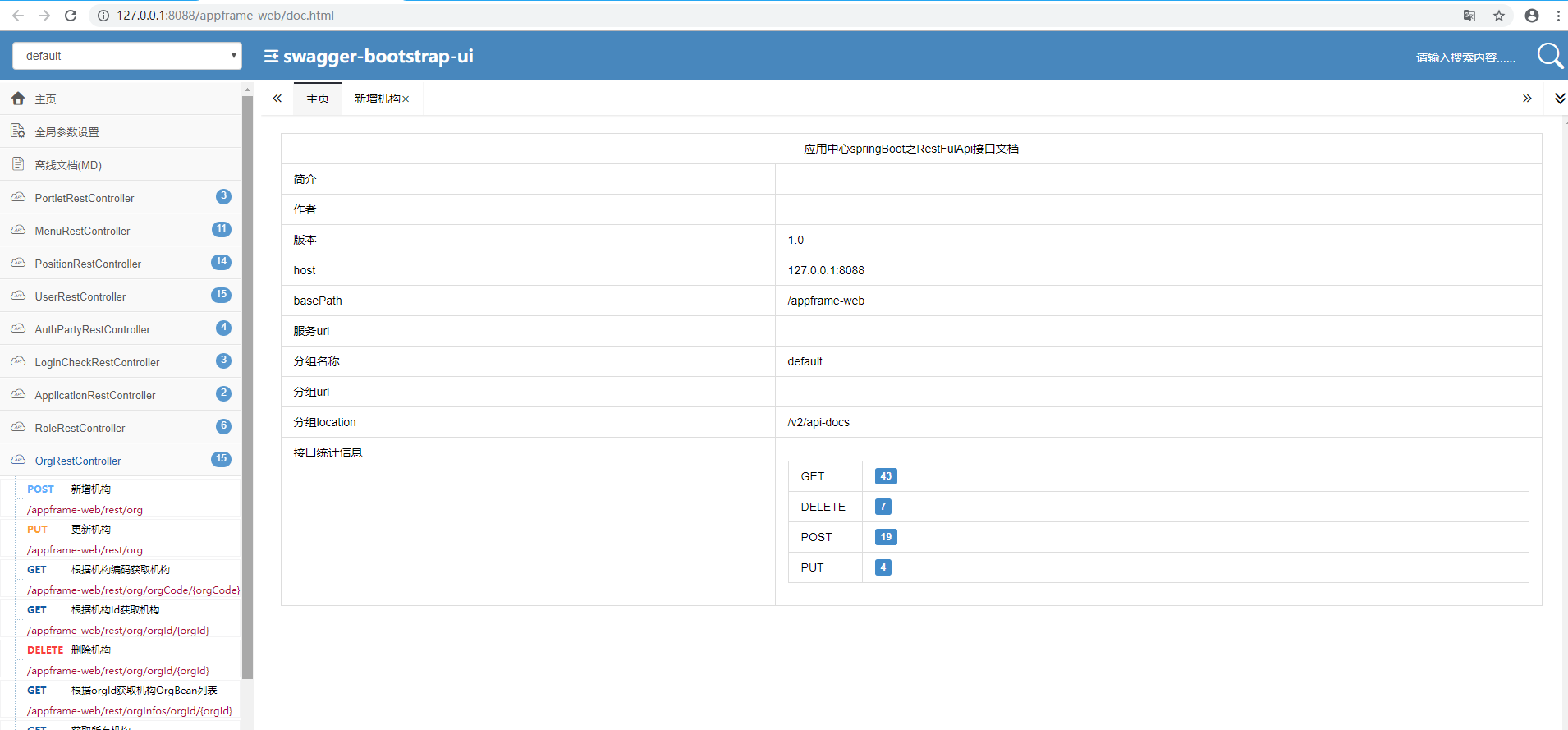
备注可以通过修改依赖,将Ui的测试界面改成bootstrap风格的Api界面
       <dependency>

            <groupId>io.springfox</groupId>

            <artifactId>springfox-swagger2</artifactId>

            <version>2.6.</version>

        </dependency>

        <dependency>

            <groupId>com.github.xiaoymin</groupId>

            <artifactId>swagger-bootstrap-ui</artifactId>

            <version>1.8.</version>

        </dependency>
风格如下:
http://127.0.0.1:8088/appframe-web/doc.html
SpringBoot RestFul集成Swagger2的更多相关文章
- Springboot Oauth2 集成Swagger2权限验证实战
Swagger是什么?能干什么?在这就不展开讲解了.本文主要讲解如何集成OAuth2的Password模式权限验证,验证接口是否具有权限. 引入依赖 <dependency> <gr ...
- SpringBoot中集成Swagger2
1.依赖jar <dependency> <groupId>io.springfox</groupId> <artifactId>springfox-s ...
- SpringBoot集成Swagger2实现Restful(类型转换错误解决办法)
1.pom.xml增加依赖包 <dependency> <groupId>io.springfox</groupId> <artifactId>spri ...
- springboot集成swagger2构建RESTful API文档
在开发过程中,有时候我们需要不停的测试接口,自测,或者交由测试测试接口,我们需要构建一个文档,都是单独写,太麻烦了,现在使用springboot集成swagger2来构建RESTful API文档,可 ...
- springboot 集成swagger2
使用Swagger 可以动态生成Api接口文档,在项目开发过程中可以帮助前端开发同事减少和后端同事的沟通成本,而是直接参照生成的API接口文档进行开发,提高了开发效率.这里以springboot(版本 ...
- SpringBoot集成Swagger2在线文档
目录 SpringBoot集成Swagger2在线文档 前言 集成SpringBoot 登录接口文档示例 代码 效果 注解说明 总结 SpringBoot集成Swagger2在线文档 前言 不得不说, ...
- 集成 Swagger2 构建强大的 RESTful API 文档
微信公众号:一个优秀的废人如有问题或建议,请后台留言,我会尽力解决你的问题. 前言 快过年了,不知道你们啥时候放年假,忙不忙.反正我是挺闲的,所以有时间写 blog.今天给你们带来 SpringBoo ...
- Spring Boot2 系列教程 (四) | 集成 Swagger2 构建强大的 RESTful API 文档
前言 快过年了,不知道你们啥时候放年假,忙不忙.反正我是挺闲的,所以有时间写 blog.今天给你们带来 SpringBoot 集成 Swagger2 的教程. 什么是 Swagger2 Swagger ...
- 【java框架】SpringBoot(3) -- SpringBoot集成Swagger2
1.SpringBoot web项目集成Swagger2 1.1.认识Swagger2 Swagger 是一个规范和完整的框架,用于生成.描述.调用和可视化 RESTful 风格的 Web 服务.总体 ...
随机推荐
- Java中如何获取多维数组的长度
在程序处理中遍历数组是一种很常见的操作,但遍历数组时,我们需要知道数组各维度的长度(一维数组除外,for each 可以遍历),下面举例说明如何求多维数组的长度. 一维 : int [] array ...
- hdu 6097 Mindis(数学几何,圆心的反演点)
Mindis Time Limit: 6000/3000 MS (Java/Others) Memory Limit: 65536/65536 K (Java/Others)Total Subm ...
- Redis--初入
安装 .下载源码,解压缩后编译源码 $ wget http://download.redis.io/releases/redis-4.0.1.tar.gz $ tar xzf redis-4.0.1 ...
- 201621123006 《Java程序设计》第2周学习总结
1. 本周学习总结 以几个关键词描述本周的学习内容.并将关键词之间的联系描述或绘制出来. 原则:少而精,自己写.即使不超过5行也可,但请一定不要简单的复制粘贴. java数据类型:java数据类型分为 ...
- python中sort()与sorted()的区别
Python list内置sort()方法用来排序,也可以用python内置的全局sorted()方法来对可迭代的序列排序生成新的序列 一,最简单的排序 1.使用sort排序 my_list = [3 ...
- [转载]Spring源码下载地址
转载自:http://blog.csdn.net/liuzheng2684/article/details/6534722,谢谢! 今天想下载一下spring的源代码,登录到Spring官网,傻眼了, ...
- spinlock变量没有初始化
http://blog.csdn.net/longwang155069/article/details/52224284
- 2PC
两阶段提交()Two-Phase Commit):是计算机网络尤其是在数据库领域内,为了使基于分布式系统架构下的所有节点在进行事务处理过程中能够保持原子性和一致性而设计的一种算法.通常,二阶段提交协议 ...
- No form of payment has been added yet.
You may select a form of payment after your account balance reaches $10.00. Learn more 显然是说达到10美元以后才 ...
- Android Studio真机测试失败-----''No target device found" (转)
参考文章: https://blog.csdn.net/chang_sir/article/details/51755572 今天想用真机测试一个程序,却报出这样一个Error"No tar ...