
GIT使用—提交的查找与变更
一、查找提交
(1)git bisect(二分搜索法)
基于任意搜索条件查找特定的错误提交。在排查某个提交版本导致的错误时非常有用。
[root@localhost public_html]# git bisect start   开始搜索

[root@localhost public_html]# git bisect bad   告知GIT那个提交时“坏”的,通常是当前版本

[root@localhost public_html]# git bisect good v2.6.27  告知那个版本提交是“好”的,通常是测试通过版本

之后Git会在范围内将每个修订版本搜索出来,之后你要做的就是缩小排查范围。

最后要告诉Git已经完成

[root@localhost public_html]# git git bisect reset

[root@localhost public_html]# git branch

* master
(2)git blame
此命令告诉你一个文件中的每一行最后是谁修改的和哪次提交做出了变更。
[root@localhost public_html]# git blame -L 1, index.html

0a307160 (tong 2018-02-27 11:52:29 +0800 1) <html>

0a307160 (tong 2018-02-27 11:52:29 +0800 2) <body>

^b4e2a14 (tong 2018-02-27 11:45:23 +0800 3) My website is alive!

0a307160 (tong 2018-02-27 11:52:29 +0800 4) </body>

0a307160 (tong 2018-02-27 11:52:29 +0800 5) </html>
(3)Pickaxe
git log -Sstring根据给定的条件沿着文件的差异历史搜索。通过搜索修订版本间的实际差异,这条命令可以找到那些执行改变的提交。
[root@localhost public_html]# git log -Shtml --pretty=oneline --abbrev-commit index.html

0a30716 This is new html!
二、查看提交历史
[root@localhost public_html]# git log

commit aa431d938e85445f6c22c7389a37349f587d5b01

Author: tong <tongxiaoda@anzhi.com>

Date:   Tue Feb 27 13:06:21 2018 +0800

    mv bar to foo

commit 1ed9a862e62bd5513021838cb435cf8170e2173d

Author: tong <tongxiaoda@anzhi.com>

Date:   Tue Feb 27 13:04:37 2018 +0800

    new bar

commit 19a473c2e935efa59b8edea19d2d12be96987a97

Author: tong <tongxiaoda@anzhi.com>

Date:   Tue Feb 27 12:00:03 2018 +0800

    Remove a poem

commit 5be473e1ed6d04ed9e96b7fa3e9e2860607cbd31

Author: tong <tongxiaoda@anzhi.com>

Date:   Tue Feb 27 11:59:16 2018 +0800

    add poem.html

commit 0a3071601cc10777e271a952ead46cffba233e24

Author: tong <tongxiaoda@anzhi.com>

Date:   Tue Feb 27 11:52:29 2018 +0800

    This is new html!

commit b4e2a14de84d29ea8890a2e19f039eb08bc2fc7d

Author: tong <tongxiaoda@anzhi.com>

Date:   Tue Feb 27 11:45:23 2018 +0800

    Initial contents of public_html
可以用 --graph 选项,查看历史中什么时候出现了分支、合并。
[root@localhost public_html]# git log --oneline --graph

* aa431d9 mv bar to foo

* 1ed9a86 new bar

* 19a473c Remove a poem

* 5be473e add poem.html

* 0a30716 This is new html!

* b4e2a14 Initial contents of public_html
可以用 '--reverse'参数来逆向显示所有日志。
[root@localhost public_html]# git log --reverse --oneline

b4e2a14 Initial contents of public_html

0a30716 This is new html!

5be473e add poem.html

19a473c Remove a poem

1ed9a86 new bar

aa431d9 mv bar to foo
如果只想查找指定用户的提交日志可以使用命令:git log --author
[root@localhost public_html]# git log --author=tong --oneline -3

aa431d9 mv bar to foo

1ed9a86 new bar

19a473c Remove a poem
如果你要指定日期,可以执行几个选项:--since 和 --before,但是你也可以用 --until 和 --after。
--no-merges 选项以隐藏合并提交
[root@localhost public_html]# git log --oneline --before={3.weeks.ago} --after={2018-01-01} --no-merges
三、更改提交
git reset命令会把版本库和工作目录改变为已知状态,其调整HEAD引用指向给定的提交,默认情况下还会更新搜索引以匹配该提交。
git reset-soft
将HEAD引用指向给定提交,索引和工作目录内容保持不变。
git reset--mixed(默认模式)
将HEAD指向给定提交,索引内容也跟着改变以符合给定提交的树结构,但工作目录中的内容保持不变。
git reset-hard
将HEAD指向给定提交,索引内容也跟着改变以符合给定提交的树结构,工作目录内容也随之改变以反映给定提交表示的树的状态。
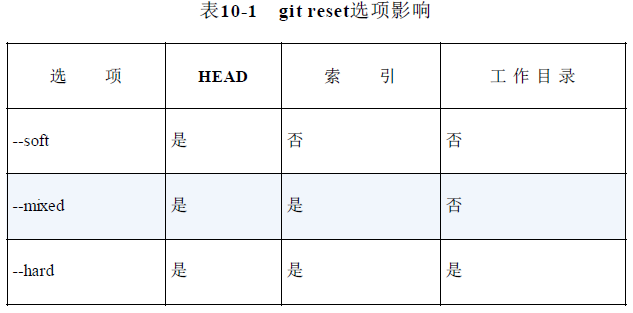
简单地重做或清除分支上的最近提交
[root@localhost ~]# cd test

[root@localhost test]# git init

Initialized empty Git repository in /root/test/.git/

[root@localhost test]# echo foo >> master_file

[root@localhost test]# git add master_file

[root@localhost test]# git commit

[master (root-commit) 96a97fb] This is test!

 1 files changed, 1 insertions(+), 0 deletions(-)

 create mode 100644 master_file

[root@localhost test]# echo "more foo" >> master_file

[root@localhost test]# git commit master_file

[master 8b6ce36] Change master_file

 1 files changed, 1 insertions(+), 0 deletions(-)

[root@localhost test]# git show-branch --more=5

[master] Change master_file

[master^] This is test!

假设第二次提交是错的,需要改变一下

[root@localhost test]# git reset HEAD^

Unstaged changes after reset:

M	master_file

[root@localhost test]# git show-branch --more=5

[master] This is test!

[root@localhost test]# cat master_file

foo

more foo

执行后Git离开了master_file的新状态,因为重置了索引,所以必须重新暂存你想要提交的修改

[root@localhost test]# echo "even more foo" >> master_file

[root@localhost test]# git commit master_file

[master eaf3fca] new change master_file

 1 files changed, 2 insertions(+), 0 deletions(-)

[root@localhost test]# git show-branch --more=5

[master] new change master_file

[master^] This is test!

查看版本库中引用变化的历史记录

[root@localhost test]# git reflog

eaf3fca HEAD@{0}: commit: new change master_file

96a97fb HEAD@{1}: HEAD^: updating HEAD

8b6ce36 HEAD@{2}: commit: Change master_file
使用git cherry-pick提交命令会在当前分支上应用给定提交引入的变更。这并不改变版本库中的现有历史记录,而是添加历史记录。
通常用于版本库中一个分支的特定提交引入不同的分支中,即把维护分支的提交移植到开发分支。
git checkout rel_2.3

git cherry-pick dev~2
使用git revert将引入一个新提交来抵消给定提交的影响。
git revert master~3
修改最新提交
git commit --amend --author "Bob <Bob@test.com>"
GIT使用—提交的查找与变更的更多相关文章
- Git撤销提交和修改相关操作
团队开发中经常遇到错误删除文件,错误提交等情况,那么使用Git该如何正确的进行撤销和恢复呢? 一.增补提交 git commit –C HEAD –a --amend -C表示复用指定提交的提交留言, ...
- git操作提交方式
git代码提交 第一次提交代码 在本地建立一个文件夹用来存储代码,相当于一个仓库进入文件夹目录输入下面命令 echo "# xxx" >> README.md (添加一 ...
- Git-Runoob:Git 查看提交历史
ylbtech-Git-Runoob:Git 查看提交历史 1.返回顶部 1. Git 查看提交历史 在使用 Git 提交了若干更新之后,又或者克隆了某个项目,想回顾下提交历史,我们可以使用 git ...
- 【第八篇】- Git 查看提交历史之Spring Cloud直播商城 b2b2c电子商务技术总结
Git 查看提交历史 Git 提交历史一般常用两个命令: git log 在使用 Git 提交了若干更新之后,又或者克隆了某个项目,想回顾下提交历史,我们可以使用 git log 命令查看. 针对 ...
- 如何避免git每次提交都输入密码
在ubuntu系统中,如何避免git每次提交都输入用户名和密码?操作步聚如下:1: cd 回车: 进入当前用户目录下:2: vim .git-credentials (如果没有安装vim 用其它编辑器 ...
- 如何利用git shell提交代码到github
在很早之前我根据找到的一些资料以及自己的实践总结了一篇如何将VS2015上的代码上传到GitHub上,后来我发现有小伙伴私信我,说跟我上面写的不一样,但是那段时间也比较忙,当我发现有人私信的时候差不过 ...
- GIT入门笔记(20)- git 开发提交代码过程梳理
git开发提交流程新项目开发,可以直接往master上提交老项目维护,可以在分支上修改提交,多次add和commit之后,也可以用pull合并主干和本地master,解决冲突后再push 1.检出代码 ...
- git 本地提交代码到 github 远程库,没有弹框 github login
git 本地提交代码到 github 远程库,没有弹框 github login: 原因: win10 有个凭据管理器,给保存了历史登陆用户名密码,导致无法切换用户. 解决办法: 删除历史登陆用户 ...
- git 命令提交项目到github
git 命令提交项目到github步骤如下: 1.使用git 命令客户端进入项目根路径,输入 git init 命令,创建github本地根目录 2.把文件加入到本地项目 git add . ,如 ...
随机推荐
- pure
Pure也是一款很出色的CSS框架,之前分享的Bootstrap是由Twitter出品的,而Pure是来自雅虎的.尽管从UI界面效果上来说,Pure没有Bootstrap那样精美,但Pure是纯CSS ...
- Struts2---输入验证
1. Struts2 的验证 1). 验证分为两种: > 声明式验证* 需要解决的问题如下: >> 确定对哪个 Action 或 Model 的那个字段进行验证 >> 使 ...
- docker remote api enable in ubuntu
现在使用docker作为开发环境,操作系统是ubuntu16.10,pycharm中使用remote interpreter,需要用到remote api,结果发现自己的原答案是针对ubuntu 14 ...
- Spring Boot 编写入门程序
1. SpringBoot 入门 快速创建独立运行的Spring项目以及与主流框架集成; 使用嵌入式的Servlet容器,应用无需打成WAR包; starters自动依赖与版本控制; 大量的自动配置, ...
- 【opencv安裝】opencv2和opencv3共存——安装opencv2和opencv3到指定目录
安装 opencv2和opencv3共存会导致运行时问题,须分开 下载源码 cmake -D CMAKE_BUILD_TYPE=RELEASE -D CMAKE_INSTALL_PREFIX=/hom ...
- Win10新建文件不自动刷新
Win10 桌面创建文件/文件夹需要F5刷新才出来,资源管理器中创建也是一样的问题. 网上搜索的结果都以修改注册表,禁用音频面板检测,上述方案可能能解决部分情况. 实际上是桌面图标缓存出问题,以下是一 ...
- Go学习笔记一:解析toml配置文件
本文系作者原创,转载请注明出处https://www.cnblogs.com/sonofelice/p/9085291.html . 一些mysql或者日志路径的信息需要放在配置文件中.那么本博文主要 ...
- birt 日志打印
在birt初始initialize 方法里,定义日志输出方法 importPackage(Packages.java.util.logging); importPackage(Packages.log ...
- ssm框架集成Quartz定时器
第一步:添加依赖 <dependency> <groupId>org.quartz-scheduler</groupId> <artifactId>qu ...
- .NET加密方式解析--散列加密
在现代社会中,信息安全对于每一个人都是至关重要的,例如我们的银行账户安全.支付宝和微信账户安全.以及邮箱等等,说到信息安全,那就必须得提到加密技术,至于加密的一些相关概念,在这里就不说了. 这一次将会 ...