
View.findViewById()和Activity.findViewById()区别
在网上看见View.findViewById() 和 Activity.findViewById()执行效率不一样
使用Activity.findViewById()如:
TextView tv_inner_1 = (TextView)this.findViewById(R.id.tv_inner_1);

TextView tv_inner_2 = (TextView)this.findViewById(R.id.tv_inner_2);
使用View.findViewById() 如:
View layout_outer = this.findViewById(R.id.layout_outer);

TextView tv_inner_1 = (TextView)layout_outer.findViewById(R.id.tv_inner_1);

TextView tv_inner_2 = (TextView)layout_outer.findViewById(R.id.tv_inner_2);
他们都是针对下面同一个xml
    <LinearLayout>

         <LinearLayout id="@+id/layout_outer">

               <TextView id="@+id/tv_inner_1"/>

               <TextView id="@+id/tv_inner_2"/>

         </LinearLayout>

    </LinearLayout>
自从学习android的hello world开始
我们就知道了这样一个函数findViewById(),他已经成为了家喻户晓,坑蒙拐骗,杀人越货必备的一个函数(好吧,这句是扯淡)
但一直用也没细致研究过它,直到写程序的时候发现一个由这个函数引起的一个莫名其妙的bug,遂决定好好研究下次函数~
我们调用的findViewById()函数其实有两种(目前我只看到两种,不确定还有没有其他的),一种是Activity类中findViewById()函数
另外一种是View类中定义的findViewById()函数
一般我们在oncreate()方法中使用的(**view)findViewById(R.id.**)既是调用的Activity中的findViewById()函数
而在其他情况写出的***view.findViewById()中调用的是view类中的findViewById()
分别看一下源代码中的实现方法及介绍
Activity类中定义的findViewById()
/**

 * Finds a view that was identified by the id attribute from the XML that

 * was processed in {@link  #onCreate}.

 *

 * @return  The view if found or null otherwise.

 */

public View findViewById(int id) {

    return getWindow().findViewById(id);

}

/**

 * Retrieve the current {@link  android.view.Window} for the activity.

 * This can be used to directly access parts of the Window API that

 * are not available through Activity/Screen.

 *

 * @return Window The current window, or null if the activity is not

 *         visual.

 */

public Window getWindow() {

    return mWindow;

}
这里可以看出这个函数是在寻找在xml中定义的指定id的对象
View类中的findViewById()
/**

 * Look for a child view with the given id.  If this view has the given

 * id, return this view.

 *

 * @param id The id to search for.

 * @return The view that has the given id in the hierarchy or null

 */

public final View findViewById(int id) {

    if (id < 0) {

        return null;

    }

    return findViewTraversal(id);

    /**

 * {@hide}

 * @param id the id of the view to be found

 * @return the view of the specified id, null if cannot be found

 */

protected View findViewTraversal(int id) {

    if (id == mID) {

        return this;

    }

    return null;

}
从这里可以看出我们是从一个view的child view中寻找指定id的对象,所以即使几个layout的XML文件中的View的id号相同的话,只要他们没有相同的父节点,或有相同的父亲节点,但不在父节点及以上节点调用findViewById通过id来查找他们就是没有问题。(这句引用自这里http://www.2cto.com/kf/201204/127404.html)
使用这个函数的常见问题:
1.既然Activity中的findViewById()是从R.java中寻找东西,那么我们就要杜绝相同名字的控件
今天自己的bug就是因为这个产生的

说到控件的命名,今天还有一个小发现
仔细看下边两段代码代码
< ?xml version="1.0" encoding="utf-8"?>

< LinearLayout xmlns:android="http://schemas.android.com/apk/res/android"

android:id="@+id/LinearLayout"

android:layout_width="match_parent"

android:layout_height="match_parent"

android:orientation="vertical" >

< /LinearLayout>
< ?xml version="1.0" encoding="utf-8"?>

< LinearLayout xmlns:android="http://schemas.android.com/apk/res/android"

android:layout_width="match_parent"

android:layout_height="match_parent"

android:orientation="vertical" >

< /LinearLayout>
一段里边Layout没有id这个参数,一段里边有id,虽然代码不同但在outline中显示出来都是
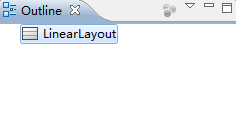
这样在第一种情况下R.id中可以找到LinearLayout这个控件,第二种是没有的哈,这些也是以后要注意的细节
2.在调用view中的findViewById()一定要想好父View是谁!即**view.findViewById()中的**view要找对,如果没有找对父View,返回基本都是null了
View.findViewById()和Activity.findViewById()区别的更多相关文章
- view和activity的区别
activity相当于控制部分,view相当于显示部分.两者之间是多对多的关系,所有东西必须用view来显示. viewGroup继承自view,实现了ViewManager,ViewParent接 ...
- view和activity的区别(转)
activity相当于控制部分,view相当于显示部分.两者之间是多对多的关系,所有东西必须用view来显示. viewGroup继承自view,实现了ViewManager,ViewParent接口 ...
- Android: Custom View和include标签的区别
Custom View, 使用的时候是这样的: <com.example.home.alltest.view.MyCustomView android:id="@+id/customV ...
- 关于android编程中service和activity的区别
一. 绝大部分情况下,Service的作用是用来“执行”后台的.耗时的.重要的任务,三者缺一不可,而最重要的原因是第三点:要执行重要的任务. 因为当一个进程启动了Service后,进程的优先级变高了, ...
- 【android-tips】如何在view中取得activity对象
(转载请注明出处:http://blog.csdn.net/buptgshengod) 今天想实现在view中返回上一个activity的功能,想了半天.因为在虽然view是包含于一个activity ...
- js架构设计模式——MVVM模式下,ViewModel和View,Model有什么区别
MVVM模式下,ViewModel和View,Model有什么区别 Model:很简单,就是业务逻辑相关的数据对象,通常从数据库映射而来,我们可以说是与数据库对应的model. View:也很简单,就 ...
- inflate, findViewById与setContentView的区别与联系
protected void onCreate(Bundle savedInstanceState) { super.onCreate(savedInstanceState); setContentV ...
- inflate, findViewById与setContentView的区别与联系 分类: H1_ANDROID 2014-04-18 22:54 1119人阅读 评论(0) 收藏
protected void onCreate(Bundle savedInstanceState) { super.onCreate(savedInstanceState); setContentV ...
- Android View的onTouchEvent和OnTouch区别
还是以自定义的TestButton为例. 我们可以通过重写onTouchEvent方法来处理诸如down move up的消息: public class TestButton extends But ...
随机推荐
- php获取excel文件数据
很简单就可以实现,下面为大家简单介绍下 1.下载PHPExcel类,是一个文件夹,还得有一个文件PHPExcel.php,两个在同级目录 require __DIR__ . './PHPExcel/I ...
- cmakelist
cmake 添加头文件目录,链接动态.静态库 罗列一下cmake常用的命令. CMake支持大写.小写.混合大小写的命令. 1. 添加头文件目录INCLUDE_DIRECTORIES 语法: incl ...
- SDP协议简述
SDP协议也是文本协议,只需要按照协议本身的格式填充.SDP协议格式即详细信息如下: 会话描述 格式及举例 v=(protocol version) v=0 o=(owner/creator and ...
- 提高你的javascript代码逼格系列之函数与数组
不知道大家有没有一种感觉,那就是自己写的javascript代码虽然能完全解决工作上的需要,但是,一眼望去,too simple!!!简直就是一个傻子都能看懂的水平,于是,在工作之余,我开始去收集一些 ...
- easyUI---分页插件
设置 //分页组件 $('#detailLayer .detailPag').pagination({ pageNumber: 1, pageSize: 10, total: result.Total ...
- python中对文件的处理
1.当文件中存放的用户名的密码,是以字符串的形式存储时,怎么进行读取和操作 eg:MLing,123456 niuniu,234567 luoluo,345678 方法一:将字符串转为字典 1)字典查 ...
- .net core web 中使用app.UseRouter的几种使用方式
public void Configure(IApplicationBuilder app, IHostingEnvironment env, ILoggerFactory loggerFactory ...
- BZOJ4818 LOJ2002 SDOI2017 序列计数 【矩阵快速幂优化DP】*
BZOJ4818 LOJ2002 SDOI2017 序列计数 Description Alice想要得到一个长度为n的序列,序列中的数都是不超过m的正整数,而且这n个数的和是p的倍数. Alice还希 ...
- JS 区分单击双击
var timeout =null; $("#Btn").on("click",function(){ clearTimeout(timeout);//停止单击 ...
- iOS Webview打开不受信的URL
在我们开发过程中经常会碰到直接访问开发人员的私有地址, 这样在app 上是无法打开指定的网页的. 在iOS中需要对WKWebView 进行如下设置: 1.在工程的Plist 文件中添加一下选项 App ...