
安卓入门 使用android创建一个项目 从启动activity中响应按钮事件 启动另一个activity 并传递参数
启动android studio创建一个新项目
  public  void  sendMessage(View view){

        Intent intent=new Intent(this,DispalyMessageActivity.class);

        EditText text =(EditText) findViewById(R.id.edit_message);

        String message=text.getText().toString();

        intent.putExtra(EXTRA_MESSAGE,message);

        startActivity(intent);

    }
添加按钮响应函数 sendMessage view中绑定的响应函数必须为公开无返回值 带有一个View参数的函数 通过View注入可以拿到View上的数据
Intent 对象常用语启动一个新的activity
findViewById 通过view中的id获取到控件对象 这与js获取input类似
通过getText 获取到输入框文本内容
intent.putExtra 将数据保存到intent对象中 这里EXTRA_MESSAGE 是当前类中定义的一个常量
startActivity用语启动一个activity
<?xml version="1.0" encoding="utf-8"?>

<LinearLayout xmlns:android="http://schemas.android.com/apk/res/android"

    xmlns:app="http://schemas.android.com/apk/res-auto"

    xmlns:tools="http://schemas.android.com/tools"

    android:orientation="horizontal"

    android:layout_width="match_parent"

    android:layout_height="match_parent"

    app:layout_behavior="@string/appbar_scrolling_view_behavior"

    tools:showIn="@layout/activity_my"

    android:id="@+id/content">

    <EditText

        android:layout_width="0dp"

        android:layout_weight="1"

        android:layout_height="wrap_content"

        android:hint="@string/edit_message"

        android:id="@+id/edit_message"/>

    <Button

        android:layout_width="wrap_content"

        android:layout_height="wrap_content"

        android:text="@string/button_message"

        android:onClick="sendMessage"/>

</LinearLayout>

<LinearLayout xmlns:android="http://schemas.android.com/apk/res/android"

xmlns:app="http://schemas.android.com/apk/res-auto"

xmlns:tools="http://schemas.android.com/tools"

android:orientation="horizontal"

android:layout_width="match_parent"

android:layout_height="match_parent"

app:layout_behavior="@string/appbar_scrolling_view_behavior"

tools:showIn="@layout/activity_my"

android:id="@+id/content">

<EditText

    android:layout_width="0dp"

    android:layout_weight="1"

    android:layout_height="wrap_content"

    android:hint="@string/edit_message"

    android:id="@+id/edit_message"/>

<Button

    android:layout_width="wrap_content"

    android:layout_height="wrap_content"

    android:text="@string/button_message"

    android:onClick="sendMessage"/>

</LinearLayout>
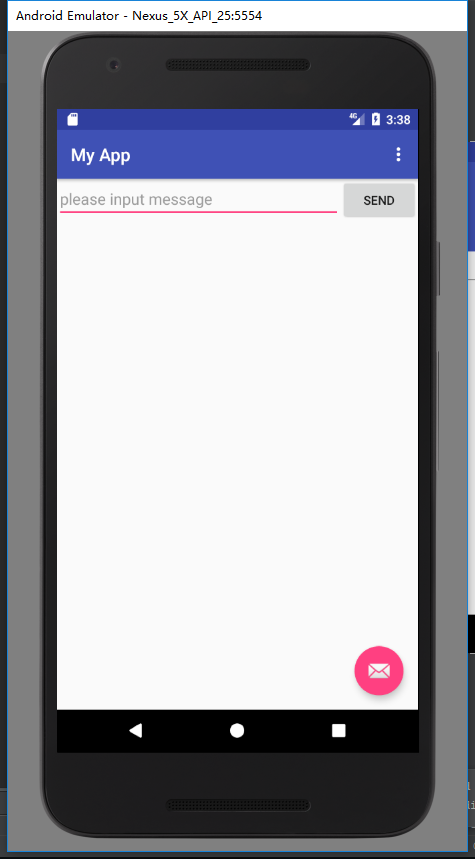
启动效果 这时点击send将跳转到一个新的activity
添加一个activity
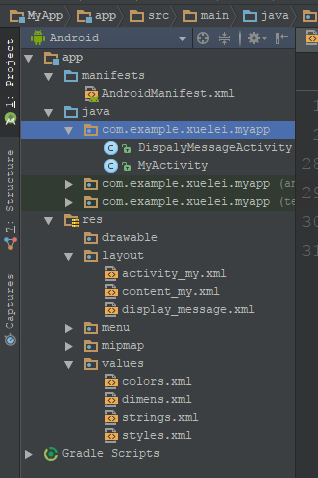
在myactivity下添加一个class并且继承AppCompatActivity
重写 onCreate方法
protected void onCreate(Bundle savedInstanceState) {

        super.onCreate(savedInstanceState);

        setContentView(R.layout.display_message);

        getSupportActionBar().setDisplayHomeAsUpEnabled(true);

        Intent intent = getIntent();

        String message = intent.getStringExtra(MyActivity.EXTRA_MESSAGE);

        TextView textView = new TextView(this);

        textView.setTextSize(80);

        textView.setText(message);

        textView.setWidth(100);

        RelativeLayout layout = (RelativeLayout) findViewById(R.id.content);

        layout.addView(textView);

    }
这通过getIntent获取到intent对象
获取其中保存的message数据
创建一个TextView对象
通过id获取到View 并向该View动态添加一个textView空间
<?xml version="1.0" encoding="utf-8"?>

<RelativeLayout xmlns:android="http://schemas.android.com/apk/res/android"

    android:id="@+id/content"

    android:layout_width="match_parent"

    android:layout_height="match_parent">

    </RelativeLayout>
在AndroidManifest(清单)中注册该View
<?xml version="1.0" encoding="utf-8"?>

<manifest xmlns:android="http://schemas.android.com/apk/res/android"

    package="com.example.xuelei.myapp">

    <application

        android:allowBackup="true"

        android:icon="@mipmap/ic_launcher"

        android:label="@string/app_name"

        android:roundIcon="@mipmap/ic_launcher_round"

        android:supportsRtl="true"

        android:theme="@style/AppTheme">

        <activity

            android:name=".MyActivity"

            android:label="@string/app_name"

            android:theme="@style/AppTheme.NoActionBar">

            <intent-filter>

                <action android:name="android.intent.action.MAIN" />

                <category android:name="android.intent.category.LAUNCHER" />

            </intent-filter>

        </activity>

        <activity

            android:name="com.example.xuelei.myapp.DispalyMessageActivity"

            android:label="@string/title_activity_display_message"

            android:parentActivityName="com.example.xuelei.myapp.MyActivity" >

            <meta-data

                android:name="android.support.PARENT_ACTIVITY"

                android:value="com.example.xuelei.myapp.MyActivity"/>

        </activity>

    </application>

</manifest>
添加一个activity name 该class的完全限定名 包名+类名
lable 设置该activity显示的lable名称
parentActivityName 指定父窗口对象 包名+类名
meta-data  这个名字值是额外的任意的可以提供给父组件的数据。一个组件元素能够包含任意数量的meta-data子元素。它们所有的值都会被收集在Bundle对象中并且使其可以作为组件的 PackageItemInfo.metaData 字段。
     一般的值可以通过value属性来指定,但是如果要指定一个资源id作为一个值,那么就要用resource属性来代替。在这里用于获取 myactivity这个对象
这样就完成一个activity的跳转了
安卓入门 使用android创建一个项目 从启动activity中响应按钮事件 启动另一个activity 并传递参数的更多相关文章
- 【SSRS】入门篇(一) -- 创建SSRS项目
原文:[SSRS]入门篇(一) -- 创建SSRS项目 在本篇中,您将学习如何在 SQL Server Data Tools (SSDT) 中创建报表服务器项目. 报表服务器项目用于创建在报表服务器中 ...
- Spring入门案例 idea创建Spring项目
spring入门案例 idea创建spring项目 Spring介绍 Spring概述 Spring是一个开源框架,Spring是2003年兴起的轻量级java开发框架,由Rod Johnson 在其 ...
- Gym 101064 D Black Hills golden jewels 【二分套二分/给定一个序列,从序列中任意取两个数形成一个和,两个数不可相同,要求求出第k小的组合】
D. Black Hills golden jewels time limit per test 2 seconds memory limit per test 256 megabytes input ...
- Spring入门(一):创建Spring项目
本篇博客作为Spring入门系列的第一篇博客,不会讲解什么是Spring以及Spring的发展史这些太理论的东西,主要讲解下如何使用IntelliJ IDEA创建第一个Spring项目以及通过一个示例 ...
- Intellij IDEA 创建Web项目并在Tomcat中部署运行(不使用maven)【转载】
原文链接:http://www.thinksaas.cn/topics/0/350/350000.html 一.创建Web项目 1.File -> New Module,进入创建项目窗口 2.选 ...
- MyEclipse下创建的项目导入到Eclipse中详细的图文配置方法
一.情景再现. 有些人比较喜欢用Myeclipse开发,有些人却比较喜欢用eclipse开发.但是其中有一个问题,Myeclipse里面的项目导入的时候出现了一个小小的问题. 如下: 二.说明问题 导 ...
- Intellij IDEA 创建Web项目并在Tomcat中部署运行
一.创建Web项目 1.File -> New Module,进入创建项目窗口 2.选择Java类型,在 Module name 处输入项目名,点击Next 3.勾选 Web Applica ...
- Eclipse和MyEclipse使用技巧--MyEclipse下创建的项目导入到Eclipse中详细的图文配置方法
一.情景再现. 有些人比较喜欢用Myeclipse开发,有些人却比较喜欢用eclipse开发.但是其中有一个问题,Myeclipse里面的项目导入的时候出现了一个小小的问题. 如下: 二.说明问题 导 ...
- IntelliJ IDEA 学习(二):Intellij IDEA 创建Web项目并在Tomcat中部署运行IDEA
一.创建Web项目 1.File -> New Module,进入创建项目窗口 2.选择Java类型,在 Module name 处输入项目名,点击Next 3.勾选 Web Applicat ...
随机推荐
- struts2自动接收表单数据
提交页面主要代码: <form method="post" action="messageAction"> <input type=&qu ...
- 小程序setData工作原理理解图
优化建议:1.频繁的去setData--我曾经用这个弄过动画效果,当然后来发现JS动画不适合小程序,CSS3动画才是王道2.每次setData都传递大量新数据--这个大量还真不好理解,暂时定为排行榜类 ...
- 小道消息:CSDN社区产品重大更新
Hi,小伙伴们: 悄悄给大家透露个消息:CSDN社区将要有重大更新. 都有哪些呢?各自是:新极客头条.Ink.博乐 是不是后面两个比較眼生?不要着急,那但是我们的重中之重.我来给大家一一道来-- 先来 ...
- OpenERP实施记录(10):采购补货
本文是<OpenERP实施记录>系列文章的一部分. 上文中业务部门接到沃尔玛三台联想Y400N笔记本电脑的订单,但是仓库无货.本文需要完成采购补货处理. 1. 联想YN400N是ABC公司 ...
- Ubuntu 所需要的中文字体美化操作步骤
中文字体美化是个很讨厌的事情,无数初学者在这里面浪费了无数时间,做了无数没有意义的事情.但这也是不得不做的,我把 Debian/Ubuntu 所需要的中文字体美化操作步骤详细记录在这里,希望能节约大家 ...
- delegate和event的区别 (zz)
一. delegate C#代理实际上类似于C++中的函数指针,因为C#中不存在指针,所以用代理可以完成一些原来在C++中用函数指针完成的操作,例如传递一个类A的方法m给另一个类B的对象,使得类B的对 ...
- 【crontab】“bad minute”及“errors in crontab file, can't install”错误处理
今天有朋友提到,在使用crontab定制后台定时备份任务时报出“bad minute”及“errors in crontab file, can't install”错误.经确认,根本原因是cront ...
- spring autowired还需要在xml中申明bean ?
如果未自动扫描spring管理的类,则需要在xml中申明.如果自动扫描包下的类,则不需要 (如果配置了自动扫描,还是不行还需要进行手动在xml中声明,则就是工程建立的有问题,包的路径等问题)
- Leet Code OJ 226. Invert Binary Tree [Difficulty: Easy]
题目: Invert a binary tree. 4 / \ 2 7 / \ / \ 1 3 6 9 to 4 / \ 7 2 / \ / \ 9 6 3 1 思路分析: 题意是将二叉树全部左右子数 ...
- PHP出现Notice警告怎么办
如下所示,出现Notice警告 程序并没有大错,只是一些变量没有定义,你在代码的第一行加入这一句就可以了:error_reporting(E_ALL ^ E_NOTICE); 恢复正常了.