
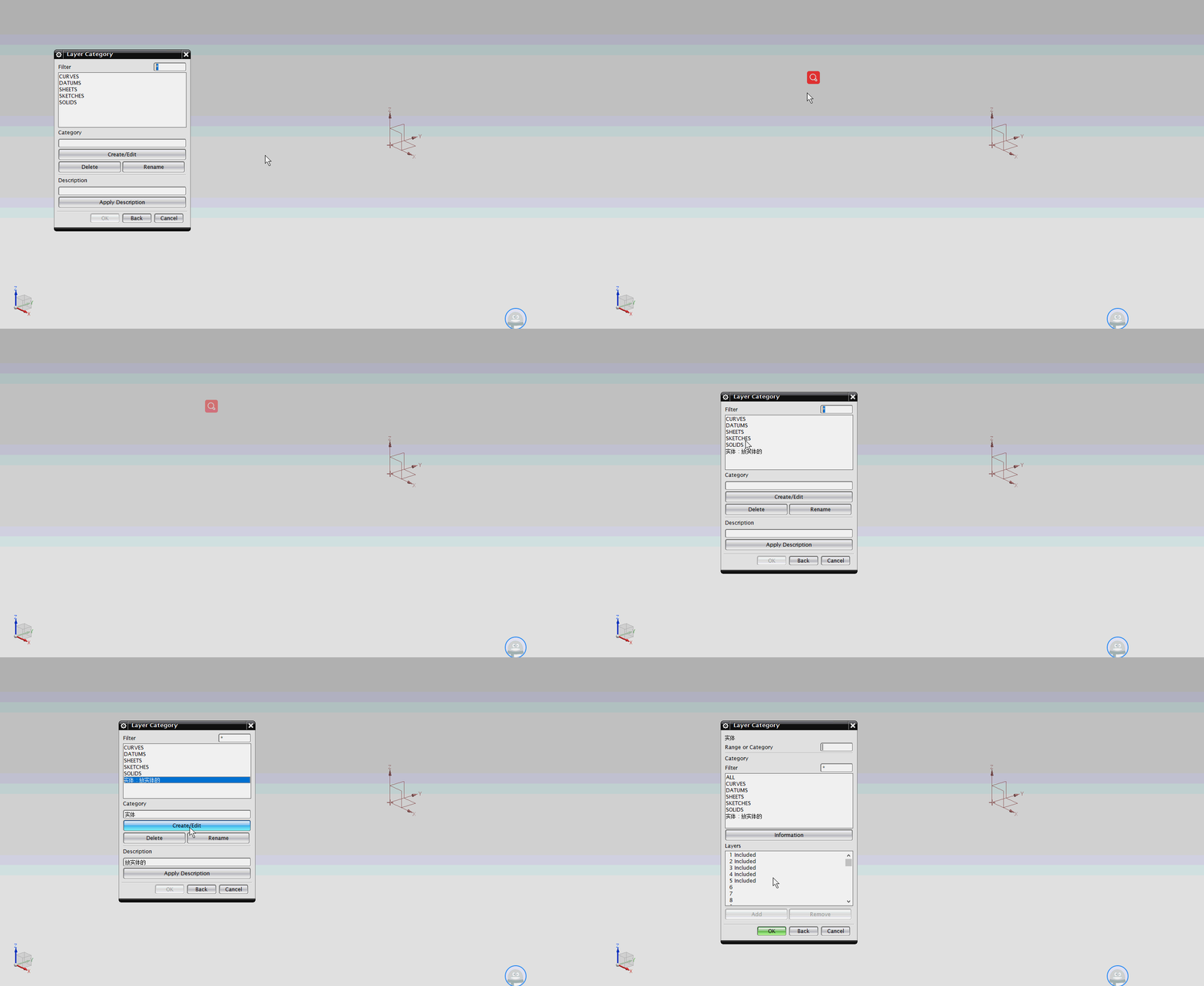
NX二次开发-UFUN创建图层类别UF_LAYER_create_category
 NX11+VS2013

 #include <uf.h>

 #include <uf_layer.h>

 UF_initialize();

 //创建图层类别

 UF_LAYER_category_info_t category_info1;

 strcpy(category_info1.name, "实体");

 strcpy(category_info1.descr, "放实体的");

 for (int i = ; i < UF_LAYER_MAX_LAYER; i++)

 {

     if (i >=  && i < )//设置添加哪些图层(0为第一层)

     {

         category_info1.layer_mask[i] = true;

     }

     else

     {

         category_info1.layer_mask[i] = false;

     }

 }

 tag_t category1 = NULL_TAG;

 UF_LAYER_create_category(&category_info1, &category1);

 UF_terminate();

 Caesar卢尚宇

 2019年11月13日
NX二次开发-UFUN创建图层类别UF_LAYER_create_category的更多相关文章
- NX二次开发-UFUN编辑图层类别名字UF_LAYER_edit_category_name
NX11+VS2013 #include <uf.h> #include <uf_layer.h> UF_initialize(); //创建图层类别 UF_LAYER_cat ...
- NX二次开发-UFUN编辑图层类别描述UF_LAYER_edit_category_descr
1 NX11+VS2013 2 3 #include <uf.h> 4 #include <uf_layer.h> 5 6 7 UF_initialize(); 8 9 //创 ...
- NX二次开发-UFUN获取图层类别的信息UF_LAYER_ask_category_info
1 NX11+VS2013 2 3 #include <uf.h> 4 #include <uf_ui.h> 5 #include <uf_layer.h> 6 7 ...
- NX二次开发-UFUN创建圆柱UF_MODL_create_cyl1
NX9+VS2012 #include <uf.h> #include <uf_modl.h> #include <uf_obj.h> #include <u ...
- NX二次开发-UFUN创建工程图注释UF_DRF_create_note
NX9+VS2012 #include <uf.h> #include <uf_drf.h> #include <NXOpen/Annotations_Note.hxx& ...
- NX二次开发-UFUN创建球UF_MODL_create_sphere1
NX11+VS2013 #include <uf.h> #include <uf_modl.h> UF_initialize(); //创建球 UF_FEATURE_SIGN ...
- NX二次开发-UFUN创建圆锥UF_MODL_create_cone1
NX11+VS2013 #include <uf.h> #include <uf_modl.h> UF_initialize(); //创建圆锥 UF_FEATURE_SIGN ...
- NX二次开发-UFUN创建镜像体UF_MODL_create_mirror_body
NX11+VS2013 #include <uf.h> #include <uf_modl.h> UF_initialize(); //创建块 UF_FEATURE_SIGN ...
- NX二次开发-UFUN创建固定的基准平面UF_MODL_create_fixed_dplane
NX11+VS2013 #include <uf.h> #include <uf_modl.h> UF_initialize(); //创建块 UF_FEATURE_SIGN ...
随机推荐
- shell脚本编写监控内存并发送邮件
1.准备发送邮件的工具: #!/usr/bin/python# -*- coding: UTF-8 -*-import sysimport smtplibimport email.mime.multi ...
- 【LeetCode 13】罗马数字转整数
题目链接 [题解] 就是上一题反过来的过程. 因为有说一般情况下后面的罗马数字是小于前面的罗马数字的. 如果前面的罗马数字小于后面的罗马数字了. 说明出现了4,9,40,90这些特殊情况. 那么就得判 ...
- vue2 开发环境部署 及 打包配置
一.脚手架工具(vue2 的脚手架工具是 vue-cli) 1.脚手架工具的安装 参考 : https://blog.csdn.net/wulala_hei/article/details/804 ...
- 使用ionic来build安卓apk时,报CordovaError: Requirements check failed for JDK 1.8 or greater
本地配置了JDK和jre的本地环境变量之后,在命令行中运行Java.javac等都能正常输出,但是在使用ionic cordova build android 来打包ionic的程序时,会提示 Cor ...
- Linux c基本知识整理
1.指针和引用的区别 1.指针是一个变量,变量存储一个地址指向内存中一个存储单元,需要单独分配内存空间.引用相当于变量的别名,不需要单独分配空间 2.引用必须初始化,指针可以先不进行初始化 3.指针可 ...
- Linux内核知识杂记
1.内核调试手段 1.printk打印内核状态 2.产生opps时使用GDB查看调用栈 2.内核空间和用户空间区别,通信方式有哪些? Linux简化了分段机制,使得虚拟地址与线性地址总是一致,因此,L ...
- 2. Pycharm的介绍与使用
使用Python原生IDLE IDLE是Python软件包自带的一个集成开发环境,点击开始-->Python安装包-->IDLE.启动 IDLE 时,会显示>>>,可以在 ...
- ThinkPHP5验证码不显示的原因及解决方法
其实很久之前刚学习tp5框架的时候就遇到了这个问题,解决完后一直没再出过问题,今天用以前的框架做新项目时又碰到了这个问题,这里记录一下 问题原因: 1.TP5本就存在这个bug 2.数据库连接不正常( ...
- 高并发下的缓存架构设计演进及redis常见的缓存应用异象解决方案
待总结 缓存穿透 缓存击穿 缓存雪崩等
- js面向对象(三)---组件开发
一.对象的多种表现形式 1.提高对象的复用性 2.如何配置参数和默认参数 不知道该怎么描述,就直接上代码吧,下面做了2个例子,重点看整个组件的大体结构 用组件的方式做拖拽窗口,你可以狠狠的点击这里进行 ...