
unittest框架,漂亮的报告BeautifulReport配置与错误截图详细解说
1.下载BeautifulReport模块
下载地址:https://github.com/TesterlifeRaymond/BeautifulReport
2.解压与存放路径
下载BeautifulReport的完整.ZIP文件,然后解压,把整个文件包放到本地python的/Lib/site-packages/目录下
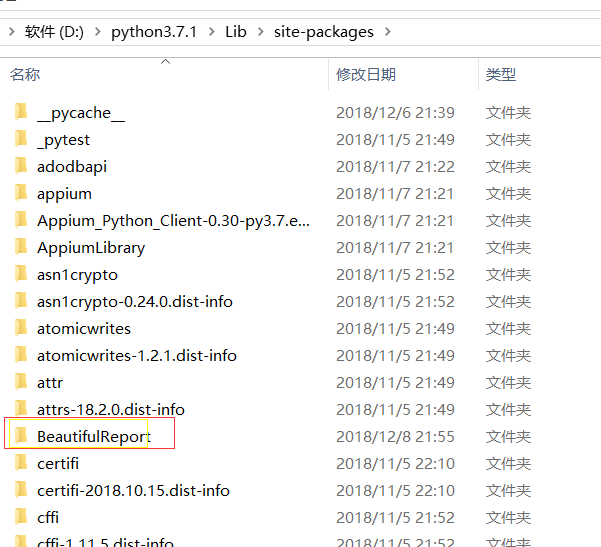
可能出现的错误,可以参考地址:https://blog.csdn.net/chenmozhe22/article/details/82888060
3.例子(web操作)
目录如下:

以下是Test_1.py文件代码:
 import unittest,time,os

 from selenium import webdriver

 from BeautifulReport import BeautifulReport

 from selenium.webdriver.common.action_chains import ActionChains

 from selenium.webdriver.support.wait import WebDriverWait

 from selenium.webdriver.common.by import By

 from selenium.webdriver.support import expected_conditions as EC

 class Test_01(unittest.TestCase):

     def save_img(self, img_name):  #错误截图方法,这个必须先定义好

         """

             传入一个img_name, 并存储到默认的文件路径下

         :param img_name:

         :return:

         """

         self.driver.get_screenshot_as_file('{}/{}.png'.format(os.path.abspath(r"G:\student_project\Hao\img"), img_name))    #os.path.abspath(r"G:\Test_Project\img")截图存放路径

     def setUp(self):

         print("开始测试")

         self.driver = webdriver.Chrome()

         self.driver.maximize_window()

         self.driver.get("https://www.baidu.com/")

     def tearDown(self):

         print("结束测试")

         self.driver.close()

     @BeautifulReport.add_test_img('test_case_1')     #装饰器,当你没有报错也要截图的话,那么你需要在用例里面调用save_img()方法

     def test_case_1(self):   #用例没有错截图示例

         WebDriverWait(self.driver,10).until(EC.visibility_of_element_located((By.XPATH,"//div[@id='u1']/a[@name='tj_settingicon' and @class='pf']")))

         ele=self.driver.find_element_by_xpath("//div[@id='u1']/a[@name='tj_settingicon' and @class='pf']")

         ActionChains(self.driver).move_to_element(ele).perform()

         self.driver.find_element_by_xpath('//a[@class="setpref"]').click()

         WebDriverWait(self.driver, 10).until(

             EC.visibility_of_element_located((By.XPATH, '//a[text()="保存设置"]')))

         text_data=self.driver.find_element_by_xpath('//a[text()="保存设置"]').text

         self.save_img("test_case_1")   #没有报错也要截图的话,直接在这里调用方法就行了

         self.assertEqual("保存设置",text_data)

     @BeautifulReport.add_test_img('test_case_2')     #装饰器,当你用例错误了,那么会自动调用save_img截图方法,存到指定目录下

     def test_case_2(self):   #用例错误截图示例

         time.sleep(1)

         text_data = self.driver.find_element_by_xpath('//div[@id="u1"]/a').text

         self.assertEqual("新闻1", text_data)
注意:如果想正确的用例也截图,那么你可以在用例上面添加装饰器,然后在用例里面调用save_img()方法就行了
以下是run.py文件代码:
 import unittest,time,os

 from BeautifulReport import BeautifulReport

 from Test_Case import Test_1

 current_path = os.getcwd()

 report_path = os.path.join(current_path, "Report")

 now = time.strftime("%Y-%m-%d %H-%M-%S", time.localtime(time.time()))

 # 报告地址&名称

 report_title = 'Example报告' + now + ".html"  # 如果不能打开这个文件,可能是now的格式,不支持:和空格

 if __name__ == '__main__':

     suite = unittest.TestSuite()

     loader=unittest.TestLoader()

     suite.addTests(loader.loadTestsFromModule(Test_1))

     #运行用例filename=报告名称,description=所有用例总的名称,report_path=报告路径,如果不填写默认当前执行文件目录,theme=报告的主题,有四种可以选择:theme_default,theme_cyan,theme_candy,theme_memories  默认是第一种

     BeautifulReport(suite).report(filename="测试报告", description='Test_01模块',report_dir=report_path,theme="theme_cyan")
4.报告展示
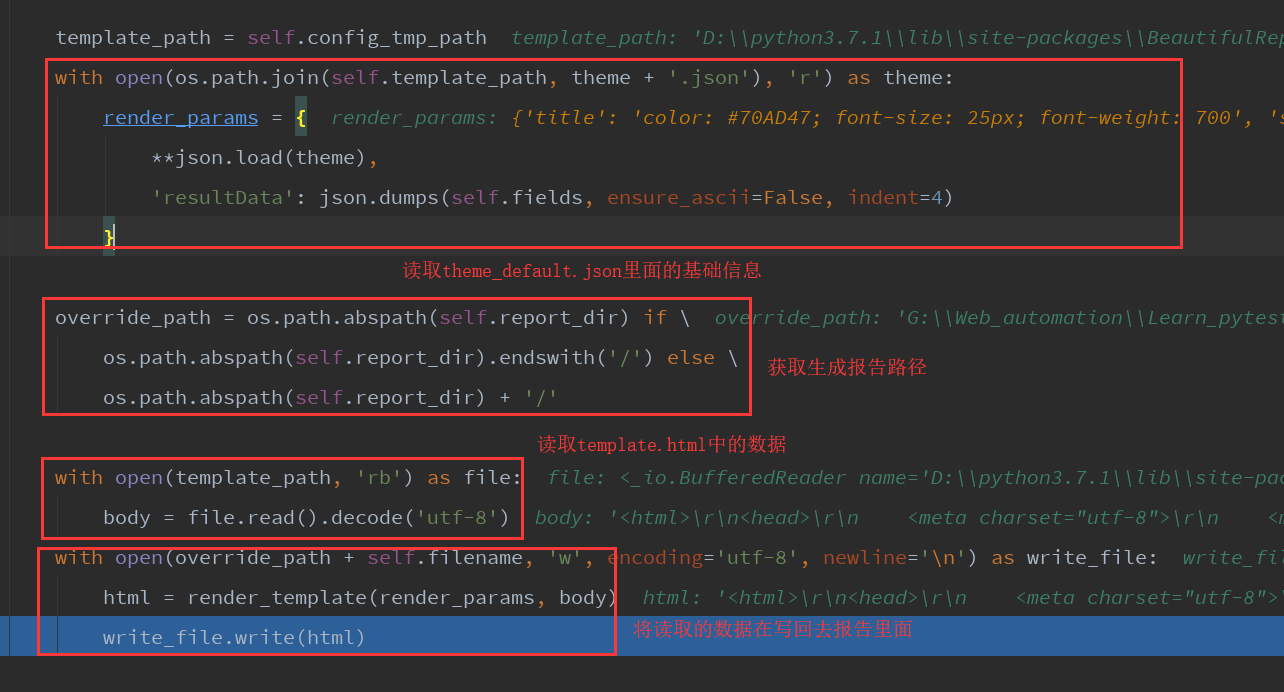
说明:生成报告原理:他是读取了D:\python3.7.1\Lib\site-packages\BeautifulReport\template路径下面的theme_default.json基础数据,在读取template.html的数据,然后在写入你运行用例后的结果+body到报告里面去,就生成了报告

unittest框架,漂亮的报告BeautifulReport配置与错误截图详细解说的更多相关文章
- unittest框架之 BeautifulReport 模板报告生成的正确姿势
使用unittest框架的自动化测试,报告一定很重要,目前介绍一个比较高大上的报告模板 BeautifulReport.如果首次使用的话需要安装 pip install beautifulreport ...
- 解惑unittest框架中导入HTMLTestRunner模块后正常运行却无法生成HTML报告问题
1.HTMLTestRunner介绍 HTMLTestRunner是一个第三方的unittest HTML报告库,用于python单元测试框架的TestRunner.它是生成一个HTML报告,以一目了 ...
- unittest框架扩展(自动生成用例)自动化-上
一.思想: 基于数据驱动和代码驱动结合的自动化测试框架. 二.自动化测试框架步骤: 1.获取用例,用例格式:.ymal 2.调用接口 3.校验结果 4.发送测试报告 5.异常处理 6.日志模块 三.基 ...
- python+unittest框架整理(一点点学习前辈们的封装思路,一点点成长。。。)
预期框架整理目标: 1.单个用例维护在单个.py文件中可单个执行,也可批量生成组件批量执行 2.对定位参数,定位方法,业务功能脚本,用例脚本,用例批量执行脚本,常用常量进行分层独立,各自维护在单独的. ...
- Unittest框架+ddt数据驱动+HTMLTestRunner+sendmail(自动发送测试报告)+git+Jenkins
本次写的是针对有代码基础的,没基础建议先去学基础,以下所有描述内容都是我已经在公司项目实践成功的!仅供参考 整体思路: 1.接口自动化用的是Python中unittest框架 2.所有的测试数据用例存 ...
- 第9课:备份mysql数据库、重写父类、unittest框架、多线程
1. 写代码备份mysql数据库: 1)Linux下,备份mysql数据库,在shell下执行命令:mysqldump -uroot -p123456 -A >db_bak.sql即可 impo ...
- unittest框架(惨不忍睹低配版)
根据我上个随笔的unittest框架优化得来,虽然对于smtp模块还是有点迷糊,不过还是勉强搭建运行成功了,还是先上代码: #login_test.py import requests class L ...
- Unittest框架小结
在日常的自动化测试过程中,Python里有一个自带的单元测试框架是unittest模块,简单易用,这里简单介绍下其主要的用法. Unittest测试框架主要包含四个部分 TestCase 也就是测试用 ...
- python接口自动化24-有token的接口项目使用unittest框架设计
获取token 在做接口自动化的时候,经常会遇到多个用例需要用同一个参数token,并且这些测试用例跨.py脚本了. 一般token只需要获取一次就行了,然后其它使用unittest框架的测试用例全部 ...
随机推荐
- pytest-测试用例teardown和setup
setup和teardown对于处理一些前置条件很有帮助 用例运行级别 模块级(setup_moudle/teardown_moudle)开始于模块始末,全局的 所有用例开始前/结束后执行一次(整个. ...
- Monkey and Banana HDU - 1069 有点像背包,又像最长上升序列
#include<iostream> #include<algorithm> #include<cstring> #include<vector> us ...
- CodeForces 1144C
链接 https://vjudge.net/problem/CodeForces-1144C #include<bits/stdc++.h> using namespace std; in ...
- SVM-支持向量机(一)线性SVM分类
SVM-支持向量机 SVM(Support Vector Machine)-支持向量机,是一个功能非常强大的机器学习模型,可以处理线性与非线性的分类.回归,甚至是异常检测.它也是机器学习中非常热门的算 ...
- nginx配置之后接口状态200,但是无返回数据问题小记
nginx配置可能有问题.导致nginx不能解析PHP文件,检测nginx里对于php的配置信息. location ~ \.php$ { fastcgi_pass 127.0.0.1:9000; f ...
- leetcode腾讯精选练习之相交链表(六)
相交链表 题目: 编写一个程序,找到两个单链表相交的起始节点. 如下面的两个链表: 在节点 c1 开始相交. 示例 1: 输入:intersectVal = 8, listA = [4,1,8,4,5 ...
- JavaScript中四种不同的属性检测方式比较
JavaScript中四种不同的属性检测方式比较 1. 用in方法 var o = {x:1}; "x" in o; //true "y" in o; //fa ...
- JDBC——Statement执行SQL语句的对象
Statement该对象用于执行静态SQL语句并返回它产生的结果.表示所有的参数在生成SQL的时候都是拼接好的,容易产生SQL注入的问题 PreparedStatement对象是一个预编译的SQL语句 ...
- decimal与float和double的区别
一直很奇怪C#的预定义数据类型中为什么加了一个decimal,有float和double不就够了吗?今天来挖一挖. 浮点型 Name CTS Type De script ion Significan ...
- Django 初试水(一)
2020年注定是一个不平凡的一年!坚持就是胜利,一起加油! 至于为什么使用 Django,也不想说太多.个人喜欢,这里不做介绍.直接进入主题.show me the code!!! python 的环 ...