
apache https 双向认证
Https分单向认证和双向认证
单向认证表现形式:网站URL链接为https://xxx.com格式
双向认证表现心事:网站URL链接为https://xxx.com格式,并且需要客户端浏览器安装一个client.pfx格式的证书文件才能打开网址
需求说明:假设需要实现本地环境newdefend.com域名双向认证。单向认证,直接忽略本文中黄色底的操作步骤即可。也不需要生成和安装客户端证书:client.pfx
参考网址:http://blog.163.com/hr_php/blog/static/235853083201503011428985/
安装环境:Wampserver集成安装包;window7系统。
第一步:cmd进入apache的bin目录。eg:D:\wamp5.3\bin\apache\Apache2.2.21\bin
指明配置文件
set OPENSSL_CONF=../conf/openssl.cnf
配置参考(不需要手动去改这个文件的内容,这里只是贴出代码,提供参考。下面建立文件夹,主要就是从这里看的):
dir        = ./demoCA # Where everything is kept

certs        = $dir/certs        # Where the issued certs are kept

crl_dir        = $dir/crl        # Where the issued crl are kept

database    = $dir/index.txt    # database index file.

# several ctificates with same subject.

new_certs_dir    = $dir/newcerts        # default place for new certs.

certificate    = $dir/cacert.pem     # The CA certificate

serial        = $dir/serial         # The current serial number

crlnumber    = $dir/crlnumber    # the current crl number

# must be commented out to leave a V1 CRL

crl        = $dir/crl.pem         # The current CRL

private_key    = $dir/private/cakey.pem# The private key

RANDFILE    = $dir/private/.rand    # private random number file
新建一些目录和文件。创建目录的原因:由于配置文件openssl.cnf里面会用到这些目录或者文件,继续下面的命令时,会操作这些目录和文件
在apache/bin目录创建如下文件夹

demoCA/newcerts/

demoCA/private/

创建如下文件

demoCA/index.txt

demoCA/serial   //内容写 2个(0-9,A-F)的字符即可,如1A
第二步:生成需要的私钥key
openssl genrsa > root.key   // 生成根密钥

openssl genrsa > server.key  // 生成服务端密钥

openssl genrsa > client.key  // 生成客户端密钥
第三步:生成自签名的根证书
openssl req -x509 -new -key root.key >root.crt
说明:-new 生成一个新的文件 -key filename 参数filename指明我们的私有密钥文件名 -x509 将产生自签名的证书,一般用来测试用,或者自己玩下做个Root CA.证书的扩展在config文件里面指定
第四步:生成服务端,客户端签名请求文件。
openssl req -new -key server.key -out server.csr

openssl req -new -key client.key -out client.csr  //此处可能会有错误信息,请看下面的错误解决方案
说明:按提示输入一系列的参数 CN - SH - SH - '' - '' - 域名/IP 。除了Common Name处填写域名/ip需要特别注意,国家地区填写“中国CN上海SH”。其余地方可以为空
Country Name ( letter code) [AU]:CNISO国家代码(只支持两位字符)

State or Province Name (full name) [Some-State]:ZJ所在省份

Locality Name (eg, city) []:HZ所在城市

Organization Name (eg, company):THS公司名称

Organizational Unit Name (eg, section) []:THS组织名称

Common Name (eg, YOUR name) []:localhost(申请证书的域名或IP地址)

Email Address []:laoniangke@xxx.com管理员邮箱

Please enter the following 'extra' attributes

to be sent with your certificate request

A challenge password []:交换密钥

An optional company name []:
提示:错误解决方案(出现在最开始创建的那堆文件里)
//错误提示
Sign the certificate? [y/n]:y

failed to update database

TXT_DB error number

//产生的原因是:

This thing happens when certificates share common data. You cannot have two

certificates that look otherwise the same.

//解决办法

//方法一:

    修改demoCA下 index.txt.attr

    unique_subject = yes  为  unique_subject = no

//方法二:

    删除demoCA下的index.txt里面的内容

//方法三:

    将 common name设置成不同的
第五步:使用根证书为服务端及客户端签名
openssl ca -in server.csr -cert root.crt -keyfile root.key -out server.crt

openssl ca -in client.csr -cert root.crt -keyfile root.key -out client.crt
说明:-in filename要签名的csr文件 -cert CA本身的证书文件名 -keyfile CA自己的私有密钥文件 -out filename签名后的证书文件名。证书的细节也会给写进去
第六步:配置openssl.cnf,创建文件路径,生成所需cakey.pem(CA的key文件)和cacert.pem(CA的crt文件)文件
openssl genrsa -out demoCA/private/cakey.pem

openssl req -out demoCA/cacert.pem   -x509 -new -key demoCA/private/cakey.pem
第七步:客户端证书转成pfx格式,生成后,直接双击文件安装到浏览器 (重要)
openssl pkcs12 -export -clcerts -in client.crt -inkey client.key -out client.pfx
注意:这个时候填写的密码,是客户安装证书的时候,需要填写的密码。密码可以为空
到此openssl相关的证书文件就结束了
第八步:配置apache目录httpd.conf文件
LoadModule ssl_module modules/mod_ssl.so

Include conf/extra/httpd-ssl.conf
第九步:配置httpd-ssl.conf。说明:如果apache下有多个站点,还要配置http-vhosts.conf
SSLSessionCache        "shmcb:D:/wamp/bin/apache/apache2.4.9/logs/ssl_scache(512000)"

<VirtualHost _default_:>

    DocumentRoot "D:/wamp/www"

    ServerName  localhost

    SSLEngine on

    SSLCertificateFile "D:/wamp/bin/apache/apache2.4.9/bin/server.crt"

    SSLCertificateKeyFile "D:/wamp/bin/apache/apache2.4.9/bin/server.key"

   # 如果是单向认证,下面3行注释掉

    SSLCACertificateFile "D:/wamp/bin/apache/apache2.4.9/bin/root.crt"

    SSLVerifyClient require

    SSLVerifyDepth  1

    CustomLog "D:/wamp/bin/apache/apache2.4.9/logs/ssl_request.log" \

              "%t %h %{SSL_PROTOCOL}x %{SSL_CIPHER}x \"%r\" %b"

</VirtualHost>
http-vhosts.conf
<VirtualHost *:>

    DocumentRoot "D:/wamp/www/www.newdefend.com"

    ServerName my.newdefend.com

</VirtualHost>

<VirtualHost *:>

    DocumentRoot "D:/wamp/www/www.newdefend.com"

    ServerName my.newdefend.com

    ErrorLog "D:/wamp/www/logs/error.log"

    TransferLog "D:/wamp/www/logs/access.log"

    SSLEngine on

    SSLCertificateFile "D:/wamp/bin/apache/apache2.4.9/bin/server.crt"

    SSLCertificateKeyFile "D:/wamp/bin/apache/apache2.4.9/bin/server.key"

    # 如果是单向认证,下面3行注释掉

    SSLCACertificateFile "D:/wamp/bin/apache/apache2.4.9/bin/root.crt"

    SSLVerifyClient require

    SSLVerifyDepth

</VirtualHost>
重启wamp
双向认证效果展示:
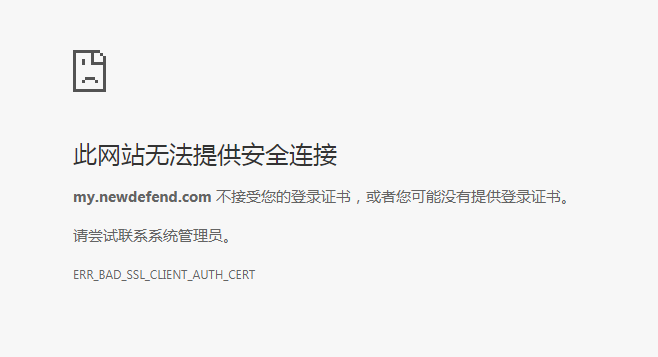
下图表示:client.pfx文件还没有在电脑上安装,请双击安装
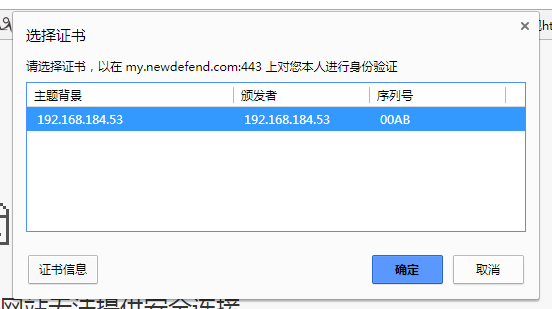
下图表示:client.pfx已经安装,客户端打开时,需要选择证书
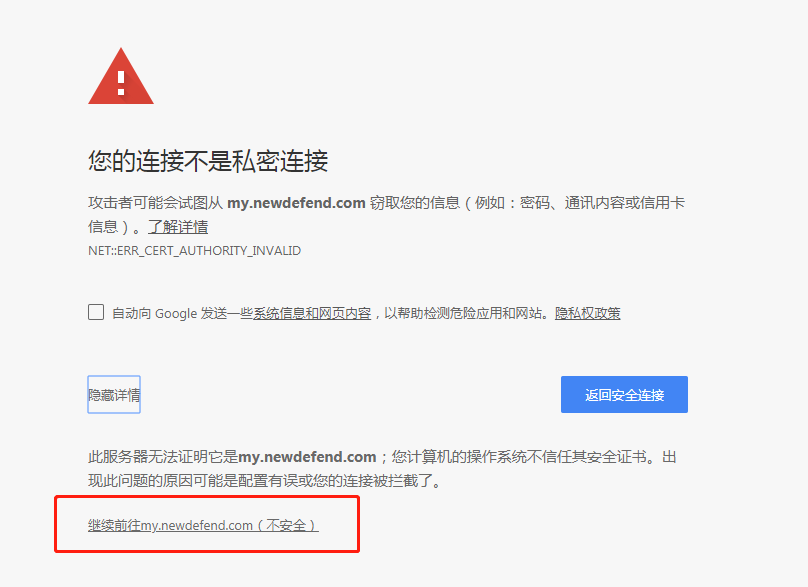
下图表示:成功,直接访问即可。因为是本地生成的证书,所以不被浏览器信任。真是上线的时候,找个权威的CA机构就不会出现这种情况了
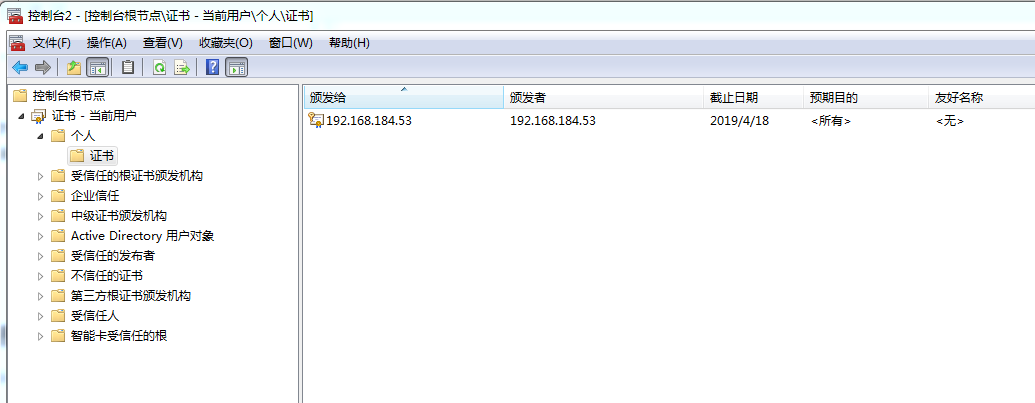
最后:查看电脑上已经安装了那些证书,请参考:https://jingyan.baidu.com/article/c275f6baf8622ae33d756794.html
效果展示如下:192.168.184.53就是我自己生成的证书
--------
apache https 双向认证的更多相关文章
- Tomcat 配置 HTTPS双向认证
Tomcat 配置 HTTPS 双向认证指引说明: � 本文档仅提供 Linux 操作系统下的指引 � 在阅读本指引前请您在 Linux 部署 JDK 和 Tomcatserver为了 Tomcat ...
- httpd设置HTTPS双向认证
去年用tomcat.jboss配置过HTTPS双向认证,那时候主要用的是JDK自带的keytool工具.这次是用httpd + openssl,区别比较大 在网上搜索了很多文章,发现全面介绍的不多,或 ...
- SpringBoot服务间使用自签名证书实现https双向认证
SpringBoot服务间使用自签名证书实现https双向认证 以服务server-one和server-two之间使用RestTemplate以https调用为例 一.生成密钥 需要生成server ...
- HTTPS 双向认证构建移动设备安全体系
HTTPS 双向认证构建移动设备安全体系 对于一些高安全性要求的企业内项目,我们有时希望能够对客户端进行验证.这个时候我们可以使用Https的双向认证机制来实现这个功能. 单向认证:保证server是 ...
- Https双向认证Android客户端配置
Https .cer证书转换为BKS证书 公式https://blog.csdn.net/zww986736788/article/details/81708967 keytool -importce ...
- Android Https双向认证 + GRPC
keywords:android https 双向认证android GRPC https 双向认证 ManagedChannel channel = OkHttpChannelBuilder.for ...
- 双向认证 HTTPS双向认证
[微信支付]微信小程序支付开发者文档 https://pay.weixin.qq.com/wiki/doc/api/wxa/wxa_api.php?chapter=4_3 HTTPS双向认证使用说明 ...
- https双向认证訪问管理后台,採用USBKEY进行系统訪问的身份鉴别,KEY的证书长度大于128位,使用USBKEY登录
近期项目需求,须要实现用USBKEY识别用户登录,採用https双向认证訪问管理后台管理界面,期间碰到过一些小问题,写出来给大家參考下. 1:前期准备工作 USBKEY 硬件:我买的是飞天诚信 epa ...
- nodejs之https双向认证
说在前面 之前我们总结了https的相关知识,如果不懂可以看我另一篇文章:白话理解https 有关证书生成可以参考:自签证书生成 正题 今天使用nodejs来实现https双向认证 话不多说,直接进入 ...
随机推荐
- SUMMARY | JAVA中的数据结构
String String类是不可修改的,创建需要修改的字符串需要使用StringBuffer(线程同步,安全性更高)或者StringBuilder(线程非同步,速度更快). 可以用“+”连接Stri ...
- UMP系统架构 LVS
- 在 /proc 里实现文件
所有使用 /proc 的模块应当包含 <linux/proc_fs.h> 来定义正确的函数. 要创建一个只读 /proc 文件, 你的驱动必须实现一个函数来在文件被读时产生数据. 当 某个 ...
- css---4表单相关伪类
input:enabled{ color:red;} input:disabled{ color:blue;} enabled or disable 表单的状态 input:checked{ widt ...
- 导入excel并进行数据提取
/** * @description: 导入excel并进行数据提取 * @param {type} * @return: */ Vue.prototype.$importExcel = functi ...
- TSP+期望——lightoj1287记忆化搜索,好题!
感觉是很经典的题 记忆化时因为不好直接通过E判断某个状态是否已经求过,所以再加一个vis打标记即可 /*E[S][u]表示从u出发当前状态是S的期望*/ #include<bits/stdc++ ...
- 《你不知道的javascript》上卷笔记整理(一)
函数声明和变量声明都会被提升,但函数声明会被提升到普通变量前,而 var foo = function bar(){}; 赋值操作不会被提升. 闭包: 基于词法作用域(作用域是根据名称查找变量的一套规 ...
- 移动端,fixed bottom问题
//不显示 .bar { position:fixed; bottom:0; z-index:99; } //显示 .bar{ position:fixed; bottom:calc(90vh); / ...
- some方法过滤
// 已经存在该tab时跳过 this.tabs.some(item => item.title === option.title) || this.tabs.push(option)
- Java-MyBatis-MyBatis3-XML映射文件:insert, update 和 delete
ylbtech-Java-MyBatis-MyBatis3-XML映射文件:insert, update 和 delete 1.返回顶部 1. insert, update 和 delete 数据变更 ...