
GVEdit中使用graphviz
官方文档
安装完graphviz后,文档在安装目录下,位置如下
E:\Gra2.38\share\graphviz\doc\html
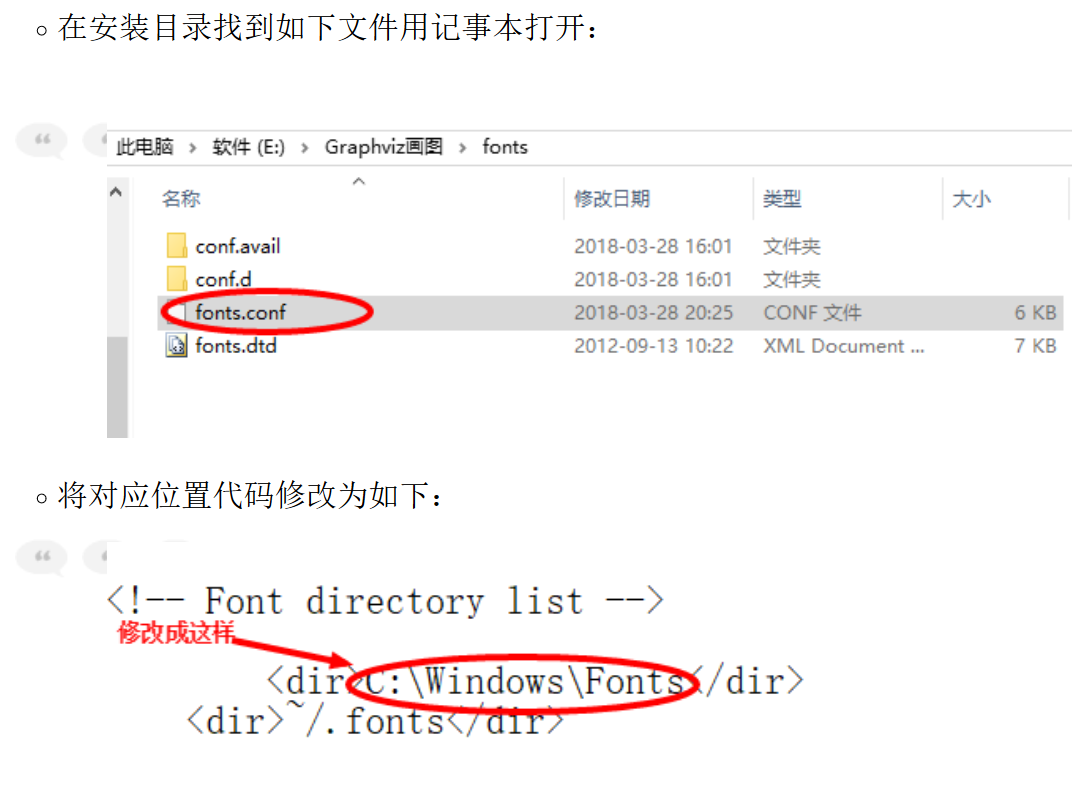
中文乱码解决
将文件保存为utf-8编码
fontname="宋体";

dot语言语法
https://blog.csdn.net/jy692405180/article/details/52077979
https://blog.csdn.net/sd10086/article/details/52979462/
demo
有向图
digraph graph1{            //digraph->  graph--

    label="this is a graph";

    a[shape="box"];

    b[shape="doublecircle"];

    i[style="filled"];

    ii[style="dotted",fontcolor="red"];

    iii[style="solid"];

    iiii[style="dashed"];

    iiiii[style="bold"];

    iiiiii[style="invis"];

    aa[style="filled",fillcolor="green"];//The premise of using "fillcolor" is that "style" is "filled"

    aaa[style="bold",color="blue"];

    bb[width=,hight=];

    edge [style="dotted"];        //node[] and edge[] are works for everything after that

    a->i;

    graph[bgcolor="lightskyblue"];

    rankdir="TB";            //LR RL TB BT

    //rotate=90;

    subgraph  cluster_sgh{            //subgraph顧﹍uster

    label="this is a subgraph";

    bgcolor=yellow;

    rankdir="LR";

    c[shape="egg",label="this is node c"];

    d[label="this is node d"];

    }

    subgraph  cluster_sgh2{

    fontname="FangSong";                //鐎涙ぞ缍

    label="input chinese";

    bgcolor=blue;

    e;f;

    e->f;

    }

    subgraph  cluster_sgh3{

    fontname="SimHei";                //姒涙垳缍

    label="youkan input chinese";

    bgcolor=red;

    g;h;

    h->h;

    }

/*

table1 [label=<

<table>

    <tr>

        <td port="one">1</td>

        <td>2</td>

    </tr>

    <tr>

        <td>3</td>

        <td>4</td>

    </tr>

</table>

>];

*/

example [ shape = record, label = "{<head>cell1 | cell2 | cell3}" ];

node [shape=record];

edge [style="bold"];

table1 [label="{<head>cell1|cell2|a}"];

table2 [label="{<head>b|c|d|e}"];

table1:head->table2:head;

}

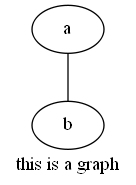
无向图
graph graph1{

    label="this is a graph";

    a;b;

    a--b;

}
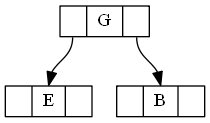
二叉树
digraph g {

    node [shape="record", height=.];

    node0[label="<f0> |<f1> G|<f2>"];

    node1[label="<f0> |<f1> E|<f2>"];

    node2[label="<f0> |<f1> B|<f2>"];

    node0:f0 -> node1:f1;

    node0:f2 -> node2:f1;

}
二叉树2
digraph edge_settings {

    A -> B [color = "black", label = 0];

    B -> D [color = "black", label = 0];

    A -> C [color = "black", label = 1];

    B -> E [color = "black", label = 1];

    C -> F [color = "black", label = 0];

    C -> G [color = "black", label = 1];

    D -> H [color = "black", label = 0];

    D -> I [color = "black", label = 1];

    E -> J [color = "black", label = 0];

    E -> K [color = "black", label = 1];

    F -> L [color = "black", label = 0];

    F -> M [color = "black", label = 1];

    G -> N [color = "black", label = 0];

    G -> O [color = "black", label = 1];

}

横竖排
digraph g{

    node[shape="record"];

    a[label="{a|b|c}"];    //vertical column

    b[label="<f0>a|<f1>b|<f2>c"];    //horizontal

}

时序图
digraph g {

    rankdir="LR";

    {

        rank="same";

        a0 -> a1 -> a2;

    }

    {

        rank="same";

        b0 -> b1 -> b2;

    }

    a1 -> b1;

}

GVEdit中使用graphviz的更多相关文章
- jupyter中使用graphviz
参考: https://www.cnblogs.com/zhanjiahui/p/11335038.html https://blog.csdn.net/linxid/article/details/ ...
- python中使用graphviz环境配置
去官网下载graphviz,并下一步安装 配置graphviz的bin目录到path环境变量下 python相关包: 使用conda注意:conda install graphviz 可能没用,要使用 ...
- Graphviz 环境变量设置
今天晚上解决了一个错误,如下:
- 安装graphviz
环境win10 1. 下载安装包首先进入官网下载msi文件 安装,一路next,不需要注意什么 2.设置环境变量 安装完毕之后,我们需要手动配置环境变量. 找到刚才我们安装地址,进入graphviz, ...
- C 语言资源大全中文版
C 语言资源大全中文版 我想很多程序员应该记得 GitHub 上有一个 Awesome - XXX 系列的资源整理.awesome-c 是 koz.ross 发起维护的 C 语言资源列表,内容包括了: ...
- Python - 使用pycallgraph生成函数关系图
1- pycallgraph简介 可用于创建python函数关系图,依赖于dot命令,需要先安装 graphviz: HomePage:http://pycallgraph.slowchop.com/ ...
- Python - 使用objgraph生成对象引用关系图
1- objgraph简介 HomePage:https://mg.pov.lt/objgraph/ PyPI:https://pypi.org/project/objgraph/ 一般用于分析pyt ...
- anaconda使用,jupyter notebook的使用方法
1. 通过anaconda安装不同的python环境 1) conda create -n python36 python=3.5 2) 激活虚拟环境: activate python36 # 进 ...
- 基于Doxygen_C语言代码文档一键生成的记录与规范(嵌入式适用)
下位机代码格式规范整合记录 注册 doxygen 账号获取doxygen 的 *.exe 执行文件 https://pan.baidu.com/s/1MF5v-Ts80BysmZtXSqONmg 提取 ...
随机推荐
- Django之跨表查询——正反向查询(ForeignKey)
1.正向查询和反向查询: 外键的查询操作: 正向查询: # 正向查询 # 基于对象,跨表查询 book_obj = models.Book.objects.all().first() ret = bo ...
- python Six 模块
Six模块用于python2和python3的兼容 import six 官网链接:https://six.readthedocs.io/
- 16-1-es5
<!DOCTYPE html> <html lang="en"> <head> <meta charset="UTF-8&quo ...
- Java虚拟机性能管理神器 - VisualVM(8) 查找JAVA应用程序耗时的方法函数【转】
Java虚拟机性能管理神器 - VisualVM(8) 查找JAVA应用程序耗时的方法函数[转] 标签: javajvm监控工具性能优化 2015-04-07 16:47 1846人阅读 评论(0) ...
- 性能分析神器VisualVM【转】
性能分析神器VisualVM[转] Posted on 2015-04-17 09:37 WadeXu 阅读(5809) 评论(6) 编辑 收藏 VisualVM 是一款免费的,集成了多个 JDK 命 ...
- linux mysql备份shell
#!/bin/bash # Shell script to backup MySql database # Author: Henry he # Last updated: -- # crontab ...
- java加拼音的工具 pinyinutil
<!--汉字转拼音--> <dependency> <groupId>com.belerweb</groupId> <artifactId> ...
- 设置和修改Linux的swap分区大小
在Linux编译gcc时,遇到编译错误,究其根源是因为内存不足,这时通过修改swap大小解决了问题 相关操作如下: 1. 查看当前分区情况free -m 2. 增加 swap 大小, 2G 左右dd ...
- Spring容器管理各种文件
1. 导入文件 <import resource="applicationContext-dataSource.xml" /> 2. 引用资源配置文件 <cont ...
- 关于LZO无法平台上压缩,但是数据需要使用平台压缩的问题解决
我们做hive查询时候经常会出现出数过慢的问题,于是采用了LZO压缩,再在压缩块上做索引的方式去解决这个问题,但是也引入了新的问题点 lzo本身的压缩功能只能在linux上压缩再上传到HDFS平台,供 ...