
SpringMvc项目加载顺序及上下文小结
前言:
使用springMvc已经三年了,但是内部原来一直不太了解,看到ServletConetxt和ApplicationContext头就大,趁着这几天学习,正好学习下相关的知识。
1.ServletContext
首先我们说到ServletContext,ServletContext是一个Web应用的全局上下文,可以理解为整个Web应用的全局变量,项目中的所有方法皆可以获取ServletContext。
说到ServletContext,就到说到所有web项目的web.xml,下面我们先贴出web.xml的一部分配置:

  <context-param>

    <param-name>contextConfigLocation</param-name>

    <param-value>classpath:applicationContext.xml</param-value>

  </context-param>

  <context-param>

    <param-name>log4jConfigLocation</param-name>

    <param-value>classpath:log4j.properties</param-value>

  </context-param>

  <listener>

    <listener-class>org.springframework.web.util.IntrospectorCleanupListener</listener-class>

  </listener>

  <listener>

    <listener-class>org.springframework.web.context.ContextLoaderListener</listener-class>

  </listener>

  <listener>

    <listener-class>listener.SessionListener</listener-class>

  </listener>

  <filter>

    <filter-name>encodingFilter</filter-name>

    <filter-class>org.springframework.web.filter.CharacterEncodingFilter</filter-class>

    <init-param>

      <param-name>encoding</param-name>

      <param-value>UTF-8</param-value>

    </init-param>

    <init-param>

      <param-name>forceEncoding</param-name>

      <param-value>true</param-value>

    </init-param>

  </filter>

  <filter-mapping>

    <filter-name>encodingFilter</filter-name>

    <url-pattern>*.do</url-pattern>

  </filter-mapping>

  <filter>

    <filter-name>sessionFilter</filter-name>

    <filter-class>web.filter.SessionFilter</filter-class>

  </filter>

  <filter-mapping>

    <filter-name>sessionFilter</filter-name>

    <url-pattern>*.do</url-pattern>

  </filter-mapping>

  <servlet>

    <servlet-name>springmvc</servlet-name>

    <servlet-class>org.springframework.web.servlet.DispatcherServlet</servlet-class>

    <load-on-startup>1</load-on-startup>

  </servlet>

  <servlet-mapping>

    <servlet-name>springmvc</servlet-name>

    <url-pattern>*.do</url-pattern>

  </servlet-mapping>
上面贴出的就是web.xml的部分配置,在这里我们首先讲解下web项目启动的加载顺序:
以Tomcat举例,启动Tomcat之后,首先会加载web.xml文件:
a)容器首先读取web.xml中的<context-param>的配置内容和<listener>标签中配置项;
b)紧接着实例化ServletContext对象,并将<context-param>配置的内容转化为键值传递给ServletContext;
c)创建<listener>配置的监听器的类实例,并且启动监听;
d)随后调用listener的contextInitialized(ServletContextEvent args)方法,ServletContext = ServletContextEvent.getServletContext();
此时你可以通过ServletContext获取context-param配置的内容并可以加以修改,此时Tomcat还没完全启动完成。
e)后续加载配置的各类filter;
f)最后加载servlet;
最后的结论是:web.xml中配置项的加载顺序是context-param=>listener=>filter=>servlet,配置项的顺序并不会改变加载顺序,但是同类型的配置项会应该加载顺序,servlet中也可以通过load-on-startup来指定加载顺序。
ServletContext中的属性所有的servlet皆可以使用ServletContext.
2.ApplicationContext
首先介绍下applicationContext,applicationContext是spring的BeanFactory的实现类:
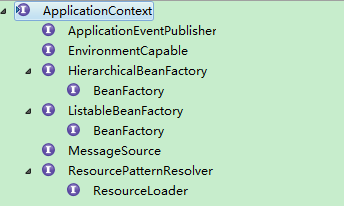
ApplicationContext接口的继承关系如上面的截图,ApplicationContext是如何产生的呢,这里我们看之前的web.xml中的
  <listener>

    <listener-class>org.springframework.web.context.ContextLoaderListener</listener-class>

  </listener>
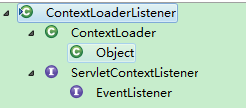 继承关系如左图
我们看看是如何初始化的
public WebApplicationContext initWebApplicationContext(ServletContext servletContext) {

        if (servletContext.getAttribute(WebApplicationContext.ROOT_WEB_APPLICATION_CONTEXT_ATTRIBUTE) != null) {

            throw new IllegalStateException(

                    "Cannot initialize context because there is already a root application context present - " +

                    "check whether you have multiple ContextLoader* definitions in your web.xml!");

        }

        Log logger = LogFactory.getLog(ContextLoader.class);

        servletContext.log("Initializing Spring root WebApplicationContext");

        if (logger.isInfoEnabled()) {

            logger.info("Root WebApplicationContext: initialization started");

        }

        long startTime = System.currentTimeMillis();

        try {

            // Store context in local instance variable, to guarantee that

            // it is available on ServletContext shutdown.

            if (this.context == null) {

                this.context = createWebApplicationContext(servletContext);

            }

            if (this.context instanceof ConfigurableWebApplicationContext) {

                ConfigurableWebApplicationContext cwac = (ConfigurableWebApplicationContext) this.context;

                if (!cwac.isActive()) {

                    // The context has not yet been refreshed -> provide services such as

                    // setting the parent context, setting the application context id, etc

                    if (cwac.getParent() == null) {

                        // The context instance was injected without an explicit parent ->

                        // determine parent for root web application context, if any.

                        ApplicationContext parent = loadParentContext(servletContext);

                        cwac.setParent(parent);

                    }

                    configureAndRefreshWebApplicationContext(cwac, servletContext);

                }

            }

            servletContext.setAttribute(c, this.context);

            ClassLoader ccl = Thread.currentThread().getContextClassLoader();

            if (ccl == ContextLoader.class.getClassLoader()) {

                currentContext = this.context;

            }

            else if (ccl != null) {

                currentContextPerThread.put(ccl, this.context);

            }

            if (logger.isDebugEnabled()) {

                logger.debug("Published root WebApplicationContext as ServletContext attribute with name [" +

                        WebApplicationContext.ROOT_WEB_APPLICATION_CONTEXT_ATTRIBUTE + "]");

            }

            if (logger.isInfoEnabled()) {

                long elapsedTime = System.currentTimeMillis() - startTime;

                logger.info("Root WebApplicationContext: initialization completed in " + elapsedTime + " ms");

            }

            return this.context;

        }

        catch (RuntimeException ex) {

            logger.error("Context initialization failed", ex);

            servletContext.setAttribute(WebApplicationContext.ROOT_WEB_APPLICATION_CONTEXT_ATTRIBUTE, ex);

            throw ex;

        }

        catch (Error err) {

            logger.error("Context initialization failed", err);

            servletContext.setAttribute(WebApplicationContext.ROOT_WEB_APPLICATION_CONTEXT_ATTRIBUTE, err);

            throw err;

        }

    }
代码中加粗的部分就是讲WebApplicationContext以WebApplicationContext.ROOT_WEB_APPLICATION_CONTEXT_ATTRIBUTE为key保存到ServletContext中,所以我们在需要获取时,可以根据request.getSession().
getAttribute("WebApplicationContext.ROOT_WEB_APPLICATION_CONTEXT_ATTRIBUTE")来获取WebApplicationContext.
所以WebApplicationContext依赖于ServletContext,ApplicationContext存储了Spring中所有的Bean,
但是我们常规的Springmvc项目一般除了applicationContext.xml之外还有springmvc.xml,两个配置文件会对应两个ApplicationContext,springmvc的ApplicationContext中可以调用applicationContext.xml的ApplciationContext。
3.获取WebApplication的几种方式
a)request.getSession().getServletContext().getAttribute("org.springframework.web.context.WebApplicationContext.ROOT")
b)实现ApplicationContextAware接口
 public interface ApplicationContextAware {

         void setApplicationContext(ApplicationContext applicationContext) throws BeansException;

}


SpringMvc项目加载顺序及上下文小结的更多相关文章
- CSS样式表、JS脚本加载顺序与SpringMVC在URL路径中传参数与SpringMVC 拦截器
CSS样式表和JS脚本加载顺序 Css样式表文件要在<head>中先加载,这样网页显示时可以第一次就渲染出正确的布局和样式,网页就不会闪烁,或跳变 JS脚本尽可能放在<body> ...
- java web.xml被文件加载过程及加载顺序小结
web.xml加载过程(步骤): 1.启动WEB项目的时候,容器(如:Tomcat)会去读它的配置文件web.xml.读两个节点: <listener></listener> ...
- java web项目启动加载顺序
转载:https://www.cnblogs.com/writeLessDoMore/p/6935524.html web.xml加载过程(步骤): 1.启动WEB项目的时候,容器(如:T ...
- 上下文ac获取为null,SpringContextUtil配置位置,以及各配置xml的加载顺序有讲究
发现一个有趣的现象,一般job都会在执行前去初始化一次ac,而任务监视器SupervisorQueueJob不会,因此启动时初始化ac为null,SupervisorQueueJob会始终无法获取上下 ...
- java web项目中classes文件夹下的class和WEB-INF/lib中jar里的class文件加载顺序
如果是发布到weblogic的话,可以在WebContent\WEB-INF\weblogic.xml里面配置.参考配置如下:<?xml version="1.0" enco ...
- web.xml加载顺序
一 1.启动一个WEB项目的时候,WEB容器会去读取它的配置文件web.xml,读取<listener>和<context-param>两个结点. 2.紧急着,容创建一个Ser ...
- web.xml文件加载顺序
1.启动一个WEB项目的时候,WEB容器会去读取它的配置文件web.xml,读取<listener>和<context-param>两个结点. 2.紧急着,容创建一个Servl ...
- web.xml 中的listener、 filter、servlet 加载顺序及其详解
在项目中总会遇到一些关于加载的优先级问题,近期也同样遇到过类似的,所以自己查找资料总结了下,下面有些是转载其他人的,毕竟人家写的不错,自己也就不重复造轮子了,只是略加点了自己的修饰. 首先可以肯定的是 ...
- 详解web.xml中元素的加载顺序
一.背景 最近在项目中遇到了启动时出现加载service注解注入失败的问题,后来经过不懈努力发现了是因为web.xml配置文件中的元素加载顺序导致的,那么就抽空研究了以下tomcat在启动时web.x ...
随机推荐
- SCRIPT7002: XMLHttpRequest: 网络错误 0x2ef3的解决方法
最近在使用jquery easyui datagrid 对页面布局,发现有时在IE下会接收不到数据并报错: SCRIPT7002: XMLHttpRequest: 网络错误 0x2ef3, 由于出现错 ...
- P3338 [ZJOI2014]力 /// FFT 公式转化翻转
题目大意: https://www.luogu.org/problemnew/show/P3338 题解 #include <bits/stdc++.h> #define N 300005 ...
- Python全栈开发:Mysql(一)
一.概述 1.什么是数据库 ? 答:数据的仓库,如:在ATM的示例中我们创建了一个 db 目录,称其为数据库 2.什么是 MySQL.Oracle.SQLite.Access.MS SQL Serve ...
- Android开发 StateListDrawable详解
前言 StateListDrawable是与xml中的selector属性对应代码实现类,它需要配合GradientDrawable的使用,如果你还不了解GradientDrawable可以参考我的另 ...
- gnome3 修改桌面背景图片模式
修改背景图片,可以在 桌面右键 选择"修改壁纸",选择"background"(背景),这里没有设定背景图片模式. 可以在 “应用程序”->"工 ...
- thinkphp 表达式查询
上面的查询条件仅仅是一个简单的相等判断,可以使用查询表达式支持更多的SQL查询语法,也是ThinkPHP查询语言的精髓,查询表达式的使用格式: $map['字段名'] = array('表达式','查 ...
- opencv3 使用glob遍历并修改文件名
1.函数说明 string::find()函数:是一个字符或字符串查找函数,该函数有唯一的返回类型,即string::size_type,即一个无符号整形类型,可能是整数也可能是长整数.如果查找成功, ...
- 扩展IEnumerable<T> ForEach()方法
相信很多人,在用Linq时,都会困惑为什么IEnumerabel<T>没有ForEach,虽然 我们一样可以这样写,很快读写 foreach(item in items) { Cons ...
- 条件渲染v-if
<!DOCTYPE html> <html lang="zh"> <head> <title></title> < ...
- mysql数据库创建数据库创建用户授权
Liunx下登录数据库 >mysql -u 用户名 -p 创建myblog用户,本地登录,口令是myblog create user 'myblog'@'localhost' identifie ...