
ADO.NET_01
一、说明
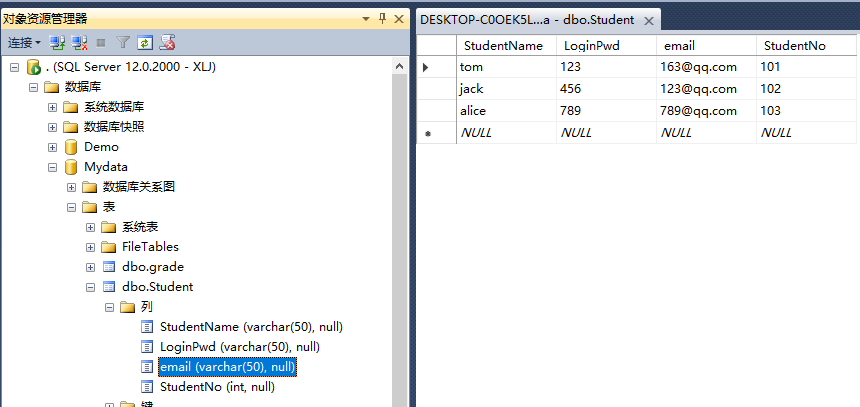
这个例子是小白跟着学习代码记录,模拟用户登陆功能,提示用户输入用户名及密码,然后与数据库里的用户数据进行比对,成功就返回成功提示及邮箱,失败,则失败提示。
二、代码
共3个文件,如下。
App.config
<?xml version="1.0" encoding="utf-8" ?>

<configuration>

    <connectionStrings>

      <add name="MyschoolConnectionString" connectionString="Data Source=.;Initial Catalog=Mydata;Persist Security Info=True;User ID=XLJ;Pooling=False;MultipleActiveResultSets=False;Encrypt=False;TrustServerCertificate=True;Password=123456;" />

    </connectionStrings>

    <startup>

        <supportedRuntime version="v4.0" sku=".NETFramework,Version=v4.7" />

    </startup>

</configuration>
StudentDao.cs
using System;

using System.Collections.Generic;

using System.Configuration;

using System.Data.SqlClient;

using System.Linq;

using System.Text;

using System.Threading.Tasks;

namespace Ado.NETDemo

{

    public class StudentDao

    {

        /// <summary>

        /// 验证用户是否存在

        /// </summary>

        /// <param name="userName"></param>

        /// <param name="password"></param>

        /// <param name="message"></param>

        /// <returns></returns>

        public bool ValidataUser(string userName, string password, ref string message)

        {

            // 1、编写连接字符串

            //string connectionString = "server=.;uid=XLJ;pwd=123456;database=Mydata;";

            //string connectionString = "Data Source=.;Initial Catalog=Mydata;Persist Security Info=True;User ID=XLJ;Pooling=False;MultipleActiveResultSets=False;Encrypt=False;TrustServerCertificate=True;Password=123456;";

            string connectionString = ConfigurationManager.ConnectionStrings["MyschoolConnectionString"].ToString();

            // 2、建立连接

            SqlConnection connection = new SqlConnection(connectionString);

            // connection.ConnectionString = connectionString;

            bool result = false;

            try

            {

                // 3、打开连接

                connection.Open();

                // Console.WriteLine("连接打开成功");

                // 4、实现登陆功能

                SqlCommand command = new SqlCommand();

                //command.CommandText = string.Format("select count(*) from Student where StudentName='{0}' and LoginPwd='{1}'", userName, userPwd);

                command.CommandText = $"select count(*) from Student where StudentName='{userName}' and LoginPwd='{password}'";

                command.Connection = connection;

                // 5、执行命令

                int num = (int)command.ExecuteScalar();

                if (num > )

                {

                    result = true;

                    message = "登陆成功";

                }

                else

                {

                    message = "用户名或者密码有误";

                }

            }

            catch (SqlException sqlException)

            {

                Console.WriteLine("数据库访问异常~" + sqlException.Message);

            }

            catch (Exception ex)

            {

                Console.WriteLine("程序出现问题,请联系管理员。" + ex.Message);

            }

            finally

            {

                // 6、关闭连接

                connection.Close();

                //Console.WriteLine("连接关闭成功");

            }

            return result;

        }

        /// <summary>

        /// 实现登陆获取邮箱

        /// </summary>

        /// <param name="userName"></param>

        /// <param name="password"></param>

        /// <returns></returns>

        public string Login(string userName, string password)

        {

            // 1、编写连接字符串

            //string connectionString = "server=.;uid=XLJ;pwd=123456;database=Mydata;";

            //string connectionString = "Data Source=.;Initial Catalog=Mydata;Persist Security Info=True;User ID=XLJ;Pooling=False;MultipleActiveResultSets=False;Encrypt=False;TrustServerCertificate=True;Password=123456;";

            string connectionString = ConfigurationManager.ConnectionStrings["MyschoolConnectionString"].ToString();

            // 2、建立连接

            SqlConnection connection = new SqlConnection(connectionString);

            // connection.ConnectionString = connectionString;

            string result = string.Empty;

            try

            {

                // 3、打开连接

                connection.Open();

                // Console.WriteLine("连接打开成功");

                // 4、实现登陆功能

                SqlCommand command = new SqlCommand();

                //command.CommandText = string.Format("select count(*) from Student where StudentName='{0}' and LoginPwd='{1}'", userName, userPwd);

                command.CommandText = $"select * from Student where StudentName='{userName}' and LoginPwd='{password}'";

                command.Connection = connection;

                // 5、执行命令

                SqlDataReader reader = command.ExecuteReader();

                reader.Read();

                result = reader["email"].ToString();

            }

            catch (SqlException sqlException)

            {

                Console.WriteLine("数据库访问异常~" + sqlException.Message);

            }

            catch (Exception ex)

            {

                Console.WriteLine("程序出现问题,请联系管理员。" + ex.Message);

            }

            finally

            {

                // 6、关闭连接

                connection.Close();

                //Console.WriteLine("连接关闭成功");

            }

            return result;

        }

    }

}
Program.cs
using System;

using System.Collections.Generic;

using System.Configuration;

using System.Data.SqlClient;

using System.Linq;

using System.Text;

using System.Threading.Tasks;

namespace Ado.NETDemo

{

    class Program

    {

        static void Main(string[] args)

        {

            Console.WriteLine("请输入用户名^_^");

            string userName = Console.ReadLine();

            Console.WriteLine("请输入密码o(* ̄︶ ̄*)o");

            string userPwd = Console.ReadLine();

            StudentDao dao = new StudentDao();

            string msg = string.Empty;

            if (dao.ValidataUser(userName, userPwd, ref msg))

            {

                string email = dao.Login(userName, userPwd);

                Console.WriteLine("恭喜{0},{1}", email, msg);

            }

            else

            {

                Console.WriteLine(msg);

            }

        }

    }

}
三、效果
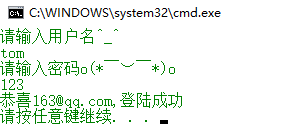
对应的数据库如下:
ADO.NET_01的更多相关文章
- ADO.NET对象的详解
1. Connection 类 和数据库交互,必须连接它.连接帮助指明数据库服务器.数据库名字.用户名.密码,和连接数据库所需要的其它参数.Connection对象会被Command对象使用,这样就能 ...
- WebForm获取GET或者POST参数到实体的转换,ADO.NET数据集自动转换实体
最近在修改维护以前的webform项目(维护别人开发的.....)整个aspx没有用到任何的控件,这个我也比较喜欢不用控件所以在提交信息的时候需要自己手动的去Request.QueryString[] ...
- ADO.NET编程之美----数据访问方式(面向连接与面向无连接)
最近,在学习ADO.NET时,其中提到了数据访问方式:面向连接与面向无连接.于是,百度了一下,发现并没有很好的资料,然而,在学校图书馆中发现一本好书(<ASP.NET MVC5 网站开发之美&g ...
- ADO.NET一小记-select top 参数问题
异常处理汇总-后端系列 http://www.cnblogs.com/dunitian/p/4523006.html 最近使用ADO.NET的时候,发现select top @count xxxx 不 ...
- .NET基础拾遗(6)ADO.NET与数据库开发基础
Index : (1)类型语法.内存管理和垃圾回收基础 (2)面向对象的实现和异常的处理 (3)字符串.集合与流 (4)委托.事件.反射与特性 (5)多线程开发基础 (6)ADO.NET与数据库开发基 ...
- 升讯威ADO.NET增强组件(源码):送给喜欢原生ADO.NET的你
目前我们所接触到的许多项目开发,大多数都应用了 ORM 技术来实现与数据库的交互,ORM 虽然有诸多好处,但是在实际工作中,特别是在大型项目开发中,容易发现 ORM 存在一些缺点,在复杂场景下,反而容 ...
- ADO.NET Entity Framework 在哪些场景下使用?
在知乎回答了下,顺手转回来. Enity Framework已经是.NET下最主要的ORM了.而ORM从一个Mapping的概念开始,到现在已经得到了一定的升华,特别是EF等对ORM框架面向对象能力的 ...
- ADO.NET 核心对象简介
ADO.NET是.NET中一组用于和数据源进行交互的面向对象类库,提供了数据访问的高层接口. ADO.NOT类库在System.Data命名空间内,根据我们访问的不同数据库选择命名空间,System. ...
- ODBC、OLE DB、 ADO的区别
转自:http://blog.csdn.net/yinjingjing198808/article/details/7665577 一.ODBC ODBC的由来 1992年Microsoft和Syba ...
随机推荐
- vim编辑器操作①
Linux文本编辑器: 行编辑器:sed 全屏编辑器:nano,vi/vim 本文主要介绍说明vim编辑器的相关使用: 其有三种模式,即: 编辑模式(默认模式).插入模式(输入模式).末行模式(内置的 ...
- Django项目:CRM(客户关系管理系统)--55--46PerfectCRM实现登陆后页面才能访问
#urls.py """PerfectCRM URL Configuration The `urlpatterns` list routes URLs to views. ...
- 前端(jQuery)(5)-- jQuery AJAX异步访问和加载片段
异步访问 index.html <!DOCTYPE html> <html lang="en"> <head> <meta charset ...
- 使用Jedis操作Redis-使用Java语言在客户端操作---List类型
在Redis中,List类型是按照插入顺序排序的字符串链表.和数据结构中的普通链表一样,我们可以在其头部(left)和尾部(right)添加新的元素.在插入时,如果该键并不存在,Redis将为该键创建 ...
- Mysql 遇到的一些坑
1.命令行按回车,或是输入\c,quit 都无法结束编辑状态,如图: 出现了"> ,然后不管输入什么都无法退出,这时输入>前的字符作为结束字符,再输入\c,既需要输入 " ...
- 看完就会用的GIT操作图解分析
无论你是前端还是后台,无论是运维还是移动端研发,GIT是逃避不了的东西,当然你说你要用SVN,那不在这次的讨论范围之内.不多说,请看下文GIT图解分析,10分钟学会git操作,当然下面的教程是为实战为 ...
- 使用session实现一次性验证码
在登录页面和各种页面,会看到有验证码输入,这样做的目的是为了防止密码猜测工具破解密码,保护了用户密码安全,验证码只能使用一次,这样就给密码猜测工具带来了很大的困难,基本上阻断了密码猜测工具的使用. 可 ...
- Win7。56个进程让我头疼
乱七八糟的进程一个一个往外蹦,如此痛苦. 安装了一个VM9,进程数量+5,安装了卖咖啡的,进程数量+5. 除去这10个,系统进程数量还有46个....还是太多... 64位系统,真的很痛苦,还没有怎么 ...
- Centos系统Python环境搭建和项目部署
目录 一.Python 1. 源安装 Python3 2. SCL安装 Python3 3. 虚拟环境venv 4. 安装Flask 5. 安装gunicorn 二.安装Nginx 1. 安装Ngin ...
- 模拟7题解 T2visit
T2 visit [组合数学][中国剩余定理] 一场考试难得见两个数学题 本来想矩阵快速幂,显然空间复杂度不行,主要是没时间,就没打 正解: 首先推波式子 1.$C_{t}^{k}$ 在t步中总 ...