
nginx 解决 connect() failed (111: Connection refused) while connecting to upstream,
嗯哼,刚装了个ubuntu的lnmp,我的天啊,踩的坑比我脂肪还多了
比如刚装完的时候访问显示502,
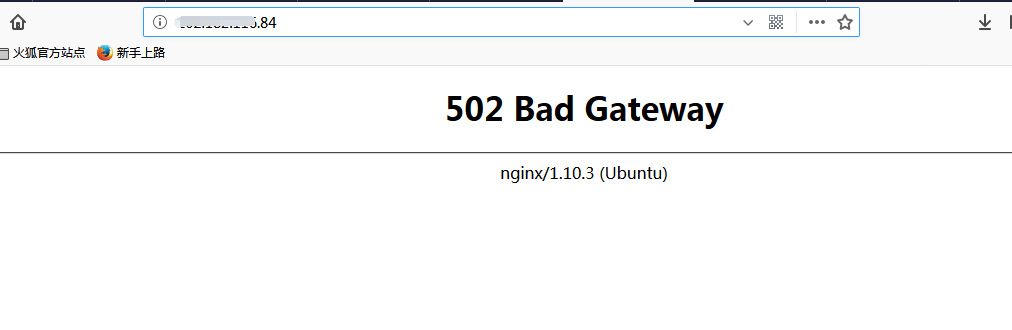
也不知道什么问题,就去看了一下nginx日志 /var/log/nginx/error.log,发现了这个错误
2018/06/03 13:38:23 [error] 21332#21332: *301 connect() failed (111: Connection refused) while connecting to upstream, client: 115.159.183.71, server: 202.182.116.84, request: "GET /phpmyadmin/index.php HTTP/1.1", upstream: "fastcgi://127.0.0.1:9000", host: "202.182.116.84"
去搜了一下,这样的错误有两个解决方式
1.php-fpm没有运行
执行如下命令查看是否启动了php-fpm,如果没有则启动你的php-fpm即可
netstat -ant | grep
2.php-fpm队列满了
php-fpm.conf(/etc/php/7.0/fpm/php-fpm.conf)配置文件pm.max_children修改大一点,重启php-fpm并观察日志情况
呵呵,但是呢,姐姐岂止是普通人,这两个都看了还是不行,解决完了才发现,没想到啊,自己竟然有一个这么大的错误
来啊从配置文件开始看起吧,
3、修改配置文件
因为nginx和php有两种链接方式,一种是
fastcgi_pass 127.0.0.1:9000;
另一种是这个
fastcgi_pass unix:/run/php/php7.0-fpm.sock;
这个具体怎么用要去php fpm里面去看他的配置文件
/etc/php/7.0/fpm/pool.d/www.conf里面的Listen
如果Listen是端口就写127.0.0.1:9000;
如果是路径,nginx的配置文件也要学路径,unix:/run/php/php7.0-fpm.sock;

重新访问就好了

所以说修改一下配置文件,在重启一下nginx,就好了。其实按理说不能发生这种事的,但是呢?自己搭的时候,几乎所有的事都有可能发生。记录下来,以防再次入坑。
nginx 解决 connect() failed (111: Connection refused) while connecting to upstream,的更多相关文章
- 解决connect() failed (111: Connection refused) while connecting to upstream
使用nginx时, 有可能遇到connect() failed (111: Connection refused) while connecting to upstream的问题. 如果upstrea ...
- Nginx报错 connect() failed (111: Connection refused) while connecting to upstream 的解决方法
今天访问公司的网站突然报错,抛出一些英文,提示看一下Nginx的error.log日志: cd /usr/local/nginx/logs/ 看到了error.log ,下一步 tail -n 2 ...
- [nginx] connect() failed (111: Connection refused) while connecting to upstream, client: 101.18.123.107, server: localhost,
nginx一直报错, 2016/12/02 10:23:19 [error] 1472#0: *31 connect() failed (111: Connection refused)while c ...
- nginx访问502 gateway,*1 connect() failed (111: Connection refused) while connecting to upstream
安装好nginx,php环境后,配置虚拟主机,结果访问后就报502 gateway,查看日志文件后,显示错误如下: 2019/04/29 16:24:39 [error] 19433#19433: * ...
- nginx 报错 connect() failed (111: Connection refused) while connecting to upstream
公司网站搬迁到新服务器后,发现站点访问不了,network里面提示502,查看相关的server配置,感觉没有什么问题,经过测试发现txt.html.等非php文件能够直接访问,也就是php访问不了, ...
- connect() failed (111: Connection refused) while connecting to upstream
配置好lamp后,在浏览器中运行程序后,出现上面的错误. 转自:http://www.xuejiehome.com/blread-1828.html I'm experiencing 502 gate ...
- 配置nginx.config 报错:connect() failed (111: Connection refused) while connecting to upstream解决
php-fpm没有运行 执行如下命令查看是否启动了php-fpm,如果没有则启动你的php-fpm即可 查看: netstat -ant | grep 9000 执行 /usr/local/php/s ...
- connect() failed (111: Connection refused) while connecting to upstream的解决
遇到这种情况, 首先 1.检查php-fpm是否启动---------如果没启动->启动, 2.用命令 netstat -ant | grep 9000 查看php-fpm进程,如果没启动-&g ...
- connect() failed (111: Connection refused) while connecting to upstream报错处理
新lnmp环境调试项目时,nginx报错如下: 解决: 发现php-fpm.conf是以套接字方式通信,而nginx是以端口方式通信,见下图: 将nginx.conf修改为如下,重新reload即可
随机推荐
- IIS添加网站
打开IIS 在网站上面点击右键进行添加网站 进入添加网站配置
- Atcoder Beginner Contest 156E(隔板法,组合数学)
#define HAVE_STRUCT_TIMESPEC #include<bits/stdc++.h> using namespace std; ; ; long long fac[N] ...
- 移动端安卓IOS对接H5项目遇到的坑
最近做一个H5项目 退出的时候需要调用原生的弹框退出, 之前以为很简单,直接ajax调用后端退出接口即可.后来发现数据拿不到,因为状态用的是cookie存储, 后来想到ajax 传参数请求,后来还是拿 ...
- Hibernate项目的基本步骤和一些错误提示
以数据库中有一张user表为例: 1.编写POJO持久化类User.javaPOJO(Plain Old Java Objects),简单的Java对象.一个POJO类不用继承任何类,也无须实现任何接 ...
- npx工具
参考文章:阮一峰的网络日志 - npx 使用教程 npx的作用 1.调用项目模块 即node_modules目录下的模块,而不用加上相对路径 $ npx mocha --version 原本应该是这样 ...
- 大数据-HBase
HBase HBase(Hadoop Database)基于Google的BigTable论文,依赖HDFS进行存储.适合存储大体量数据.HBase是高可靠性(数据安全).高性能(存取效率).面向列. ...
- Virtual Judge POJ 1002 487-3279
模拟 #include<iostream> #include<algorithm> #include<string.h> #include<stdio.h&g ...
- centos6 源码编译安装nginx 1.6 教程 nginx安装脚本
操作系统centos 6.9 安装nginx需要pcre zlib openssl的库,下文都是在官网直接下载用作编译安装 该nginx安装教程,有安装maxmind IP 库 该教材有修改最大打开文 ...
- 【Python】解决浮点数间运算存在不确定尾数的问题
#浮点数间运算存在不确定尾数,所以会输出False if 0.1+0.2==0.3: print("Ture\n") else: print("False\n" ...
- win api + 基础乐理产生正弦波声音
暂时记录. 感觉想写个电子钢琴乐程序了,不过感觉音有点怪怪的. #include <iostream> #include <windows.h> #include <Mm ...