
.net Core3.0 +Nlog+Sqlserver
1.下载Nlog、Nlog.Web.AspNetCore包

2.添加NLog.config xml文件
资料https://github.com/NLog/NLog/wiki/Database-target#dbprovider-examples
<?xml version="1.0" encoding="utf-8" ?>

<nlog xmlns="http://www.nlog-project.org/schemas/NLog.xsd"

      xmlns:xsi="http://www.w3.org/2001/XMLSchema-instance"

      autoReload="true"

      internalLogLevel="Warn"

      internalLogFile="C:\git\damienbod\AspNetCoreNlog\Logs\internal-nlog.txt">     //配置错误可以在这里找到提示信息

  <targets>

    <target name="AllDatabase" xsi:type="Database" dbProvider="Microsoft.Data.SqlClient.SqlConnection, Microsoft.Data.SqlClient" connectionString="Data Source = .;Initial Catalog = test; User ID = sa;Password =wys;"

            commandText="insert into dbo.Log (Application, Logged, Level, Message,Logger, CallSite, Exception

      ) values (@Application, @Logged, @Level, @Message,@Logger, @Callsite, @Exception);">  //dbProvider是必须的

      <!--

  Remarks:

    The appsetting layouts require the NLog.Extended assembly.

    The aspnet-* layouts require the NLog.Web assembly.

    The Application value is determined by an AppName appSetting in Web.config.

    The "NLogDb" connection string determines the database that NLog write to.

    The create dbo.Log script in the comment below must be manually executed.

  Script for creating the dbo.Log table.

  SET ANSI_NULLS ON

  SET QUOTED_IDENTIFIER ON

  CREATE TABLE [dbo].[Log] (

      [Id] [int] IDENTITY(1,1) NOT NULL,

      [Application] [nvarchar](50) NOT NULL,

      [Logged] [datetime] NOT NULL,

      [Level] [nvarchar](50) NOT NULL,

      [Message] [nvarchar](max) NOT NULL,

      [Logger] [nvarchar](250) NULL,

      [Callsite] [nvarchar](max) NULL,

      [Exception] [nvarchar](max) NULL,

    CONSTRAINT [PK_dbo.Log] PRIMARY KEY CLUSTERED ([Id] ASC)

      WITH (PAD_INDEX  = OFF, STATISTICS_NORECOMPUTE  = OFF, IGNORE_DUP_KEY = OFF, ALLOW_ROW_LOCKS  = ON, ALLOW_PAGE_LOCKS  = ON) ON [PRIMARY]

  ) ON [PRIMARY]

-->

      <parameter name="@application" layout="AspNetCoreNlog" />

      <parameter name="@logged" layout="${date}" />

      <parameter name="@level" layout="${level}" />

      <parameter name="@message" layout="${message}" />

      <parameter name="@logger" layout="${logger}" />

      <parameter name="@callSite" layout="${callsite:filename=true}" />

      <parameter name="@exception" layout="${exception:tostring}" />

    </target>

  </targets>

  <rules>

    <!--All logs, including from Microsoft-->

    <logger name="*" minlevel="info" writeTo="AllDatabase" />

  </rules>

</nlog>
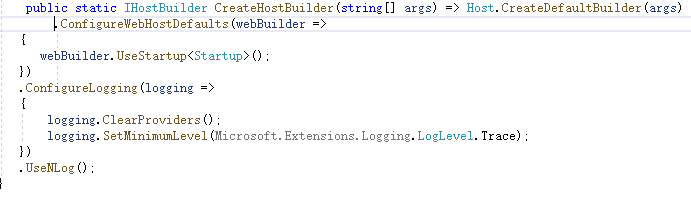
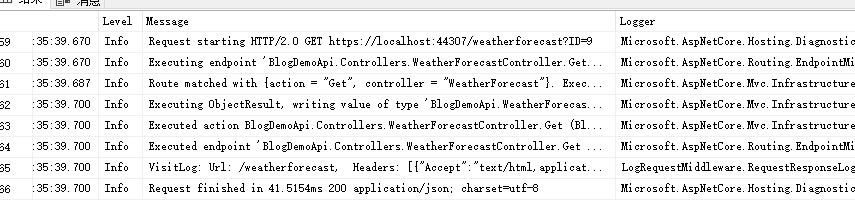
找到Program.cs
改成这样

.net Core3.0 +Nlog+Sqlserver的更多相关文章
- Net Core平台灵活简单的日志记录框架NLog+SqlServer初体验
Net Core平台灵活简单的日志记录框架NLog+SqlServer初体验 前几天分享的"[Net Core平台灵活简单的日志记录框架NLog+Mysql组合初体验][http://www ...
- .NET Core3.0 日志 logging
多年的经验,日志记录是软件开发的重要组成部分.没有日志记录机制的系统不是完善的系统.在开发阶段可以通过debug附件进程进行交互调试,可以检测到一些问题,但是在上线之后,日志的记录起到至关重要的作用. ...
- EFCore--->> CodeFirst (Vs2019 Core3.0)的简单使用
直接上干货 EFCore--->> CodeFirst (Vs2019 Core3.0) 1: 安装下面3个对应的package(在Nuget控制台或者直接NuGet包查询点击下载,我喜欢 ...
- .Net Core 3.0后台使用httpclient请求网络网页和图片_使用Core3.0做一个简单的代理服务器
目标:使用.net core最新的3.0版本,借助httpclient和本机的host域名代理,实现网络请求转发和内容获取,最终显示到目标客户端! 背景:本人在core领域是个新手,对core的使用不 ...
- .Net Core3.0 WebApi 项目框架搭建 五: 轻量型ORM+异步泛型仓储
.Net Core3.0 WebApi 项目框架搭建:目录 SqlSugar介绍 SqlSugar是国人开发者开发的一款基于.NET的ORM框架,是可以运行在.NET 4.+ & .NET C ...
- What?VS2019创建新项目居然没有.NET Core3.0的模板?Bug?
今天是个值得欢喜的日子,因为VS2019在今天正式发布了.作为微软粉,我已经用了一段时间的VS2019 RC版本了.但是,今天有很多小伙伴在我的<ASP.NET Core 3.0 上的gRPC服 ...
- 2019年第一天——使用Visual Studio 2019 Preview创建第一个ASP.Net Core3.0的App
一.前言: 全文翻译自:https://www.talkingdotnet.com/creating-first-asp-net-core-3-0-app-visual-studio-2019/ Vi ...
- VS2019没有.net core3.0模板的解决办法
今天装好了,net core sdk 3.0之后,打开Visual Studio2019后,新建项目时发现尽然没有.net core3.0的模板. 搜了下其他博主的文章,按照文章里做了如下设置: ...
- asp.net core3.0 mvc 用 autofac
好久没有写文章了,最近在用.net core3.0,一些开发中问题顺便记录: 1.首先nuget引入 Autofac Autofac.Extensions.DependencyInjection 2. ...
随机推荐
- CenOS安装MySQL服务
说明:本教程是CenOS安装MySQL服务. 0. 预备知识: 什么是rpm RMP 是 LINUX 下的一种软件的可执行程序,你只要安装它就可以了.这种软件安装包通常是一个RPM包(Redha ...
- maven 打包详解
Maven可以使用mvn package指令对项目进行打包,如果使用Java -jar xxx.jar执行运行jar文件,会出现"no main manifest attribute, in ...
- Perl Tk在IC设计中的应用、Windows、Linux平台下的安装-各种错误的摸索解决
本文转自:自己的微信公众号<集成电路设计及EDA教程> <Perl Tk在IC设计中的应用.Windows.Linux平台下的安装-各种错误的摸索解决> Perl在IC设计中有 ...
- 理解POP、OOP、AOP编程
一.面向过程编程:(POP:Procedure Oriented Programming) 面向过程编程是以功能为中心来进行思考和组织的一种编程方法,它强调的是功能(即系统的数据被加工和处理的过程), ...
- CSS绝对定位absolute详解
转:https://www.jianshu.com/p/a3da5e27d22b 之前介绍过CSS浮动float详解,本篇介绍的绝对定位absolute和浮动float有部分相似性.如果能理解 ...
- Codeforces_731_F
http://codeforces.com/problemset/problem/731/F 其实是暴力枚举,但是有些小技巧,直接保存每个数的数量. 枚举每个起点时,然后依次加上起点大小的分段的数量的 ...
- WeChall_Training: Crypto - Caesar I (Crypto, Training)
As on most challenge sites, there are some beginner cryptos, and often you get started with the good ...
- 未来图书-需求分析——脑机接口、VR、AI推荐系统
个人比较喜欢科幻作品,也常常畅想未来.. "书"作为几千年来人类文明信息载体,必然会不断演变.. 文荟宿舍墙上贴着Elon Musk的海报,向往像他一样能够在有限的生命中用极致的想 ...
- Java线程核心基础(上)
Java线程核心基础(上) 一.实现多线程 根据Oracle官方文档,目前推荐的创建线程方法主要有两种,分别是继承Thread类和实现Runnable接口.通过阅读Thread类源码,可以发现二者不同 ...
- ajax实现文本框的联想功能
先写一个jsp通过ajax传值给servlet进行查询再传给对应的div进行显示. <%@ page language="java" contentType="te ...