
Python学习之文件操作(二)
CSV文件处理
在Python中处理CSV文件可以使用模块csv。有关csv模块的官方资料看这里。
1 读取csv文件
csv.reader(csvfile, dialect='excel', **fmtparams)
使用reader()函数来读取csv文件,返回一个reader对象。reader对象可以使用迭代获取其中的每一行。
>>> import csv

>>> with open('userlist.csv','rt') as csv_file:

    csv_conent = [ row for row in csv.reader(csv_file)]

>>> csv_conent

[['Doctor', 'No'], ['Rosa', 'Klebb'], ['Mister', 'Big'], ['Auric', 'Goldfinger'], ['Ernst', 'Blofeld']]

>>>
class csv.DictReader(csvfile, fieldnames=None, restkey=None, restval=None, dialect='excel', *args, **kwds)
可以使用DicReader()按照字典的方式读取csv内容,如下:
>>> import csv

>>> with open('userlist3.csv','rt',newline='') as csvfile:

    reader = csv.DictReader(csvfile, fieldnames =[1,2],delimiter=':')

    for row in reader:

        print(row[1],row[2])

Doctor No

Rosa Klebb

Mister Big

Auric Gold

Ernst Blofeld

>>>
2 写入csv文件
csv.writer(csvfile, dialect='excel', **fmtparams)
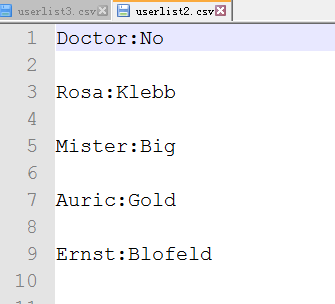
使用writer()函数来写csv文件,返回一个writer对象。writer对象可以使用writerow()写一行数据,或者使用。writerows()写多行数据
>>> import csv

>>> namelist = []

>>> namelist = [

    ['Doctor','No'],

    ['Rosa','Klebb'],

    ['Mister','Big'],

    ['Auric','Gold'],

    ['Ernst','Blofeld'],

    ]

>>> with open('userlist2.csv','wt') as c_file:

    csvout = csv.writer(c_file, delimiter=':')

    csvout.writerows(namelist)

>>> with open('userlist3.csv','wt',newline='') as c_file:

    csvout = csv.writer(c_file, delimiter=':')

    csvout.writerows(namelist)
生成的csv文件如下:

class csv.DictWriter(csvfile, fieldnames, restval='', extrasaction='raise', dialect='excel', *args, **kwds)
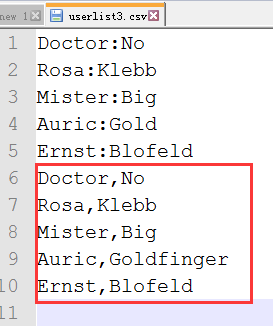
使用DictWriter把字典类型的数据写入到csv文件中,如下:
>>> import csv

>>> villains = [

{'first': 'Doctor', 'last': 'No'},

{'first': 'Rosa', 'last': 'Klebb'},

{'first': 'Mister', 'last': 'Big'},

{'first': 'Auric', 'last': 'Goldfinger'},

{'first': 'Ernst', 'last': 'Blofeld'},

]

>>> with open('userlist3.csv','at',newline='') as csvfile:

    writer = csv.DictWriter(csvfile,['first','last'])

    writer.writerows(villains)
XML文件处理
XML是可扩展标记语言,它使用tag来分隔数据。
处理XML文件,可以使用python中的xml模块,它包含下面的几个子模块:
xml.etree.ElementTree: the ElementTree API, a simple and lightweight XML processor
xml.dom: the DOM API definition
xml.dom.minidom: a minimal DOM implementation
xml.dom.pulldom: support for building partial DOM trees
xml.sax: SAX2 base classes and convenience functions
xml.parsers.expat: the Expat parser binding
xml模块更多的相关内容参考官方文档。
使用xml.etree.ElementTree来解析处理XML文件内容,如下:
<?xml version="1.0"?>

<data>

    <country name="Liechtenstein">

        <rank>1</rank>

        <year>2008</year>

        <gdppc>141100</gdppc>

        <neighbor name="Austria" direction="E"/>

        <neighbor name="Switzerland" direction="W"/>

    </country>

    <country name="Singapore">

        <rank>4</rank>

        <year>2011</year>

        <gdppc>59900</gdppc>

        <neighbor name="Malaysia" direction="N"/>

    </country>

    <country name="Panama">

        <rank>68</rank>

        <year>2011</year>

        <gdppc>13600</gdppc>

        <neighbor name="Costa Rica" direction="W"/>

        <neighbor name="Colombia" direction="E"/>

    </country>

</data>
sample.xml
>>> import xml.etree.ElementTree as et

>>> tree = et.ElementTree(file='sample.xml')

>>> root = tree.getroot()

>>> root.tag

'data'

>>> for child in root:

    print('tag:',child.tag, 'attributes:',child.attrib)

    for grandchild in child:

        print('\ttag:',grandchild.tag,'attributes:',grandchild.attrib)

tag: country attributes: {'name': 'Liechtenstein'}

    tag: rank attributes: {}

    tag: year attributes: {}

    tag: gdppc attributes: {}

    tag: neighbor attributes: {'name': 'Austria', 'direction': 'E'}

    tag: neighbor attributes: {'name': 'Switzerland', 'direction': 'W'}

tag: country attributes: {'name': 'Singapore'}

    tag: rank attributes: {}

    tag: year attributes: {}

    tag: gdppc attributes: {}

    tag: neighbor attributes: {'name': 'Malaysia', 'direction': 'N'}

tag: country attributes: {'name': 'Panama'}

    tag: rank attributes: {}

    tag: year attributes: {}

    tag: gdppc attributes: {}

    tag: neighbor attributes: {'name': 'Costa Rica', 'direction': 'W'}

    tag: neighbor attributes: {'name': 'Colombia', 'direction': 'E'}

>>> len(root)

3

>>> len(root[0])

5

>>> len(root[1])

4

>>>
JSON/pickle数据处理
python中使用json模块把复杂结构的数据转换成JSON字符串,或者把JSON字符串转换成数据。
一个典型的复杂结构的数据如下:
>>> menu = \

    {

    "breakfast": {

                "hours": "7-11",

                "items": {

                        "breakfast burritos": "$6.00",

                        "pancakes": "$4.00"

                        }

                },

    "lunch" : {

            "hours": "11-3",

            "items": {

                    "hamburger": "$5.00"

                    }

            },

    "dinner": {

            "hours": "3-10",

            "items": {

                    "spaghetti": "$8.00"

                    }

            }

    }
menu
1 转换成JSON字符串
使用dumps()将menu转换成JSON格式的字符串如下:
>>> import json

>>> menu_json = json.dumps(menu)

>>> menu_json

'{"dinner": {"items": {"spaghetti": "$8.00"}, "hours": "3-10"}, "breakfast": {"items": {"pancakes": "$4.00", "breakfast burritos": "$6.00"}, "hours": "7-11"}, "lunch": {"items": {"hamburger": "$5.00"}, "hours": "11-3"}}'

>>>
更多json模块的用法参考官方文档。
2 转换成复杂结构的数据
使用loads()函数把JSON字符串转换成python的结构数据,如下:
>>> menu2 = json.loads(menu_json)

>>> menu2

{'dinner': {'items': {'spaghetti': '$8.00'}, 'hours': '3-10'}, 'breakfast': {'items': {'pancakes': '$4.00', 'breakfast burritos': '$6.00'}, 'hours': '7-11'}, 'lunch': {'items': {'hamburger': '$5.00'}, 'hours': '11-3'}}

>>> type(menu2)

<class 'dict'>

>>> type(menu_json)

<class 'str'>

>>>
pickle的功能类似于json,也可以将python中的结构化的数据序列化(转换为字符串)。其优点是可以序列化更多的python中的数据对象,比如datetime对象。其缺点是只能在python中使用,json的话其他语言也支持。
例子如下:
>>> import json

>>> import pickle

>>> import datetime

>>> now1 = datetime.datetime.utcnow()

>>> jsoned = json.dumps(now1)

Traceback (most recent call last):

  File "<pyshell#89>", line 1, in <module>

    jsoned = json.dumps(now1)

  File "C:\Python35-32\lib\json\__init__.py", line 230, in dumps

    return _default_encoder.encode(obj)

  File "C:\Python35-32\lib\json\encoder.py", line 199, in encode

    chunks = self.iterencode(o, _one_shot=True)

  File "C:\Python35-32\lib\json\encoder.py", line 257, in iterencode

    return _iterencode(o, 0)

  File "C:\Python35-32\lib\json\encoder.py", line 180, in default

    raise TypeError(repr(o) + " is not JSON serializable")

TypeError: datetime.datetime(2016, 11, 5, 7, 22, 20, 551139) is not JSON serializable

>>> pickled = pickle.dumps(now1)

>>> now1

datetime.datetime(2016, 11, 5, 7, 22, 20, 551139)

>>> now2 = pickle.loads(pickled)

>>> now2

datetime.datetime(2016, 11, 5, 7, 22, 20, 551139)

>>>
YAML文件处理
python使用第三方模块pyyaml来操作数据。官方文档点这里。
一个典型的YAML文件如下:
name:

    first: James

    last: McIntyre

dates:

    birth: 1828-05-25

    death: 1906-03-31

details:

    bearded: true

    themes: [cheese, Canada]

books:

    url: http://www.gutenberg.org/files/36068/36068-h/36068-h.htm

poems:

    - title: 'Motto'

      text: |

        Politeness, perseverance and pluck,

        To their possessor will bring good luck.

    - title: 'Canadian Charms'

      text: |

        Here industry is not in vain,

        For we have bounteous crops of grain,

        And you behold on every field

        Of grass and roots abundant yield,

        But after all the greatest charm

        Is the snug home upon the farm,

        And stone walls now keep cattle warm.
>>> with open('sample.yml','rt') as y_file:

    text = y_file.read()

>>> data = yaml.load(text)

>>> data['poems']

[{'text': 'Politeness, perseverance and pluck,\nTo their possessor will bring good luck.\n', 'title': 'Motto'}, {'text': 'Here industry is not in vain,\nFor we have bounteous crops of grain,\nAnd you behold on every field\nOf grass and roots abundant yield,\nBut after all the greatest charm\nIs the snug home upon the farm,\nAnd stone walls now keep cattle warm.', 'title': 'Canadian Charms'}]

>>> data['details']

{'bearded': True, 'themes': ['cheese', 'Canada']}

>>> data['poems'][0]

{'text': 'Politeness, perseverance and pluck,\nTo their possessor will bring good luck.\n', 'title': 'Motto'}

>>>
配置文件处理
Python中可以使用configparser模块来处理如下格式的配置文件。
[DEFAULT]

ServerAliveInterval = 45

Compression = yes

CompressionLevel = 9

ForwardX11 = yes

[bitbucket.org]

User = hg

[topsecret.server.com]

Port = 50022

ForwardX11 = no
>>> import configparser

>>> config = configparser.ConfigParser()

>>> config['DEFAULT'] = {'ServerAliveInterval': '',

...                      'Compression': 'yes',

...                      'CompressionLevel': ''}

>>> config['bitbucket.org'] = {}

>>> config['bitbucket.org']['User'] = 'hg'

>>> config['topsecret.server.com'] = {}

>>> topsecret = config['topsecret.server.com']

>>> topsecret['Port'] = ''     # mutates the parser

>>> topsecret['ForwardX11'] = 'no'  # same here

>>> config['DEFAULT']['ForwardX11'] = 'yes'

>>> with open('example.ini', 'w') as configfile:

...   config.write(configfile)

...
更多configeparser的内容参考官方文档。
Excel表格处理
处理Excel文件的模块有很多,例如openpyxl, xlsxwriter, xlrd等。详细请参考官方文档。
Python学习之文件操作(二)的更多相关文章
- python学习笔记:文件操作和集合(转)
转自:http://www.nnzhp.cn/article/16/ 这篇博客来说一下python对文件的操作. 对文件的操作分三步: 1.打开文件获取文件的句柄,句柄就理解为这个文件 2.通过文件句 ...
- python学习日记(文件操作)
文件操作概述 计算机系统分为:操作系统,计算机硬件,应用程序. 我们用python或其他语言编写的应用程序若想要把数据永久保存下来,必须要保存于硬盘中,这就涉及到应用程序要操作硬件,众所周知,应用程序 ...
- python学习总结---文件操作
# 文件操作 ### 目录管理(os) - 示例 ```python # 执行系统命令 # 清屏 # os.system('cls') # 调出计算器 # os.system('calc') # 查看 ...
- 03 python学习笔记-文件操作(三)
本文内容主要包括以下方面: 1. 文件操作基本认识2. 只读(r, rb)3. 只写(w, wb)4. 追加(a, ab)5. r+读写6. w+写读7. a+写读(追加写读)8. 文件的修改 一.文 ...
- python学习day8 文件操作(深度学习)
文件操作 (day7内容扩展) 1 文件基本操作 obj = open('路径',mode='模式',encoding='编码')obj.write()obj.read()obj.close() 2 ...
- Python学习 :文件操作
文件基本操作流程: 一. 创建文件对象 二. 调用文件方法进行操作 三. 关闭文件(注意:只有在关闭文件后,才会写入数据) fh = open('李白诗句','w',encoding='utf-8') ...
- python 学习分享-文件操作篇
文件操作 f_open=open('*.txt','r')#以只读的方式(r)打开*.txt文件(需要与py文件在同一目录下,如果不同目录,需写全路径) f_open.close()#关闭文件 打开文 ...
- Python学习笔记——文件操作
python中,一切皆对象. 一.文件操作流程 (1)打开文件,得到一个文件句柄(对象),赋给一个对象: (2)通过文件句柄对文件进行操作: (3)关闭文件. 文件对象f通过open()函数来创建 ...
- Python学习之==>文件操作
1.打开文件的模式 r,只读模式(默认)[不可写:文件不存在,会报错] w,只写模式[不可读:不存在则创建:存在则删除内容] a,追加模式[不可读:不存在则创建:存在则追加内容] r+,读写模式[可读 ...
随机推荐
- 欧拉函数+反演——2019hdu多校6588
\[ 求\sum_{i=1}^{n}(\sqrt[3]i,i)\\ 首先转化一下这个式子,考虑对于i\in[j^3,(j+1)^3-1],\sqrt[3]i=j\\ 所以可以枚举所有j,然后对i\in ...
- 取对数求阶乘位数——lightoj1045
/* 求 n! 在base进制下的位数 取对数,用换底公式,预处理对数前缀和 b^x = n! x = log_b(n!) = log_10(n!)/log_10(b) 对x向上取整即可 */ #in ...
- scrollReveal.js导致页面加载完之后页面中点击事件添加的css参数失效了(我的Hexo next博客引发的问题)
文章目录 时间 背景 问题解决 个人博客:https://mmmmmm.me 源码:https://github.com/dataiyangu/dataiyangu.github.io 时间 2019 ...
- sql准确判断某个ip
问题:如图 当我执行sql要准确查找某个IP是属于哪个库室时候,我刚开始是这样写的 select * from Definition_Read_Room where HFIP like '%172.2 ...
- 2019 牛客多校第一场 D Parity of Tuples
题目链接:https://ac.nowcoder.com/acm/contest/881/D 看此博客之前请先参阅吕凯飞的论文<集合幂级数的性质与应用及其快速算法>,论文中很多符号会被本文 ...
- 拾遗:Git 基础
http://www.liaoxuefeng.com/wiki/0013739516305929606dd18361248578c67b8067c8c017b000/ 一.参数配置 $ git con ...
- Windows环境下安装openface
由于昨天在学习人脸识别,就涉及到了openface 我使用的是Windows环境下的pycharm开发工具,昨天一直安装openface但就是没有相关的教程,使用pip install openfac ...
- 2014 0416 word清楚项目黑点 输入矩阵 普通继承和虚继承 函数指针实现多态 强弱类型语言
1.word 如何清除项目黑点 选中文字区域,选择开始->样式->全部清除 2.公式编辑器输入矩阵 先输入方括号,接着选择格式->中间对齐,然后点下面红色框里的东西,组后输入数据 ...
- 2018湘潭大学程序设计竞赛【C】
题目链接:https://www.nowcoder.com/acm/contest/105/C 题意:给你几个矩形的左上角和右下角的坐标,让你算有几个矩形相交. 题解: 每次都暴力标记一下炸弹区域里的 ...
- Dos中转义符
遇到个问题: java test R=<file> 11 22 按理说应该打印 R=<file> 11 22 但是,系统报错,写的是系统找不到指定文件. 是"< ...