
Python学习第二十三课——Mysql 表记录的一些基本操作 (查)
查(select * from 表名)
基本语法:
select <字段1,字段2,...> from <表名> where <表达式>;
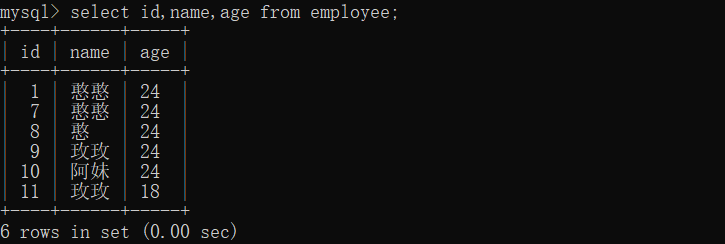
例如,查询student表中所有的记录,在终端窗口输入命令:
select id,name,age from employee;
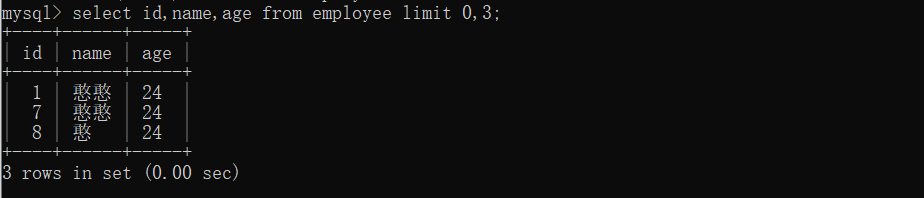
也可以查询限定的记录,输入如下命令,可以限定查询结果为第0条到第1条记录,也就是返回第一条记录:
select * from empolyee limit 0,3;
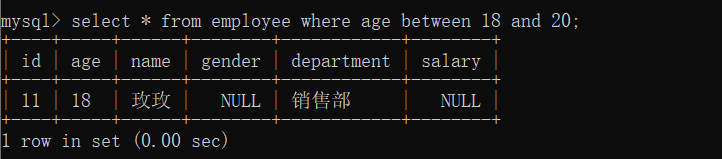
也可以查询通过年龄限制查询
select * from employee where age between 18 and 20;
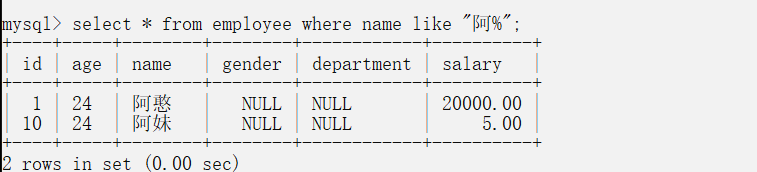
模糊查询(like):
select * from employee where name like "阿%";
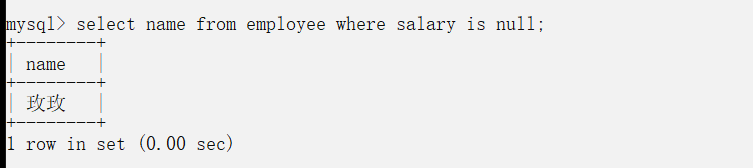
查询空值:
select name from employee where salary is null;
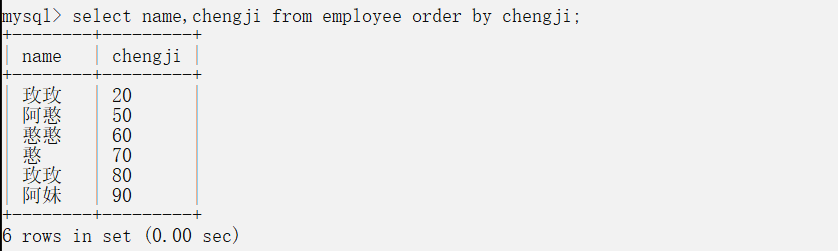
排序查询(order by)
select name,chengji from employee order by chengji;
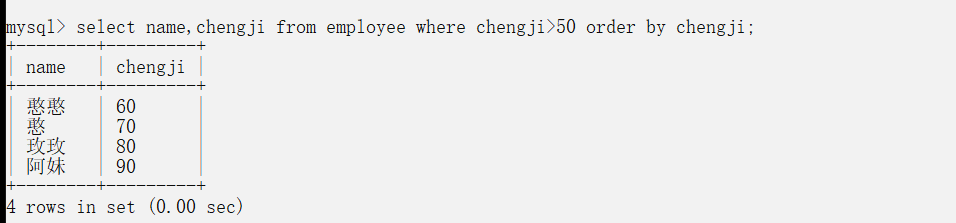
select name,chengji from employee where chengji>50 order by chengji;
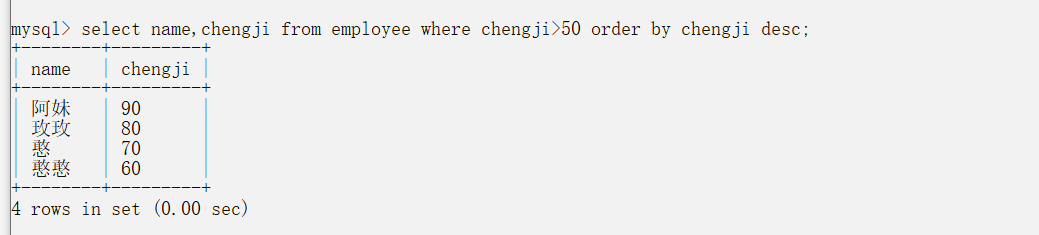
降序查询:
select name,chengji from employee where chengji>50 order by chengji desc;
as 可以添加一个字段:
select name,chengji1+chengji2 as 总成绩 from employee;
select name,chengji1+chengji2 as 总成绩 from employee order by 总成绩;
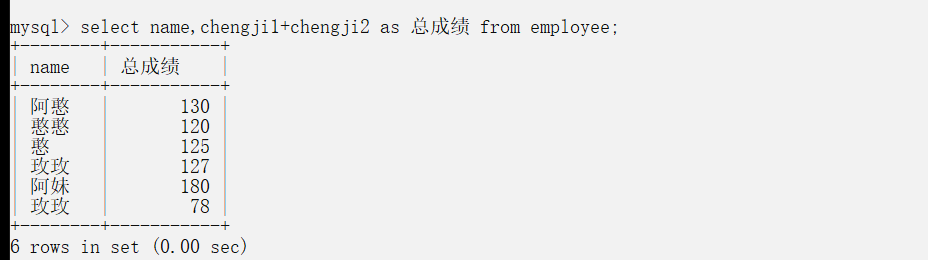
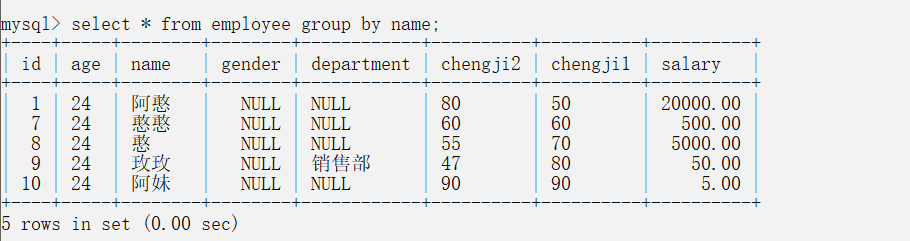
分组查询 group by :
注意:按分组条件分组每一组只会显示第一条记录;
select * from employee group by name;(按照name分组 name一样的将被分为一组)
Python学习第二十三课——Mysql 表记录的一些基本操作 (查)的更多相关文章
- Python学习第二十二课——Mysql 表记录的一些基本操作 (增删改)
记录基本操作: 增:(insert into) 基本语法: insert into 表名(字段) values(对应字段的值): 例子1: insert into employee(id,name,a ...
- Python学习第二十一课——Mysql 对数据库的基本操作
数据库操作(DDL) 在数据库下创建表(create_table) 创建表代码块: CREATE TABLE employee( id TINYINT PRIMARY KEY auto_increme ...
- Python学习第二十七课——写一个和Django框架的自己的框架
MyWeb框架: from wsgiref.simple_server import make_server def application(environ, start_response): pri ...
- Python学习第二十课——自定property and classmethod
自定制property class Lazyproperty: def __init__(self,func): # print('==========>',func) self.func=fu ...
- Python学习第十三课——re(正则表达式)模块
.的用法 import re s = 'fhsdjakaxdsancjh' # .代表一个元素,完成模糊匹配 res = re.findall("a..x", s) # 找到s中以 ...
- Python学习-第二天-字符串和常用数据结构
Python学习-第二天-字符串和常用数据结构 字符串的基本操作 def main(): str1 = 'hello, world!' # 通过len函数计算字符串的长度 print(len(str1 ...
- Python学习day43-数据库(多表关系)
figure:last-child { margin-bottom: 0.5rem; } #write ol, #write ul { position: relative; } img { max- ...
- python学习第二次笔记
python学习第二次记录 1.格式化输出 name = input('请输入姓名') age = input('请输入年龄') height = input('请输入身高') msg = " ...
- Python学习day44-数据库(单表及多表查询)
figure:last-child { margin-bottom: 0.5rem; } #write ol, #write ul { position: relative; } img { max- ...
随机推荐
- Wx-小程序-使用canvas截图保存
1. wxml 页面 使用画布来站位,并给按钮添加绑定事件 <button class='btn btn-theme' bindtap='setSaveImage'>保存图片到本地< ...
- MomentJS记录下开发中用到的日期
1.计算当前周一到周日的日期 var weekOfday = moment().format('E');//计算今天是这周第几天 var last_monday = moment().s ...
- 公有IP和私有IP的区别
什么是IP? 在网络中,每台计算机都有一个唯一的地址,方便别人找到它,这个地址称为IP地址 IP地址是一个网络编码,用来确定网络中的一个节点,是由32位的二进制组成 IP地址的组成? IP地址由网络部 ...
- linux下安装keepalived
keepalived安装文档 1. 安装环境 su - root yum -y install kernel-devel* yum -y install openssl-* yum -y instal ...
- Sql Server跨服务器操作数据
var serversSql = "select count(*) count from sys.servers WHERE name='ITSV'"; var result = ...
- 【应急响应】Linux安全加固
一.补丁管理 1.查看系统信息 uname -a 2.配置yun源 CentosOS 可以直接升级 RHEL系列可以配置使用CentosOS源 3.升级软件包 yum –y update 二.安全工具 ...
- Java 常见异常及处理方案
Java 常见异常处理方案 异常是程序中的一些错误,但并不是所有的错误都是异常,并且错误有时候是可以避免的. 比如说,你的代码少了一个分号,那么运行出来结果是提示是错误java.lang.Error: ...
- 163music 反爬分析
# 网易163 音乐的 mp3下载 .mp3 下载的一个API吧 封 IP 的一种报错 网易云就给我返回了一个{"code":-460,"msg":" ...
- docker-compose介绍及部署LNMP
一.简介 Compose是用于定义和运行多容器Docker应用程序的工具,是docker的服务编排工具,主要应用于构建基于Docker的复杂应用,compose通过一个配置文件来管理多个docker容 ...
- 使用Python处理非对称加密-测试大佬常用的处理方式
一.思考❓❔ 1.什么是非对称加密? 公钥加密系统,广泛用于数据加密传输 更详细的解释可参考维基百科( https://en.wikipedia.org/wiki/RSA_(cryptosystem) ...