
ANT task之Junit、JunitReport
一、ANT任务之Junit:
学习ANT其实主要是学习ANT的task,ANT众多task中有一个Testing Tasks,它下面有两个任务:Junit和JunitReport,主要用来进行单元测试及生成单元测试报告。
| Testing Tasks |
|---|
| Task Name | Description |
|---|---|
| Junit |
Runs tests from the Junit testing framework. This task has been tested with JUnit 3.0 up to JUnit 3.7; it won't work with versions prior to JUnit 3.0. |
| JunitReport |
Merges the individual XML files generated by the Junit task and applies a stylesheet on the resulting merged document to provide a browsable report of the testcases results. |
官方网址:http://ant.apache.org/manual/index.html
<junit>下面可以包含其它元素,例如:
1、<test>:运行单个TestCase
2、<batchtest>:运行多个TestCase
3、<formatter>:定义测试结果输出格式
还有很多,详细可以参考官方文档。
二、项目实例:
由于ant安装比较得简单,网上一搜一大把且现在ecplise基本都带ant,所以本文并未说明如何搭建ant环境。
另外,在eclipse中可以通过:window->show view 来调出Ant视图
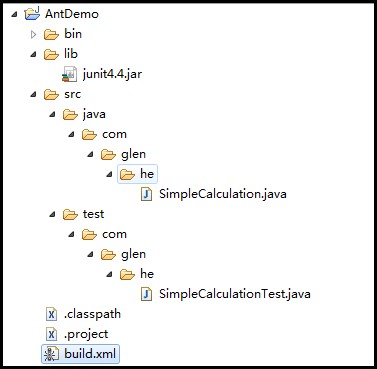
1、目录结构如下:
2、SimpleCalculation类代码如下:
 package com.glen.he;

 public class SimpleCalculation {

     public int Add(int a,int b){

         return (a+b);

     }

 }
SimpleCalculation
3、测试类SimpleCalculationTest代码如下:
 package com.glen.he;

 import com.glen.he.SimpleCalculation;

 import static org.junit.Assert.*;

 import org.junit.Test;

 public class SimpleCalculationTest {

     SimpleCalculation sc = new SimpleCalculation();

     @Test

     public void AddTest() {

         int c = sc.Add(3, 5);

         assertEquals(8, c);

     }

 }
SimpleCalculationTest
4、在项目要目录下添加build.xml(执行一个测试)文件,内容如下:
 <?xml version="1.0" encoding="UTF-8"?>

 <project name="AntDemo" default="junit" basedir=".">

     <!-- =================================================================== -->

     <!-- 变量设置  -->

     <!-- =================================================================== -->

     <!-- 源代码src路径 -->

     <property name="src.path" value="src/java"/>

     <!-- 编译文件class路径 -->

     <property name="build.path" value="build"/>

     <!-- 单元测试代码路径 -->

     <property name="test.path" value="src/test"/>

     <!-- lib包路径 -->

     <property name="lib.path" value="lib"/>

     <!-- =================================================================== -->

     <!-- 设置classpath -->

     <!-- =================================================================== -->

     <path id="compile.path">

         <fileset dir="${lib.path}">

             <include name="**/*.jar"/>

         </fileset>

         <pathelement path="${build.path}"/>

     </path>

     <!-- =================================================================== -->

     <!-- 清除历史编译class -->

     <!-- =================================================================== -->

     <target name="clean" description="clean">

         <delete dir="${build.path}"/>

     </target>

     <!-- =================================================================== -->

     <!-- 编译测试文件,初始化目录 -->

     <!-- =================================================================== -->

     <target name="compile" description="compile">

         <mkdir dir="${build.path}"/>

         <javac srcdir="${src.path}" destdir="${build.path}"  classpathref="compile.path"/>

         <javac srcdir="${test.path}" destdir="${build.path}"  classpathref="compile.path"/>

     </target>

     <!-- =================================================================== -->

     <!-- 执行测试案例 -->

     <!-- =================================================================== -->

     <target name="junit" depends="clean,compile">

         <junit printsummary="true">

              <classpath refid="compile.path"/>

              <test name="com.glen.he.SimpleCalculationTest"/>

          </junit>

      </target>

 </project>
说明:
<junit printsummary="true">
<classpath refid="compile.path"/>
<test name="com.glen.he.SimpleCalculationTest"/>
</junit>
<path id="compile.path">
<fileset dir="${lib.path}">
<include name="**/*.jar"/>
</fileset>
<pathelement path="${build.path}"/>
</path
我们在<junit〉任务下,使用了编译后的.class文件的目录,还有编译所需的jar包所在的目录。 因为,JUnit任务实际就是为我们运行Test类,而不仅仅是像我们发布Ant文件那样只是javac编译,只需要编译所需的Jar包。我们还需要像java任务那样运.class文件,所以必须包括编译后的.class文件。
5、然后把build.xml文件拖到Ant视图中,如下图,双击junit执行即可。

6、执行结果:
 1 Buildfile: D:\AntTest\build.xml

 2 clean:

 3    [delete] Deleting directory D:\AntTest\build

 4 compile:

 5     [mkdir] Created dir: D:\AntTest\build

 6     [javac] Compiling 1 source file to D:\AntTest\build

 7

 8     [javac] Compiling 1 source file to D:\AntTest\build

 9 junit:

10     [junit] Running com.glen.he.SimpleCalculationTest

11     [junit] Tests run: 1, Failures: 0, Errors: 0, Time elapsed: 0.016 sec

12 BUILD SUCCESSFUL

13 Total time: 1 second
三、增强版build.xml
通过上面第二步,基本可以达到使用ant和junit来进行单元测试,但还远远不够,比如需要批量运行案例,生成报告等,下面会介绍这些内容
1、使用formatter属性输出junit信息:
- 修改build.xml文件,增加第16,49,51,57,58,59行代码
- 修改build.xml文件,修改53行代码,增加了todir属性,指定xml的输出路径。
 <?xml version="1.0" encoding="UTF-8"?>

 <project name="AntDemo" default="junit" basedir=".">

     <!-- =================================================================== -->

     <!-- 变量设置  -->

     <!-- =================================================================== -->

     <!-- 源代码src路径 -->

     <property name="src.path" value="src/java"/>

     <!-- 编译文件class路径 -->

     <property name="build.path" value="build"/>

     <!-- 单元测试代码路径 -->

     <property name="test.path" value="src/test"/>

     <!-- lib包路径 -->

     <property name="lib.path" value="lib"/>

     <!-- 生成报告junit4.xml路径 -->

     <property name="report.path" value="report"/>

     <!-- =================================================================== -->

     <!-- 设置classpath -->

     <!-- =================================================================== -->

     <path id="compile.path">

         <fileset dir="${lib.path}">

             <include name="**/*.jar"/>

         </fileset>

         <pathelement path="${build.path}"/>

     </path>

     <!-- =================================================================== -->

     <!-- 清除历史编译class -->

     <!-- =================================================================== -->

     <target name="clean" description="clean">

         <delete dir="${build.path}"/>

     </target>

     <!-- =================================================================== -->

     <!-- 编译测试文件,初始化目录 -->

     <!-- =================================================================== -->

     <target name="compile" description="compile">

         <mkdir dir="${build.path}"/>

         <javac srcdir="${src.path}" destdir="${build.path}"  classpathref="compile.path"/>

         <javac srcdir="${test.path}" destdir="${build.path}"  classpathref="compile.path"/>

     </target>

     <!-- =================================================================== -->

     <!-- 执行测试案例 -->

     <!-- =================================================================== -->

     <target name="junit" depends="clean,compile">

         <mkdir dir="${report.path}"/>

         <junit printsummary="true" fork="true">

              <formatter type="xml" usefile="true"/>

              <classpath refid="compile.path"/>

              <test name="com.glen.he.SimpleCalculationTest" todir="${report.path}" fork="true"/>

          </junit>

      </target>

     <target name="delete">

         <delete dir="${report.path}"/>

     </target>

 </project>
执行junit的task后,在项目report目录下生成了一个名为TEST-com.glen.he.SimpleCalculationTest.xml的xml文件。
另外:
<formatter type="xml" usefile="true"/>中type属性值还有plain、brief
这时会输出一个文本文件,提供测试失败时的详细内容以及每个测试的运行统计。
2、批量运行单元测试案例:
- 修改build.xml文件,把步骤7中的第53行代码替换成下面的58~62行代码;
 <?xml version="1.0" encoding="UTF-8"?>

 <project name="AntDemo" default="junit" basedir=".">

     <!-- =================================================================== -->

     <!-- 变量设置  -->

     <!-- =================================================================== -->

     <!-- 源代码src路径 -->

     <property name="src.path" value="src/java"/>

     <!-- 编译文件class路径 -->

     <property name="build.path" value="build"/>

     <!-- 单元测试代码路径 -->

     <property name="test.path" value="src/test"/>

     <!-- lib包路径 -->

     <property name="lib.path" value="lib"/>

     <!-- 生成报告junit4.xml路径 -->

     <property name="report.path" value="report"/>

     <!-- =================================================================== -->

     <!-- 设置classpath -->

     <!-- =================================================================== -->

     <path id="compile.path">

         <fileset dir="${lib.path}">

             <include name="**/*.jar"/>

         </fileset>

         <pathelement path="${build.path}"/>

     </path>

     <target name="init">

         <mkdir dir="${build.path}"/>

         <mkdir dir="${report.path}"/>

     </target>

     <!-- =================================================================== -->

     <!-- 清除历史编译class -->

     <!-- =================================================================== -->

     <target name="clean" description="clean">

         <delete dir="${build.path}"/>

     </target>

     <!-- =================================================================== -->

     <!-- 编译测试文件,初始化目录 -->

     <!-- =================================================================== -->

     <target name="compile" depends="init" description="compile">

         <javac srcdir="${src.path}" destdir="${build.path}"  classpathref="compile.path"/>

         <javac srcdir="${test.path}" destdir="${build.path}"  classpathref="compile.path"/>

     </target>

     <!-- =================================================================== -->

     <!-- 执行测试案例 -->

     <!-- =================================================================== -->

     <target name="junit" depends="compile">

         <junit printsummary="true" fork="true">

              <formatter type="xml" usefile="true"/>

              <classpath refid="compile.path"/>

             <batchtest fork="on" todir="${report.path}" haltonfailure="no">

                 <fileset dir="${build.path}">

                     <include name="**/*Test.class"/>

                 </fileset>

             </batchtest>

          </junit>

      </target>

     <!-- 清除Junit生成的报表文档 -->

     <target name="delete">

         <delete dir="${report.path}"/>

     </target>

 </project>
3、使用<JunitReport>生成测试报告:
在上面我们已经知道,通过formatter(type=“xml”)输出junit信息时会在指定目录下生成一个Test-类路径名.xml的xml文件,但是这个xml文件看起来很不方便。Ant提供了<junitreport>任务使用XSLT将xml文件转换为HTML报告,该任务首先将生成的XML文件整合成单一的XML文件,然后再对他进行转换,这个整合的文件默认情况下被命名为:TESTS-TestSuites.xml.
- 修改上面的build.xml文件,增加65~71行,如下:
 <?xml version="1.0" encoding="UTF-8"?>

 <project name="AntDemo" default="junit" basedir=".">

     <!-- =================================================================== -->

     <!-- 变量设置  -->

     <!-- =================================================================== -->

     <!-- 源代码src路径 -->

     <property name="src.path" value="src/java"/>

     <!-- 编译文件class路径 -->

     <property name="build.path" value="build"/>

     <!-- 单元测试代码路径 -->

     <property name="test.path" value="src/test"/>

     <!-- lib包路径 -->

     <property name="lib.path" value="lib"/>

     <!-- 生成报告junit4.xml路径 -->

     <property name="report.path" value="report"/>

     <!-- =================================================================== -->

     <!-- 设置classpath -->

     <!-- =================================================================== -->

     <path id="compile.path">

         <fileset dir="${lib.path}">

             <include name="**/*.jar"/>

         </fileset>

         <pathelement path="${build.path}"/>

     </path>

     <target name="init">

         <mkdir dir="${build.path}"/>

         <mkdir dir="${report.path}"/>

     </target>

     <!-- =================================================================== -->

     <!-- 清除历史编译class -->

     <!-- =================================================================== -->

     <target name="clean" description="clean">

         <delete dir="${build.path}"/>

     </target>

     <!-- =================================================================== -->

     <!-- 编译测试文件,初始化目录 -->

     <!-- =================================================================== -->

     <target name="compile" depends="init" description="compile">

         <javac srcdir="${src.path}" destdir="${build.path}"  classpathref="compile.path"/>

         <javac srcdir="${test.path}" destdir="${build.path}"  classpathref="compile.path"/>

     </target>

     <!-- =================================================================== -->

     <!-- 执行测试案例 -->

     <!-- =================================================================== -->

     <target name="junit" depends="compile">

         <junit printsummary="true" fork="true">

              <formatter type="xml" usefile="true"/>

              <classpath refid="compile.path"/>

             <batchtest fork="on" todir="${report.path}" haltonfailure="no">

                 <fileset dir="${build.path}">

                     <include name="**/*Test.class"/>

                 </fileset>

             </batchtest>

          </junit>

         <!-- 产生单元测试报表文档 -->

         <junitreport todir="${report.path}">

             <fileset dir="${report.path}">

                 <include name="TEST-*.xml" />

             </fileset>

             <report format="frames" todir="${report.path}" />

         </junitreport>

      </target>

     <!-- 清除Junit生成的报表文档 -->

     <target name="delete">

         <delete dir="${report.path}"/>

     </target>

 </project>
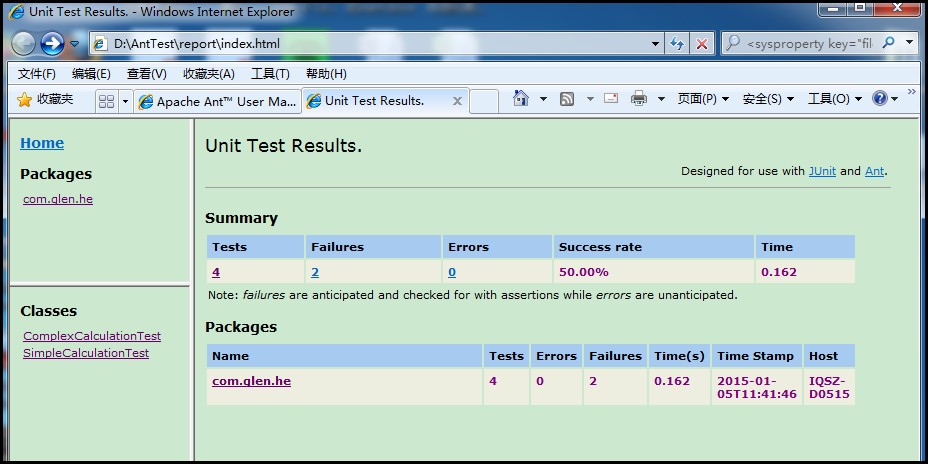
执行后会在指定目录下生成报告文档,打开index.html可以很方便的看到执行的结果。
1、如下图所示(我又补充了3个案例,并且故意让两个案例失败),显示执行的统计结果:
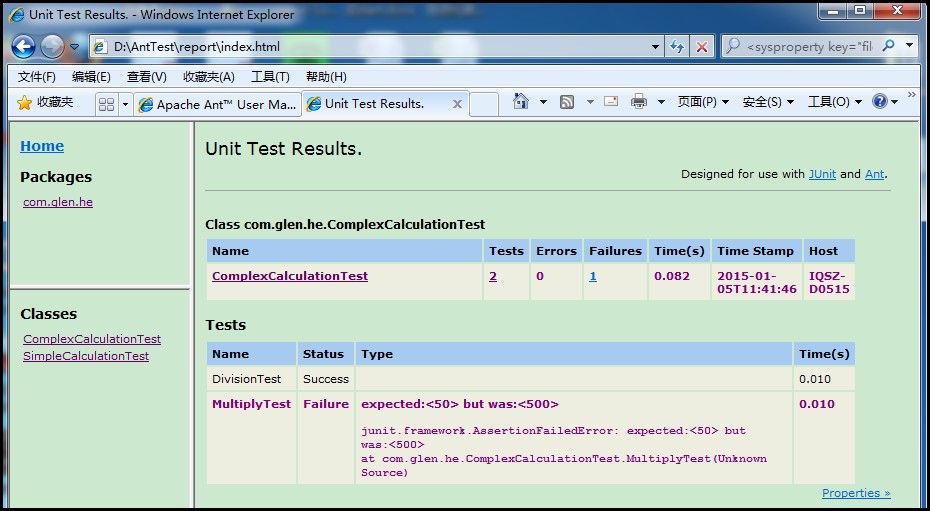
2、点击classes下面的ComplexCalculationTest,可以看到具体某个类里面的单元测试案例执行统计情况以及失败案例的错误信息提示。
OVER!
参考:
http://blog.csdn.net/shendl/article/details/532587
http://blog.csdn.net/tochal/article/details/12560151
ANT task之Junit、JunitReport的更多相关文章
- Gradle Goodness: Rename Ant Task Names When Importing Ant Build File
Migrating from Ant to Gradle is very easy with the importBuild method from AntBuilder. We only have ...
- JMeter Ant Task 生成的*.jtl打开之后request和response data是空的,怎样让其不是空的呢?
JMeter Ant Task 生成的*.jtl打开之后request和response data是空的,怎样让其不是空的呢?修改JMeter.properties,将jmeter.save.save ...
- 传统项目目录结构下maven+junit+junitReport
<build> <defaultGoal>compile</defaultGoal> <sourceDirectory>${basedir}/src&l ...
- [Groovy]Groovy with Ant Task
平时经常会用Ant来写一写脚本,但最近跨入到Groovy的时代,试着做一些改变.Groovy里集成了AntBuilder能非常方便的调用到Ant的对象模型. 现考察如下 1. Groovy里定义的属性 ...
- Jmeter Ant Task如果报告中有错误,在邮件内容里面直接显示出来 系列2
由于部门有多个项目,将自动化测试框架运用于多个项目时,希望针对每个项目修改的东西越少越好,为此,做如下修改: D:\apache-jmeter-2.7\extras\jmeter-results-de ...
- Jmeter Ant Task如何让beanshell断言失败的详细信息展示在report里面
首先必须给beanshell断言添加FailureMessage if(${TotalClient_SS}+2!=${TotalClient_SS2}){Failure=true; Fai ...
- 搭建持续集成单元测试平台(Jenkins+Ant+Java+Junit+SVN)
一.环境准备 Jenkins: 到官网下载jenkins.war包:http://jenkins-ci.org/ 安装方法有两种: 把下载下来的jenkins.war包放到文件夹下,如C:\jenki ...
- Ant junitreport with Maven
大家可能都知道在Ant里可以使用junit和junitreport两个task来完成对测试结果生成HTML格式的报告. Maven里的Surefire-report的插件只能对Java测试报告支持的比 ...
- 利用ant 和 Junit 生成测试报告
我们除了使用java来直接运行junit之外,我们还可以使用junit提供的junit task与ant结合来运行. 涉及的几个主要的ant task如下: <junit>,定义一个jun ...
随机推荐
- NGINX前端代理TOMCAT取真实客户端IP
nginx前端代理tomcat取真实客户端IP 使用Nginx作为反向代理时,Tomcat的日志记录的客户端IP就不在是真实的客户端IP,而是Nginx代理的IP.要解决这个问题可以在Nginx配置一 ...
- python测试开发django-20.添加创建时间DateTimeField
前言 我们在admin后台发布一篇文章的时候,一般会有创建时间和最后更新时间这2个字段,创建时间就是第一次编辑文章的时候自动添加的,最后更新时间就是每次修改文章的内容后自动更新 在models.py建 ...
- Swift - 通过叠加UILabel来实现混合的进度条
Swift - 通过叠加UILabel来实现混合的进度条 效果 源码 https://github.com/YouXianMing/Swift-Animations // // MixedColorP ...
- 执行tsung时报"Maximum number of concurrent users in a single VM reached
原创作品,允许转载,转载时请务必以超链接形式标明文章 原始出处 .作者信息和本声明.否则将追究法律责任.http://ovcer.blog.51cto.com/1145188/1581326 [roo ...
- Android 代码实现应用强制装到手机内存
在Froyo(android 2.2,API Level:8)中引入了android:installLocation.通过设置该属性可以使得开发者以及用户决定程序的安装位置. android:inst ...
- 简明 MongoDB 入门教程
MongoDB 是免费开源的跨平台 NoSQL 数据库,命名源于英文单词 humongous,意思是「巨大无比」,可见开发组对 MongoDB 的定位.与关系型数据库不同,MongoDB 的数据以类似 ...
- endnote插入参考文献后的对齐方式和缩进空格
原文链接 https://jingyan.baidu.com/article/63acb44a3f0f6161fcc17ed0.html 1 2 3 4 5 6 7 分步阅读 1.endnote 导入 ...
- cocos2d-js中Chipmunk物理引擎相关(1)
近期看些cocos2d-js的东西.用到当中的Chipmunk的一些东西.由于相关的资料也不是非常具体,所以看到一些东西实用就记录下来. 1. chipmunk是cocos2d的一个一个物理引擎.用来 ...
- RV32A指令集
RV32A指令包括两类:AMO(atomic memory operation)指令,Load-Reserved/Store-Conditional指令 Category Fmt RV32I base ...
- Oracle比较2个表内容
Comparing the Contents of Two Tables A表和B表.拥有一致列,C2一列内容不同. I have two tables named A and B. They hav ...