
转:Creating a Nested ESXi 5 Environment
http://tsmith.co/2011/creating-a-nested-esxi-5-environment/
http://tsmith.co/2012/vsphere-5-1-lab-nested-esxi-5-1/
vSphere 5.1 Lab – Nested ESXi 5.1
Now that I’ve got some shared storage setup for the lab environment, it’s time to get some ESXi 5.1 hosts. Since this is a lab environment, I want to run some nested ESXi 5.1 hosts.
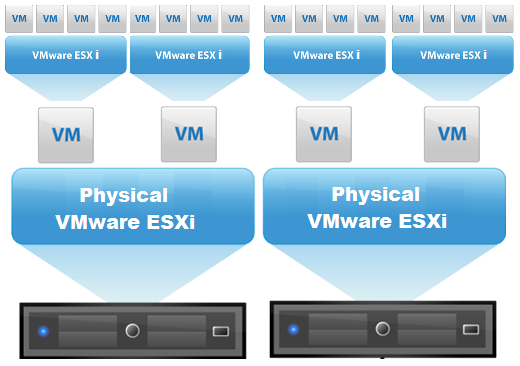
Running nested means installing a hypervisor inside of another hypervisor. This could be XenServer, Hyper-V, or ESXi. Obviously, I recommend the later! You can install and run VMs on top of the nested ESXI install, and they can be 64bit, but that depends on the CPU.
I had already blogged about running a nested setup previously, however, there are enough changes from 5.0 to 5.1 to merit a new post and instructions.
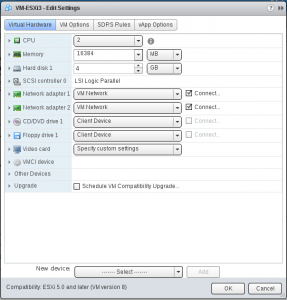
The first step is to create a new VM. When choosing an opertating system, just choose “Other 64 bit”. We will change that later. I gave my VMs the following:
- 2 vCPUs
- 16 GB RAM
- 4 GB Hard Disk
- 2 NICs
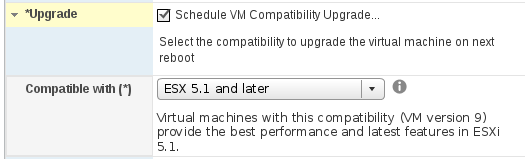
For our Nested ESXi server, we will need to make sure that it is hardware version 9. When I created a VM with the Windows client, it was version 8, and I had to upgrade the VM hardware; however, with the web client, the default was hardware version 9. If you are version 8, simply edit the VMsettings, and choose to schedule VM compatability upgrade, and choose “compatable with ESX 5.1 and later”.
At this point, we need to enable VT and EPT (or AMD-V and RVI) support on our new VM. Your CPU may or may not support this. In fact, ESXi 5.1 is more strict! In ESXi5, you could run 64bit Windows on a nested ESXi box, even if you didn’t have the proper support for EPT or AMD RVI. In 5.1, you are required to have a CPU that supports EPT or AMD RVI.
To check, browse to https://your-esxi-ip-here/mob/?moid=ha-host&doPath=capability and look for NestedHVSupported.
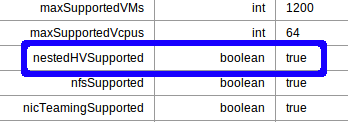
If it is false, fear not – you can still run 32bit windows on your nested ESXi hosts.
At this point, we will need to enable Hardware Virtualization in the Guest:
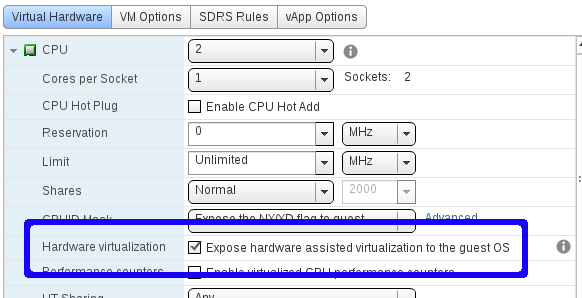
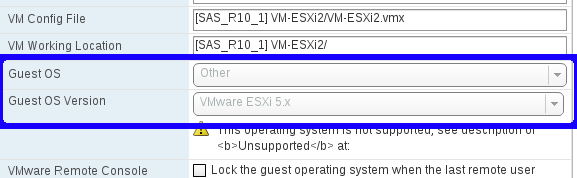
And also, change the Guest OS type to Other, ESXi 5.x. Note! Currently, this can’t be done in the vSphere Web Client, and for now will have to be changed in the Windows client. (Edit Settings)
Finally, we need to enable Promiscious Mode on our vSwitch, just like in our Nested ESXi 5.0environment.
We need to make sure the networking is setup properly. On each host, for your VM Network, enable promiscuous mode for the port group.
- click Configuration
- click Networking
- click Properties for your vSwitch with the VM Network (assuming your haven’t renamed”
- Click “VM Network” and choose Edit.
- Click Security
- Check Promiscuous Mode and choose Enable.
That’s it! Simply mount your ESXi ISO, and install inside the VM.
In the next post in the vSphere 5.1 Lab, we will install the vCenter Server Appliance, and attach our Nested ESXi hosts to it to create clusters, etc.
转:Creating a Nested ESXi 5 Environment的更多相关文章
- VMware ESXi 5.5无法与Windows 2012 NTP Server同步时间
这次笔者需要面对的环境对时间的同步有比较高的要求, 而虚拟化的环境中时间是比较容易出问题的, 您可以参考上一篇博文为什么Domain controller上的time synchronization非 ...
- Using LACP with a vSphere Distributed Switch 5.1
Using LACP with a vSphere Distributed Switch 5.1 by Chris Wahl on Oct 15th, 2012 | 6,347 views One o ...
- VMware Lab setup - A virtualized lab for testing HA and DRS
https://www.simple-talk.com/sysadmin/virtualization/vmware-lab-setup---a-virtualized-lab-for-testing ...
- lua 环境揭秘
什么是环境? http://www.lua.org/manual/5.1/manual.html#2.9 Besides metatables, objects of types thread, fu ...
- 原创:vsphere概念深入系列四:Nic Teaming若干问题
参考文档:http://www.hyper-v.nu/archives/marcve/2013/01/lbfo-hyper-v-switch-qos-and-actual-performance-pa ...
- To LACP or not to LACP (on a 5.1 vDS)
http://www.poppingclouds.com/2012/12/20/to-lacp-or-not-to-lacp-on-a-5-1-vds-2/ I have been recently ...
- Groovy 处理 XML
1. Parsing XML 1.1. XmlParser and XmlSlurper The most commonly used approach for parsing XML with Gr ...
- Java: Class Variable/Static Variable
1. Class Variable/Static Variable: Class variable is also known as static variable with "static ...
- 64位平台C/C++开发注意事项(转载)
转自http://coolshell.cn/articles/3512.html 在http://www.viva64.com/en/l/上例出了28个在64位平台上使用C/C++开发的注意事项,对于 ...
随机推荐
- Maven 使用了一个标准的目录结构和一个默认的构建生命周期。
Maven 使用了一个标准的目录结构和一个默认的构建生命周期. 约定优于配置 当创建 Maven 工程时,Maven 会创建默认的工程结构.开发者只需要合理的放置文件,而在 pom.xml 中不再需要 ...
- ASIHTTPRequest系列(一):同步和异步请求
ASIHTTPRequest系列(一):同步和异步请求 发表于8个月前(2013-11-27 19:21) 阅读(431) | 评论(0) 6人收藏此文章, 我要收藏 赞0 ASIHTTPRequ ...
- 关于面试总结8-http协议相关面试题
前言 在PC浏览器的地址栏输入一串URL,然后按Enter键这个页面渲染出来,这个过程中都发生了什么事?这个是很多面试官喜欢问的一个问题 如果测试只是停留在表面上点点点,不知道背后的逻辑,是无法发现隐 ...
- Android Lint简介
Android Lint是SDK Tools 16 (ADT 16)之后才引入的工具,通过它对Android工程源代码进行扫描和检查,可发现潜在的问题,以便程序员及早修正这个问题.Android Li ...
- WebView入门
webview是Android展示网页信息的控件,本文就来简要讲解这个控件的用法.关于webview我找到了一些很不错的文章,我就直接贴上连接,自己就不重复造轮子了.本文仅写出我本人目前使用过的东西, ...
- Android 判断是否能真正上网
有时候我们连接上一个没有外网连接的WiFi或者有线就会出现这种极端的情况,目前Android SDK还不能识别这种情况,一般的解决办法就是ping一个外网. * @author suncat * @c ...
- DES、MD5、RSA加密算法
本篇主要是实现标题中的三个加密算法,至于机制大家自行百度吧. 一.DES 实现类:DES.java package com.kale.des; import java.security.SecureR ...
- C#中的自动赋值
工作中用到对同一个类型的对象的赋值,需要逐个属性的赋值赋过去,在网上找了很久没发觉合适的,就自己动手写了个,以做备忘用. protected void AutoAssign(object from , ...
- Mac-OSX下Ruby更新
Mac下是自带Ruby环境的,在有些情况我们是需要更新Ruby的,安装和更新Ruby环境可以通过rvm命令进行操作,rvm在安装过程中通过HomeBrew安装依赖包,如果之前没有装过HomeBrew, ...
- 【大数据】大数据处理-Lambda架构-Kappa架构
大数据处理-Lambda架构-Kappa架构 elasticsearch-head Elasticsearch-sql client NLPchina/elasticsearch-sql: Use S ...