
python requests模块中返回时间elapsed解析
一、问题:
Python 中requests库在发送http请求时相当方便好用,但在使用时一直受一个问题困扰,怎么才能查看请求时长呢?
自己写时间函数再相减?NO,这个方法肯定不行。
二、解决:
好吧。我们还是看看requests管方文档,功夫不负有心人,管网API竟然后介绍是:
elapsed = None

The amount of time elapsed between sending the request and the arrival of the response (as a timedelta). This property specifically measures the time taken between sending the first byte of the request and finishing parsing the headers. It is therefore unaffected by consuming the response content or the value of the stream keyword argument.
看不懂吧,切完回requests中文文档,Opps,没有翻译,只能靠自己了。
中文大致理解如下:
在发送请求和响应到达之前耗费的时间差(timedelta),指发送第一个byte数据头至处更完最后一个数据头之间,所以这个时长不受相应的内容影响。
看完后,是不是还云里雾里,没关系,我们看看源码,requests对elapsed方法的源码如下:
        # Get the appropriate adapter to use

        adapter = self.get_adapter(url=request.url)

        # Start time (approximately) of the request

        start = datetime.utcnow()

        # Send the request

        r = adapter.send(request, **kwargs)

        # Total elapsed time of the request (approximately)

        r.elapsed = datetime.utcnow() - start
从源码中我们可以看到使用的datetime函数来计算时间差。
datetime是什么?不懂,来看文档吧。
classmethod datetime.utcnow()

Return the current UTC date and time, with tzinfo None. This is like now(), but returns the current UTC date and time, as a naive datetime object. See also now().
返回UTC日期和时间,UTC是什么?看看解释:Coordinated Universal Time 世界统一时间,世界标准时间
所以,你不用担心你发的请求的客户端与服务器时间不一致这种问题。
三:深入理解:
最后,问题来了,返回的时间是什么单位呢?
我们自己写个脚本就什么都知道了:
import datetime

import time

a=datetime.datetime.now()

time.sleep(0.1) #睡眠0.1秒

b=datetime.datetime.now()

print b-a
结果为:
>>>

0:00:00.100000
所以,得知,单位为微秒、微秒、
四:对比
既然知道了使用,那么,你肯定会问,这个时间准吗?
我们用jmeter来对比,访问baidu
jmeter配置如下:

运行结果的聚合报告我们看看:

结果为204ms
我们再次用requests来试试,代码如下:
import requests

r=requests.get('http://www.baidu.com')

print r.elapsed.microseconds/1000.
结果:
>>>

138.0
138ms
结果差不多。
这里我又试了内部系统真正的的接口数据

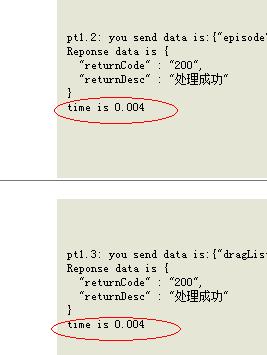
可以得知,差距不太大,数据我们可以还是有参考价值的。
参考:
Requests文档:http://cn.python-requests.org/zh_CN/latest/api.html?highlight=elapsed#requests.Response.elapsed
datatime文档:https://docs.python.org/2.7/library/datetime.html?highlight=datetime#module-datetime
其它解释:http://bbs.csdn.net/topics/390898823
python requests模块中返回时间elapsed解析的更多相关文章
- 使用python requests模块搭建http load压测环境
网上开源的压力测试工具超级的多,但是总有一些功能不是很符合自己预期的,于是自己动手搭建了一个简单的http load的压测环境 1.首先从最简单的http环境着手,当你在浏览器上输入了http://w ...
- python 之模块之 xml.dom.minidom解析xml
# -*- coding: cp936 -*- #python 27 #xiaodeng #python 之模块之 xml.dom.minidom解析xml #http://www.cnblogs.c ...
- python requests模块session的使用建议及整个会话中的所有cookie的方法
话不多说,直接上代码 测试代码 服务端 下面是用flask做的一个服务端,用来设置cookie以及打印请求时的请求头 # -*- coding: utf-8 -*- from flask import ...
- Python requests模块解析XML
检查QQ是否在线(api感觉不准) import requests from xml.etree import ElementTree qq_str = input('please input the ...
- Python—requests模块详解
1.模块说明 requests是使用Apache2 licensed 许可证的HTTP库. 用python编写. 比urllib2模块更简洁. Request支持HTTP连接保持和连接池,支持使用co ...
- Python requests模块学习笔记
目录 Requests模块说明 Requests模块安装 Requests模块简单入门 Requests示例 参考文档 1.Requests模块说明 Requests 是使用 Apache2 Li ...
- Python Requests模块讲解4
高级用法 会话对象 请求与响应对象 Prepared Requests SSL证书验证 响应体内容工作流 保持活动状态(持久连接) 流式上传 块编码请求 POST Multiple Multipart ...
- 使用monkey技术修改python requests模块
例如请求前和请求后各来一条日志,这样就不需要在自己的每个代码都去加日志了. 其实也可以直接记录'urllib3.connectionpool' logger name的日志. 修改了requests ...
- Python multiprocess模块(中)
主要内容: 一. 锁 二. 信号量 三. 事件 通过event来完成红绿灯模型 四. 队列(重点) 队列实现进程间的通信 五. 生产者消费者模型 1. 初始版本(程序会阻塞住) 2. 升级版本一(通过 ...
随机推荐
- Android学习之——ListView下拉刷新
背景知识 ListView使用非常广泛,对于使用ListView的应用来说,下拉刷新是必不可少要实现的功能. 我们常用的微博.网易新闻,搜狐新闻都使用了这一功能,如下图所示. 微博 搜狐新闻 ...
- Blender 移动、旋转、缩放
1.手动调整物体的属性 当我们添加了一个物体后,例如一个Torus物体. 在左侧下角部分能看到“Add Torus”面板,面板包含了Locatin.Rotation.Major Segments.Mi ...
- thinkphp 在阿里云上的nginx.config配置
# For more information on configuration, see: # * Official English Documentation: http://nginx.org/e ...
- mysql数据库中查看当前使用的数据库是哪个数据库?
环境描述: mysql版本:5.5.57-log 操作系统版本:Red Hat Enterprise Linux Server release 6.6 (Santiago) 需求说明: 查看当前使用的 ...
- Golang 在 Mac、Linux、Windows 交叉编译
https://blog.csdn.net/panshiqu/article/details/53788067
- 下拉刷新 上拉更多 支持ListView GridView WebView【转载】
转载自:http://www.stay4it.com/?p=245 老贴重发,源代码放附件了,需要的下载把. 终于有新货了.昨天改了下,在ListView和GridView加了个返回到顶部的按钮,li ...
- flexbox父盒子align-items属性
<!DOCTYPE html> <html lang="en"> <head> <meta charset="UTF-8&quo ...
- 彻底关闭Google的安全搜索
在使用简体中文的情况下,访问Google总是会跳转到香港,这个时候的安全搜索是无法关闭的. 下面介绍一个最简单的方法,直接使用Google的中文界面:https://www.google.com/we ...
- iOS App Extensions
一.扩展概述 扩展(Extension)是iOS 8中引入的一个非常重要的新特性.扩展让app之间的数据交互成为可能.用户可以在app中使用其他应用提供的功能,而无需离开当前的应用. 在iOS 8系统 ...
- 通过RF数据库查询中文字段结果正常显示的转换方法
方法1:统一显示为中文 1.通过RF数据库查询中文字段结果格式:'\xba\xcb\xbc\xf5\xcd\xa8\xb9\xfd' 2.通过Decode Bytes To String进行gbk解码 ...