
windows安装python2.7后的注册(registry)问题
【提要】win平台上,python2.7官网的安装包在安装后不会添加环境变量且不会把安装信息写入注册表。
把python和pip的安装路径添加到环境变量是做python开发必要的一步,而写入注册表的原因是,有些python包以
windows installer的形式安装,安装的时候需要用到python的注册表信息,比如,numpy, scipy。
安装步骤:
(1)到python官网下载安装包,www.python.org/downloads,运行安装;
(2)把python.exe所在路径(python安装路径)以及pip.exe路径(python安装路径下的Script文件加)添加到path环境变量。
比如我的python在这里:“C:\Python27”,那么添加路径:“C:\Python27”和“C:\Python27\Scripts”到path环境变量;
(3)在注册表中添加python注册信息,用于python可以操作windows的注册表,可以运行python文件来完成此步操作,
以下为python源码,把它拷贝出来,放在任意位置,用python运行即可。

 1 import sys

 2

 3

 4 from _winreg import *

 5

 6 # tweak as necessary

 7 version = sys.version[:3]

 8 installpath = sys.prefix

 9 regpath = "SOFTWARE\\Python\\Pythoncore\\%s\\" % (version)

10 installkey = "InstallPath"

11 pythonkey = "PythonPath"

12 pythonpath = "%s;%s\\Lib\\;%s\\DLLs\\" % (

13 installpath, installpath, installpath

14 )

15

16 def RegisterPy():

17     print "begin RegisterPy "

18     try:

19         print "open key : %s"%regpath

20         reg = OpenKey(HKEY_CURRENT_USER, regpath)

21     except EnvironmentError as e:

22         try:

23             reg = CreateKey(HKEY_CURRENT_USER, regpath)

24             SetValue(reg, installkey, REG_SZ, installpath)

25             SetValue(reg, pythonkey, REG_SZ, pythonpath)

26             CloseKey(reg)

27         except:

28             print "*** EXCEPT: Unable to register!"

29             return

30

31         print "--- Python", version, "is now registered!"

32         return

33

34

35     if (QueryValue(reg, installkey) == installpath and

36         QueryValue(reg, pythonkey) == pythonpath):

37             CloseKey(reg)

38             print "=== Python", version, "is already registered!"

39             return CloseKey(reg)

40

41     print "*** ERROR:Unable to register!"

42     print "*** REASON:You probably have another Python installation!"

43

44 def UnRegisterPy():

45     #print "begin UnRegisterPy "

46     try:

47         print "open HKEY_CURRENT_USER key=%s"%(regpath)

48         reg = OpenKey(HKEY_CURRENT_USER, regpath)

49         #reg = OpenKey(HKEY_LOCAL_MACHINE, regpath)

50     except EnvironmentError:

51         print "*** Python not registered?!"

52         return

53     try:

54        DeleteKey(reg, installkey)

55        DeleteKey(reg, pythonkey)

56        DeleteKey(HKEY_LOCAL_MACHINE, regpath)

57     except:

58        print "*** Unable to un-register!"

59     else:

60        print "--- Python", version, "is no longer registered!"

61

62 if __name__ == "__main__":

63     RegisterPy()
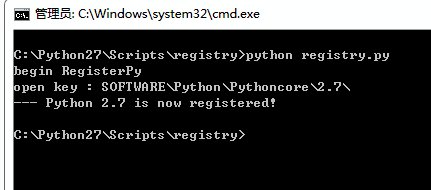
如下图所示,出现Pyhton 2.7 is now registered!字样即为注册成功。
在注册表中也能看到相应的信息:
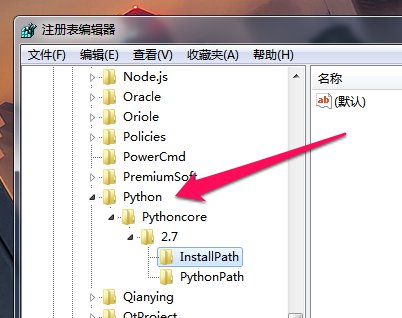
如果由于诸如安装后又卸载了多个版本python的原因导致注册表信息不对,可以直接手动编辑注册表,然后重新注册。
手动在注册表中添加注册信息的方法跟上述python代码中过程一致。
windows安装python2.7后的注册(registry)问题的更多相关文章
- 【转载】windows安装python2.7后的注册表问题
原文出自:https://www.cnblogs.com/tlz888/p/6879227.html [提要]win平台上,python2.7官网的安装包在安装后不会添加环境变量且不会把安装信息写入注 ...
- Windows 安装 python2.7
Windows 安装 python2.7 python2.7下载地址: https://www.python.org/downloads/release/python-2714/ 安装过程: 设置系统 ...
- CentOS6.5 安装Python2.7后, yum出现“No module named yum”错误
安装如下方法安装python2.7: yum install –y python27 python27-devel python-docutils cd /usr/bin/ rm -rf python ...
- 解决 在 WINDOWS 下 同时安装 python2 python3 后 pip 错误
再之前同时安装 python 后 只需把环境变量PATH 里面改为 PATH=C:\Python36-32\Scripts\;C:\Python36-32\;C:\Python27\;C:\Pytho ...
- centos6.8 安装Python2.7后, yum出现“No module named yum”错误
出现yum错误:No module named yum 解决方法,查看 /usr/bin下python有哪几个版本 ll /usr/bin 我这里是:2.6 和 2.7 (刚安装的) 由于yum命 ...
- windows 安装python2.7
下载:https://www.python.org/downloads/release/python-2716/ 安装即可. 设置环境变量 进入C:\Python27,修改python.exe 为py ...
- Windows安装完ADFS后卸载ADFS清除ADFS数据库
ADFS卸载后不会卸载掉之前ADFS配置后留下来的数据库,所以如果有必要去删掉这个数据库的话需要找到对应的路径去将数据库删除掉. 具体路径为C:/windows/wid/data/adfsartifa ...
- Windows安装python3.x后,pip list警告!DEPRECATION: The default format will switch to columns in the future.
前言(凑字数专用) 这个警告虽然不影响你的正常使用,但是每次都好几行红色警告,总是给人一种怪怪的感觉(当然不是FBI的警告了……),所以咱们还是把他解决掉~ 网上好多解决办法都是Ubuntu的解决办法 ...
- windows安装python2.7、python3.7和pycharm
下载安装包 下载可执行文件 安装 安装2.7 安装pycharm
随机推荐
- 从零開始学android<使用嵌套布局实现计算器界面.十七.>
所谓的嵌套布局就是在一个文件里嵌套多个布局文件 <span style="font-size:18px;"> <LinearLayout android:layo ...
- POJ 2135 Farm Tour && HDU 2686 Matrix && HDU 3376 Matrix Again 费用流求来回最短路
累了就要写题解,近期总是被虐到没脾气. 来回最短路问题貌似也能够用DP来搞.只是拿费用流还是非常方便的. 能够转化成求满流为2 的最小花费.一般做法为拆点,对于 i 拆为2*i 和 2*i+1.然后连 ...
- 嗜血法医第一二三季/Dexter全集迅雷下载
嗜血法医 第一.二.三季 Dexter Season 1 2 3 (2006-2007-2008) 本季看点:都市的夜里,永远藏着你无法想象的秘密.德克斯特·摩根(迈克尔·C·豪尔 Michael C ...
- 浅谈Java Future接口
Java项目编程中,为了充分利用计算机CPU资源,一般开启多个线程来执行异步任务.但不管是继承Thread类还是实现Runnable接口,都无法获取任务执行的结果.JDK 5中引入了Callable和 ...
- Failed to register: Error: fabric-ca request register failed with errors [[{"code":0,"message":"No identity type provided. Please provide identity type"}]]解决方案
I try to run sample application as stated here : http://hyperledger-fabric.readthedocs.io/en/release ...
- Secondary NameNode 的作用
https://blog.csdn.net/xh16319/article/details/31375197 很多人都认为,Secondary NameNode是NameNode的备份,是为了防止Na ...
- 让Android Preference Summary中实时显示内容变更
Android中提供的Preference可以保存用户的喜好设置.在启明星安卓版员工通讯录里,有一个地方保存用户输入的URL就是用的Preference. 但是Preference默认显示的是Summ ...
- HTTP tunnel
HTTP Tunneling is a technique by which communications performed using various network protocols are ...
- springmvc学习笔记(13)-springmvc注解开发之集合类型參数绑定
springmvc学习笔记(13)-springmvc注解开发之集合类型參数绑定 标签: springmvc springmvc学习笔记13-springmvc注解开发之集合类型參数绑定 数组绑定 需 ...
- ASP.NET Razor C# 和 VB 代码语法
ylbtech-.NET: ASP.NET Razor C# 和 VB 代码语法 Razor 不是一种编程语言.它是服务器端的标记语言. 1. C# 和 VB 代码语法返回顶部 Razor 同时支持 ...