
svn“Previous operation has not finished; run 'cleanup' if it was interrupted“报错的解决方法
今天碰到了个郁闷的问题,svn执行clean up命令时报错“Previous operation has not finished; run 'cleanup' if it was interrupted”。无论你到那个父层次的目录执行“clean up “,都是报一样的错。执行cleanup时候,提示要cleanup。看来是进入死循环了。
可能是频繁做了一些改名,文件打开的时候更新或者提交操作,导致svn罢工了。这个也该算是svn的bug吧。类似的情况,其实之前也碰到过。之前都是图省事,把整个svn checkout的主目录都删掉,重新checkout来解决的。但是随着项目的深入开展,要更新的文件越来越多。这个问题迟早要解决的,试试看吧。问题的关键看来需要找到死锁的地方,解锁才行。网上查了下资料。Svn的operation是存放在“work queue’“里的。而“work queue’是在内嵌数据库wc.db的work_queue表中的。看看work_queue表中放了些什么,再做处理。
1. 内嵌数据库一般是用sqlite进行轻量级管理的。网上可以下到sqlite-shell-win32-x86: sqlite3.exe
2. 为了方便命令行执行,将sqlite3.exe放到svn 项目的主目录下,和.svn目录同级下。
3. 执行 sqlite3 .svn/wc.db "select * from work_queue".看到有4条记录。就是刚才我执行的一些操作。
226539|(sync-file-flags 93目录名 文件名)
226540|(file-remove 21 .svn/tmp/svn-7B43C232)
226541|(sync-file-flags 目录名 文件名)
226542|(file-remove 21 .svn/tmp/svn-7B48224E)
4. 执行 sqlite3 .svn/wc.db "delete from work_queue". 把队列清空。
5. 执行 sqlite3 .svn/wc.db "select * from work_queue". 确认一下是否已经清空队列,发现已经没有记录显示,说明已经清空了。
6. 最后再试一下,看是否可以 clean up了。果然成功了。
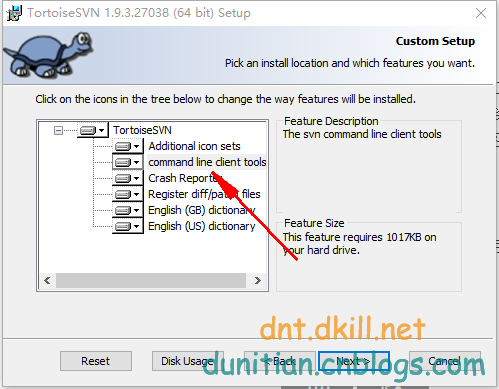
另外还有一种方法别人也推荐,但因为这个成功了就没再试。就是使用命令行工具svn.exe 执行cleanup svn项目目录。因为默认安装的时候,这个命令行工具是不被安装的,所以需要启动安装程序,选择”修改“,选上”命令行工具“才行。估计这个命令的实际效果和上面一种方法是类似的。不过应该比图形界面的右键菜单的更强大些吧。有兴趣可以试试。
顺便补充一下, sqlite是一个非常常用的嵌入式数据库,就是一个db文件。像手机qq等这些软件都会内置一个这样的数据库进行多条数据的管理。
cleanup failed to process the following paths:xxx
Previous operation has not finished; run 'cleanup' if it was interrupted

解决方法有两个,一个是用sqlite清除下数据库wc.db的work_queue,这种网上说的比较多。我说下第二种方法:这个需要svn客户端的命令行
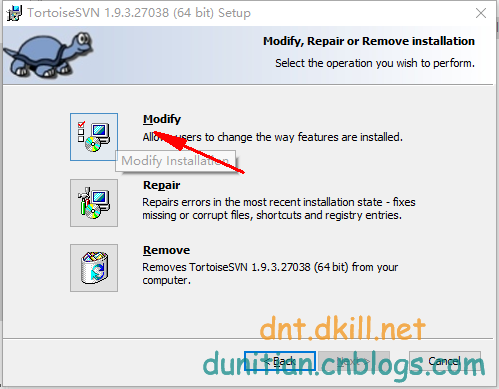
打开安装包,选Modify
勾选下Command
到工作目录下输入svn cleanup

收工,可以update和commit了


svn“Previous operation has not finished; run 'cleanup' if it was interrupted“报错的解决方法的更多相关文章
- svn“Previous operation has not finished; run 'cleanup' if it was interrupted“报错的解决方案
今天SVN提交代码遇到"Previous operation has not finished; run 'cleanup' if it was interrupted"报错,&q ...
- 【SVN】总结:svn“Previous operation has not finished; run 'cleanup' if it was interrupted“
svn执行clean up命令时报错“Previous operation has not finished; run 'cleanup' if it was interrupted”.无论你到那个父 ...
- svn“Previous operation has not finished; run 'cleanup' if it was interrupted
今天碰到了个郁闷的问题,svn执行clean up命令时报错“Previous operation has not finished; run 'cleanup' if it was interrup ...
- svn“Previous operation has not finished; run 'cleanup' if it was interrupted“ 或者不能cleanup,或者提示空目录 报错的解决方法
参考了文档: http://blog.csdn.net/superch0054/article/details/38668017 今天碰到了个郁闷的问题,svn执行clean up命令时报错“Prev ...
- svn Previous operation has not finished; run 'cleanup' if it was interrupted
svn cleanup failed–previous operation has not finished; run cleanup if it was interrupted Usually, a ...
- Previous operation has not finished; run 'cleanup' if it was interrupted
在使用myeclipse的时候,点击保存的时候,控制台窗口总是弹出这个svn :Previous operation has not finished; run 'cleanup' if it was ...
- SVN:Previous operation has not finished; run 'cleanup' if it was interrupted
异常处理汇总-开发工具 http://www.cnblogs.com/dunitian/p/4522988.html cleanup failed to process the following ...
- 【svn】在提交文件是报错:previous operation has not finished;run 'cleanup' if it was interrupted
1.svn在提交文件是报错:previous operation has not finished;run 'cleanup' if it was interrupted2.原因,工作队列被占用,只需 ...
- svn报错cleanup failed–previous operation has not finished; run cleanup if it was interrupted的解决办法
今天在svn提交的时候它卡顿了一下,我以为已经提交完了,就按了一下,结果就再也恢复不了,也继续不了了... 报错 cleanup failed–previous operation has not f ...
随机推荐
- 移动端web,tap与click事件
一.tap与click的区别 两者都会在点击时系统自动触发,但是在手机WEB端,click会有 200~300 ms.延迟来自判断双击和长按,因为只有默认等待时间结束以确定没有后续动作发生时,才会触发 ...
- epoll的LT和ET使用EPOLLONESHOT
epoll有两种触发的方式即LT(水平触发)和ET(边缘触发)两种,在前者,只要存在着事件就会不断的触发,直到处理完成,而后者只触发一次相同事件或者说只在从非触发到触发两个状态转换的时候儿才触发. 这 ...
- delphi 线程的应用 和spcomm的应用
http://bbs.csdn.net/topics/390744417 串口控件本身的线程不是这样理解的,你不用管它本身用不用线程,它的内部线程和你也没关系.前面说过了,你可以在自己的主线程里创建好 ...
- 清华梦的粉碎—写给清华大学的退学申请(转自王垠Blog)
清华梦的诞生 小时候,妈妈给我一个梦.她指着一个大哥哥的照片对我说,这是爸爸的学生,他考上了清华大学,他是我们中学的骄傲.长大后,你也要进入清华大学读书,为我们家争光.我不知道清华是什么样子,但是我知 ...
- CLR如何加载程序集以及程序集版本策略
在项目的配置文件Web.config中,会看到<runtime>节点,以及包含在其中的<assemblyBinding>节点,这显然与程序集有关,这些节点到底何时被用到呢? 在 ...
- IOS 内存斗争小史之 对象、指针、内存的基本理解
1.指针和对象,都是内存块.一个大,一个小.一个在栈中,一个在堆中. 2.iOS中,我们可以生命一个指针,也可以通过alloc获取一块内存. 3.我们可以直接消灭掉一个指针,将其置为nil.但是我们没 ...
- 【Devops】【docker】【CI/CD】Jenkins源码管理,设置gitlab上项目的clone地址 + jenkins构建报错:Please make sure you have the correct access rights and the repository exists.
注意,如果 jenkins构建报错:Please make sure you have the correct access rights and the repository exists. 而此时 ...
- ASP.NET MVC:Cookie 的过期时间在服务器端是获取不到的
现状 一旦 Cookie 在服务器端设置后,在后续的请求中是获取不到过期时间的,因为:Cookie 是存储和过期处理都是由客户端管理的,在后续的请求中,浏览器向服务器发送 Cookie 的时候就不包含 ...
- 关于面试总结13-app测试面试题
前言 现在面试个测试岗位,都是要求全能的,web.接口.app啥都要会测,那么APP测试一般需要哪些技能呢? 面试app测试岗位会被问到哪些问题,怎样让面试管觉得你对APP测试很精通的样子? 本篇总结 ...
- 对于多个button要在同一个监听器中实现自己的单击事件的方法小诀窍。
在网上的一些教程中往往是把一个button加入多个监听器,却非常少有人会把多个button在同一个监听器中去实现他们的单击事件,并且这杨的事实上是非常有用的,比方说在制作一个简单的计算器是就须要0-9 ...