
Rpgmakermv(5) MiniLabel插件介绍
============================================================================
Introduction
============================================================================
This plugin lets you place text above the heads of various events using a
miniature label through a comment tag.
============================================================================
Comment Tags
============================================================================
Comment tags are 'notetags' used within the lines of an event's comments.
The reason I'm using the comment tags instead of the notetags is because
each page of an event can yield a different potential name.
To use this, make a comment within the event you wish to make the mini
label for and insert the following:
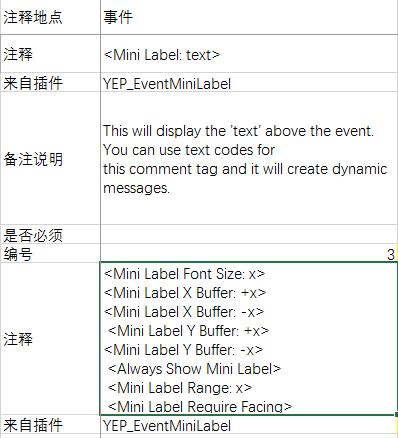
<Mini Label: text>
This will display the 'text' above the event. You can use text codes for
this comment tag and it will create dynamic messages.
<Mini Label Font Size: x>
This will change the font size used for the mini label to x. If this tag
isn't used, the font size will be the default value in the parameters.
<Mini Label X Buffer: +x>
<Mini Label X Buffer: -x>
This will adjust the X buffer for the mini label by x value. If this tag
isn't used, the X buffer will be the default value in the parameters.
<Mini Label Y Buffer: +x>
<Mini Label Y Buffer: -x>
This will adjust the Y buffer for the mini label by x value. If this tag
isn't used, the Y buffer will be the default value in the parameters.
<Always Show Mini Label>
This will make the mini label to always be shown, even when the plugin
command to hide mini labels is used.
<Mini Label Range: x>
The player will have to be within x tiles of this event in order for the
mini label to appear visibly.
<Mini Label Require Facing>
This will require the player to be facing the direction of the event in
order for the mini label to appear.
============================================================================
Plugin Commands
============================================================================
If you would like to shut off the Event Mini Label mid-game or turn it on,
you can use the following plugin commands:
Plugin Command:
HideMiniLabel
Hides all Event Mini Label.
ShowMiniLabel
Shows all Event Mini Label.
RefreshMiniLabel
Refreshes all Event Mini Labels on the map.
============================================================================
Changelog
============================================================================
Version 1.12:
- Updated for RPG Maker MV version 1.5.0.
Version 1.11:
- Added 'Battle Transition' plugin parameter. Enabling this will allow you
to show the Event Mini Labels during the battle transition. Keeping it
disabled will hide them during the transition.
Version 1.10:
- Mini Windows will now readjust their size to show at normal scale if the
map is zoomed in.
Version 1.09:
- Fixed a bug that caused Mini Labels that started off as hidden to remain
hidden even after turning the Mini Labels on.
Version 1.08:
- Added <Mini Label Require Facing> comment tag.
- Moved the priority of the Mini Labels to be later added to the spriteset
so they can stay on top of more effects.
Version 1.07:
- Added more padding space so text doesn't get cut off.
Version 1.06:
- Fixed a bug that caused some mini labels to show if the event was loaded
onto the map without any currently active pages.
Version 1.05:
- Added 'X Buffer' plugin parameter and the <Mini Label X Buffer: +x> and
<Mini Label X Buffer: -x> comment tags to alter the X position of the event
mini label.
Version 1.04:
- Added 'RefreshMiniLabel' plugin command to allow you to manually refresh
all mini labels on the map.
Version 1.03:
- Optimized updating performance to reduce lag on maps with many events.
Version 1.01:
- Fixed a bug that didn't update event labels under certain page conditions.
- Added <Mini Label Range: x> notetag.
Version 1.00:
- Finished Plugin!
Rpgmakermv(5) MiniLabel插件介绍的更多相关文章
- Rpgmakermv(7) Chronus插件介绍翻译
协议:MIT 作用:时间,有时间推进,可以设置速度,随着游戏中时间的推进,会发生昼夜改变和天气变化. ------------------------------------------------- ...
- 【转】LiveWriter插入高亮代码插件介绍 基于SyntaxHighighter
转自:http://www.cnblogs.com/yaoshiyou/archive/2009/11/25/1610901.html 插件介绍 辛苦了两人小时写日志不小心浏览器崩溃了,发誓以后一定记 ...
- JMeter性能监测插件介绍(三)
JMeter 性能监测插件介绍 压力测试过程中,能够随时对负载服务器的健康状况的把控是相当重要的,有了这些数据,我们才能准确分析出服务器负载瓶颈.JMeter 插件包现在能够支持服务器监控,可以在所有 ...
- 【转载】Grunt常用插件介绍
项目名称 grunt-contrib v0.8.0 项目地址 https://github.com/gruntjs/grunt-contrib 项目介绍 此项目是对grunt常用插件的集合,刚接触gr ...
- 学习笔记——Maven实战(八)常用Maven插件介绍(下)
我们都知道Maven本质上是一个插件框架,它的核心并不执行任何具体的构建任务,所有这些任务都交给插件来完成,例如编译源代码是由maven- compiler-plugin完成的.进一步说,每个任务对应 ...
- Notepad++前端开发常用插件介绍 - BorisHuai前端修炼 - 博客频道 - CSDN
Notepad++前端开发常用插件介绍 - BorisHuai前端修炼 - 博客频道 - CSDN.NET http://blog.csdn.net/borishuai/article/details ...
- (转)jQuery LigerUI 插件介绍及使用之ligerTree
一,简介 ligerTree的功能列表: 1,支持本地数据和服务器数据(配置data或者url) 2,支持原生html生成Tree 3,支持动态获取增加/修改/删除节点 4,支持大部分常见的事件 5 ...
- ArcGIS快速制图插件介绍
ArcGIS快速制图插件介绍 By 李远祥 作品背景 <快速制图插件增强版>在原有的<快速制图插件>基础上,加入植被乱序填充.生成立体楼快.等高线增强显示.一键导出地图和数据. ...
- subline text3常用插件介绍
常用插件介绍: html beautify(ctrl+shift+alt+f) 自动排版代码 Emmet 输入少量代码后摁Tab键,系统自动补全代码. AutoFileName 快速列出你想引用的文 ...
随机推荐
- hdu 4746Mophues[莫比乌斯反演]
Mophues Time Limit: 2000/1000 MS (Java/Others) Memory Limit: 327670/327670 K (Java/Others) Total ...
- jmeter聚合报告导出时乱码的解决
在使用jmeter性能测试时,聚合报告导出后使用excel打开时是乱码,查看相关文件后是编码的问题,解决方法如下: 1.现象: 用excel打开变成这种乱码无法看清 2.解决: 先使用记事本打开后,选 ...
- node项目部署相关问题
process.env process.env属性返回一个对象,包含了当前Shell的所有环境变量. 通常的做法是,新建一个环境变量NODE_ENV,用它确定当前所处的开发阶段,生产阶段设为produ ...
- 关于Django的序列化
阅读目录 Django支持的序列化格式 Django的序列化 Django支持的序列化格式 1 2 3 4 Identifier Information xml Serializes to and f ...
- vue之计算属性和侦听器
一.计算属性 模板内的表达式非常便利,但是设计它们的初衷是用于简单运算的.在模板中放入太多的逻辑会让模板过重且难以维护.例如: <div> {{ message.split('').rev ...
- Python之logging日志模块
logging 用于便捷既然日志切线程安全的模块 vim log_test.py import logging logging.basicConfig(filename='log.log', form ...
- ubuntu16.04下安装artoolkit5
目前对AR技术的常见理解就是CV(Computer Vision)+CG(Computer Graphic).CV的方法很多,简单些比如FREAK+ICP(ARToolKit中的NFT),复杂些就是S ...
- Ubuntu16.04下安装配置numpy,scipy,matplotlibm,pandas 以及sklearn+深度学习tensorflow配置+Keras2.0.6(非Anaconda环境)
1.ubuntu镜像源准备(防止下载过慢): 参考博文:http://www.cnblogs.com/top5/archive/2009/10/07/1578815.html 步骤如下: 首先,备份一 ...
- GP服务中无Tasks
发布GP服务,之后执行GP服务时,发现无Tasks,如下图所示 正常情况应该如下图 问题原因在于,arcmap与server版本不一致~~ (10.4.1arcmap 与 10.2.2 server) ...
- AWTK 全称为 Toolkit AnyWhere,是 ZLG 倾心打造的一套基于 C 语言开发的 GUI 框架(三平台+2个手机平台+嵌入式)
最终目标: 支持开发嵌入式软件. 支持开发Linux应用程序. 支持开发MacOS应用程序. 支持开发Windows应用程序. 支持开发Android应用程序. 支持开发iOS应用程序. 支持开发2D ...