
[nginx]站点目录及文件访问控制
nginx.conf配置文件
http ->多个server -> 多个location ->可限制目录和文件访问(根据i扩展名限制或者rewrite.)
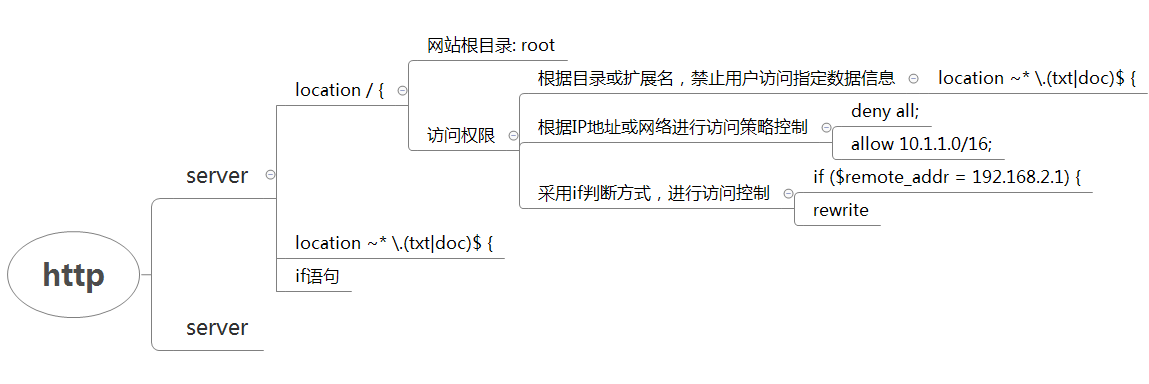
根据目录或扩展名,禁止用户访问指定数据信息
禁止访问目录下的某些扩展名文件
这次我测一下,禁止访问网站目录下的 html/images/*.txt文件
[root@n1 nginx]# tree html/

html/

├── 50x.html

├── images

│   └── maotai.txt

└── index.html
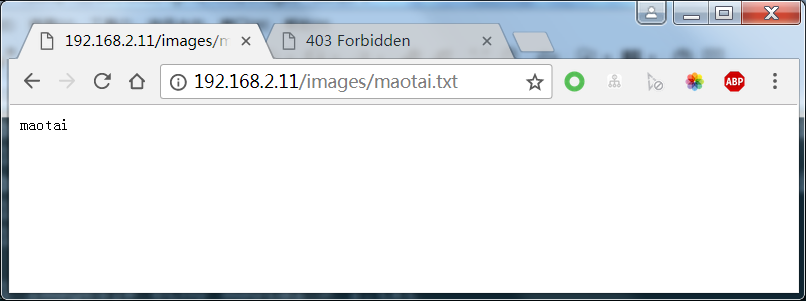
- 设置禁止访问
location ~ ^/images/.*\.(txt|php|php5|sh|pl|py|html)$

{

    deny all;

}
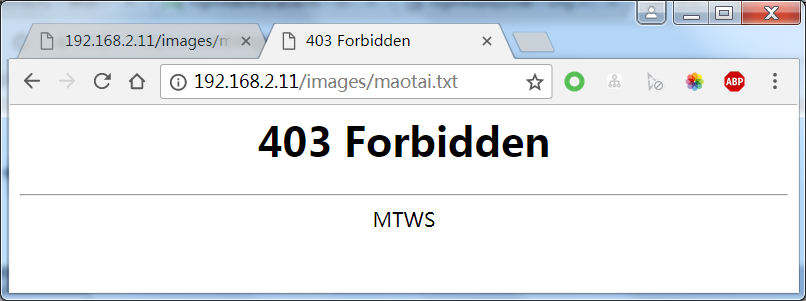
- 日志查看
- access.log: 允许访问

192.168.2.1 - - [11/Mar/2018:10:58:06 +0800] "GET /images/maotai.txt HTTP/1.1" 200 7 "-" "Mozilla/5.0 (Windows NT 6.1; WOW64) AppleWebKit/537.36 (KHTML, like Gecko) Chrome/64.0.3282.186 Safari/537.36"

- access.log: 禁止访问

192.168.2.1 - - [11/Mar/2018:10:59:10 +0800] "GET /images/maotai.txt HTTP/1.1" 403 563 "-" "Mozilla/5.0 (Windows NT 6.1; WOW64) AppleWebKit/537.36 (KHTML, like Gecko) Chrome/64.0.3282.186 Safari/537.36"

- error.log

2018/03/11 10:59:10 [error] 28357#0: *16 access forbidden by rule, client: 192.168.2.1, server: localhost, request: "GET /images/maotai.txt HTTP/1.1", host: "192.168.2.11"
附录: nginx.conf
worker_processes  1;

events {

    worker_connections  1024;

}

http {

    include       mime.types;

    default_type  application/octet-stream;

    sendfile        on;

    keepalive_timeout  65;

    server {

        listen       80;

        server_name  localhost;

        location / {

            root   html;

            index  index.html index.htm;

        }

        location ~ ^/images/.*\.(txt|php|php5|sh|pl|py|html)$

        {

            deny all;

        }

        error_page   500 502 503 504  /50x.html;

        location = /50x.html {

            root   html;

        }

    }

}
当访问禁止的数据信息时,进行页面跳转(rewrite)
访问http://www.maotai.com/images/1.png -> http://www.baidu.com/images/1.png

        location ~* \.(txt|doc)$ {

            if (-f $request_filename){

                root html/images/;

                #rewrite …..可以重定向到某个URL

                rewrite ^/(.*) http://www.baidu.com/$1 permanent;

                break;

            }

        }
根据IP地址或网络进行访问策略控制
location / {

    deny 192.168.1.1;

    allow 192.168.1.0/24;

    allow 10.1.1.0/16;

    deny all;

}
worker_processes  1;

events {

    worker_connections  1024;

}

http {

    include       mime.types;

    default_type  application/octet-stream;

    sendfile        on;

    keepalive_timeout  65;

    server {

        listen       80;

        server_name  localhost;

        location / {

            root   html;

            index  index.html index.htm;

        }

        location ~* \.(txt|doc)$ {

            if (-f $request_filename){

                root html/images/;

                #rewrite …..可以重定向到某个URL

                rewrite ^/(.*) http://www.nmtui.com/$1 permanent;

                break;

            }

        }

        error_page   500 502 503 504  /50x.html;

        location = /50x.html {

            root   html;

        }

    }

}
采用if判断方式,进行访问控制
        if ($remote_addr = 192.168.2.1) {

            return 403;

        }
worker_processes  1;

events {

    worker_connections  1024;

}

http {

    include       mime.types;

    default_type  application/octet-stream;

    sendfile        on;

    keepalive_timeout  65;

    server {

        listen       80;

        server_name  localhost;

        location / {

            root   html;

            index  index.html index.htm;

        }

        if ($remote_addr = 192.168.2.1) {

            return 403;

        }

        error_page   500 502 503 504  /50x.html;

        location = /50x.html {

            root   html;

        }

    }

}
[nginx]站点目录及文件访问控制的更多相关文章
- nginx站点目录及文件URL访问控制
一.根据扩展名限制程序和文件访问 利用nginx配置禁止访问上传资源目录下的PHP.Shell.Perl.Python程序文件. 配置nginx,禁止解析指定目录下的指定程序. location ~ ...
- Nginx的站点目录及文件URL的访问控制
1.根据扩展名限制程序和文件访问: web2.0时代,绝大多数网站都是以用户为中心的,这些产品有一些共同点,就是不允许用户发布内容到服务器,还允许用户发图片甚至附件上传到服务器上,给用户开启了上传的功 ...
- nginx——优化 Nginx 站点目录
1. 禁止解析指定目录下的指定程序 location ~ ^/data/.*.(php|php5|sh|pl|py)$ { # 根据实际来禁止哪些目录下的程序,且该配置必须写在 Nginx 解析 PH ...
- Nginx 站点设置目录列表显示
Nginx 站点目录列表显示. 可以编辑添加在 server { } 模块 或者 location { } 模块下. autoindex on; # 开启目录文件列表 autoindex_exact_ ...
- nginx+php使用open_basedir限制站点目录防止跨站
以下三种设置方法均需要PHP版本为5.3或者以上.方法1)在Nginx配置文件中加入 fastcgi_param PHP_VALUE "open_basedir=$document_root ...
- tomcat相关配置技巧梳理 (修改站点目录、多项目部署、限制ip访问、大文件上传超时等)
tomcat常用架构:1)nginx+tomcat:即前端放一台nginx,然后通过nginx反向代理到tomcat端口(可参考:分享一例测试环境下nginx+tomcat的视频业务部署记录)2)to ...
- Nginx+Php中限制站点目录防止跨站的配置方案记录
Nginx+Php中限制站点目录防止跨站的配置方案记录(使用open_basedir)-------------------方法1)在Nginx配置文件中加入: 1 fastcgi_param PH ...
- nginx其他目录下上传站点
1.查看主配置文件 [root@bogon ~]# cat /etc/nginx/nginx.conf user root root; worker_processes auto; worker_rl ...
- web站点放在nginx其他目录下
web站点放在nginx其他目录下 .查看主配置文件 [root@bogon mysql]# cat /etc/nginx/nginx.conf user root root; worker_proc ...
随机推荐
- Porting .Net RSA xml keys to Java
byte[] expBytes = Base64.decodeBase64(exponentElem.getText().trim())); byte[] modBytes = Base64.deco ...
- 【php+微擎】微擎学习相关帮助推荐
我刚接触微擎没多久,学习中遇到很多问题,走过很多弯路.遇到很多问题在网上也查不到,因此想把我自己的学习历程写出来供新手们参考(本人还是菜鸟一枚,文中错误之处,敬请指正!) 我以一个新手小白的角度来帮助 ...
- Easyui入门视频教程 第04集---Easyui布局
目录 目录 ----------------------- Easyui入门视频教程 第09集---登录完善 图标自定义 Easyui入门视频教程 第08集---登录实现 ajax button的 ...
- appfuse的使用方法
2008-07-27 appfuse是如何使用的? 比如我想编写一个 struts+spring+hibernate+ajax的网站,如何用appfuse加速我的开发进度呢 ----------- ...
- 使用安全rm
rm命令像一把刀子一样,玩不好会伤到自己.不要觉得自己头脑清醒,人总有犯迷糊的时候. 在.bashrc中设置PATH=/home/me/bin/:$PATH 在自己的bin目录下,添加rm脚本mv - ...
- struts2基本配置详解2
接上篇struts2基本配置详解,还有一些配置没有讲到,下面将继续. struts.xml <package name="com.amos.web.action" names ...
- angularJS实现无刷新文件下载
$scope.getExcel = function () { $http.post("/production/statistics/export", { storeId: $sc ...
- MySQL导入SQL文件过大或连接超时的解决办法/在navcat执行sql卡在0%
set global max_allowed_packet=100 000 000;set global net_buffer_length=100000;SET GLOBAL interactiv ...
- 定制jQuery File Upload为微博式单文件上传
日志未经声明,均为AlloVince原创.版权采用『 知识共享署名-非商业性使用 2.5 许可协议』进行许可. jQuery File Upload是一个非常优秀的上传组件,主要使用了XHR作为上传方 ...
- dbms_random.seed
语法: DBMS_RANDOM.SEED ( val IN BINARY_INTEGER); DBMS_RANDOM.SEED ( val IN VARCHAR2); val: Seed number ...