
Android(三) 匹配屏幕密度
过去,程序员通常以像素为单位设计计算机用户界面。例如:图片大小为80×32像素。这样处理的问题在于,如果在一个dpi(每英寸点数)
高的显示器上运行该程序,则用户界面会显得很小。在有些情况下,用户界面可能会小到难以看清内容。由此我们采用与分辨率无关的度量单位来
开发程序就能够解决这个问题。
一。常用的术语:分清dp与dpi
(1)px (pixels)像素:每个px对应屏幕上的一个点
(2)Resolution(分辨率):和电脑的分辨率概念一样,指手机屏幕纵、横方向像素个数
(3)Density(密度):屏幕里像素值浓度
(4)dpi(dot per inch) 每英寸像素数:QVGA(Quarter Video Graphics Array)(320*240)分辨率的屏幕物理尺寸是(2英寸*1.5英寸),dpi=160
(5)dp或dip(density independent pixels)密度独立像素:一种基于屏幕密度的单位,在每英寸160点的显示器上,1dip=1px
但随着屏幕密度的改变,dip和px的换算会发生改变。这个和设备硬件有关,一般我们为了支持WVGA、HVGA和QVGA 推荐使用这个
换算:px=dp*(dpi/160)
(6)sp (scaled pixels ) 放大像素:主要处理字体的大小
(7)in (inches)英寸:标准长度单位
(8)mm (millimeters)毫米:标准长度单位
(9)pt (points)点:标准长度单位,1/72 英寸
二。为什么引入dp
1.不引入dp时

2.引入dp后

设定160dp的长度,相当于告诉Android在160dpi屏幕上显示160px,在240dpi屏幕上显示240px 。
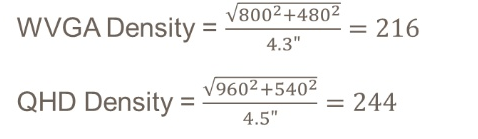
三。DPI(dot per inch)计算
(1)分辨率480 x 800,屏幕尺寸4.3英寸 216
(2)分辨率540 x 960,屏幕尺寸4.5英寸 244
(3)分辨率240 x 320,屏幕尺寸2.5英寸 160

2.将不同屏幕大小和不同dpi(dot per inch)的设备大致划分为四类,如下图:

三。DisplayMetrics(点击查看源码)
public float density
The logical density of the display. This is a scaling factor for the Density Independent Pixel unit, where one DIP is one pixel
on an approximately 160 dpi screen (for example a 240x320, 1.5"x2" screen), providing the baseline of the system's display.
Thus on a 160dpi screen this density value will be 1; on a 120 dpi screen it would be .75; etc.
This value does not exactly follow the real screen size (as given by xdpi and ydpi, but rather is used to scale the size of the
overall UI in steps based on gross changes in the display dpi. For example, a 240x320 screen will have a density of 1 even if its
width is 1.8", 1.3", etc. However, if the screen resolution is increased to 320x480 but the screen size remained 1.5"x2" then the
density would be increased (probably to 1.5).
四。代码
Resources r = getResources();

float px = TypedValue.applyDimension(TypedValue.COMPLEX_UNIT_DIP, 14, r.getDisplayMetrics());
public static float convertDpToPixel(float dp, Context context){

    Resources resources = context.getResources();

    DisplayMetrics metrics = resources.getDisplayMetrics();

    float px = dp * (metrics.densityDpi / 160f);

    return px;

}

public static float convertPixelsToDp(float px, Context context){

    Resources resources = context.getResources();

    DisplayMetrics metrics = resources.getDisplayMetrics();

    float dp = px / (metrics.densityDpi / 160f);

    return dp;

}
Android(三) 匹配屏幕密度的更多相关文章
- android多分辨率多屏幕密度下UI适配方案
相关概念 分辨率:整个屏幕的像素数目,为了表示方便一般用屏幕的像素宽度(水平像素数目)乘以像素高度表示,形如1280x720,反之分辨率为1280x720的屏幕,像素宽度不一定为1280 屏幕密度:表 ...
- android屏幕适配的全攻略2--支持手机各种屏幕密度dpi
如何为不同密度的屏幕提供不同的资源和使用密度独立的单位. 1 使用密度无关像素 坚决杜绝在布局文件中使用绝对像素来定位和设置大小.因为不同的屏幕有不同的像素密度,所以使用像素来设置控件大小是有问题的, ...
- 支持不同Android设备,包括:不同尺寸屏幕、不同屏幕密度、不同系统设置
Some of the important variations that you should consider include different languages, screen sizes, ...
- Android中图片大小和屏幕密度的关系讲解
Android手机适配是非常让人头疼的一件事,尤其是图片,android为了做到是适配提供了很多文件夹来存放不同大小的图片,比如:drawable-ldpi.drawable-mdpi.drawabl ...
- Android开发系列之屏幕密度和单位转换
由于Android的开源性,所以目前市面上面Android手机的分辨率特别多,这样的话就给我适配带来了一定的难度.要想做好适配,我们首先应该明白什么是分辨率.PPI.屏幕大小等概念,还有在不同的屏幕密 ...
- android屏幕密度规律及dp px转换
px和dp(sp) 之间转化公式: 1 乘以(dp转px)或者除以(px转dp) scal缩放因子,在上浮0.5f /** * 密度转换像素 * */ public static int dip2p ...
- Android Developers:支持不同的屏幕密度
这节课程向你展示如何通过提供不同的资源和使用与分辨率无关的测量单位,支持不同屏幕密度. 使用密度无关的像素 —————————————————————————————————————————————— ...
- android中dip、dp、px、sp和屏幕密度
1. dip: device independent pixels(设备独立像素). 不同设备有不同的显示效果,这个和设备硬件有关,一般我们为了支持WVGA.HVGA和QVGA 推荐使用这 这个 ...
- android: android中dip、dp、px、sp和屏幕密度
android中dip.dp.px.sp和屏幕密度 转自:http://www.cnblogs.com/fbsk/archive/2011/10/17/2215539.html 1. dip: dev ...
随机推荐
- Splash images_enabled 属性
images_enabled属性用于设置加载页面时是否加载图片,如下,禁止之后,返回的页面截图就不会带有任何图片,加载速度也会快很多 function main(splash, args) splas ...
- PyQt4显示提示信息
我们可以为任何窗口部件设置一个气球提示. #!/usr/bin/python # -*- coding:utf-8 -*- import sys from PyQt4 import QtGui fro ...
- maven默认本地仓库目录
C:\Users\${姓名}\.m2\repository\
- 音频中PCM的概念
本文取自由http://blog.csdn.net/droidphone一部分 1. PCM是什么 PCM是英文Pulse-code modulation的缩写,中文译名是脉冲编码调制.我们知道在现实 ...
- Android Studio 无法预览xml布局视图的解决办法
版权声明:本文为博主原创文章,未经博主允许不得转载. https://blog.csdn.net/lvyoujt/article/details/73283762 提示:failed to load ...
- 【开源整理】.Net开源项目资源大全
汇总了.NET平台开源的工具类库,新的内容在不断更新中.内容借鉴了博客园.伯乐在线.GitHub等平台. (注:下面用 [$] 标注的表示收费工具,但部分收费工具针对开源软件的开发/部署/托管是免费的 ...
- 【Linux基础】Linux基础命令行学习笔记
绝对路径:cd /home/python相对路径:cd Downloads . 表示:当前那路径..表示:当前路径的上一层../.. 表示:当前路径的上二层 没有...或者以上的 ls: ls 查看当 ...
- Android设计和开发系列第一篇:Notifications通知(Develop—API Guides)
Notifications IN THIS DOCUMENT Design Considerations Creating a Notification Required notification c ...
- Qt编写机房安全作业预警系统
最近给一个朋友做了个项目,运行在一个日本大型企业中,大屏显示.机房安全作业预警系统工事主要是由监控系统和报警系统组成.其目的就是通过监控系统实时观察空压机房内的动态,通过报警系统确认空压机房在规定的时 ...
- Firefox --- 火狐浏览器下载
http://www.firefox.com.cn/download/