
MVC教程九:异常过滤器
我们平常在程序里面为了捕获异常,会加上try-catch-finally代码,但是这样会使得程序代码看起来很庞大,在MVC中我们可以使用异常过滤器来捕获程序中的异常,如下图所示:
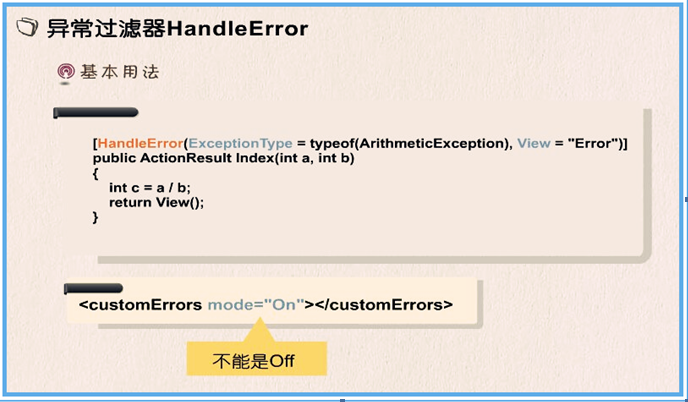
使用了异常过滤器以后,我们就不需要在Action方法里面写Try -Catch-Finally这样的异常处理代码了,而把这份工作交给HandleError去做,这个特性同样可以应用到Controller上面,也可以应用到Action方面上面。
注意:
使用异常过滤器的时候,customErrors配置节属性mode的值,必须为On。
演示示例:
1、Error控制器代码如下:
 using System;

 using System.Collections.Generic;

 using System.Linq;

 using System.Web;

 using System.Web.Mvc;

 using System.Data.SqlClient;

 using System.IO;

 namespace _3_异常过滤器.Controllers

 {

     public class ErrorController : Controller

     {

         // GET: Error

         [HandleError(ExceptionType =typeof(ArithmeticException),View ="Error")]

         public ActionResult Index(int a,int b)

         {

             int c = a / b;

             ViewData["Result"] = c;

             return View();

         }

         /// <summary>

         /// 测试数据库异常

         /// </summary>

         /// <returns></returns>

         [HandleError(ExceptionType = typeof(SqlException), View = "Error")]

         public ActionResult DbError()

         {

             // 错误的连接字符串

             SqlConnection conn = new SqlConnection(@"Initial Catalog=StudentSystem; Integrated Security=False;User Id=sa;Password=******;Data Source=127.0.0.1");

             conn.Open();

             // 返回Index视图

             return View("Index");

         }

         /// <summary>

         /// IO异常

         /// </summary>

         /// <returns></returns>

         [HandleError(ExceptionType = typeof(IOException), View = "Error")]

         public ActionResult IOError()

         {

             // 访问一个不存在的文件

             System.IO.File.Open(@"D:\error.txt",System.IO.FileMode.Open);

             // 返回Index视图

             return View("Index");

         }

     }

 }
2、路由配置如下:
 using System;

 using System.Collections.Generic;

 using System.Linq;

 using System.Web;

 using System.Web.Mvc;

 using System.Web.Routing;

 namespace _3_异常过滤器

 {

     public class RouteConfig

     {

         public static void RegisterRoutes(RouteCollection routes)

         {

             routes.IgnoreRoute("{resource}.axd/{*pathInfo}");

             routes.MapRoute(

                 name: "Default",

                 url: "{controller}/{action}/{id}",

                 defaults: new { controller = "Home", action = "Index", id = UrlParameter.Optional }

             );

             // 新增路由配置

             routes.MapRoute(

               name: "Default2",

               url: "{controller}/{action}/{a}/{b}",

               defaults: new { controller = "Home", action = "Index", a=0,b=0 }

           );

         }

     }

 }
3、配置文件如下:
<system.web>

    <compilation debug="true" targetFramework="4.6.1" />

    <httpRuntime targetFramework="4.6.1" />

    <httpModules>

      <add name="ApplicationInsightsWebTracking" type="Microsoft.ApplicationInsights.Web.ApplicationInsightsHttpModule, Microsoft.AI.Web" />

    </httpModules>

    <!--customErrors配置节mode的属性值必须为On-->

    <customErrors mode="On">

    </customErrors>

</system.web>
4、运行结果
URL:http://localhost:21868/error/index/8/4
结果:

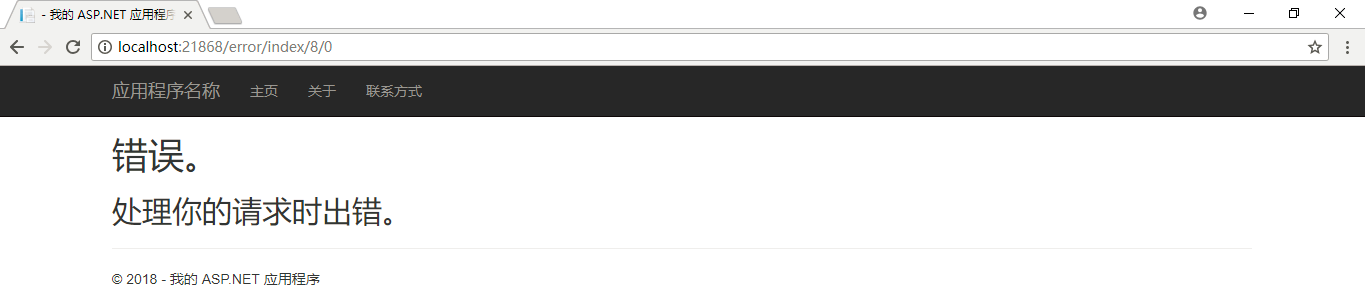
URL:http://localhost:21868/error/index/8/0
结果:

URL:http://localhost:21868/error/DbError
结果:
URL:http://localhost:21868/error/IOError
结果:

在同一个控制器或Action方法上可以通过HandleError处理多个异常,通过Order属性决定捕获的先后顺序,但最上面的异常必须是下面异常的同类级别或子类。如下图所示:
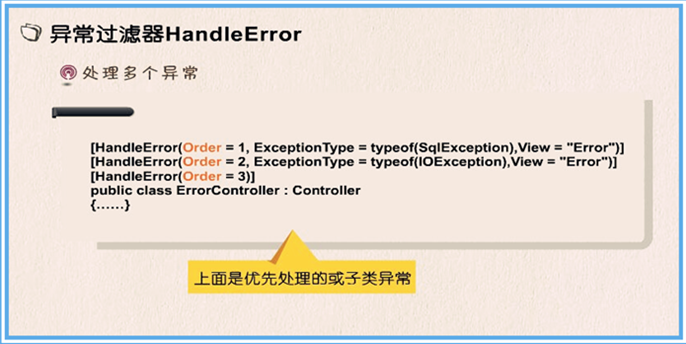
上面的程序可以修改成如下的代码:
 using System;

 using System.Collections.Generic;

 using System.Linq;

 using System.Web;

 using System.Web.Mvc;

 using System.Data.SqlClient;

 using System.IO;

 namespace _3_异常过滤器.Controllers

 {

     [HandleError(Order =, ExceptionType = typeof(SqlException), View = "Error")]

     [HandleError(Order =, ExceptionType = typeof(IOException), View = "Error")]

     [HandleError(Order =)] //不指定View,默认跳转到Share下面的Error视图

     public class ErrorController : Controller

     {

         public ActionResult Index(int a,int b)

         {

             int c = a / b;

             ViewData["Result"] = c;

             return View();

         }

         /// <summary>

         /// 测试数据库异常

         /// </summary>

         /// <returns></returns>

         public ActionResult DbError()

         {

             // 错误的连接字符串

             SqlConnection conn = new SqlConnection(@"Initial Catalog=StudentSystem; Integrated Security=False;User Id=sa;Password=******;Data Source=127.0.0.1");

             conn.Open();

             // 返回Index视图

             return View("Index");

         }

         /// <summary>

         /// IO异常

         /// </summary>

         /// <returns></returns>

         public ActionResult IOError()

         {

             // 访问一个不存在的文件

             System.IO.File.Open(@"D:\error.txt",System.IO.FileMode.Open);

             // 返回Index视图

             return View("Index");

         }

     }

 }
在上面的示例中,捕获异常的时候只是跳转到了Error视图,如果我们想获取异常的具体信息该怎么办呢?如下图所示:
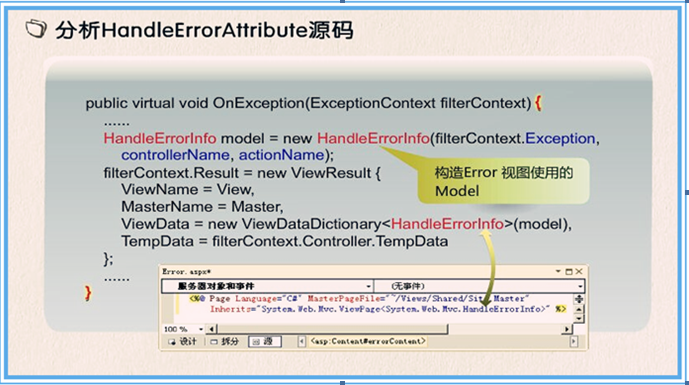
查看MVC源码,可以发现HandleError返回的是HandleErrorInfo类型的model,利用该model可以获取异常的具体信息,修改Error视图页面如下:
@model HandleErrorInfo

<!DOCTYPE html>

<html>

<head>

<meta http-equiv="Content-Type" content="text/html; charset=utf-8"/>

    <meta name="viewport" content="width=device-width" />

    <title>错误</title>

    <style type="text/css">

        p{

            color:red;

        }

    </style>

</head>

<body>

    @*<hgroup>

        <h1>错误。</h1>

        <h2>处理你的请求时出错。</h2>

    </hgroup>*@

    <p>

        抛错控制器:<b>@Model.ControllerName</b>  抛错方法:<b>@Model.ActionName</b>  抛错类型:<b>@Model.Exception.GetType()</b>

    </p>

    <p>

        异常信息:@Model.Exception.Message

    </p>

    <p>

        堆栈信息:@Model.Exception.StackTrace

    </p>

</body>

</html>
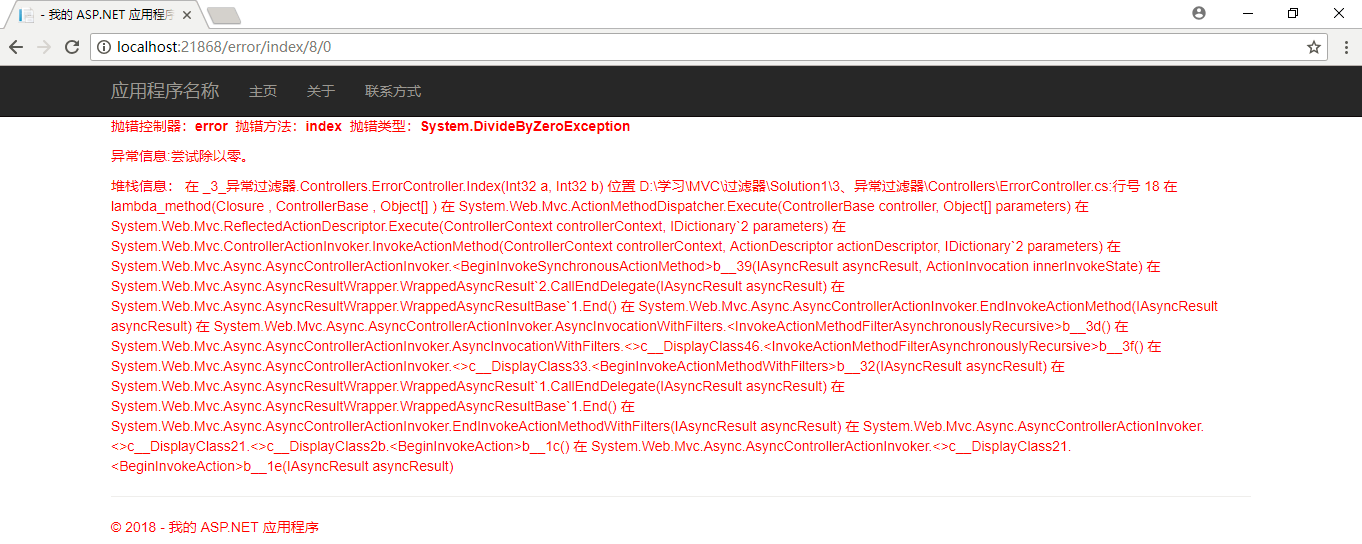
结果:
MVC教程九:异常过滤器的更多相关文章
- MVC教程:授权过滤器
一.过滤器 过滤器(Filter)的出现使得我们可以在ASP.NET MVC程序里更好的控制浏览器请求过来的URL,并不是每个请求都会响应内容,只有那些有特定权限的用户才能响应特定的内容.过滤器理论上 ...
- ASP.NET MVC 过滤、异常过滤器
记录下过滤器的学习—_— APS.NET MVC中的每一个请求,都会分配给相应的控制器和对应的行为方法去处理,而在这些处理的前后如果想再加一些额外的逻辑处理,这样会造成大量代码的重复使用,这不是我们希 ...
- 简明python教程九----异常
使用try...except语句来处理异常.我们把通常的语句放在try-块中,而把错误处理语句放在except-块中. import sys try: s = raw_input('Enter som ...
- MVC异常日志生产者消费者模式记录(异常过滤器)
生产者消费者模式 定义自己的异常过滤器并注册 namespace Eco.Web.App.Models { public class MyExceptionAttribute : HandleErro ...
- MVC 全局异常过滤器HandleErrorAttribute
using System; using System.Collections.Generic; using System.Linq; using System.Web; using System.We ...
- asp.net core MVC 全局过滤器之ExceptionFilter异常过滤器(一)
本系类将会讲解asp.net core MVC中的内置全局过滤器的使用,将分为以下章节 asp.net core MVC 过滤器之ExceptionFilter异常过滤器(一) asp.net cor ...
- 笨鸟先飞之ASP.NET MVC系列之过滤器(06异常过滤器)
概念介绍 异常过滤器主要在我们方法中出现异常的时候触发,一般我们用 异常过滤器 记录日志,或者在产生异常时做友好的处理 如果我们需要创建异常过滤器需要实现IExceptionFilter接口. nam ...
- [Asp.net MVC]HandleErrorAttribute异常过滤器
摘要 在asp.net mvc中除了使用try...catch/finally来处理异常外,它提供了一种通过在Controller或者Action上添加特性的方式来处理异常. HandleErrorA ...
- MVC与WebApi中的异常过滤器
一.MVC的异常过滤器 1.自定义MVC异常过滤器 创建一个类,继承HandleErrorAttribute即可,如果不需要作为特性使用直接实现IExceptionFilter接口即可, 注意,该 ...
随机推荐
- uefi+GPT分区安装ubuntu[zz]
现状:1.预装win8的笔记本几乎都是uefi启动模式,配合GPT磁盘分区,于是遇到了“麻烦”不会装了,或者说按照老教程安装,结果失败了.而且有很多人在问怎么解决,其实网上就有嘛,关键词就是“uefi ...
- 使用C# 链接 Mysql 显示??? 乱码 的解决方案
下载以下文件 mysql-connector-odbc-5.3.6-win32.msi 下载并打开以下文件: mysql-installer-community-5.6.28.0.msi 安装mysq ...
- haproxy 关闭ssl3
在使用的过程中,我们发现在用IE浏览器的时候 我们设置成 然后我们的网站会出现部分页面不出来 然后我们也发现在扫面网站链接的时候 所以当务之急是关闭ssl3 我这里的反向代理使用的是haproxy 版 ...
- Shiro(一):shiro架构和组件介绍
简介 Apache Shiro是一个强大且易用的Java安全框架,执行身份认证.授权.加密和会话管理.使用Shiro的易于理解的API,可以快速.轻松地获得任何应用程序,从最小的移动应用程序到最大的网 ...
- UIButton 标题靠右
_classBtn = [UIButton buttonWithType:UIButtonTypeCustom]; _classBtn.frame = CGRectMake( kDeviceWid ...
- 使用android-resource-remover优化资源使用率和lint-result.xml如果导出
安装教程:http://blog.csdn.net/mlj1668956679/article/details/38643145 按照上面教程中.下载了 get-pip.py.后一运行出现这个问题 ...
- Atitit undac网络设备管理法案 (路由器 交换机等) 法案编号USRr101510
Atitit undac网络设备管理法案 (路由器 交换机等) 法案编号USRr101510 1.1. 版本历史1 1.2. 密码设置规范 与原则1 1.3. 如何设置密码 ,设置一个简单又安 ...
- 【Unity】11.7 布料
分类:Unity.C#.VS2015 创建日期:2016-05-02 一.简介 Unity提供了两种布料组件:交互布料(Interactive Cloth).蒙皮布料(Skinned Cloth).为 ...
- impress.js 一个创建在线幻灯的js库
真的好奇怪,我居然会写前端技术的博客.没有办法的,最近实习,看的大多是前端.所以今天就用这个来练练手了. Impress.js 是一个非常棒的用来创建在线演示的Javascript库.它基于CSS3转 ...
- 转:Git: git stash 用法小结
一.应用场景 综合下网上的介绍和资料, git stash (git储藏)可用于以下情形: 发现有一个类是多余的,想删掉它又担心以后需要查看它的代码,想保存它但又不想增加一个脏的提交.这时就可以考虑 ...