
Android studio导入eclipse项目遇到的错误解决方案
Error:Execution failed for task ':app:compileDebugJavaWithJavac'. > Compilation failed; see the compiler error output for details.
在控制台输入
gradlew compileDebugSources --stacktrace -info
在打印的log中找到问题

发现是缺少一些类的问题
Error running app: Default Activity Not Found
1、打开配置

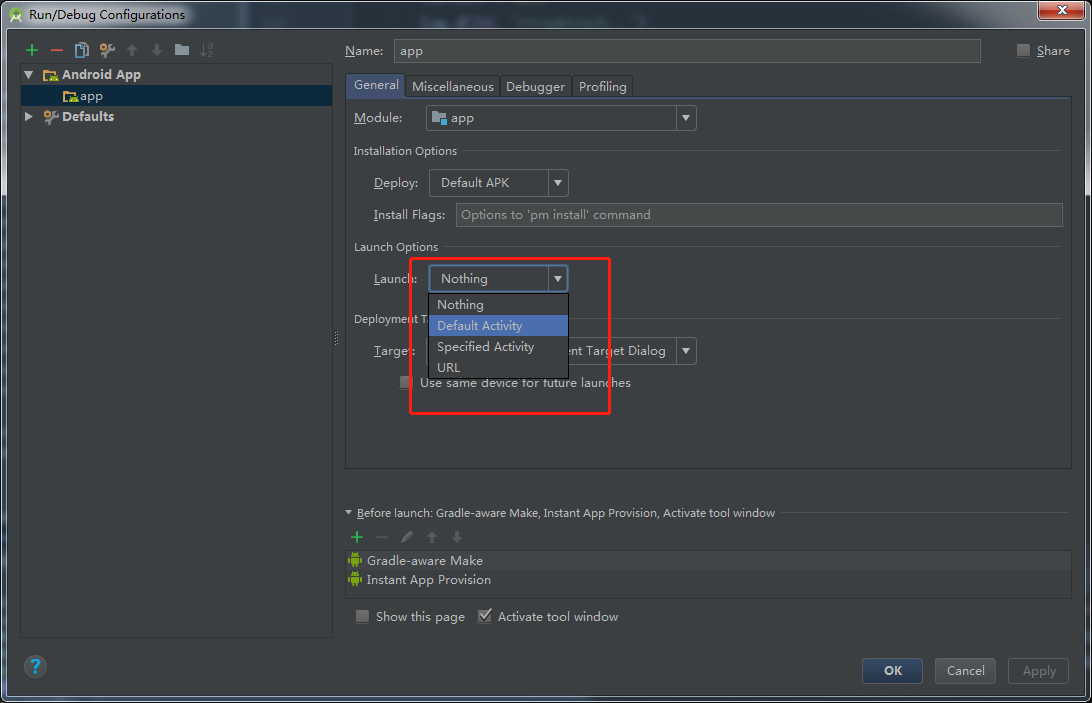
将default Activity换成Nothing即可
Annotation processors must be explicitly declared now.
导入的项目中用到的butter knife报错
Error:Execution failed for task ':app:javaPreCompileDebug'.

> Annotation processors must be explicitly declared now.  The following dependencies on the compile classpath are found to contain annotation processor.  Please add them to the annotationProcessor configuration.

    - butterknife-7.0..jar

  Alternatively, set android.defaultConfig.javaCompileOptions.annotationProcessorOptions.includeCompileClasspath = true to continue with previous behavior.  Note that this option is deprecated and will be removed in the future.

  See https://developer.android.com/r/tools/annotation-processor-error-message.html for more details.
解决方法:
在build.gradle中添加如下配置
android {

    ...

    defaultConfig {

        ...

        javaCompileOptions { annotationProcessorOptions { includeCompileClasspath = true } }

    }

    ...

}
Android studio导入eclipse项目遇到的错误解决方案的更多相关文章
- Android Studio导入Eclipse项目的两种方法
Android Studio导入Eclipse项目有两种方法,一种是直接把Eclipse项目导入Android Studio,另一种是在Eclipse项目里面进行转换,然后再导入Android Stu ...
- Android studio导入Eclipse项目,和一些错误的解决
Android studio导入Eclipse开发的项目步骤如下 如果已经打开Android studio的话就选择你已打开的项目,关闭然后导入 开始导入 导入完成. 2.项目出错 Error:(13 ...
- Android Studio导入Eclipse项目和一些常见的问题
Android Studio版本 Eclipse项目工程:一个主工程,一个Emojicon依赖库. 有两种方式导入Eclipse工程: 1.兼容Eclipse 2.全新的Android Gradle ...
- Android studio导入eclipse项目且不改变目录结构
Android studio的安装与配置论坛当中已经有很多在此就不在细说了,现在开始说下如何在Android studio当中导入eclipse的项目且不改变其目录结构和配置,让使用eclipse的同 ...
- Android Studio导入Eclipse项目
随着Google 对新Android编辑器Android Studio(以下简称AS)的版本不断更新,越来越多的人开始由熟悉的编辑器Eclipse转向AS,而Eclipse开发团队也坦言将放弃对Ecl ...
- Android studio导入eclipse项目(亲测)
之前上网搜索的时候,网上都说先用eclipse导出gradle,之后再用Android Studio的import project导入,但是这个方法使用的过程中会出现许多错误,解决了一个又一个还是不得 ...
- 图解Android Studio导入Eclipse项目源码
方法/步骤 打开Android Studio,在主页面中选择"File"->"New"->"Import project...&quo ...
- android studio 导入eclipse项目后的报错解决
1.如何导入: 2.导入的时候会让你创建gradle,一直下一步,不用修改 3.编译, a.会报编码格式错误,如果有中文会报这个错,修改成utf-8 b.找不到类,解决办法 右键工程 引入外部的包,重 ...
- Android studio导入eclipse项目混淆打包出错
将proguard-android.txt复制一份重命名成proguard-rules.pro,且在build.gradle添加 release { minifyEnabled ...
随机推荐
- iOS基础总结
面试题预览: 1.KVO实现原理? 2.说说你理解的埋点? 3.消息转发机制原理? 4.说说你理解weak属性? 5.假如Controller太臃肿,如何优化? 6.项目中网络层如何做安全处理? 7. ...
- Flex tree加三状态的Checkbox
网上有下过其它人的实现的样例.可是样式不好改.还有就是不能初始化选中,还有三态效果那个半选中状态也是不清楚.所以自己依据Itemrender搞了一个,还凑合 效果如图:全选和半选状态,Checkbox ...
- MySQL创建用户与授权方法实例精讲
MySQL中创建用户与授权的实现方法. 运行环境:widnows xp professional + MySQL5.0 一, 创建用户: 命令:CREATE USER 'username'@'host ...
- ISE中的Force Process Up-to-Date功能:ISE中如何在未综合实现的前提下打开ChipScope ?
ISE中如何在未综合实现的前提下双击Analyze Design Using ChipScope打开ChipScope ? 有时,你正在ISE中调试程序,在ChipScope中看到了现象,顺手修改了程 ...
- <![CDATA[]]>和转义字符
被<![CDATA[]]>这个标记所包含的内容将表示为纯文本,比如<![CDATA[<]]>表示文本内容“<”. 此标记用于xml文档中,我们先来看看使用转义符的情 ...
- VLAN,GRE,VXLAN
https://www.cnblogs.com/charles1ee/p/6629009.html VLAN介绍 局域网LAN(多个机器连接一个Hub或者Switch),是一个广播域 VLAN:一台S ...
- linux netstat 统计连接数查看
服务器上的一些统计数据 1)统计80端口连接数netstat -nat|grep -i "80"|wc -l 2)统计httpd协议连接数ps -ef|grep httpd|wc ...
- Java运行时动态加载类之ClassLoader
https://blog.csdn.net/fjssharpsword/article/details/64922083 *************************************** ...
- 比较正确的 iPhone7/7+ 的进入DFU的方法是这样的
正确的.没有歧义的.在WIndows7系统下进入DFU并刷机的方法是: 1)PC端打开iTunes,数据线连接iPhone7与PC: 2)iPhone7关机: 3)同时按下电源键和音量减键,LOGO会 ...
- hdu 4253(经典题目:二分+最小生成树)
题意:就是说有A.B两个公司要修路,有m条路,可能是属于A修的,也可能是属于B修的,现在要求所有路都联通的情况下的最小权值,并且A公司必须要修k条路. 同: 代码: #include<iostr ...