
使用bareos备份
bareos主要由主控端和客户端构成:
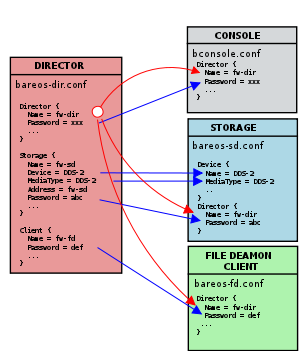
包含的重要的服务有:
bareos-director
bareos-storage
bareos-filedaemon
bareos-bconsole
bareos-database
bareos安装
安装bareos yum源:
wget -O /etc/yum.repos.d/bareos.repo http://download.bareos.org/bareos/release/latest/CentOS_6/bareos.repo
yum install bareos bareos-database-mysql
/usr/lib/bareos/scripts/create_bareos_database/usr/lib/bareos/scripts/make_bareos_tables/usr/lib/bareos/scripts/grant_bareos_privileges
/etc/init.d/bareos-dir start # Director进程,逻辑控制/etc/init.d/bareos-sd start # Storage Daemon/etc/init.d/bareos-fd start # File Daemon
bconsole
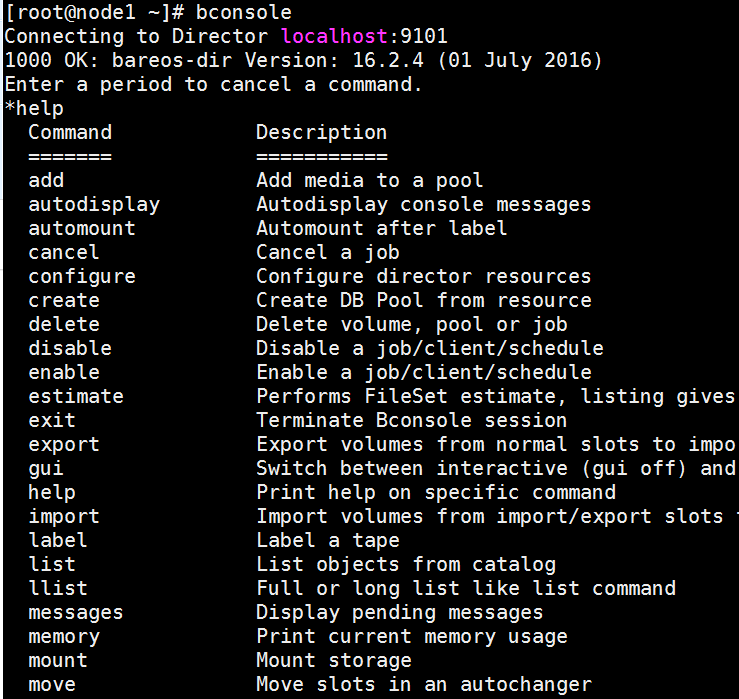
- 常用的命令有:
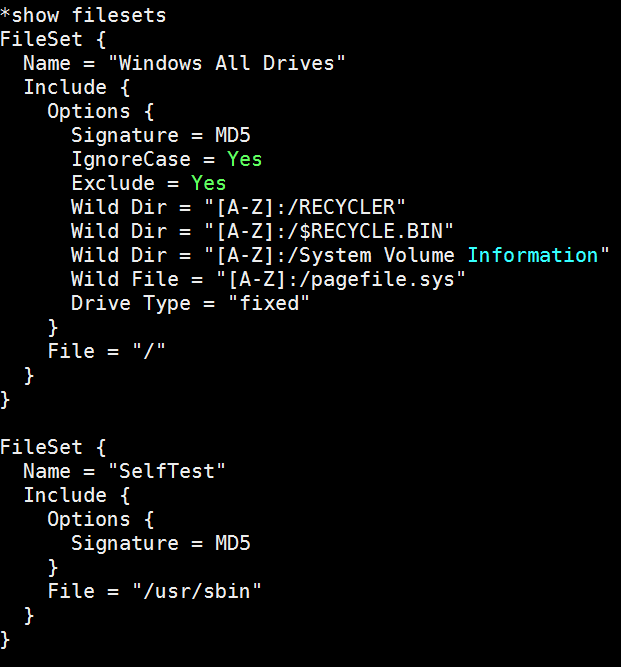
show filesetsstatus dirstatus clientstatus storagestatus schedulerun #运行run命令开始执行备份任务quit
安装Bareos Webui
- CentOS 7上安装可参考:http://blog.topspeedsnail.com/archives/8404
System requirements
- A working Bareos environment, Bareos >= 16.2. The Bareos Director and Bareos Webui should have the same version.
- You can install Bareos Webui on any host it does not have to be installed on the same as the Bareos Director.
- An Apache 2.x Webserver with mod-rewrite, mod-php5 and mod-setenv enabled.
- PHP >= 5.5
yum install httpd php php-cli php-common
cd /var/www/html/wget https://codeload.github.com/bareos/bareos-webui/zip/master -O bareos-webui.zipunzip bareos-webui.zip
mv bareos-webui-master bareos-webuicp bareos-webui/install/apache/bareos-webui.conf /etc/httpd/conf.d/
修改bareos-webui.conf文件
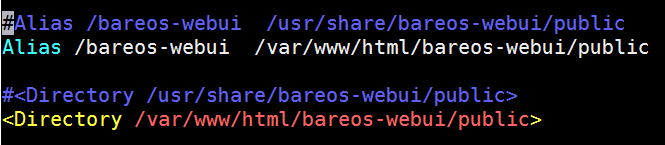
/etc/init.d/httpd restart
onfigure the directors
mkdir /etc/bareos-webui

cp /var/www/html/bareos-webui/install/directors.ini /etc/bareos-webui/
Configure the webui
cp /var/www/html/bareos-webui/install/configuration.ini /etc/bareos-webui/
Create restricted named consoles
cp /var/www/html/bareos-webui/install/bareos/bareos-dir.d/console/admin.conf.example /etc/bareos-webui/admin.conf
cp /var/www/html/bareos-webui/install/bareos/bareos-dir.d/profile/webui-admin.conf /etc/bareos-webui/
console配置文件/etc/bareos-webui/admin.conf
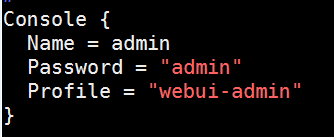
profile resource配置文件/etc/bareos-webui/webui-admin.conf
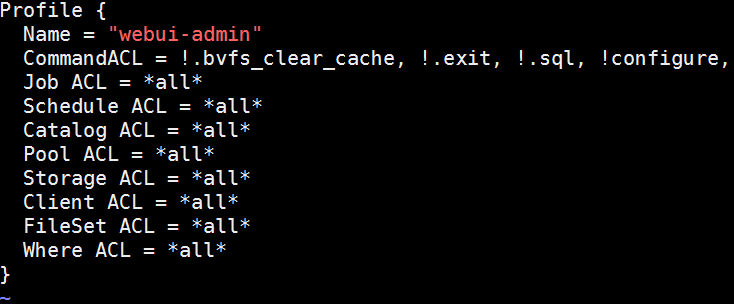
修改/etc/bareos/bareos-dir.d/director/bareos-dir.conf文件,在最后添加如下两行
@/etc/bareos-webui/admin.conf
@/etc/bareos-webui/webui-admin.conf
/etc/init.d/bareos-dir restart
登录web页面:http://IP/bareos-webui
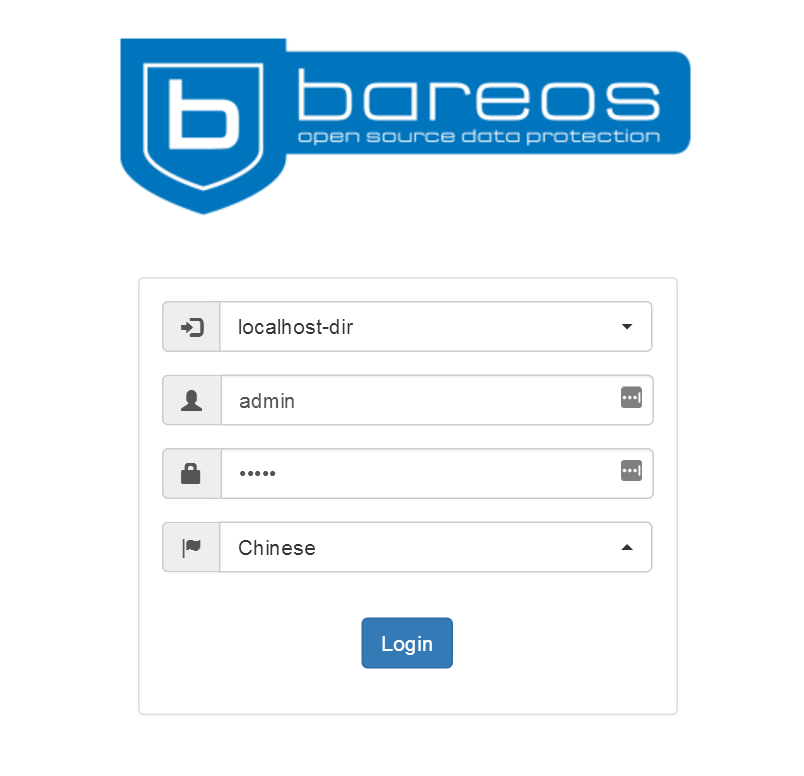
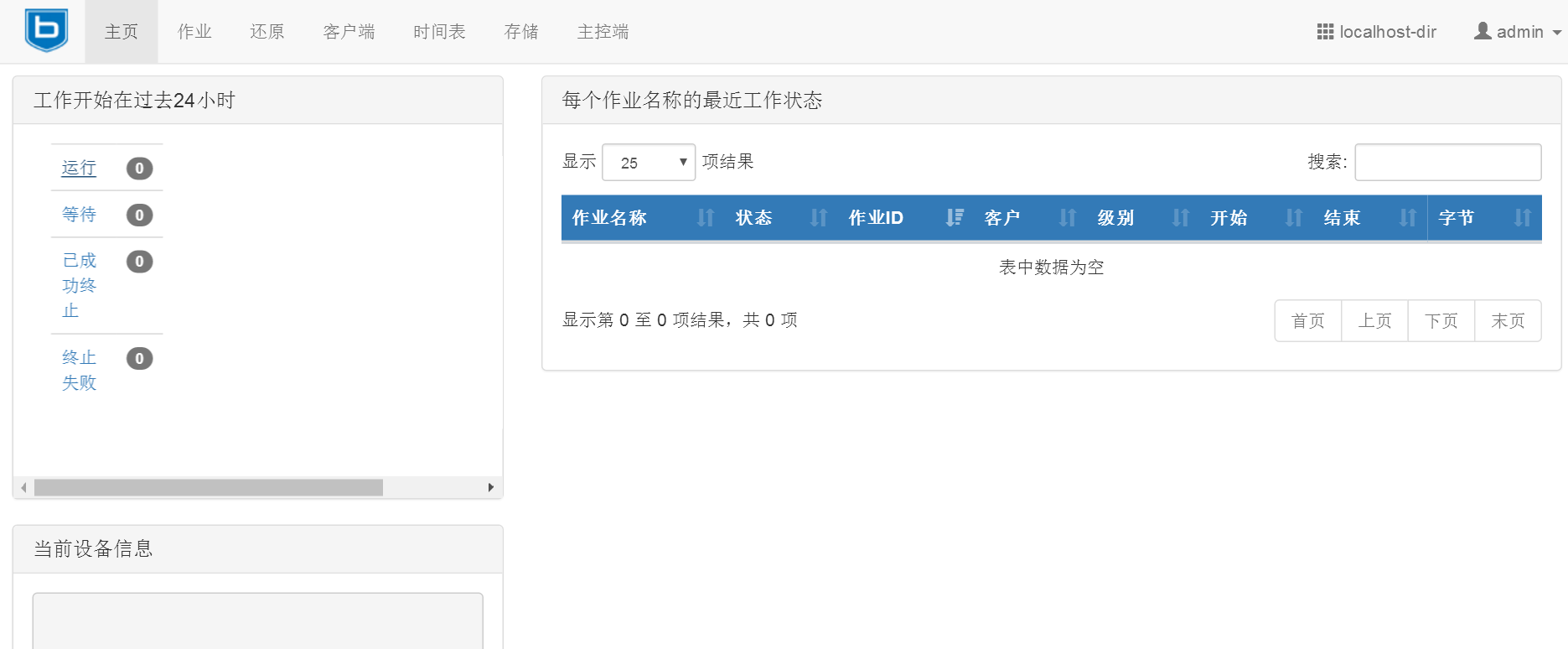
手动测试备份任务
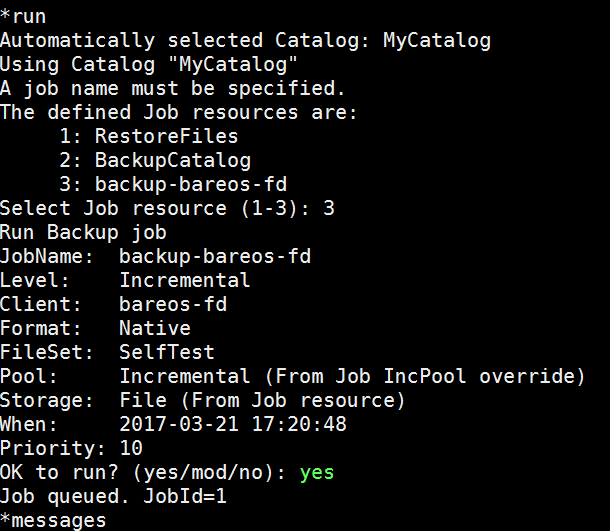
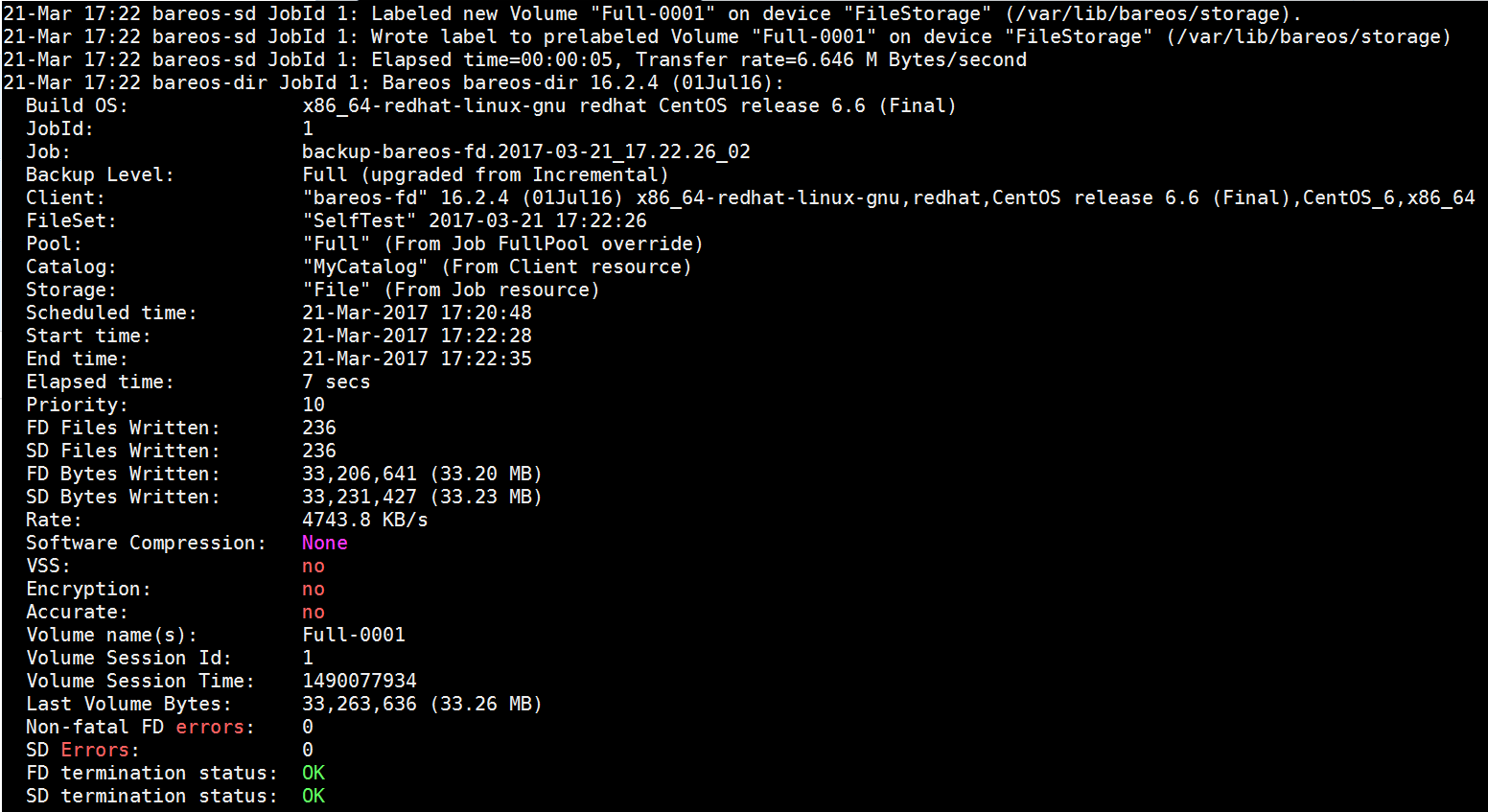
查看备份文件

测试恢复
默认恢复到/tmp/bareos-restores,可以输入mod自定义位置
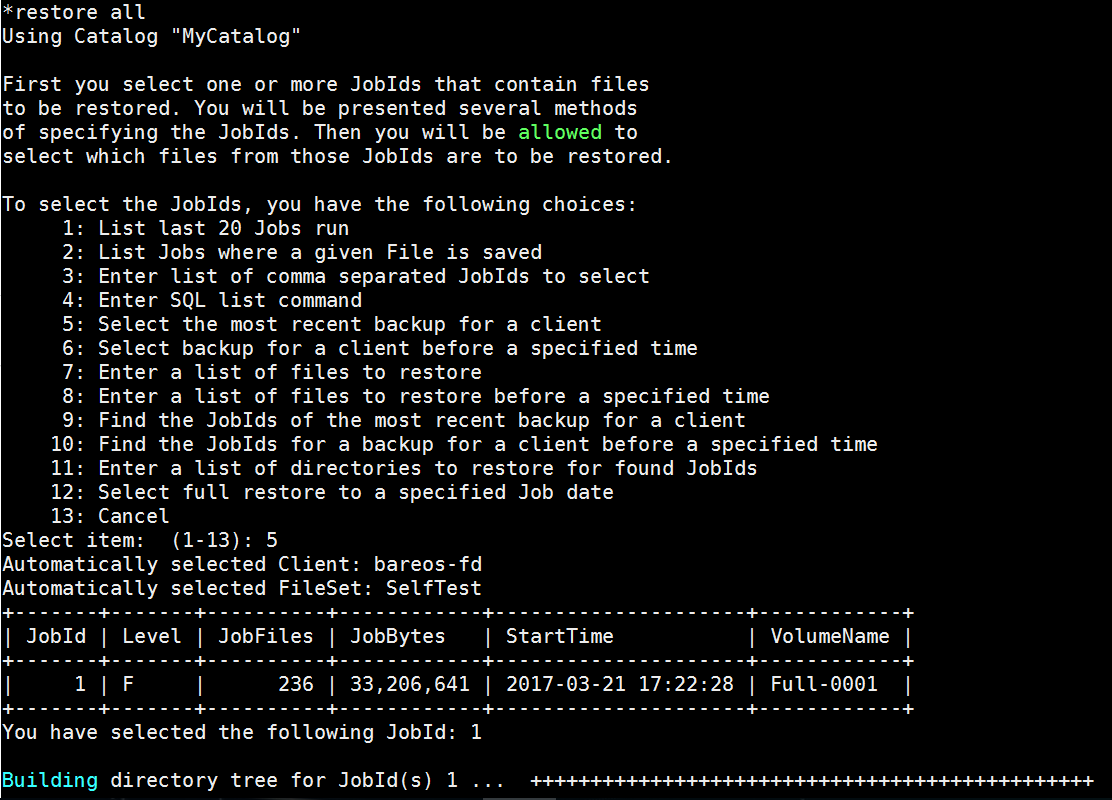
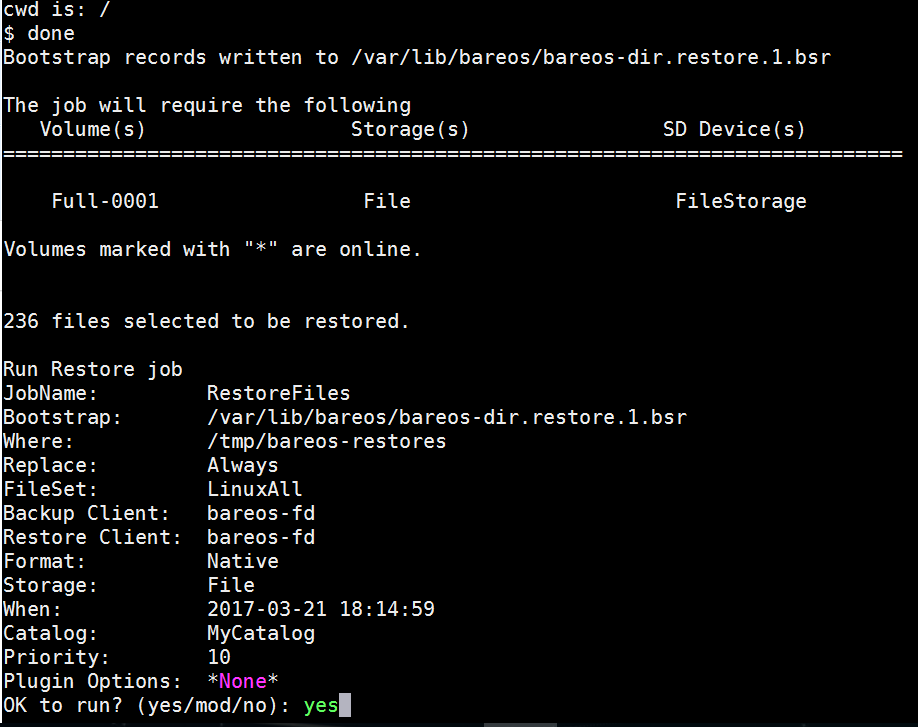
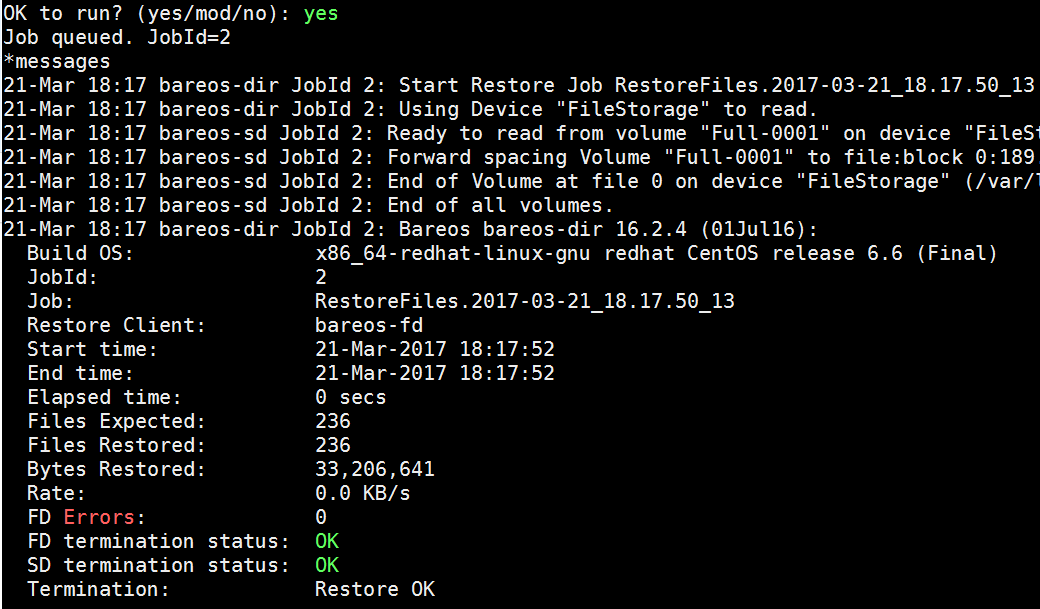
查看恢复的文件

恢复单个文件
如果有多个文件可以写个列表,使用<符号导入
restore client=client1 file=</tmp/file-list
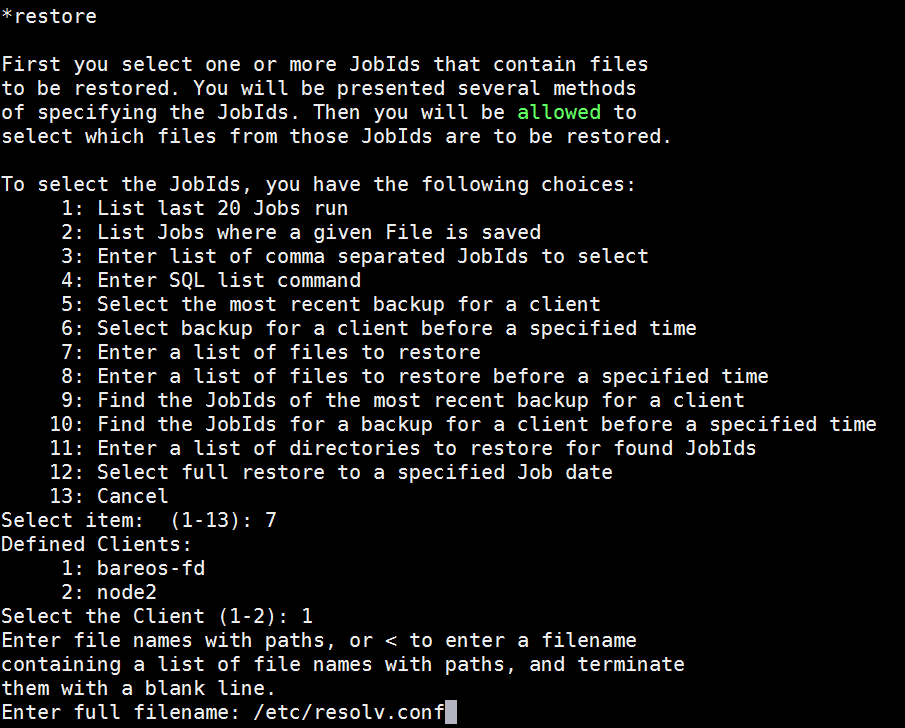
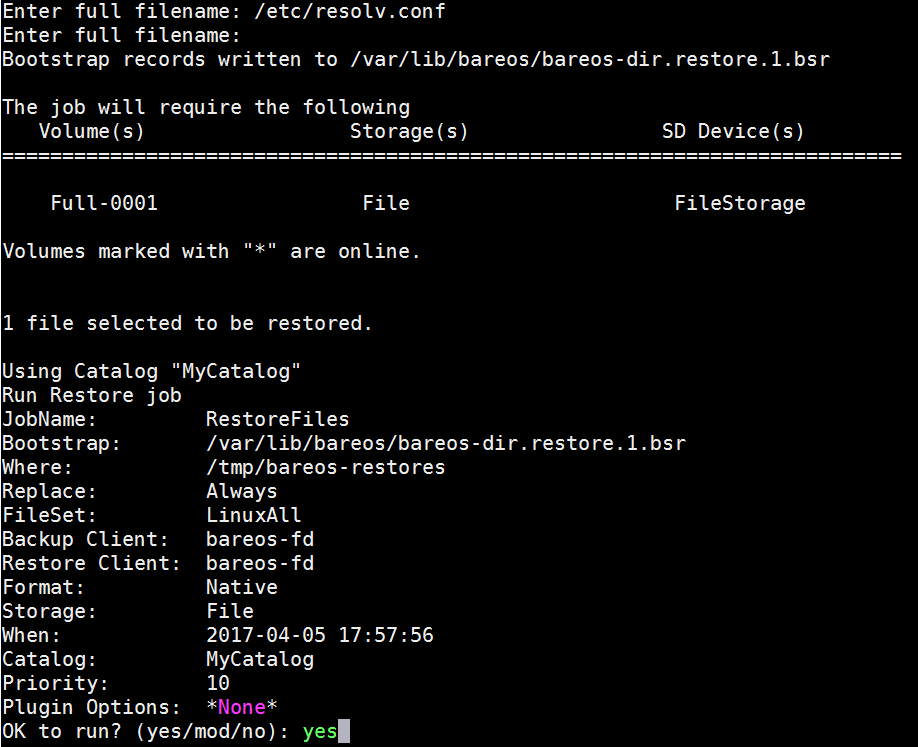
增加bareos-filedaemon客户端
在新的服务安装bareos-filedaemon
yum install -y bareos-filedaemon
在bareos-director服务器执行如下命令
bconsole
*configure add client name=node2 address=172.17.20.124 password=secret
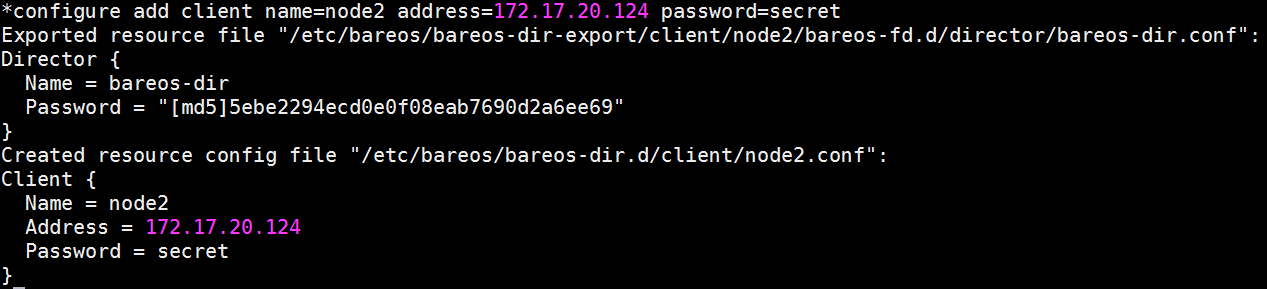
会创建如下两个文件
/etc/bareos/bareos-dir-export/client/node2/bareos-fd.d/director/bareos-dir.conf
/etc/bareos/bareos-dir.d/client/node2.conf
从bareos-director上拷贝文件到新的bareos-filedaemon服务器
scp /etc/bareos/bareos-dir-export/client/node2/bareos-fd.d/director/bareos-dir.conf node2:/etc/bareos/bareos-fd.d/director/
scp /etc/bareos/bareos-dir.d/client/node2.conf node2:/etc/bareos/bareos-dir.d/client/
在bareos-director服务器上执行
*reload
在新的bareos-client启动服务
service bareos-fd start
查看bareos-fd命令
bareos-fd -xc
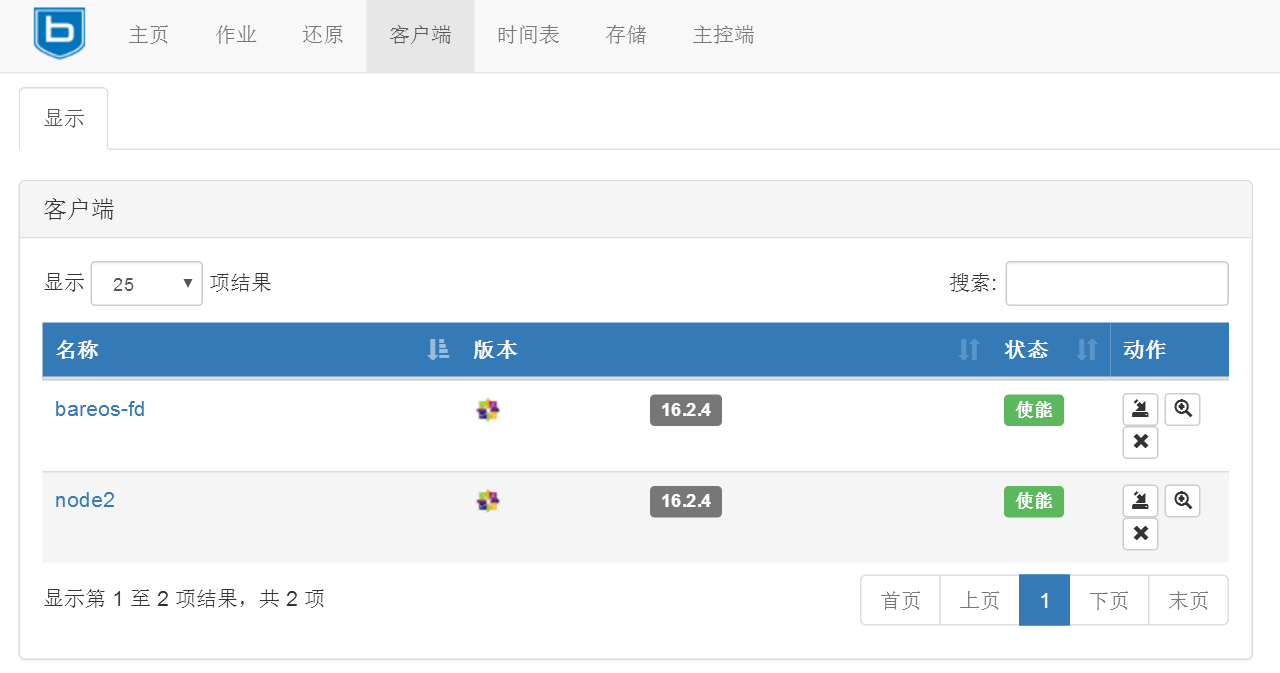
在web页面上查看客户端
使用新的client运行一个job
查看node2的状态

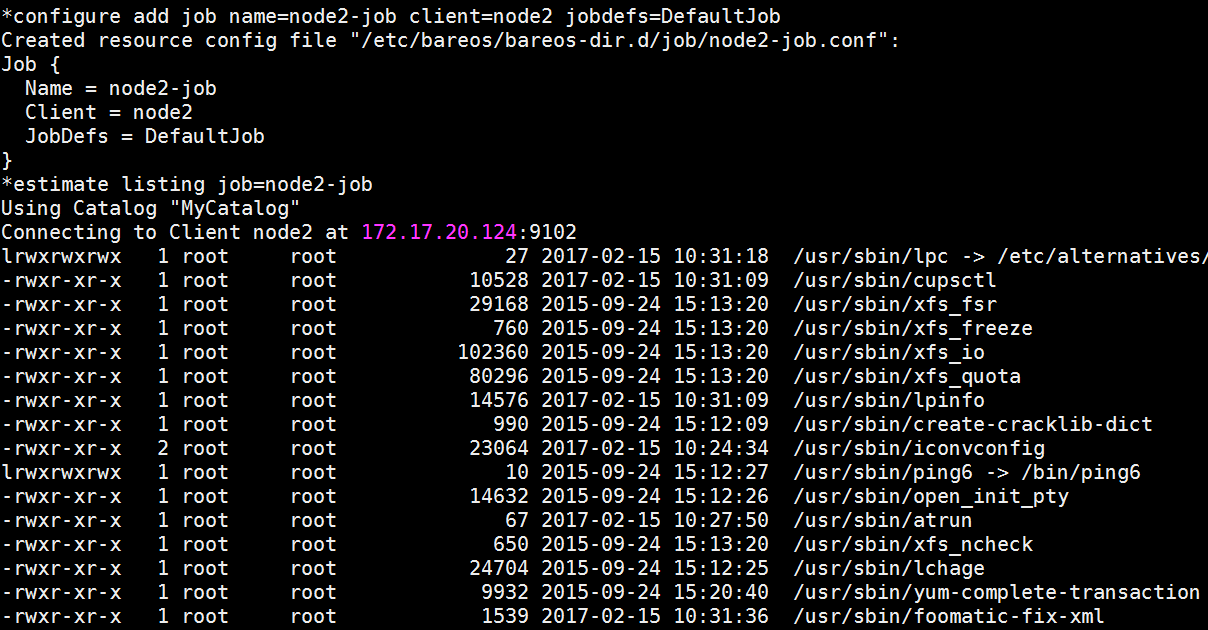
预估备份情况
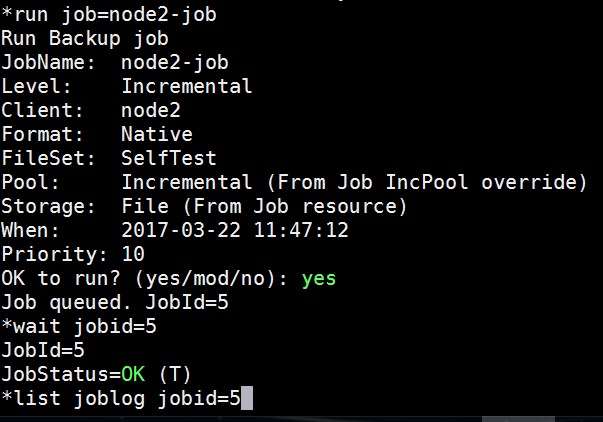
运行备份job
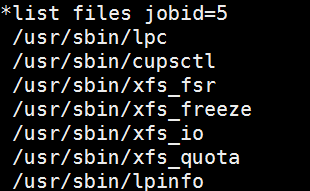
列出备份的文件
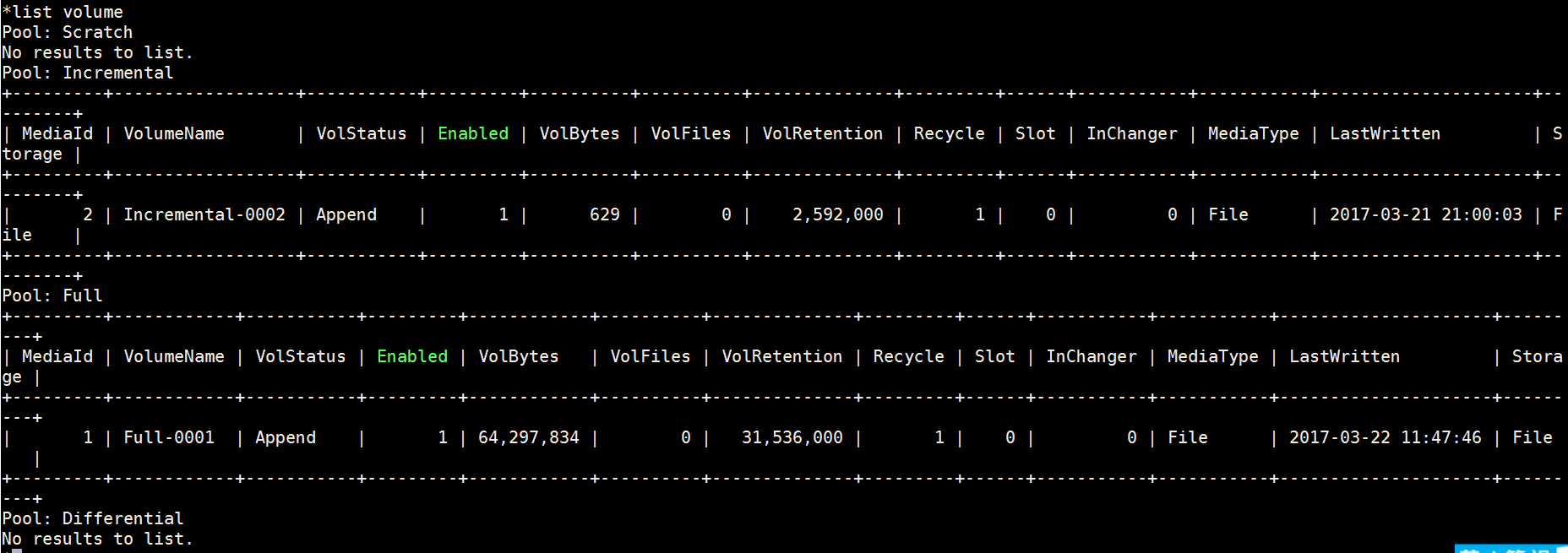
查看存储卷
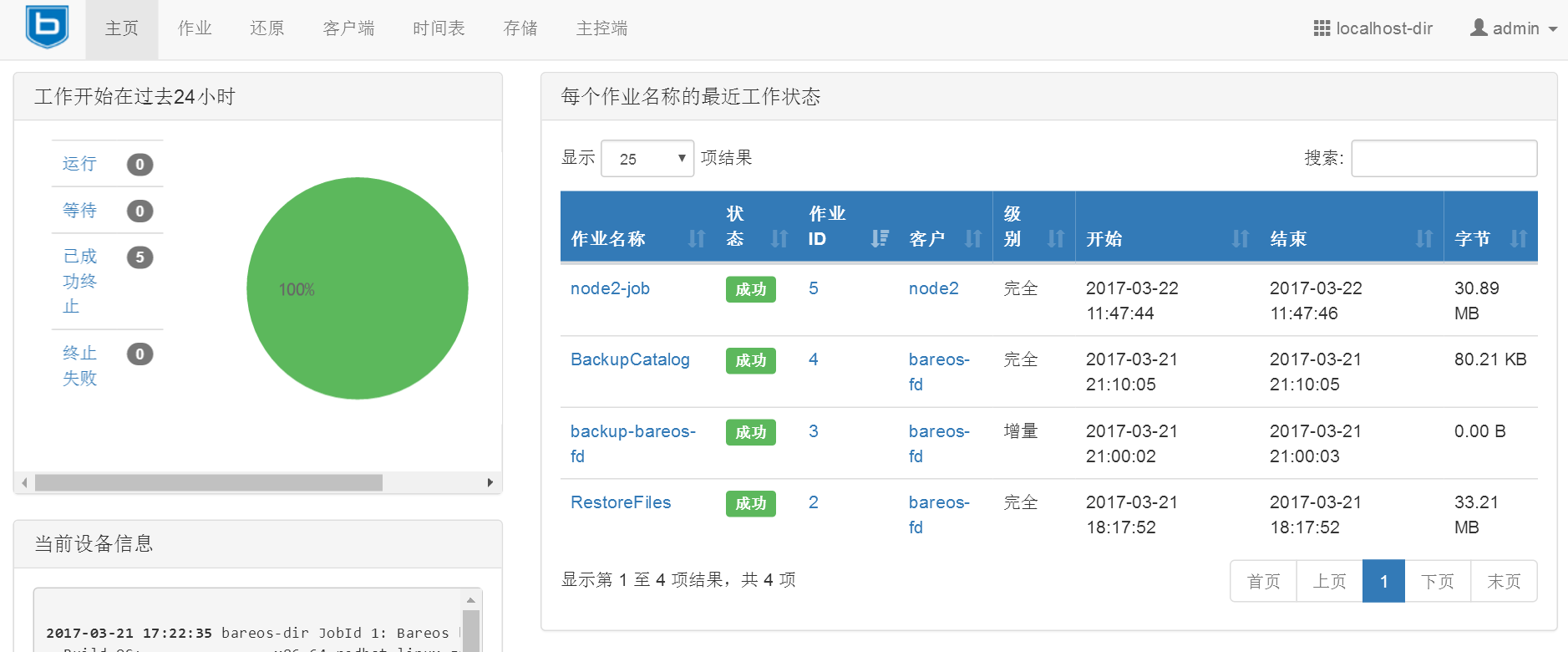
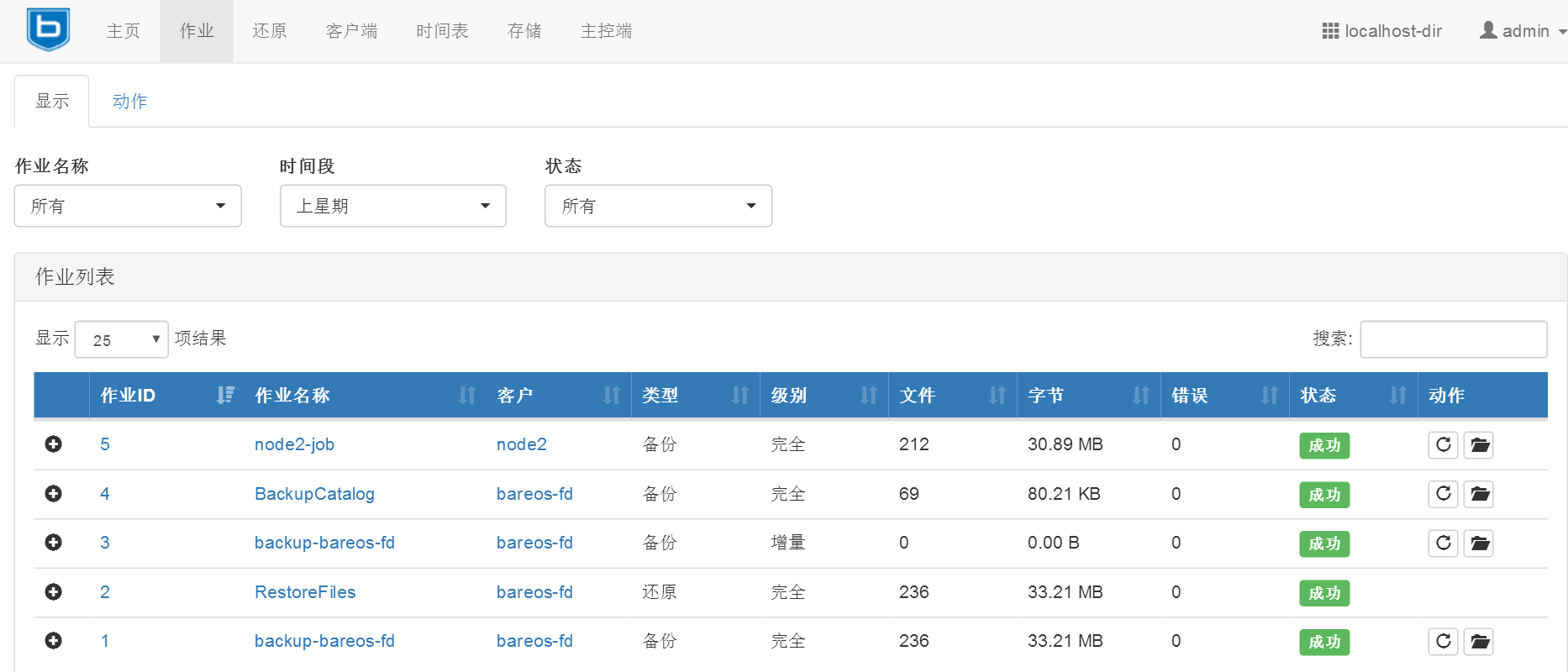
在web页面上查看所做的操作
备份相关配置
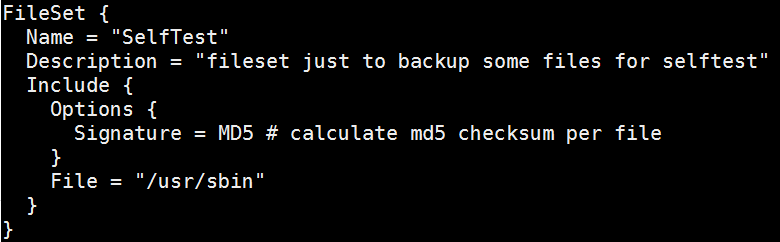
定义要备份的文件或目录(高级的定义写法请参考官方文档)
/etc/bareos/bareos-dir.d/fileset/SelfTest.conf配置文件
例如:
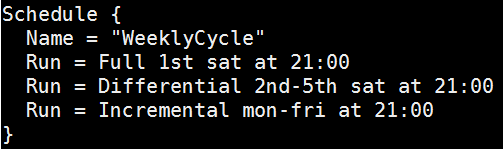
定义备份的时间表(高级的时间表写法可以参考官方文档)
/etc/bareos/bareos-dir.d/schedule/WeeklyCycle.conf配置文件
例如:
AfterBackup时间表
/etc/bareos/bareos-dir.d/schedule/WeeklyCycleAfterBackup.conf配置文件
例如:

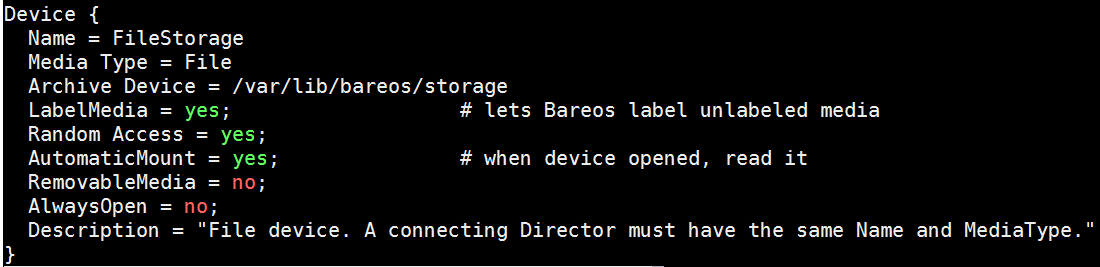
定义备份存放的路径
/etc/bareos/bareos-sd.d/device/FileStorage.conf配置文件
例如:
Job和Jobdefs路径
/etc/bareos/bareos-dir.d/job/
/etc/bareos/bareos-dir.d/jobdefs/DefaultJob.conf #默认job定义
存储定义的路径
/etc/bareos/bareos-dir.d/storage/
console和profile权限路径
/etc/bareos/bareos-dir.d/console/
/etc/bareos/bareos-dir.d/profile/
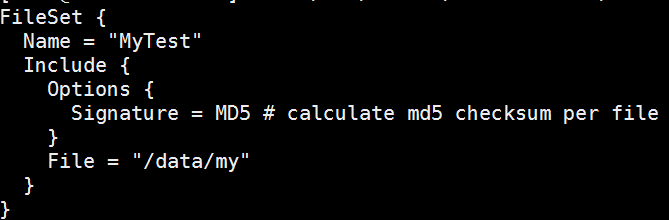
添加自定义fileset
/etc/bareos/bareos-dir.d/fileset/my.conf
使用命令行*configure add fileset name=my,或者重启/etc/init.d/bareos-dir restart使其生效。
使用show fileset查看
添加自定义jobdefs
/etc/bareos/bareos-dir.d/jobdefs/My.conf
使用命令行*configure add jobdefs name=My,或者重启/etc/init.d/bareos-dir restart使其生效。
使用show jobdefs查看

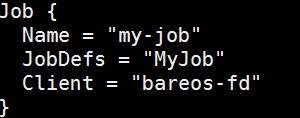
添加自定义job
/etc/bareos/bareos-dir.d/job/my-job.conf
重启/etc/init.d/bareos-dir restart
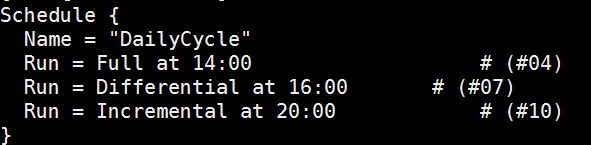
添加自定义schedule
/etc/bareos/bareos-dir.d/schedule/DailyCycle.conf
重启/etc/init.d/bareos-dir restart
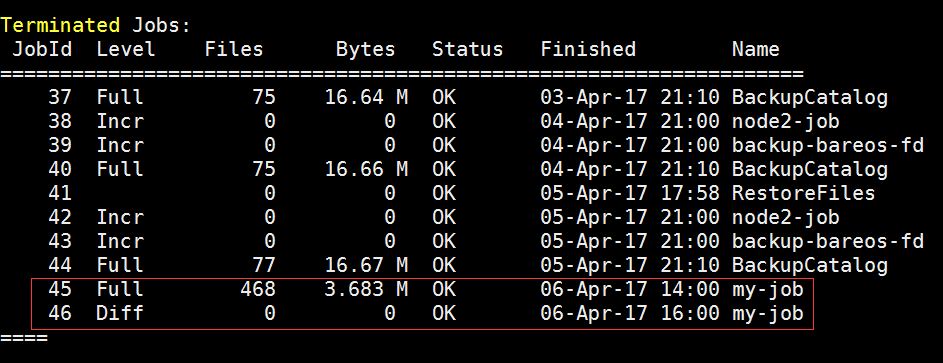
查看自定义备份是否运行成功
定义备份保留时间
/etc/bareos/bareos-dir.d/pool/Full.conf
Volume Retention = 365 days
添加备份情况邮件提醒
/etc/bareos/bareos-dir.d/messages/Standard.conf
重启/etc/init.d/bareos-dir restart

Copy or Migration
迁移数据,从一个Volume移动到另一个Volume。(具体用法可参考官方文档)
安装 bareos-storage-tape
相关配置文件:
/etc/bareos/mtx-changer.conf
/etc/bareos/bareos-sd.d/autochanger/autochanger-0.conf
/etc/bareos/bareos-sd.d/device/tapedrive-0.conf
插件使用
可以配合一些插件备份数据
例如:
MySQL Plugin
Backup of MySQL Databases using the Bareos MySQL Percona xtrabackup Plugin
1.Install the xtrabackup tool from Percona
2.Install the files BareosFdPercona.py and bareos-fd-percona.py in your Bareos plugin directory
https://github.com/bareos/bareos-contrib/tree/master/fd-plugins/bareos_percona
3.Configuration Activate your plugin directory in the fd resource conf on the client
编辑bareos-fd.d/client/mysql-fd.conf
Client {
   Name = mysql-fd
   #...
   Plugin Directory = /usr/lib64/bareos/plugins
   Plugin Name = "python"
 }
编辑bareos-dir.d/fileset/mysql.conf
FileSet {
     Name = "mysql"
     Include  {
         Options {
             compression=GZIP
             signature = MD5
         }
         File = /etc
         #...
         Plugin = "python:module_path=/usr/lib64/bareos/plugins:module_name=bareos-fd-percona"
     }
 }
其他插件 bpipe plugin,LDAP Plugin,VMware Plugin等用法可参考官方文档。
加密(具体可参考官方文档)
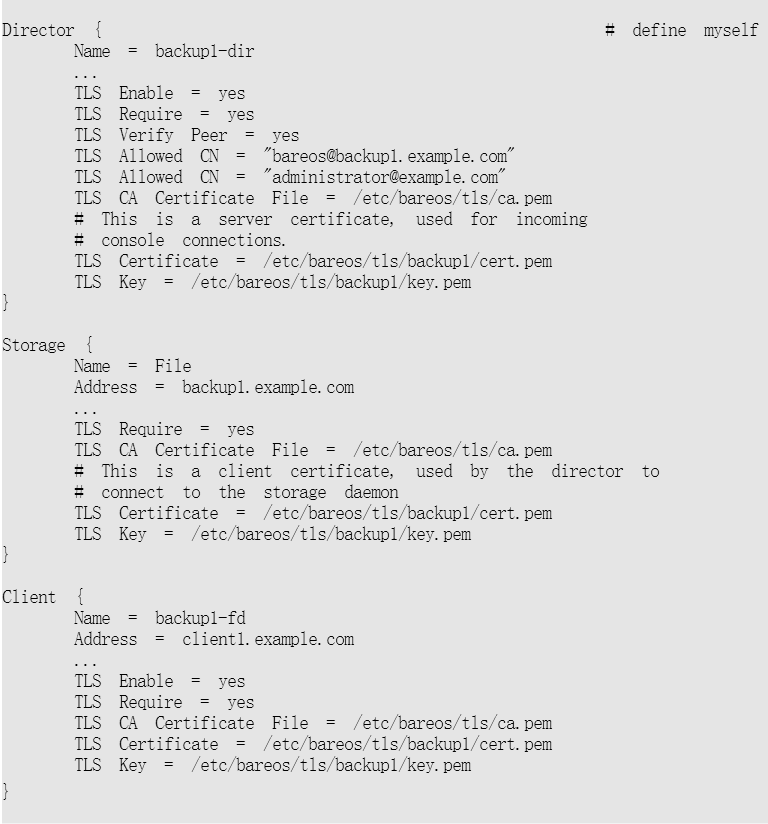
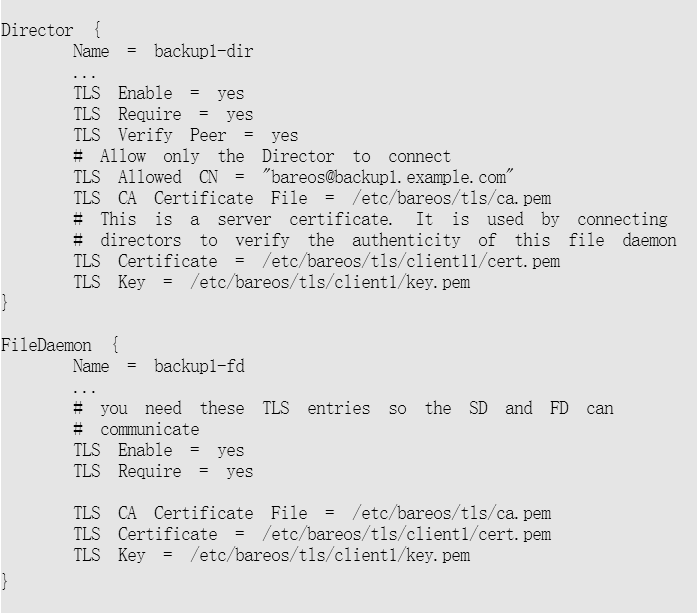
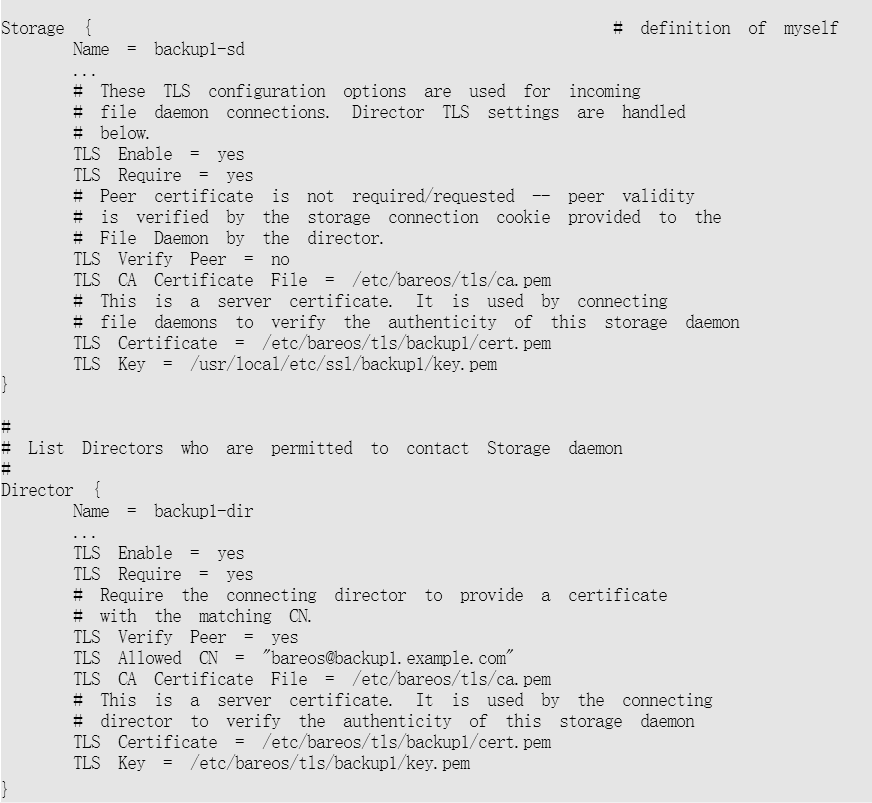
传输加密
修改bareos-dir.conf
修改bareos-fd.conf
修改bareos-sd.conf
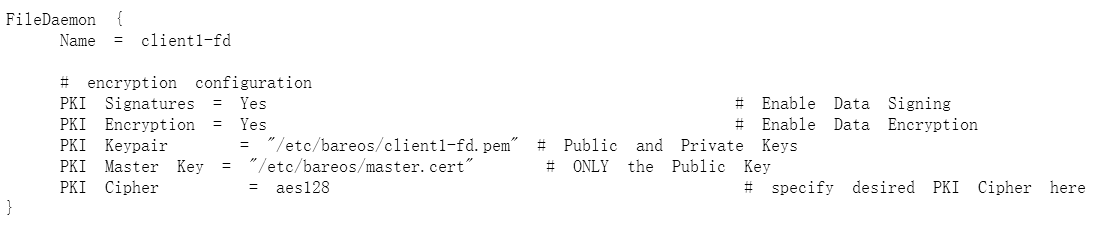
数据加密
修改bareos-fd.conf
由于图片地址用的公司的,现提供PDF文件:
https://files.cnblogs.com/files/wsl222000/%E4%BD%BF%E7%94%A8bareos%E5%A4%87%E4%BB%BD.pdf
使用bareos备份的更多相关文章
- SQL Server 大数据搬迁之文件组备份还原实战
一.本文所涉及的内容(Contents) 本文所涉及的内容(Contents) 背景(Contexts) 解决方案(Solution) 搬迁步骤(Procedure) 搬迁脚本(SQL Codes) ...
- MySQL 系列(四)主从复制、备份恢复方案生产环境实战
第一篇:MySQL 系列(一) 生产标准线上环境安装配置案例及棘手问题解决 第二篇:MySQL 系列(二) 你不知道的数据库操作 第三篇:MySQL 系列(三)你不知道的 视图.触发器.存储过程.函数 ...
- MongoDB备份(mongodump)和恢复(mongorestore)
MongoDB提供了备份和恢复的功能,分别是MongoDB下载目录下的mongodump.exe和mongorestore.exe文件 1.备份数据使用下面的命令: >mongodump -h ...
- 分享一个MySQL分库分表备份脚本(原)
分享一个MySQL分库备份脚本(原) 开发思路: 1.路径:规定备份到什么位置,把路径(先判断是否存在,不存在创建一个目录)先定义好,我的路径:/mysql/backup,每个备份用压缩提升效率,带上 ...
- 数据库备份并分离日志表(按月)sh 脚本
#!/bin/sh year=`date +%Y` month=`date +%m` day=`date +%d` hour=`date +%H` dir="/data/dbbackup/f ...
- 我的MYSQL学习心得(十四) 备份和恢复
我的MYSQL学习心得(十四) 备份和恢复 我的MYSQL学习心得(一) 简单语法 我的MYSQL学习心得(二) 数据类型宽度 我的MYSQL学习心得(三) 查看字段长度 我的MYSQL学习心得(四) ...
- Linux 中我该如何备份系统
系统备份概述 在前面的一些文章中,我反复提到经常会把系统搞崩溃,所以备份系统就是一件不容忽视的事情.由于 Linux 系统本身的优越性,系统的备份和还原还是比较容易的.主要表现在以下方面: Linux ...
- Atitit.每月数据采集与备份 v4
Atitit.每月数据采集与备份 v4 备份检查表 r12 00cate 00item im Inputmethod ok ok Log Log ok cyar Cyar log ... ok c ...
- Atitit 知识管理的重要方法 数据来源,聚合,分类,备份,发布 搜索
Atitit 知识管理的重要方法 数据来源,聚合,分类,备份,发布 搜索 1.1. Rss 简易信息聚合(也叫聚合内容 Really Simple Syndication1 1.1. Rss 简易信息 ...
随机推荐
- 007API网关服务Zuul
001.POM配置 和普通Spring Boot工程相比,增加了Eureka Client.Zuul依赖和Spring Cloud依赖管理 <dependencies> <depen ...
- windows 下进程与线程的遍历
原文:http://www.cnblogs.com/Apersia/p/6579376.html 在Windows下进程与线程的遍历有好几种方法. 进程与线程的遍历可以使用<TlHelp.h&g ...
- 【Supervised Learning】支持向量机SVM (to explain Support Vector Machines (SVM) like I am a 5 year old )
Support Vector Machines 引言 内核方法是模式分析中非常有用的算法,其中最著名的一个是支持向量机SVM 工程师在于合理使用你所拥有的toolkit 相关代码 sklearn-SV ...
- 微信小程序开发4-JSON
1.JSON是JavaScript语法的子集 2.JSON的语法规则 数据在名称/值对中 数据由逗号分隔 大括号保存对象 中括号保存数组 3.JSON 值可以是: 数字(整数或浮点数) 字符串(在双引 ...
- 通过JavaScript创建Qml对象
有两种方法可以创建,都是全局对象Qt提供的方法 一:用Qt.createComponent加载一个qml文件并创建Component 二:用Qt.createQmlObject从一个qml字符串创建C ...
- Oracle数据库从入门到精通 多表查询知识以及范例
视频课程:李兴华 Oracle从入门到精通视频课程 学习者:阳光罗诺 视频来源:51CTO学院 总体内容: 多表查询的意义以及基本问题. 表的连接查询 SQL:1999语法标准对多表查询的支持. 数据 ...
- Java程序中解决数据库超时与死锁
Java程序中解决数据库超时与死锁 2011-06-07 11:09 佚名 帮考网 字号:T | T Java程序中解决数据库超时与死锁,每个使用关系型数据库的程序都可能遇到数据死锁或不可用的情况 ...
- 学会利用Ionic官网文档
和任何新技术一样,ionic也提供了详细的官方文档说明.网址如下: http://ionicframework.com/docs/ 学会使用ionic控件 ionic提供了大量优秀的高性能的仿原生控件 ...
- ARC以及MRC中setter方法的差异
ARC以及MRC中setter方法的差异 有时候,你会需要重写setter或者getter方法,你知道么,ARC与MRC的setter方法是有着差异的呢. 先看下MRC下的setter方法: 在看下A ...
- mysql中replicate_wild_do_table和replicate_do_db区别
使用replicate_do_db和replicate_ignore_db时有一个隐患,跨库更新时会出错. 如在Master(主)服务器上设置 replicate_do_db=test(my.conf ...