
spring mvc: 密码框
以user为例,包含username, password字段.
user.java
public class User {

   private String username;

   private String password;

   public String getUsername() {

      return username;

   }

   public void setUsername(String username) {

      this.username = username;

   }

   public String getPassword() {

      return password;

   }

   public void setPassword(String password) {

      this.password = password;

   }

}
UserController.java代码
import org.springframework.stereotype.Controller;

import org.springframework.web.bind.annotation.ModelAttribute;

import org.springframework.web.bind.annotation.RequestMapping;

import org.springframework.web.bind.annotation.RequestMethod;

import org.springframework.web.servlet.ModelAndView;

import org.springframework.ui.ModelMap;

@Controller

public class UserController {

   @RequestMapping(value = "/user", method = RequestMethod.GET)

   public ModelAndView user() {

      return new ModelAndView("user_index", "command", new User());

   }

   @RequestMapping(value = "/addUser", method = RequestMethod.POST)

   public String addUser(@ModelAttribute("SpringWeb")User user,

      ModelMap model) {

      model.addAttribute("username", user.getUsername());

      model.addAttribute("password", user.getPassword());

      return "user_add";

   }

}
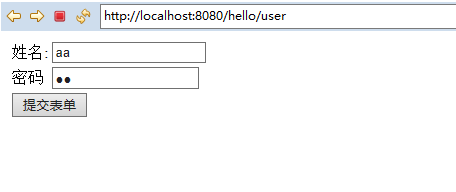
这里的第一个服务方法user(),我们已经在ModelAndView对象中传递了一个名称为“command”的空User对象,因为如果在JSP文件中使用<form:form>标签,spring框架需要一个名称为“command”的对象。 所以当调用user()方法时,它返回user.jsp视图。
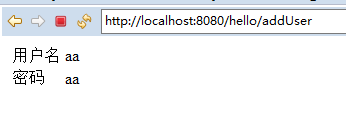
第二个服务方法addUser()将根据URL => HelloWeb/addUser 上的POST方法请求时调用。根据提交的信息准备模型对象。 最后从服务方法返回“userlist”视图,这将呈现userlist.jsp视图。
user_index.jsp 的代码如下所示
<%@ page language="java" contentType="text/html; charset=utf-8"    pageEncoding="utf-8"%>

<%@ taglib uri="http://www.springframework.org/tags/form" prefix="form"%>

<!DOCTYPE html PUBLIC "-//W3C//DTD HTML 4.01 Transitional//EN" "http://www.w3.org/TR/html4/loose.dtd">

<html>

<head>

<meta http-equiv="Content-Type" content="text/html; charset=utf-8">

<title>添加user信息</title>

</head>

<body>

<form:form method="post" action="/hello/addUser">

<table>

	<tr>

		<td><form:label path="username">姓名:</form:label></td>

		<td><form:input path="username" /></td>

	</tr>

	<tr>

		<td><form:label path="password">密码</form:label></td>

		<td><form:password path="password"/></td>

	</tr>

	<tr>

		<td colspan="2">

			<input type="submit" value="提交表单"/>

		</td>

	</tr>

</table>

</form:form>

</body>

</html>
user_add.jsp
<%@ page language="java" contentType="text/html; charset=utf-8"    pageEncoding="utf-8"%>

<%@ taglib uri="http://www.springframework.org/tags/form" prefix="form" %>

<%@ taglib uri="http://java.sun.com/jsp/jstl/core" prefix="c" %>

<%@ page isELIgnored="false" %>

<!DOCTYPE html PUBLIC "-//W3C//DTD HTML 4.01 Transitional//EN" "http://www.w3.org/TR/html4/loose.dtd">

<html>

<head>

<meta http-equiv="Content-Type" content="text/html; charset=utf-8">

<title>用户信息显示</title>

</head>

<body>

<table>

	<tr>

		<td>用户名</td>

		<td>${username}</td>

	</tr>

	<tr>

		<td>密码</td>

		<td>${password}</td>

	</tr>

</table>

</body>

</html>
如图:
spring mvc: 密码框的更多相关文章
- Spring MVC密码处理
以下示例显示如何在使用Spring Web MVC框架的表单中使用密码.首先使用Eclipse IDE来创建一个WEB工程,并按照以下步骤使用Spring Web Framework开发基于动态表单的 ...
- spring mvc:文本框
采用:<%@taglib uri="http://www.springframework.org/tags/form" prefix="form"%> ...
- Spring MVC文本框
以下示例显示如何使用Spring Web MVC框架在表单中使用文本框.首先使用Eclipse IDE来创建一个Web工程,按照以下步骤使用Spring Web Framework开发基于动态表单的W ...
- spring mvc:常用标签库(文本框,密码框,文本域,复选框,单选按钮,下拉框隐藏于,上传文件等)
在jsp页面需要引入:<%@taglib uri="http://www.springframework.org/tags/form" prefix="form&q ...
- spring mvc:复选框(多选)
以user为例,user下有 username用户,password密码, address地址, receivePaper是否订阅, favotireFramework兴趣爱好, user.java ...
- Spring MVC列表多选框
以下示例显示如何在使用Spring Web MVC框架的表单中使用列表框(Listbox).首先使用Eclipse IDE来创建一个WEB工程,实现一个让用户可选择自己所善长的技术(多选)的功能.并按 ...
- Spring MVC复选框(多项)
以下示例显示如何在使用Spring Web MVC框架的表单中使用多个复选框(Checkbox).首先使用Eclipse IDE来创建一个WEB工程,并按照以下步骤使用Spring Web Frame ...
- Spring MVC复选框
以下示例显示如何在使用Spring Web MVC框架的表单中使用复选框(Checkbox).首先使用Eclipse IDE来创建一个WEB工程,并按照以下步骤使用Spring Web Framewo ...
- Spring MVC-表单(Form)标签-密码框(Password)示例(转载实践)
以下内容翻译自:https://www.tutorialspoint.com/springmvc/springmvc_password.htm 说明:示例基于Spring MVC 4.1.6. 以下示 ...
随机推荐
- responsive and functional programming RxJava
RxJava由于使用了多个回调,一开始理解起来可能有点难度,其实多看几遍也就明白了,它的招式套路都是一样的: 首先就是创建Observable,创建Observable有很多种方式,这里使用了Obse ...
- JavaBean 介绍
// Person.java public class Person{ private String name; private int age; // 无参构造函数 public Person(){ ...
- Redis核心解读(转)
原文:Redis核心解读 Redis是知名的键值数据库,它广泛用于缓存系统.关于Redis的信息已经不用我多介绍了.这个系统的Redis文章主要从另外一个角度关注,Redis作为一个开源项目,短短2W ...
- cookies设置时间
默认cookies失效时间是直到关闭浏览器,cookies失效,也可以指定cookies时间. Response.Cookies("user_name").Expires=Date ...
- MySQL读写分离之amoeba
MySQL读写分离之amoeba主从复制的搭建环境参考:http://www.cnblogs.com/fansik/p/5270334.htmlamoeba依赖于jdk环境:jdk环境搭建参考:htt ...
- 修改hostname不重启机器并生效
1.依次执行: vi /etc/sysconfig/network 这种修改方式不会马上生效,需要重启服务器后生效,所以继续执行下面命令 echo ***(例如:node13 ...
- 开博第一篇,学习markdown
Markdown学习 其实之前自己也一直有记录,不过是Evernote记录,没有分享出来,最近看了一些牛人博客,觉得也应该分享出来.和别人多交流,多学习.所以花了几小时学了一下Markdown语法,现 ...
- ssh远程执行远程执行命令
ssh zxrac1 '/home/oracle/tmp/t5.sh 2 2 >/dev/null 2>&1 &'
- linux 或c 时间相关处理类型和函数
注意1.精确级别,纳秒级别原型long clock_gettime (clockid_t which_clock, struct timespec *tp); 头文件time.hwhich_cloc ...
- Python函数加工厂-装饰器
引言: 函数和装饰器好比程序界的加工厂: 1.函数一般可用来加工一种或者多种数据类型的数据:字符串.数字.列表.字典等 举一个简单例子:已知半径求面积 def s(r): s = 3.14 * r * ...