
spring mvc: 密码框
以user为例,包含username, password字段.
user.java
public class User {

   private String username;

   private String password;

   public String getUsername() {

      return username;

   }

   public void setUsername(String username) {

      this.username = username;

   }

   public String getPassword() {

      return password;

   }

   public void setPassword(String password) {

      this.password = password;

   }

}
UserController.java代码
import org.springframework.stereotype.Controller;

import org.springframework.web.bind.annotation.ModelAttribute;

import org.springframework.web.bind.annotation.RequestMapping;

import org.springframework.web.bind.annotation.RequestMethod;

import org.springframework.web.servlet.ModelAndView;

import org.springframework.ui.ModelMap;

@Controller

public class UserController {

   @RequestMapping(value = "/user", method = RequestMethod.GET)

   public ModelAndView user() {

      return new ModelAndView("user_index", "command", new User());

   }

   @RequestMapping(value = "/addUser", method = RequestMethod.POST)

   public String addUser(@ModelAttribute("SpringWeb")User user,

      ModelMap model) {

      model.addAttribute("username", user.getUsername());

      model.addAttribute("password", user.getPassword());

      return "user_add";

   }

}
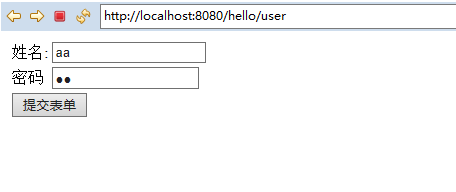
这里的第一个服务方法user(),我们已经在ModelAndView对象中传递了一个名称为“command”的空User对象,因为如果在JSP文件中使用<form:form>标签,spring框架需要一个名称为“command”的对象。 所以当调用user()方法时,它返回user.jsp视图。
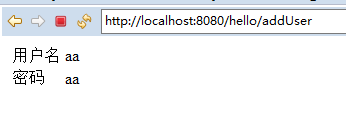
第二个服务方法addUser()将根据URL => HelloWeb/addUser 上的POST方法请求时调用。根据提交的信息准备模型对象。 最后从服务方法返回“userlist”视图,这将呈现userlist.jsp视图。
user_index.jsp 的代码如下所示
<%@ page language="java" contentType="text/html; charset=utf-8"    pageEncoding="utf-8"%>

<%@ taglib uri="http://www.springframework.org/tags/form" prefix="form"%>

<!DOCTYPE html PUBLIC "-//W3C//DTD HTML 4.01 Transitional//EN" "http://www.w3.org/TR/html4/loose.dtd">

<html>

<head>

<meta http-equiv="Content-Type" content="text/html; charset=utf-8">

<title>添加user信息</title>

</head>

<body>

<form:form method="post" action="/hello/addUser">

<table>

	<tr>

		<td><form:label path="username">姓名:</form:label></td>

		<td><form:input path="username" /></td>

	</tr>

	<tr>

		<td><form:label path="password">密码</form:label></td>

		<td><form:password path="password"/></td>

	</tr>

	<tr>

		<td colspan="2">

			<input type="submit" value="提交表单"/>

		</td>

	</tr>

</table>

</form:form>

</body>

</html>
user_add.jsp
<%@ page language="java" contentType="text/html; charset=utf-8"    pageEncoding="utf-8"%>

<%@ taglib uri="http://www.springframework.org/tags/form" prefix="form" %>

<%@ taglib uri="http://java.sun.com/jsp/jstl/core" prefix="c" %>

<%@ page isELIgnored="false" %>

<!DOCTYPE html PUBLIC "-//W3C//DTD HTML 4.01 Transitional//EN" "http://www.w3.org/TR/html4/loose.dtd">

<html>

<head>

<meta http-equiv="Content-Type" content="text/html; charset=utf-8">

<title>用户信息显示</title>

</head>

<body>

<table>

	<tr>

		<td>用户名</td>

		<td>${username}</td>

	</tr>

	<tr>

		<td>密码</td>

		<td>${password}</td>

	</tr>

</table>

</body>

</html>
如图:
spring mvc: 密码框的更多相关文章
- Spring MVC密码处理
以下示例显示如何在使用Spring Web MVC框架的表单中使用密码.首先使用Eclipse IDE来创建一个WEB工程,并按照以下步骤使用Spring Web Framework开发基于动态表单的 ...
- spring mvc:文本框
采用:<%@taglib uri="http://www.springframework.org/tags/form" prefix="form"%> ...
- Spring MVC文本框
以下示例显示如何使用Spring Web MVC框架在表单中使用文本框.首先使用Eclipse IDE来创建一个Web工程,按照以下步骤使用Spring Web Framework开发基于动态表单的W ...
- spring mvc:常用标签库(文本框,密码框,文本域,复选框,单选按钮,下拉框隐藏于,上传文件等)
在jsp页面需要引入:<%@taglib uri="http://www.springframework.org/tags/form" prefix="form&q ...
- spring mvc:复选框(多选)
以user为例,user下有 username用户,password密码, address地址, receivePaper是否订阅, favotireFramework兴趣爱好, user.java ...
- Spring MVC列表多选框
以下示例显示如何在使用Spring Web MVC框架的表单中使用列表框(Listbox).首先使用Eclipse IDE来创建一个WEB工程,实现一个让用户可选择自己所善长的技术(多选)的功能.并按 ...
- Spring MVC复选框(多项)
以下示例显示如何在使用Spring Web MVC框架的表单中使用多个复选框(Checkbox).首先使用Eclipse IDE来创建一个WEB工程,并按照以下步骤使用Spring Web Frame ...
- Spring MVC复选框
以下示例显示如何在使用Spring Web MVC框架的表单中使用复选框(Checkbox).首先使用Eclipse IDE来创建一个WEB工程,并按照以下步骤使用Spring Web Framewo ...
- Spring MVC-表单(Form)标签-密码框(Password)示例(转载实践)
以下内容翻译自:https://www.tutorialspoint.com/springmvc/springmvc_password.htm 说明:示例基于Spring MVC 4.1.6. 以下示 ...
随机推荐
- Runtime Error! R6025-pure virtual function call 问题怎么解决
一.故障现象:1.360软件的木马查杀.漏洞修复等组件不能使用,提示runtime error2.暴风影音等很多软件不能正常使用3.设备管理器不能打开,提示“MMC 不能打开文件”4.部分https安 ...
- 在容器最前面添加DOM元素 parent.insertBefore(new, parent.children[0])
//判断容器当前有没有子级元素,如果没有直接appendChild就行了; if (p.children[0]) { p.insertBefore(span, p.children[0]); } el ...
- AHOI2019退役记
$DAY\quad -1$: 连作业都不写了来刷题... 希望能长点$RP$吧... 反正也是抱着退役的心情来考试... 我要是到了周日还不出长门我就退游!!! $DAY\quad 0$: 早上一起来 ...
- String StringBuffer StringBuilder 老生常谈
1.String 与 StringBuffer . StringBuilder的区别 String 字符串常量 而 (StringBuffer 和 StringBuilder 字符串变量) 执行速度上 ...
- mysql聚合函数操作
1.mysql对中文进行排序 注:是用convert函数用gb2312编码转换 SELECT * FROM 表名 ORDER BY CONVERT(字段名 USING gb2312 ) ASC;
- ansible安装及使用
一.ansible介绍 1.ansible简介 官方的title是“Ansible is Simple IT Automation”——简单的自动化IT工具. Ansible跟其他IT自动化技术的区别 ...
- C++异常安全、copy and swap
异常安全的代码是指,满足两个条件 1异常中立性 : 是指当你的代码(包括你调用的代码)引发异常时,这个异常 能保持原样传递到外层调用代码.(异常中立,就是指任何底层的异常都会抛出到上层,也就相当于是异 ...
- Django-form进阶+详细版
Django的Form主要具有一下几大功能: 生成HTML标签 验证用户数据(显示错误信息) HTML Form提交保留上次提交数据 初始化页面显示内容 一.创建Form类 #!/usr/bin/en ...
- Spark机器学习4·分类模型(spark-shell)
线性模型 逻辑回归--逻辑损失(logistic loss) 线性支持向量机(Support Vector Machine, SVM)--合页损失(hinge loss) 朴素贝叶斯(Naive Ba ...
- Nginx 301与302配置
说明 1.首先看一个完整代码示例,关于nginx 301 302跳转的. 301跳转设置: server { listen 80; server_name 123.com; rewrite ^/(.* ...