
Button实现图文混排
Button实现图文混排
一、简介
本文介绍两种图文混排方式
1、android:drawableTop="@drawable/star"实现文字上有图片
当然有上下左右等等
2、SpannableString的ImageSpan实现图文混排
二、代码实例
效果图:
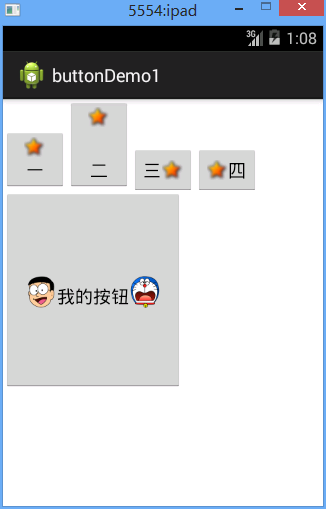
一二三四是用的第一种方式
下面的用的第二种方式
代码:
fry.Activity02
 package fry;

 import com.example.buttonDemo1.R;

 import android.app.Activity;

 import android.graphics.BitmapFactory;

 import android.os.Bundle;

 import android.text.Spannable;

 import android.text.SpannableString;

 import android.text.style.ImageSpan;

 import android.view.MotionEvent;

 import android.view.View;

 import android.view.View.OnClickListener;

 import android.view.View.OnFocusChangeListener;

 import android.view.View.OnTouchListener;

 import android.widget.Button;

 public class Activity02 extends Activity  {

     private Button btn_big;

     @Override

     protected void onCreate(Bundle savedInstanceState) {

         // TODO Auto-generated method stub

         super.onCreate(savedInstanceState);

         setContentView(R.layout.activity02);

         btn_big=(Button) findViewById(R.id.btn_big);

         //SpannableString的ImageSpan添加左边图片

         SpannableString spannableString1=new SpannableString("left");

         ImageSpan imageSpan=new ImageSpan(this, BitmapFactory.decodeResource(getResources(), R.drawable.image_left));

         spannableString1.setSpan(imageSpan, 0, 4, Spannable.SPAN_EXCLUSIVE_EXCLUSIVE);

         //SpannableString的ImageSpan添加右边图片

         SpannableString spannableString2=new SpannableString("right");

         ImageSpan imageSpan2=new ImageSpan(this, BitmapFactory.decodeResource(getResources(), R.drawable.image_right));

         spannableString2.setSpan(imageSpan2, 0, 5, Spannable.SPAN_EXCLUSIVE_EXCLUSIVE);

         btn_big.append(spannableString1);

         btn_big.append("我的按钮");

         btn_big.append(spannableString2);

     }

 }
/buttonDemo1/res/layout/activity02.xml
 <?xml version="1.0" encoding="utf-8"?>

 <LinearLayout xmlns:android="http://schemas.android.com/apk/res/android"

     android:layout_width="match_parent"

     android:layout_height="match_parent"

     android:orientation="vertical" >

     <LinearLayout

         android:layout_width="match_parent"

         android:layout_height="wrap_content"

         android:orientation="horizontal"

         >

         <!--android:drawableTop="@drawable/star"实现文字上有图片  -->

         <Button

             android:layout_width="wrap_content"

             android:layout_height="wrap_content"

             android:text="一"

             android:drawableTop="@drawable/star"

             />

         <!--android:drawablePadding="30dp实现文字和文字上的图片中间有30dp的空隙  -->

         <Button

             android:layout_width="wrap_content"

             android:layout_height="wrap_content"

             android:text="二"

             android:drawableTop="@drawable/star"

             android:drawablePadding="30dp"

             />

         <Button

             android:layout_width="wrap_content"

             android:layout_height="wrap_content"

             android:text="三"

             android:drawableRight="@drawable/star"

             />

         <Button

             android:layout_width="wrap_content"

             android:layout_height="wrap_content"

             android:text="四"

             android:drawableLeft="@drawable/star"

             />

     </LinearLayout>

     <Button

         android:id="@+id/btn_big"

         android:layout_width="180dp"

         android:layout_height="200dp"

         />

 </LinearLayout>
Button实现图文混排的更多相关文章
- EditText图文混排
下面就具体说一下我遇到的问题,首先是EditText里面的图文混排问题,这个问题的难点就是三点: 1.怎么插图片 2.怎么保存插入的图片和文字 3.怎么解析回图片和文字 解决: 一.怎么插入图片 在这 ...
- IOS实现UIButton图文混排、自定义按钮按下和正常状态下不同的背景颜色、根据文字长度自定义UIButton长度
在一些项目中,我们需要自定义自己的UIButton,使Button上面同时具有图片和文字描述,实现自定义UIButton的图文混排. 首先我们需要定义一个继承自UIButton的类,同时实现自己的in ...
- XMPP键盘订制实现图文混排
在现阶段的通信服务中,各种标准都有,因此会出现无法实现相互连通,而XMPP(Extensible Message and presence Protocol)协议的出现,实现了整个及时通信服务协议的互 ...
- IOS总结_实现UIButton的图文混排(二)
非常久没有写博客了,之前写过一篇关于UIButton图文混排的,可是有点复杂,今天来一个比較简单地.相信大家回用得着 UIButton *button=[[UIButton alloc, , )]; ...
- Android图文混排-实现EditText图文混合插入上传
前段时间做了一个Android会议管理系统,项目需求涉及到EditText的图文混排,如图: 在上图的"会议详情"中.须要支持文本和图片的混合插入,下图演示输入的演示样例: 当会议 ...
- 用NSAttributedString实现简单的图文混排
iOS7以后,因为TextKit的强大,可以用NSAttributedString很方便的实现图文混排(主要是利用了NSTextAttachment). 关于Textkit的牛逼之处,可以参考objc ...
- 图文混排--CoreText的简单运用
常见的在一些微博微信中可以看见一段文字中有不同的字体,字体有不同的颜色,并且可能会有一些笑脸之类的表情,这些可以通过图文混排做到. 图文混排可以通过WebView和CoreText做到,其他还有别的方 ...
- 【转】关于FLASH中图文混排聊天框的小结
原文链接 图文混排也是FLASH里一个很古老的话题了,我们不像美国佬那样游戏里面聊天框就是聊天框,全是文字干干净净,也不像日本人发明了并且频繁地使用颜文字.不管是做论坛.做游戏,必定要实现的一点就是带 ...
- DIV+CSS 图文混排的图片居中办法
不少人为了让 Div 图文混排的图片可以居中,给 IMG 套各式各样的 SPAN.DIV.LI 等等,以便于使用 text-align来进行居中. <div>图文混排 <br> ...
随机推荐
- 解决Windows 7 IIS7.5 用户 'IIS APPPOOL\{站点名} AppPool'登录失败
今天调试程序的时候,使用VS调试没有任何问题,但是发布到IIS就发生错误了,网上搜索了一下,问题具体上就出在IIS的应用程序池的设置上.我使用的是Windows7 IIS7.5. 错误为:用户 'II ...
- datagridview数据导出到excel
/// <summary> /// 导出Excel /// </summary> /// <param name="mydgv">控件 Data ...
- Storm-源码分析- spout (backtype.storm.spout)
1. ISpout接口 ISpout作为实现spout的核心interface, spout负责feeding message, 并且track这些message. 如果需要Spout track发出 ...
- An operation on a socket could not be performed because the system lacked sufficient buffer space or because a queue was full.
与 SQL Server 建立连接时出现与网络相关的或特定于实例的错误.未找到或无法访问服务器.请验证实例名称是否正确并且 SQL Server 已配置为允许远程连接. (provider: TCP ...
- 004-Set 和 Map 数据结构
原文地址:http://es6.ruanyifeng.com/#docs/set-map 1.Set ES6 提供了新的数据结构 Set.它类似于数组,但是成员的值都是唯一的,没有重复的值. Set ...
- pgadmin3
一般性 \copyright 显示PostgreSQL的使用和发行许可条款 \g [文件] or; 执行查询 (并把结果写入文件或 |管道) \gset [PREF ...
- JFinal项目搭建
1.Myeclipse中 新建 Dynamic Web Project 导入jar包 2.配置web.xml <?xml version="1.0" encoding=& ...
- 向html当中插入数据
].;i<obj.length;i++){ $('#compclass').append("<option>"+obj[i].fields.name+" ...
- hadoop09----线程池
java并发包 1.java并发包介绍 线程不能无限制的new下去,否则系统处理不了的. 使用线程池.任务来了就开一runable对象. concurrent 包开始不是jdk里面的,后来加入到jd ...
- 哆啦A梦里的某一首诗
<哆啦A梦>长篇<宇宙开拓>主题曲<放松心情>作词:武田铁矢 我终于发现, /昨日失去的一切, /虽然还无法完全意会, /可是对我却非常重要. /加紧脚步追赶, / ...