
Java开发工程师(Web方向) - 04.Spring框架 - 第4章.数据访问
第4章--数据访问
Spring JDBC
DAO (Data Access Object) 实现数据访问相关接口(接口和实现分离)
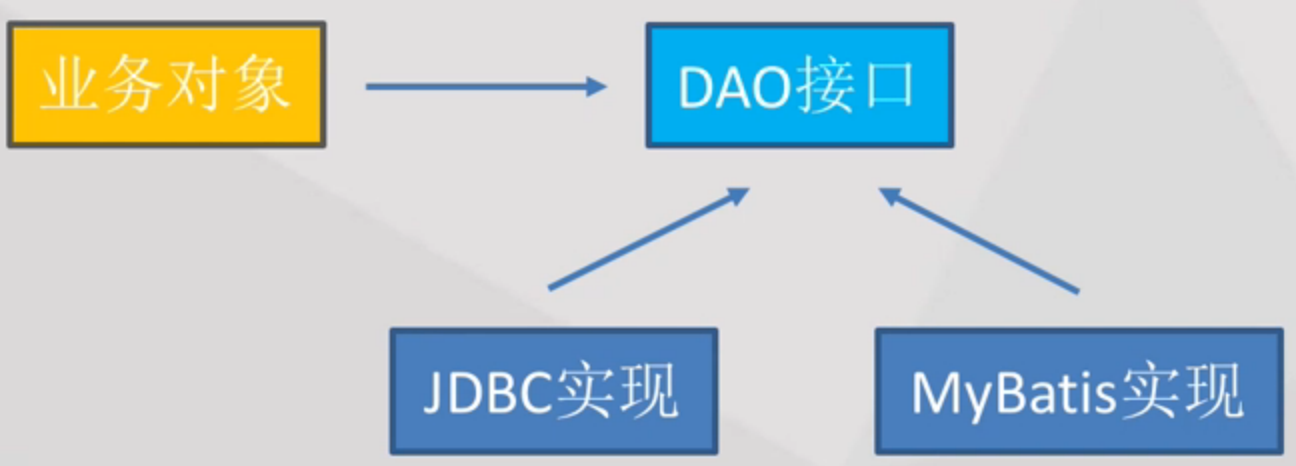
ORM (Object Relation Mapping) 对象关系映射:数据库中记录<->Java对象
Why Spring JDBC?
之前使用JDBC时:设置连接参数、打开连接、声明SQL语句、执行SQL、得到访问结果、执行程序特定的业务、处理捕获的异常、关闭连接语句和结果集等
Class.forName(JDBC_DRIVER); DriverManager.getConnection(DB_URL, USER, PASS); conn.createStatement(); 等等
真正需要关心的是:设置连接参数、SQL语句以及参数、执行程序特定业务
Spring JDBC:封装用户不需要关心的那些底层实现细节,通过接口暴露给用户,从而提高效率
DataSource:数据源--设置连接参数
包括了:驱动类名、数据库连接地址、用户名、密码
接口方法:getConnection
DateSource不是Spring提供的,而是JavaEE本身就提供的,而Spring提供了它的不同实现

配置:
<bean id="dataSource" class="org.apache.commons.dbcp.BasicDataSource" destroy-method="close">

    <property name="driverClassName" value="${jdbc.driverClassName}"/>

    <property name="url" value="${jdbc.url}"/>

    <property name="username" value="${jdbc.username}"/>

    <property name="password" value="${jdbc.password}"/>

</bean>

<context:property-placeholder location="db.properties"/>
jdbcTemplate:数据库SQL语句及参数、异常处理
select -- queryForObject()
int rowCount = this.jdbcTemplate.queryForObject("select count(*) from user", Integer.class);
int countOfNamedJoe = this.jdbcTemplate.queryForObject("select count(*) from user where first_name = ?", Integer.class, "Joe");
int lastName = this.jdbcTemplate.queryForObject("select last_name from user where id = ?", new Object[]{1212L}, String.class);
// queryForObject提供了很多接口,比如例二和例三中parameter的位置不一样
insert/delete/update -- update()
this.jdbcTemplate.update("insert into user (first_name, last_name) values (?, ?)", "Meimei", "Han");
this.jdbcTemplate.update("update user set last_name = ? where id = ?)", "Li", 5276L);
this.jdbcTemplate.update("delete from user where id = ?)", Long.valueOf(userId));
create -- execute()
this.jdbcTemplate.execute("create table user (id int, first_name varchar(100), last_name varchar(100))");
通过RowMapper可以将返回的结果转换为一个个单个的Object对象:
// 返回一个Java对象
User user = this.jdbcTemplate.queryForObject(

    "select first_name, last_name from user where id = ?",

    new Object[] {1212L},

    new RowMapper<User>() {

        public User mapRow(ResultSet rs, int rowNum) throws SQLException {

            User user = new User();

            user.setFirstName(rs.getString("first_name"));

            user.setLastName(rs.getString("last_name"));

            return user;

        }

    });
// 返回一系列Java对象

List<User> users = this.jdbcTemplate.query(

    "select first_name, last_name from user",

    new RowMapper<User>() {

        public User mapRow(ResultSet rs, int rowNum) throws SQLException {

            User user = new User();

            user.setFirstName(rs.getString("first_name"));

            user.setLastName(rs.getString("last_name"));

            return user;

        }

    });
定义JdbcTemplate:
public class JdbcExampleDao implements ExampleDao {

    private JdbcTemplate jdbcTemplate;

    public void setDataSource(DataSource dataSource) {

        this.jdbcTemplate = new JdbcTemplate(dataSource);

    }

    // ... DAO 接口实现

}
通过xml中的bean配置DAO
<bean id="exampleDao" class="com.netease.course.JdbcExampleDao">

    <property name="dataSource" ref="dataSource"/>

</bean>
通过Annotation配置DAO
@Repository

public class JdbcExampleDao implements ExampleDao {

    private JdbcTemplate jdbcTemplate;

    @Autowired

    public void setDataSource(DataSource dataSource) {

        this.jdbcTemplate = new JdbcTemplate(dataSource);

    }

    // ... DAO 接口实现

}
// @Repository与Component相似,定义了一个bean并指明了是个DAO的bean
// @Autowired自动注入了setDataSource
使用实例:
1. 创建Maven工程
artifact-id: com.netease.course
group-id: spring-data
2. pom中添加spring容器的依赖
<project xmlns="http://maven.apache.org/POM/4.0.0" xmlns:xsi="http://www.w3.org/2001/XMLSchema-instance" xsi:schemaLocation="http://maven.apache.org/POM/4.0.0 http://maven.apache.org/xsd/maven-4.0.0.xsd">

  <modelVersion>4.0.0</modelVersion>

  <groupId>com.netease.course</groupId>

  <artifactId>spring-data</artifactId>

  <version>0.0.1-SNAPSHOT</version>

  <dependencies>

      <dependency>

          <groupId>org.springframework</groupId>

          <artifactId>spring-context</artifactId>

          <version>4.2.1.RELEASE</version>

      </dependency>

      <dependency>

          <groupId>org.springframework</groupId>

          <artifactId>spring-jdbc</artifactId>

          <version>4.2.1.RELEASE</version>

      </dependency>

  </dependencies>

</project>
3. src/main/resources中创建spring的空的xml配置文件application-context.xml
<?xml version="1.0" encoding="UTF-8"?>

<beans xmlns="http://www.springframework.org/schema/beans"

    xmlns:xsi="http://www.w3.org/2001/XMLSchema-instance"

    xmlns:context="http://www.springframework.org/schema/context"

    xsi:schemaLocation="

    http://www.springframework.org/schema/beans

    http://www.springframework.org/schema/beans/spring-beans.xsd

    http://www.springframework.org/schema/context

    http://www.springframework.org/schema/context/spring-context.xsd">

</beans>
4. src/main/resources中创建database的配置文件db.properties
jdbc.driverClassName = com.mysql.jdbc.Driver

jdbc.url = jdbc:mysql://localhost/dbname

jdbc.username = matt

jdbc.password = matt
5. 在application-context.xml中配置数据源
<bean id="dataSource" class="org.apache.commons.dbcp.BasicDataSource" destroy-method="close">

    <property name="driverClassName" value="${jdbc.driverClassName}" />

    <property name="url" value="${jdbc.url}" />

    <property name="username" value="${jdbc.username}" />

    <property name="password" value="${jdbc.password}" />

</bean>

<context:property-placeholder location="db.properties" />
6. src/main/java下创建包com.netease.course
7. 在com.netease.course包中创建DAO文件JdbcTemplateDao.java
@Repository

public class JdbcTemplateDao {

    private JdbcTemplate jdbcTemplate;

    @Autowired

    public void setDataSource(DataSource dataSource) {

        this.jdbcTemplate = new JdbcTemplate(dataSource);

    }

    public void createTable() {

        jdbcTemplate.execute("create table user (id int primary key, first_name varchar(100), "

                + "last_name varchar(100))");

    }

}
8. 由于是通过Annotation配置的,所以需要在application-context.xml配置文件中说明
<context:component-scan base-package="com.netease.course" />
9. 在com.netease.course包中创建测试类TestData.java
public class TestData {

    public static void main (String[] args) throws Exception {

        ApplicationContext context = new ClassPathXmlApplicationContext("application-context.xml");

        JdbcTemplateDao dao = context.getBean("jdbcTemplateDao", JdbcTemplateDao.class);

        dao.createTable();

        ((ConfigurableApplicationContext) context).close();

    }

}
// 得到Annotation定义的Dao实例,并执行Dao中的方法
10. Run
Error:
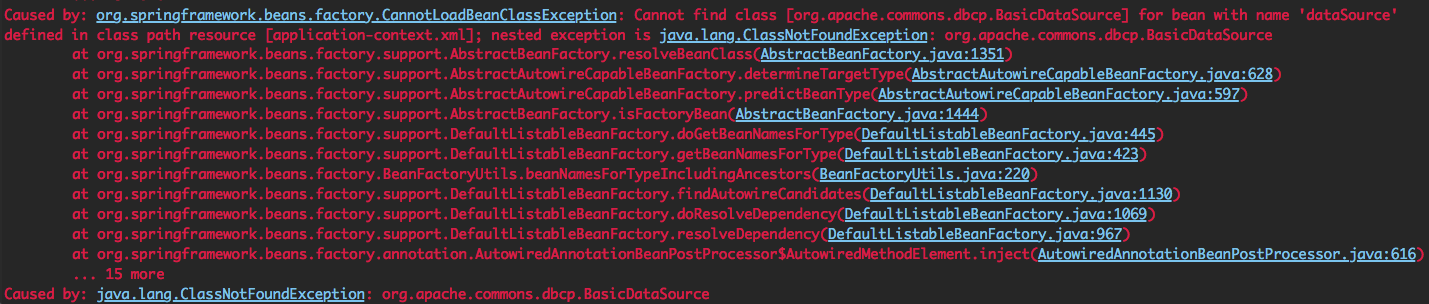
11. 解决方法:在dependencies里加上dbcp的依赖
<dependency>

      <groupId>commons-dbcp</groupId>

     <artifactId>commons-dbcp</artifactId>

      <version>1.4</version>

</dependency>
12. Run
报错
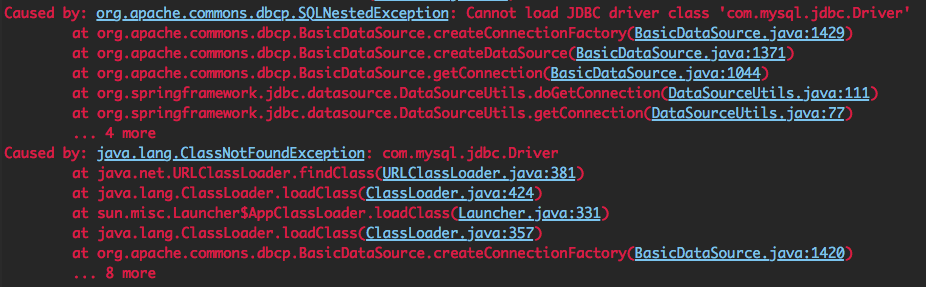
原因:com.mysql.jdbc.Driver就是定义在db.properties中的,需要添加MySQL的依赖
13. 添加MySQL驱动的依赖
<dependency>

    <groupId>mysql</groupId>

    <artifactId>mysql-connector-java</artifactId>

    <version>5.1.25</version>

</dependency>
14. Run
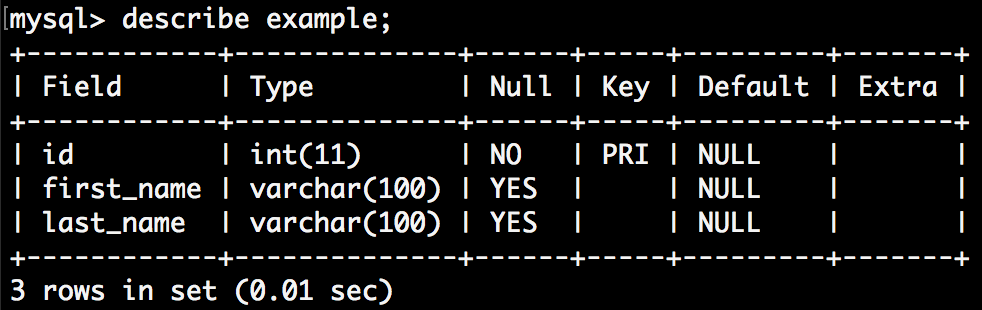
15. extends the functionalities
// DAO.java

public void insertData() {

    this.jdbcTemplate.update("insert into example values (1, ?, ?)", "Meimei", "Han");

    this.jdbcTemplate.update("insert into example values (2, ?, ?)", "Lei", "Li");

}

public int count() {

    return this.jdbcTemplate.queryForObject("select count(*) from user", Integer.class);

}

// Test.java

dao.insertData();

System.out.println(dao.count());
运行成功,打印2
16. 将返回结果转换为User对象:在com.netease.course包下创建User.java
private int id;

private String firstName;

private String lastName;

// 并写上setters和getters
在JdbcTemplateDao.java中
public List<User> getUserList() {

    return this.jdbcTemplate.query("select * from example", new RowMapper<User>() {

        public User mapRow(ResultSet rs, int rowNum) throws SQLException {

            User user = new User();

            user.setId(rs.getInt("id"));

            user.setFirstName(rs.getString("first_name"));

            user.setLastName(rs.getString("last_name"));

            return user;

        }

    });

}
Test.java
List<User> users = dao.getUserList();

for (User user: users) {

    System.out.println(user.getId() + ":" + user.getFirstName() + " " + user.getLastName());

}
运行返回:
1:Meimei Han
2:Lei Li
NamedParameterJdbcTemplate:为了解决复杂sql语句中包含过多?导致的混乱
例:
// NamedParameterJdbcTemplateDao.java

@Repository

public class NamedParameterJdbcTemplateDao {

    private NamedParameterJdbcTemplate namedParameterJdbcTemplate;

    @Autowired

    public void setDataSource(DataSource dataSource) {

        this.namedParameterJdbcTemplate = new NamedParameterJdbcTemplate(dataSource);

    }

    public int countOfUsersByFirstName(String firstName) {

        String sql = "select count(*) from example where first_name = :first_name";

        Map<String, String> namedParameters = Collections.singletonMap("first_name", firstName);

        return this.namedParameterJdbcTemplate.queryForObject(sql, namedParameters, Integer.class);

        // 将map传递给queryForObject()作为参数,namedParameterJdbcTemplate会自动的匹配对应的参数名称的值,并组装成完整的sql

    }

}

// Test.java

NamedParameterJdbcTemplateDao dao = context.getBean("namedParameterJdbcTemplateDao", NamedParameterJdbcTemplateDao.class);

System.out.println(dao.countOfUsersByFirstName("Meimei"));
queryForObject的用法:
queryForObject(String sql, Map<String,?> paramMap, RowMapper<T> rowMapper)
queryForObject(String sql, SqlParameterSource paramSource, Class<T> requiredType)
可通过SqlParameterSource的子类BeanPropertySqlParameterSource来简化过程
SQLException异常处理:
无法连接到数据库、sql语法错误、row/column不存在等
是一个checked exception:必须使用try-catch或throws解决
但是由于这些SQLException一旦出现,事实上整个程序是无法运行的
且需要不厌其烦地写这些try-catch
--> Spring中使用DataAccessException (是一种unchecked的exception)
--不需到处都写try-check和throws,只需在最终层写上一个try-catch即可
DataAccessException有很多很多细分的子类(在org.springframework.dao包下)
事务管理
背景:1. 使用JDBC事务和Hibernate事务的接口不同,导致兼容需要修改代码。
2. 若有众多事务需要管理,通过代码进行管理事务会十分繁琐、混乱
Spring事务管理:
优点:统一的事务编程模型,兼容不同底层
编程式事务及声明式事务(AOP)
PlatformTransactionManager:org.springframework.transaction
接口:
TransactionStatus getTransaction(TransactionDefinition definition) throws TransactionException;
void commit(TransactionStatus status) throws TransactionException;
void rollback(TransactionStatus status) throws TransactionException;
实现:
DataSourceTransactionManager:基于JDBC的实现 org.springframework.jdbc.datasource
HibernateTransactionManager:基于Hibernate的实现 org.springframework.orm.hibernate*
-- 接口一致
TransactionDefinition:事务的定义
getName:事务名称
getIsolationLevel:隔离级别
getPropagationBehavior:传播行为
getTimeout:超时时间(超过则回滚)
isReadOnly:是否是只读事务
TransactionStatus:事务的状态
isNewTransaction:是否是新的事务
hasSavepoint:是否有savepoint(诊断,NESTED)
isCompleted:是否已完成
isRollbackOnly:事务结果是否是rollback-only(只有rollback一个结果而不会commit)
setRollbackOnly:设置事务为rollback-only(当TransactionTemplate时才会调用)
隔离级别:
ISOLATION_READ_UNCOMMITTED: 读未提交
ISOLATION_READ_COMMITTED: 读提交
ISOLATION_REPEATABLE_READ: 重复读
ISOLATION_SERIALIZABLE: 串行化
ISOLATION_DEFAULT: 默认:根据底层数据库而定
传播行为:跟事务本身属性无关,跟函数调用有关,影响了事务的提交状态
比如两个事务嵌套,事务间是相互影响的呢还是相互不影响的
值:
PROPAGATION_MANDATORY: 函数必须在一个事务中运行,事务不存在则抛异常(比如在调用某函数之前,必须要存在一个事务,否则该函数抛异常)
PROPAGATION_NEVER: 不应该在事务中运行,否则抛异常
PROPAGATION_NOT_SUPPORTED: 不应该在事务中运行,否则把事务挂起
PROPAGATION_SUPPORTS: 不需要事务,但是若有事务了,则在事务中执行
PROPAGATION_REQUIRED: 必须在事务中执行,否则启动新事务
内部事务会影响外部事务:设T1调用了T2,若T2抛出异常,会影响外部的T1,因此T1和T2都要rollback
PROPAGATION_NESTED: 必须在事务中执行,否则启动新事务
事务之间相互不影响:上述T2的异常不会影响T1,只需rollback T2
从底层实现来看,每个logical的transaction都有自己的一个savepoint,失败时回滚到savepoint即可
PROPAGATION_REQUIRES_NEW: 必须在新事务中执行,挂起当前事务(即每个logical事务都对应一个独立的physical事务)
NB: 设代码中的transactionA调用了transactionB,看起来是两个Transaction,但是在底层数据库实现时,很可能把这两个视为一个数据库事务
逻辑事务 logical:比如上述transactionA和B
物理事务 physical:比如上述数据库事务
声明式事务:
在bean中添加配置
xmlns:aop="http://www.springframework.org/schema/aop"
xmlns:tx="http://www.springframework.org/schema/tx"
对应location:
xsi:schemaLocation="
http://www.springframework.org/schema/tx
http://www.springframework.org/schema/tx/spring-tx.xsd
http://www.springframework.org/schema/aop
http://www.springframework.org/schema/aop/spring-aop.xsd"
定义事务管理器:
<bean id="txManager" class="org.springframework.jdbc.datasource.DataSourceTransactionManager">

    <property name="dataSource" ref="dataSource" />

</bean>
定义事务Advice:(事务是基于AOP实现的)
<tx:advice id="txAdvice" transaction-manager="txManager">

       <tx:attributes>

       <tx:method name="get*" read-only="true"/>

       <tx:method name="*"/>

       </tx:attributes>

</tx:advice>
配置<tx:method/>
name:匹配的函数名称(支持*匹配)
propagation:事务传播行为
isolation:事务隔离级别
timeout:超时
read-only:只读
rollback-for:触发回滚的异常,用逗号分隔
no-rollback-for:不触发回滚的异常(正常提交),用逗号分隔
本例:
事务Advice应用到get*方法上,是read-only="true"的
事务Advice应用到get*方法上,使用默认隔离方式、默认隔离级别和默认传播行为等
定义Pointcut:(AOP)
<aop:config>

        <aop:pointcut expression="execution(* com.netease.course.AccountDao.*(..))" id="daoOperation"/>

        <aop:advisor advice-ref="txAdvice" pointcut-ref="daoOperation"/>

</aop:config>
使用声明式事务,需要定义很多的xml配置
Spring也提供了Annotation的方式来声明:
@Transactional
<tx:annotation-driven transaction-manager="txManager"/>

<bean id="txManager" class="org.springframework.jdbc.datasource.DataSourceTransactionManager">

    <property name="dataSource" ref="dataSource" />

</bean>
配置属性:
value:使用哪一个TransactionManager
propagation:事务传播行为
isolation:事务隔离级别
timeout:超时
readOnly:只读
rollbackFor:触发回滚的异常类对象数组(是.class对象)
rollbackForClassName:触发回滚的异常类名称数组(是名称)
noRollbackFor/noRollbackForClassName:不触发回滚
具体函数的Annotation例子:
@Transactional(propagation=Propagation.REQUIRED, rollbackFor=Exception.class)

public boolean methodName(..) {...}
实例:转账
Account.java
public class Account {

    private String user;

    private double balance;

    public String getUser() {

        return user;

    }

    public void setUser(String user) {

        this.user = user;

    }

    public double getBalance() {

        return balance;

    }

    public void setBalance(double balance) {

        this.balance = balance;

    }

}
AccountDao.java
@Repository

public class AccountDao {

    private JdbcTemplate jdbcTemplate;

    @Autowired

    public void setDataSource(DataSource dataSource) {

        this.jdbcTemplate = new JdbcTemplate(dataSource);

    }

    public void resetMoney() {

        jdbcTemplate.update("update account set balance=1000");

    }

    public List<Account> accountList() {

        return this.jdbcTemplate.query("select * from account", new RowMapper<Account>() {

            public Account mapRow(ResultSet rs, int rowNum) throws SQLException {

                Account account = new Account();

                account.setUser(rs.getString("user"));

                account.setBalance(rs.getDouble("balance"));

                return account;

            }

        });

    }

    public void transferMoney(String source, String target, double amount) {

        this.jdbcTemplate.update("update account set balance=balance-? where user=?", amount, source);

        this.jdbcTemplate.update("update account set balance=balance+? where user=?", amount, target);

    }

}
Test.java
public static void main (String[] args) throws Exception {

    ApplicationContext context = new ClassPathXmlApplicationContext("application-context.xml");

    AccountDao dao = context.getBean("accountDao", AccountDao.class);

    dao.resetMoney();

    List<Account> accountList = dao.accountList();

    for(Account account: accountList) {

        System.out.println(account.getUser() + ":" + account.getBalance());

    }

    dao.transferMoney("Kimi", "Miki", 520);

    accountList = dao.accountList();

    for(Account account: accountList) {

        System.out.println(account.getUser() + ":" + account.getBalance());

    }

    ((ConfigurableApplicationContext) context).close();

}
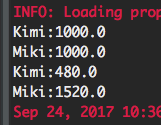
运行:
事务测试:
在dao中添加private void throwException(){ throw new RuntimeException("ERROR"); }
在两次update之间调用throwException();
并在test.java中的transferMoney()周围写上try-catch块,catch中syso出e.getMessage();
运行:

转账操作失败,需要通过事务方式进行设定,全部失败或是全部成功
改进:使用事务来完成这些任务
在application-context.xml中加入schema/tx和schema/aop
在application-context.xml中加入<context:component-scan base-package="com.netease.course" /> 以使用Annotation
在transferMoney()定义加上@Transactional(propagation = Propagation.REQUIRED)
运行结果均为1000.0,正确
编程式事务:
TransactionTemplate:在回调里写相关事务操作即可,不需要关心何时commit何时rollback
PlatformTransactionManager的实现:
整合MyBatis
数据访问单元测验
关于Spring JDBC说法错误的是:
- A.简化访问数据库的代码,提高效率;
- B.可以直接帮助我们将数据库记录转化成Java对象;2.00/2.00
- C.更方便的异常处理;
- D.可以帮助我们进行资源管理:连接的创建,关闭等;
关于Spring事务管理,说明不正确的是:
- A.统一的事务管理模型;
- B.声明式事务支持;
- C.编程式事务支持;
- D.不依赖于底层事务的实现;2.00/2.00
假设事务A,B的传播行为定义为PROPAGATION_REQUIRED,由A事务会调用B事务,如果B事务抛出异常,并由A事务中代码捕获,那么A事务是否可以正常提交:
- A.以上说法都不对;
- B.不能提交;2.00/2.00
- C.可以提交;
- D.由A事务确定;
关于SQLException和DataAccessException,说明错误的是:
- A.SQLException是Spring提供的异常类;1.50/3.00
- B.DataAccessException是checked异常;1.50/3.00
- C.DataAccessException是Spring提供的异常类;
- D.SQLException是checked异常;
MyBatis通过Java Annotation写的Mapper必须通过接口(interface)来实现,不能通过类(class)。
- A.×
- B.√2.00/2.00
数据访问单元作业
http://zhanjingbo.site/14766902757975.html
1(12分)
根据本单介绍的Spring JDBC,事务管理,MyBatis等内容,分别使用Spring JDBC及MyBatis提供一个转帐服务(保证事务),提供一个transferMoney接口:
transferMoney(Long srcUserId, Long targetUserId, double count);// srcUserId及targetUserId为转帐用户标识
基本要求:必须附加一个项目说明文档,说明每个功能点对应程序的运行结果(截图),项目的接口说明或者关键代码(不要把全部代码贴出来)等可以反映项目结果的内容。提交作业的时候必须有这个项目说明文档,否则会影响最终评分。
答:
1. 创建Spring的配置文件application-context.xml
<?xml version="1.0" encoding="UTF-8"?>

<beans xmlns="http://www.springframework.org/schema/beans"

    xmlns:xsi="http://www.w3.org/2001/XMLSchema-instance"

    xmlns:context="http://www.springframework.org/schema/context"

    xmlns:aop="http://www.springframework.org/schema/aop"

    xmlns:tx="http://www.springframework.org/schema/tx"

    xsi:schemaLocation="

    http://www.springframework.org/schema/beans

    http://www.springframework.org/schema/beans/spring-beans.xsd

    http://www.springframework.org/schema/context

    http://www.springframework.org/schema/context/spring-context.xsd

    http://www.springframework.org/schema/tx

    http://www.springframework.org/schema/tx/spring-tx.xsd

    http://www.springframework.org/schema/aop

    http://www.springframework.org/schema/aop/spring-aop.xsd" >

    <context:component-scan base-package="com.netease.course" />

    <bean id="dataSource" class="org.apache.commons.dbcp.BasicDataSource" destroy-method="close">

            <property name="driverClassName" value="${jdbc.driverClassName}" />

            <property name="url" value="${jdbc.url}" />

            <property name="username" value="${jdbc.username}" />

            <property name="password" value="${jdbc.password}" />

        </bean>

        <tx:annotation-driven transaction-manager="txManager"/>

        <bean id="txManager" class="org.springframework.jdbc.datasource.DataSourceTransactionManager">

            <property name="dataSource" ref="dataSource" />

        </bean>

    <context:property-placeholder location="db.properties" />

</beans>
2. db.properties略
3. 创建Account.java
public class Account {

    private int userId;

    private double balance;

    // 所需getters和setters

}
4a. 使用Spring JDBC实现AccountDao
@Repository

public class AccountDao {

    private JdbcTemplate jdbcTemplate;

    @Autowired

    public void setDataSource(DataSource dataSource) {

        this.jdbcTemplate = new JdbcTemplate(dataSource);

    }

    public void resetMoney() {

        jdbcTemplate.update("update account set balance=1000");

    }

    public List<Account> accountList() {

        return this.jdbcTemplate.query("select * from account", new RowMapper<Account>() {

            public Account mapRow(ResultSet rs, int rowNum) throws SQLException {

                Account account = new Account();

                account.setUserId(rs.getInt("id"));

                account.setBalance(rs.getDouble("balance"));

                return account;

            }

        });

    }

    @Transactional(propagation = Propagation.REQUIRED)

    public void transferMoney(Long srcUserId, Long targetUserId, double count) {

        // srcUserId及targetUserId为转帐用户标识

        updateBalance(-count, srcUserId);

    updateBalance(count, targetUserId);

    }

    private void updateBalance(double count, Long userId) {

        this.jdbcTemplate.update("update account set balance=balance+? where id=?", count, userId);

    }

    private void throwException() {

        throw new RuntimeException("UPDATE ERROR");

    }

}
4b. 使用MyBatis实现AccountDao
<?xml version="1.0" encoding="UTF-8" ?>

<!DOCTYPE mapper PUBLIC "-//mybatis.org//DTD Mapper 3.0//EN" "http://mybatis.org/dtd/mybatis-3-mapper.dtd">

<mapper namespace=".matthew.dao.AccountDao">

    <resultMap type="Account" id="AccountResult">

        <result property="userId" column="userId" />

        <result property="balance" column="balance" />

    </resultMap>

    <update id="reset">

        update account set balance=1000

    </update>

    <select id="getUserList" resultMap="AccountResult">

        select * from account

    </select>

    <update id="updateBalance">

        update account set balance=balance+#{param2} where userId=#{param1}

    </update>

</mapper>
5. main()
public static void main (String[] args) throws Exception {

    ApplicationContext context = new ClassPathXmlApplicationContext("application-context.xml");

    AccountDao dao = context.getBean("accountDao", AccountDao.class);

    dao.resetMoney();

    List<Account> accountList = dao.accountList();

    for(Account account: accountList) {

        System.out.println(account.getUserId() + ":" + account.getBalance());

    }

    try {

        dao.transferMoney(1L, 2L, 520);

    } catch (Exception e) {

        System.out.println(e.getMessage());

    }

    accountList = dao.accountList();

    for(Account account: accountList) {

        System.out.println(account.getUserId() + ":" + account.getBalance());

    }

    ((ConfigurableApplicationContext) context).close();

}
6. 运行结果

7. 模拟exception throw测试
在transferMoney()中的两个update之间调用throwException();
8. 运行结果

Java开发工程师(Web方向) - 04.Spring框架 - 第4章.数据访问的更多相关文章
- Java开发工程师(Web方向) - 04.Spring框架 - 第2章.IoC容器
第2章.IoC容器 IoC容器概述 abstract: 介绍IoC和bean的用处和使用 IoC容器处于整个Spring框架中比较核心的位置:Core Container: Beans, Core, ...
- Java开发工程师(Web方向) - 04.Spring框架 - 第1章.Spring概述
第1章.Spring概述 Spring概述 The Spring Framework is a lightweight solution and a potential one-stop-shop f ...
- Java开发工程师(Web方向) - 04.Spring框架 - 第3章.AOP技术
第3章--AOP技术 Spring框架 - AOP概述 笔记https://my.oschina.net/hava/blog/758873Spring框架 - AOP使用 笔记https://my.o ...
- Java开发工程师(Web方向) - 04.Spring框架 - 第5章.Web框架
第5章--Web框架 Web框架概述 Web框架单元测验 本次得分为:13.50/15.00, 本次测试的提交时间为:2017-09-25 1单选(2分) 关于Spring MVC中Dispatche ...
- Java开发工程师(Web方向) - 04.Spring框架 - 期末测试
Spring框架客观题 Spring框架编程题 http://blog.csdn.net/sinoacc/article/details/51702458 1 (25分) 假设有如下数据表: crea ...
- Java开发工程师(Web方向) - 02.Servlet技术 - 第3章.Servlet应用
第3章.Servlet应用 转发与重定向 转发:浏览器发送资源请求到ServletA后,ServletA传递请求给ServletB,ServletB生成响应后返回给浏览器. 请求转发:forward: ...
- Java开发工程师(Web方向) - 02.Servlet技术 - 第4章.JSP
第4章--JSP JSP JSP(Java Server Pages) - 中文名:Java服务器页面 动态网页技术标准 JSP = Html + Java + JSP tags 在服务器端执行,返回 ...
- Java开发工程师(Web方向) - 02.Servlet技术 - 第2章.Cookie与Session
第2章--Cookie与Session Cookie与Session 浏览器输入地址--HTTP请求--Servlet--HTTP响应--浏览器接收 会话(session):打开浏览器,打开一系列页面 ...
- Java开发工程师(Web方向) - 02.Servlet技术 - 第1章.Servlet
第1章--Servlet Servlet简介 Servlet应用于? 浏览器发出HTTP请求,服务器接收请求后返回响应给浏览器. 接收请求后到返回响应之间: 服务器将请求对象转交给Servlet容器 ...
随机推荐
- maven编译package慢
mvn package编译出现连接不上mvn库的问题: [root@localhost nnnnn]# mvn package[INFO] Scanning for projects...Downlo ...
- iview中table里嵌套i-switch、input、select等
iview中table内嵌套 input render:(h,params) => { return h('Input',{ props: { value:'', size:'small', } ...
- HDU 1014 Uniform Generator(模拟和公式)
传送门: http://acm.hdu.edu.cn/showproblem.php?pid=1014 Uniform Generator Time Limit: 2000/1000 MS (Java ...
- 在CentOS 7上安装Docker环境
官网文档:https://docs.docker.com/engine/installation/linux/centos/ ,本文大部分是照搬官方文档写的,如果你英文还不错,那么就直接移步官方文档吧 ...
- sharepoint2016安装OOS,OOS场负载均衡
Office Online Server is the successor to Office Web Apps Server. It may be connected to SharePoint, ...
- Shell脚本之Crontab的格式
Crontab的格式 第1列分钟1-59第2列小时1-23(0表示子夜)第3列日1-31第4列月1-12第5列星期0-6(0表示星期天)第6列要运行的命令 下面是crontab的格式:分 时 日 ...
- Oracle子查询之简单子查询
Oracle 简单子查询 顾名思义,简单子查询是嵌套在 SQL 语句中的另一个SELECT 语句,并且子查询只返回一列数据 1,单行子查询: 子查询 (内查询) 在主查询之前一次执行完成.子查询的结果 ...
- Window系统Oracle 安装
一:安装Oracle 数据库软件 1.先去官网下载所需文件:http://www.oracle.com/technetwork/database/enterprise-edition/download ...
- dva框架使用详解及Demo教程
dva框架的使用详解及Demo教程 在前段时间,我们也学习讲解过Redux框架的基本使用,但是有很多同学在交流群里给我的反馈信息说,redux框架理解上有难度,看了之后还是一脸懵逼不知道如何下手,很多 ...
- LeetCode 中级 - 组合总和II(105)
给定一个数组 candidates 和一个目标数 target ,找出 candidates 中所有可以使数字和为 target 的组合. candidates 中的每个数字在每个组合中只能使用一次. ...