
mongoDB在java上面的应用
1、实际应用过程中肯定不会直接通过Linux的方式来连接和使用数据库,而是通过其他驱动的方式来使用mongoDB
2、本教程只针对于Java来做操作,主要是模拟mongoDB数据库在开发过程中的应用
3、在官网下载对应的jar包,来做mongoDB的驱动支持,当然也可以利用pom.xml文件自己下载
jar下载地址:https://oss.sonatype.org/content/repositories/releases/org/mongodb/mongodb-driver/3.4.2/
这个是3.4.2版本的,有需要可以下载其他版本
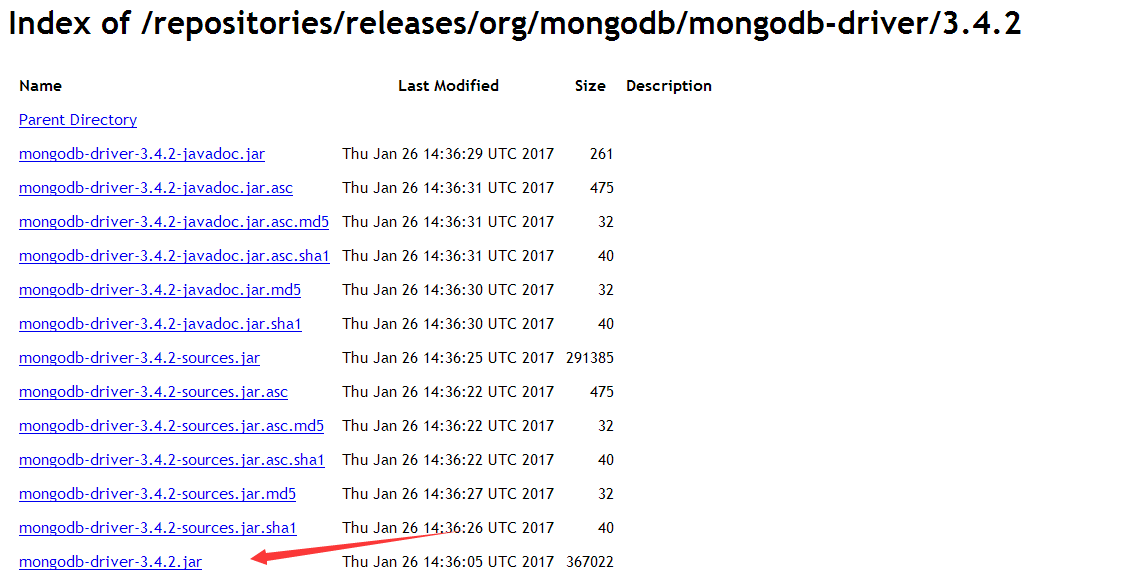
也可以在pom.xml文件中加入
<dependencies>

    <dependency>

        <groupId>org.mongodb</groupId>

        <artifactId>mongodb-driver</artifactId>

        <version>3.4.2</version>

    </dependency>

</dependencies>
4、连接数据库,连接数据库的方式有两种。一种是没有用户名密码,另外一种是有的
1)没有密码
  public static void main(String[] args) {

        try{

            // 连接到 mongodb 服务

            MongoClient mongoClient = new MongoClient( "localhost" , 27017 );

            // 连接到数据库

            MongoDatabase mongoDatabase = mongoClient.getDatabase("test");

            System.out.println("Connect to database successfully");

        }catch(Exception e){

            System.err.println( e.getClass().getName() + ": " + e.getMessage() );

        }

    }
2)有密码
  public static void main(String[] args) {

        try {

            //连接到MongoDB服务 如果是远程连接可以替换“localhost”为服务器所在IP地址

            //ServerAddress()两个参数分别为 服务器地址 和 端口

            ServerAddress serverAddress = new ServerAddress("localhost",27017);

            List<ServerAddress> addrs = new ArrayList<ServerAddress>();

            addrs.add(serverAddress);

            //MongoCredential.createScramSha1Credential()三个参数分别为 用户名 数据库名称 密码

            MongoCredential credential = MongoCredential.createScramSha1Credential("username", "databaseName", "password".toCharArray());

            List<MongoCredential> credentials = new ArrayList<MongoCredential>();

            credentials.add(credential);

            //通过连接认证获取MongoDB连接

            MongoClient mongoClient = new MongoClient(addrs,credentials);

            //连接到数据库

            MongoDatabase mongoDatabase = mongoClient.getDatabase("databaseName");

            System.out.println("Connect to database successfully");

        } catch (Exception e) {

            System.err.println( e.getClass().getName() + ": " + e.getMessage() );

        }

    }
5、创建集合
    public static void main(String[] args) {

        try{

            // 连接到 mongodb 服务

            MongoClient mongoClient = new MongoClient( "localhost" , 27017 );

            // 连接到数据库

            MongoDatabase mongoDatabase = mongoClient.getDatabase("test");

            System.out.println("Connect to database successfully");

            mongoDatabase.createCollection("test");

            System.out.println("集合创建成功");

        }catch(Exception e){

            System.err.println( e.getClass().getName() + ": " + e.getMessage() );

        }

    }
6、获取集合
    public static void main(String[] args) {

        try{

            // 连接到 mongodb 服务

            MongoClient mongoClient = new MongoClient( "localhost" , 27017 );

            // 连接到数据库

            MongoDatabase mongoDatabase = mongoClient.getDatabase("test");

            System.out.println("Connect to database successfully");

            MongoCollection<Document> collection = mongoDatabase.getCollection("test");

            System.out.println("集合 test 选择成功");

        }catch(Exception e){

            System.err.println( e.getClass().getName() + ": " + e.getMessage() );

        }

    }
7、插入文档(BSON格式)
    public static void main(String[] args) {

        try{

            MongoClient mongoClient = new MongoClient( "localhost" , 27017 );  // 连接到 mongodb 服务

            MongoDatabase mongoDatabase = mongoClient.getDatabase("test");  // 连接到数据库

            System.out.println("Connect to database successfully");

            MongoCollection<Document> collection = mongoDatabase.getCollection("test"); //获取集合

            System.out.println("集合 test 选择成功");

            Document document = new Document("title", "MongoDB").append("description", "database").append("likes", 100);  //新建文档

            List<Document> documents = new ArrayList<Document>();

            documents.add(document);

            collection.insertMany(documents);  //添加文档(对应的BSON数据)

            System.out.println("文档插入成功");

        }catch(Exception e){

            System.err.println( e.getClass().getName() + ": " + e.getMessage() );

        }

    }
8、检索文档,查找对用数据
public static void main(String[] args) {

    try{

        MongoClient mongoClient = new MongoClient( "localhost" , 27017 );  // 连接到 mongodb 服务

        MongoDatabase mongoDatabase = mongoClient.getDatabase("test");  // 连接到数据库

        System.out.println("Connect to database successfully");

        MongoCollection<Document> collection = mongoDatabase.getCollection("test"); //获取集合

        System.out.println("集合 test 选择成功");

        FindIterable<Document> findIterable = collection.find();  //获取迭代器

        MongoCursor<Document> mongoCursor = findIterable.iterator();  //获取游标

        while(mongoCursor.hasNext()){  //循环获取数据

        System.out.println(mongoCursor.next());

    }

    }catch(Exception e){

        System.err.println( e.getClass().getName() + ": " + e.getMessage() );

    }

}
9、更新文档数据
public static void main( String args[] ){

    try{

        MongoClient mongoClient = new MongoClient( "localhost" , 27017 );  // 连接到 mongodb 服务

        MongoDatabase mongoDatabase = mongoClient.getDatabase("mycol");  // 连接到数据库

        System.out.println("Connect to database successfully");

        MongoCollection<Document> collection = mongoDatabase.getCollection("test");

        System.out.println("集合 test 选择成功");

        collection.updateMany(Filters.eq("likes", 100), new Document("$set",new Document("likes",200)));  //更新文档 将文档中likes=100的文档修改为likes=200

        FindIterable<Document> findIterable = collection.find();  //检索查看结果

        MongoCursor<Document> mongoCursor = findIterable.iterator();

        while(mongoCursor.hasNext()){

            System.out.println(mongoCursor.next());

        }

    }catch(Exception e){

        System.err.println( e.getClass().getName() + ": " + e.getMessage() );

    }

}
10、删除文档
public static void main( String args[] ){

    try{

        MongoClient mongoClient = new MongoClient( "localhost" , 27017 );  // 连接到 mongodb 服务

        MongoDatabase mongoDatabase = mongoClient.getDatabase("test");  // 连接到数据库

        System.out.println("Connect to database successfully");

        MongoCollection<Document> collection = mongoDatabase.getCollection("test");

        System.out.println("集合 test 选择成功");

        collection.deleteOne(Filters.eq("likes", 200));  //删除符合条件的第一个文档

        collection.deleteMany (Filters.eq("likes", 200));  //删除所有符合条件的文档

        //检索查看结果

        FindIterable<Document> findIterable = collection.find();

        MongoCursor<Document> mongoCursor = findIterable.iterator();

        while(mongoCursor.hasNext()){

            System.out.println(mongoCursor.next());

        }

    }catch(Exception e){

        System.err.println( e.getClass().getName() + ": " + e.getMessage() );

    }

}
11、基本的操作就是这样,在实际应用过程中,可以通过一定的数据格式要求来做一些修改和添加,数据的应用可以通过Document来具体获取获取进行处理
12、为了方便数据库的管理和学习也可以参考其他的学习方法,来实现对应的结果
13、推荐一个学习mongoDB的网站,适合新手!老鸟略过。。。
网址:http://www.runoob.com/mongodb/mongodb-tutorial.html
mongoDB在java上面的应用的更多相关文章
- 在Eclipse中设置Java类上面的注释(包含作者、日期等)
希望在Eclipse中,让Java类上面的注释像下面这样,改如何设置呢? 在Eclipse中,点击菜单中的Window-->Preferences,打开如下窗口:
- 从上面的集合框架图可以看到,Java 集合框架主要包括两种类型的容器,一种是集合(Collection),存储一个元素集合,另一种是图(Map),存储键/值对映射
从上面的集合框架图可以看到,Java 集合框架主要包括两种类型的容器,一种是集合(Collection),存储一个元素集合,另一种是图(Map),存储键/值对映射.Collection 接口又有 3 ...
- mongodb与java整合
mongodb与java整合需要用到mongodb驱动,如果是maven环境,则添加如下倚赖: <dependency> <groupId>org.mongodb</gr ...
- MongoDB的Java驱动使用整理 (转)
MongoDB Java Driver 简单操作 一.Java驱动一致性 MongoDB的Java驱动是线程安全的,对于一般的应用,只要一个Mongo实例即可,Mongo有个内置的连接池(池大小默认为 ...
- 在MongoDB的MapReduce上踩过的坑
太久没动这里,目前人生处于一个新的开始.这次博客的内容很久前就想更新上来,但是一直没找到合适的时间点(哈哈,其实就是懒),主要内容集中在使用Mongodb时的一些隐蔽的MapReduce问题: 1.R ...
- 【MongoDB for Java】Java操作MongoDB
上一篇文章: http://www.cnblogs.com/hoojo/archive/2011/06/01/2066426.html介绍到了在MongoDB的控制台完成MongoDB的数据操作,通过 ...
- edtftpj让Java上传FTP文件支持断点续传
在用Java实现FTP上传文件功能时,特别是上传大文件的时候,可以需要这样的功能:程序在上传的过程中意外终止了,文件传了一大半,想从断掉了地方继续传:或者想做类似迅雷下载类似的功能,文件太大,今天传一 ...
- [转]MongoDB for Java】Java操作MongoDB
原文地址: MongoDB for Java]Java操作MongoDB 开发环境: System:Windows IDE:eclipse.MyEclipse 8 Database:mongoDB 开 ...
- mongodb在java驱动包下的操作(转)
推荐几章很有用的文章 java操作参考文档 http://www.cnblogs.com/hoojo/archive/2011/06/02/2068665.html http://blog.csdn. ...
随机推荐
- 「bzoj4264 小C找朋友」
权限题 就是一个集合\(hash\) 集合\(hash\)可以用于判断两个集合是否相等,具体做法就是给每个随机一个值,之后异或起来就是可以了 这个题就是这样,处理出每个点直接相连的点集的\(hash\ ...
- geos学习笔记:安装和使用
1.首先在https://trac.osgeo.org/geos下载geos-3.6.2.tar.bz2 解压后 cd geos- ./configue //或选择安装的目录./configure - ...
- 调节Ubuntu分辨率
列出当前支持的分辨率 使用 xrandr 命令新增显示模式 至此分辨率更改完成 重启后会失效 在 ~/.profile 最末尾添加修改分辨率的命令
- JavaScript:回调模式(Callback Pattern) (转载)
JavaScript:回调模式(Callback Pattern) 函数就是对象,所以他们可以作为一个参数传递给其它函数: 当你将introduceBugs()作为一个参数传递给writeCode() ...
- zabbix时间不同步
Linux下如何实现与Internet时间同步 一.安装ntp [root@server-2 ~]# yum install -y ntpdate 二.同步时间 // 方式一.使用域名连接,要经过DN ...
- javascript中filter方法
array1.filter(callbackfn[, thisArg]) 參數 參數 定義 array1 必要項. 陣列物件. callbackfn 必要項. 最多接受三個引數的函式. filte ...
- OC变量命名禁忌
OC变量命名禁忌 1.在NSString类不能定义变量名为description, 每个类都有 - (NSString *)description{} 这样一个get方法. 2.不能将变量的名称定义为 ...
- Oracle split分区表引起ORA-01502错误
继上次删除分区表的分区遇到ORA-01502错误后[详细见链接:Oracle分区表删除分区引发错误ORA-01502: 索引或这类索引的分区处于不可用状态],最近在split分区的时候又遇到了这个问题 ...
- (一 、上)搭建简单的SpringBoot + java + maven + mysql + Mybatis+通用Mapper 《附项目源码》
最近公司一直使用 springBoot 作为后端项目框架, 也负责搭建了几个新项目的后端框架.在使用了一段时间springBoot 后,感觉写代码 比spring 更加简洁了(是非常简洁),整合工具也 ...
- c#随便聊聊数据库操作
最近在学习web后台以及Python,到了程序员的转折年纪了,哎.估计很久不会写博文了.言归正传. 在原理的数据库连接池HiKari项目上.我扩展了独立的3个库,说是3个库,其实原本该是一个库.先聊聊 ...